
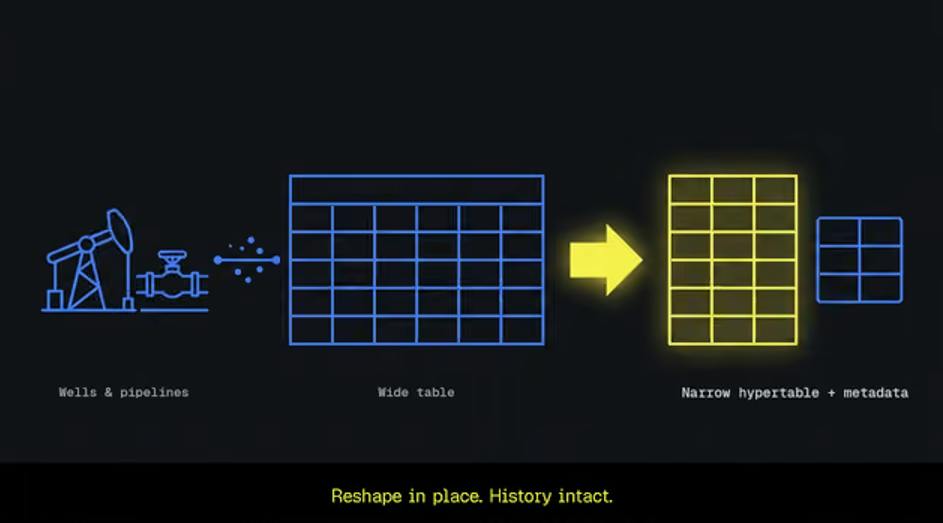
An oilfield SCADA migration guide: reshape a wide sensor table into a narrow hypertable plus a metadata table, in place, with your dashboards still running. Every new instrument the field commissions turns into a schema change for you. A casing-pressure transmitter goes on a pad, a flow computer lands on a gathering line, and your wide telemetry table gets another indexed column on top of years of readings. You already know the shape is wrong. What has kept you from fixing it is the cost of the fix: reshaping a table that size looks like re-ingesting all of that history, and the dashboards on top of it cannot go dark while you do. This guide walks through that migration: moving a wide time-series table to a narrow schema in place, with history intact and dashboards still running. It leaves out the harder case of tags whose descriptors change over time, and it picks up where Time-Series Cardinality leaves off, so it does not re-argue the shape. If you control both the ingest and the queries, there is a gentler route: run a second ingest into the new table alongside the old one, then move queries over one at a time. That breaks the migration into small, separately reversible steps, and it is worth taking when you can. This guide covers the common case where you can't, because the ingest can't be duplicated or the queries aren't yours to rewrite. If you are on Tiger Cloud and would rather not run it yourself, the Enterprise plan includes a migration team that will help design a migration plan around your own tables. Before you start What you get at the end is a table that stops fighting you. Readings land in a narrow hypertable of (recorded_at, tag_id, value), so the next instrument the field adds becomes one row in a metadata table instead of a column across years of history. Every descriptor the wide table repeated on each reading now lives once, on the tag. And the dashboards you cannot take down keep working, because the old table name and the old columns survive as a view over the new shape. On a hundred million generated readings, the whole sequence took under seven minutes of machine time on our hardware, against a clean dataset with no live ingest competing for the disk; most of that was the reshape in Step 2. Three things need to be true before you schedule it: The origin table is a TimescaleDB hypertable. The guide assumes it throughout. You control new tag registration for the migration window. In practice that is a freeze on adding pads or instruments to your ingest for the duration, for a reason Step 2 makes concrete. You can find a quiet minute for the swap in Step 4. This is a typical wide origin table. Tables shaped like this rarely come from a commercial historian such as PI, which keeps tag metadata apart from the readings and does not store them in SQL at all. They come from in-house ingest, where a project starts with a few wells and a hand-written INSERT, then keeps growing as pads and instruments are added. Map your own columns onto it; the names below are the ones every later step uses. CREATE TABLE sensor_readings ( recorded_at TIMESTAMPTZ NOT NULL, tag_id TEXT NOT NULL, -- tag path, e.g. 'Pad07/Well3/TubingPressure' device_id TEXT NOT NULL, site TEXT NOT NULL, line TEXT NOT NULL, firmware_ver TEXT NOT NULL, unit TEXT NOT NULL, value DOUBLE PRECISION NOT NULL ) WITH ( tsdb.hypertable, tsdb.partition_column = 'recorded_at' ); CREATE INDEX ON sensor_readings (tag_id, device_id, site, line, firmware_ver, recorded_at DESC); The DDL is shown in the current table-option form. Yours was probably created with create_hypertable(), and that changes nothing below. If your origin is a plain Postgres table rather than a hypertable, the migration gets easier in exactly two places: Step 3 gets CREATE INDEX CONCURRENTLY back, and the rename in Step 4 is an ordinary Postgres rename. Everything else is identical. Design the destination schema Create the destination before you touch the origin. Two tables: the metadata table owns the descriptors, and the narrow hypertable owns the facts. CREATE TABLE tag_metadata ( tag_id BIGINT GENERATED ALWAYS AS IDENTITY PRIMARY KEY, tag_name TEXT NOT NULL UNIQUE, -- 'Pad07/Well3/TubingPressure' device_id TEXT NOT NULL, site TEXT NOT NULL, line TEXT NOT NULL, firmware_ver TEXT NOT NULL, unit TEXT NOT NULL, ts_start TIMESTAMPTZ, ts_end TIMESTAMPTZ, ts_last_seen TIMESTAMPTZ ); CREATE TABLE sensor_readings_narrow ( recorded_at TIMESTAMPTZ NOT NULL, tag_id BIGINT NOT NULL, value DOUBLE PRECISION NOT NULL ) WITH ( tsdb.hypertable, tsdb.partition_column = 'recorded_at', tsdb.create_default_indexes = false, tsdb.segmentby = 'tag_id' ); The shape itself is the standard one, and TigerData's metadata table best practices cover the reasoning; the cardinality piece measured the benefits. Three choices inside that DDL decide whether the narrow shape pays off. Keep tag_id a narrow BIGINT surrogate. The text tag path goes in tag_name once, on the metadata row. A fat TEXT key repeated on every fact row forfeits most of the win. Enforce referential integrity at the ingest layer. A foreign key from the facts to tag_metadata adds a per-row check on a high-ingest path, which is why the DDL above declares none. If you want the constraint anyway, the supported direction is a hypertable referencing a regular table, which is the direction drawn here. Segment by tag_id. Compression segmented by the tag is where the narrow schema's advantage widens most, and a source identifier is the usual segmentby candidate. One consequence of creating the table this way: columnstore is on by default, so TimescaleDB creates a columnstore policy automatically, set to convert any chunk older than one chunk interval on a daily schedule. Every historical slice you are about to load is older than that, so the policy would start converting chunks while Step 2 is still writing next to them. The docs' own guidance for backfilling while converting is to pause the policy until the load is done, because conversion contends for locks with any concurrent write to the same chunk. Pause it now and re-enable it once the verification checks pass. SELECT alter_job(job_id, scheduled => false) FROM timescaledb_information.jobs WHERE proc_name = 'policy_compression' AND hypertable_name = 'sensor_readings_narrow'; Two things are deliberately absent from the DDL. There is no index on the narrow table yet; tsdb.create_default_indexes = false keeps TimescaleDB from adding one, and Step 3 builds the composite index after the load. And there is one value DOUBLE PRECISION column, which assumes every tag is a float. Industrial tags are not uniformly float. If yours carry booleans, state codes, or strings, the appendix at the end shows the typed-column variant of this schema and the three places it changes the steps. Make that call before you reshape. Step 0: Check that your tag descriptors are stable The whole migration rests on one assumption about your data: that a tag's descriptors are functionally dependent on the tag, so a given tag is always on the same device, at the same site, on the same line, reporting the same unit. The original post closes by asking you to check one property of your data before you plan anything. This is that check. Its answer decides whether the migration is an afternoon or a project. One scan, and it took about a minute against a hundred million rows. SELECT tag_id, COUNT(*) FROM ( SELECT DISTINCT tag_id, device_id, site, line, firmware_ver, unit FROM sensor_readings ) d GROUP BY tag_id HAVING COUNT(*) > 1; An empty result is the clean case: every tag has carried exactly one descriptor set across its whole history, the backfill in Step 1 falls straight out of the data, and the rest of this guide is for you. Rows mean some tags changed descriptors over their lifetime. On a pad this is routine. A workover moves a transmitter from one well to another, an instrument swap changes the device behind a tag path, or an RTU firmware upgrade bumps firmware_ver on every tag it serves. Those tags need availability windows, which is what the ts_start and ts_end columns in the metadata table exist for: one metadata row per descriptor set, bounded in time, with ts_last_seen tracking which row is current. That path makes the reshape join in Step 2 time-dependent and materially slower, and it is a longer migration, not just a different INSERT. This guide does not walk it; a follow-up will. If Step 0 returns rows, stop here and scope that migration instead of forcing this one. One scan of the wide table, one row per tag. The text tag path lands in tag_name, and the surrogate is generated. INSERT INTO tag_metadata (tag_name, device_id, site, line, firmware_ver, unit) SELECT DISTINCT s.tag_id, s.device_id, s.site, s.line, s.firmware_ver, s.unit FROM sensor_readings s WHERE NOT EXISTS ( SELECT 1 FROM tag_metadata m WHERE m.tag_name = s.tag_id ); The guard is NOT EXISTS rather than ON CONFLICT ... DO NOTHING, and the difference matters. Both make the backfill safe to re-run, which Step 2 depends on. Only NOT EXISTS leaves Step 0's safety net armed: a tag that somehow carries two descriptor sets still trips the UNIQUE constraint on tag_name loudly, where ON CONFLICT would swallow it in silence and keep whichever set it saw first. Step 2: Reshape the facts in resumable time slices The pattern is a control table plus one transaction per time slice, where each transaction writes both the facts and its own completion marker. One unbounded INSERT ... SELECT over a multi-terabyte hypertable is the wrong instinct at this size, because a backfill this large cannot afford one long transaction: it holds a lock for hours, generates write-ahead log faster than replicas can consume it, and cannot resume if it dies at 90 percent. CREATE TABLE migration_slices ( slice_start TIMESTAMPTZ PRIMARY KEY, slice_end TIMESTAMPTZ NOT NULL, completed_at TIMESTAMPTZ NOT NULL DEFAULT now(), row_count BIGINT NOT NULL ); A control table, rather than a unique constraint on (tag_id, recorded_at), records completions because that constraint would be expensive at this scale and may not even hold in field telemetry. A week is a reasonable slice width for a table this size; pick whatever keeps one transaction to minutes on your hardware. BEGIN; WITH moved AS ( INSERT INTO sensor_readings_narrow (recorded_at, tag_id, value) SELECT r.recorded_at, m.tag_id, r.value FROM sensor_readings r JOIN tag_metadata m ON m.tag_name = r.tag_id WHERE r.recorded_at >= TIMESTAMPTZ '2024-01-01' AND r.recorded_at = s.slice_start AND o.recorded_at (SELECT count(*) FROM sensor_readings_old o WHERE o.recorded_at >= s.slice_start AND o.recorded_at = TIMESTAMPTZ '2024-01-01' AND recorded_at = TIMESTAMPTZ '2024-01-01' AND recorded_at 1e-9 * greatest(abs(o.sum_value), abs(n.sum_value), 1); Only when both checks pass, and your dashboards have run a normal cycle against the view, drop sensor_readings_old. That is also the moment to re-enable the columnstore job you paused in the schema step, with the same alter_job call and scheduled => true. Until you drop the old table, the cutover is a reversible rename. If a step fails before then, find your row. What happened Why Your move Step 1 trips the UNIQUE constraint on tag_name A tag carries two descriptor sets You are in the lifecycle case from Step 0. Stop and re-scope; do not weaken the constraint. A slice dies mid-run Crash, kill, or timeout inside the transaction Re-run the slice. The transaction rolled back whole and the primary key on slice_start makes a blind retry safe. Row counts disagree for a slice A tag was registered after the backfill and the inner join dropped it, or ingest was still landing in the window when the slice ran Re-run Step 1, delete that slice's rows and its control row, and run the slice again from sensor_readings_old. Some windows never completed The loop was driven from a high-water mark Ask migration_slices which windows are missing and run those. An index build fails partway The root index is invalid pg_index WHERE indisvalid IS FALSE finds it. Drop it and rebuild. The rename times out A long-running read holds the lock Retry during a quiet minute. Do not remove the lock_timeout. A dashboard breaks after cutover The view does not expose a column that query selects Fix the view, not the query. An aggregate or policy still reads the old table It stayed bound through the rename Re-point it per the previous section. What you now own A narrow hypertable, a metadata table with one row per tag, dashboards that never noticed the swap, and an old table you can still fall back to until you choose not to. Before you book the window, rehearse it. Run Step 0 tonight. Then copy one week of your wide table into a scratch schema, run Steps 1 through 4 against it with the same freeze in place, and kill a slice mid-run on purpose so you see the rollback happen on your own hardware. And if you would rather not own the columnstore and retention policies you just re-created by hand, Tiger Cloud manages the hypertable, compression, and policies. If the rehearsal leaves you wanting a second pair of eyes before the real window, TigerData's support plans put PostgreSQL and TimescaleDB experts on the other end of the ticket. The float-only schema keeps every step above readable, and plenty of telemetry tables really are all measurements. When yours also carry pump run states, valve positions, alarm codes, or a text mode label, the standard fix is what TigerData calls the medium table layout: one nullable value column per data type instead of one value column for everything. A new tag still costs one metadata row; only a new data type costs a column. CREATE TABLE sensor_readings_narrow ( recorded_at TIMESTAMPTZ NOT NULL, tag_id BIGINT NOT NULL, value DOUBLE PRECISION, -- measurements value_int BIGINT, -- booleans as 0/1, state and alarm codes value_text TEXT, -- mode labels, free-text states CHECK (num_nonnulls(value, value_int, value_text) = 1) ) WITH ( tsdb.hypertable, tsdb.partition_column = 'recorded_at', tsdb.create_default_indexes = false, tsdb.segmentby = 'tag_id' ); The float column keeps the name value, so the Step 4 view still serves the old value column unchanged for every measurement tag. The CHECK enforces exactly one value per row and needs no lookup, so unlike a foreign key it stays cheap on the ingest path. The rest of the migration changes in three places: Step 2: the reshape INSERT carries each typed column from the wide table into its match instead of a single value. Step 4: the compatibility view selects value_int and value_text alongside value, so queries reading state or text tags keep working. Verification: the per-day checksum sums value only, so a state or text value that lands in the wrong typed column passes it. Add count(value_int) and count(value_text) to both sides.
Normalizing a Wide Well and Pipeline Telemetry Table Without Re-Ingesting History
Full Article
Original Source
Read the full article at Hackernoon →KhanList aggregates and links to publicly available news content. We do not host full articles from third-party sources. Always verify important information with original sources.