
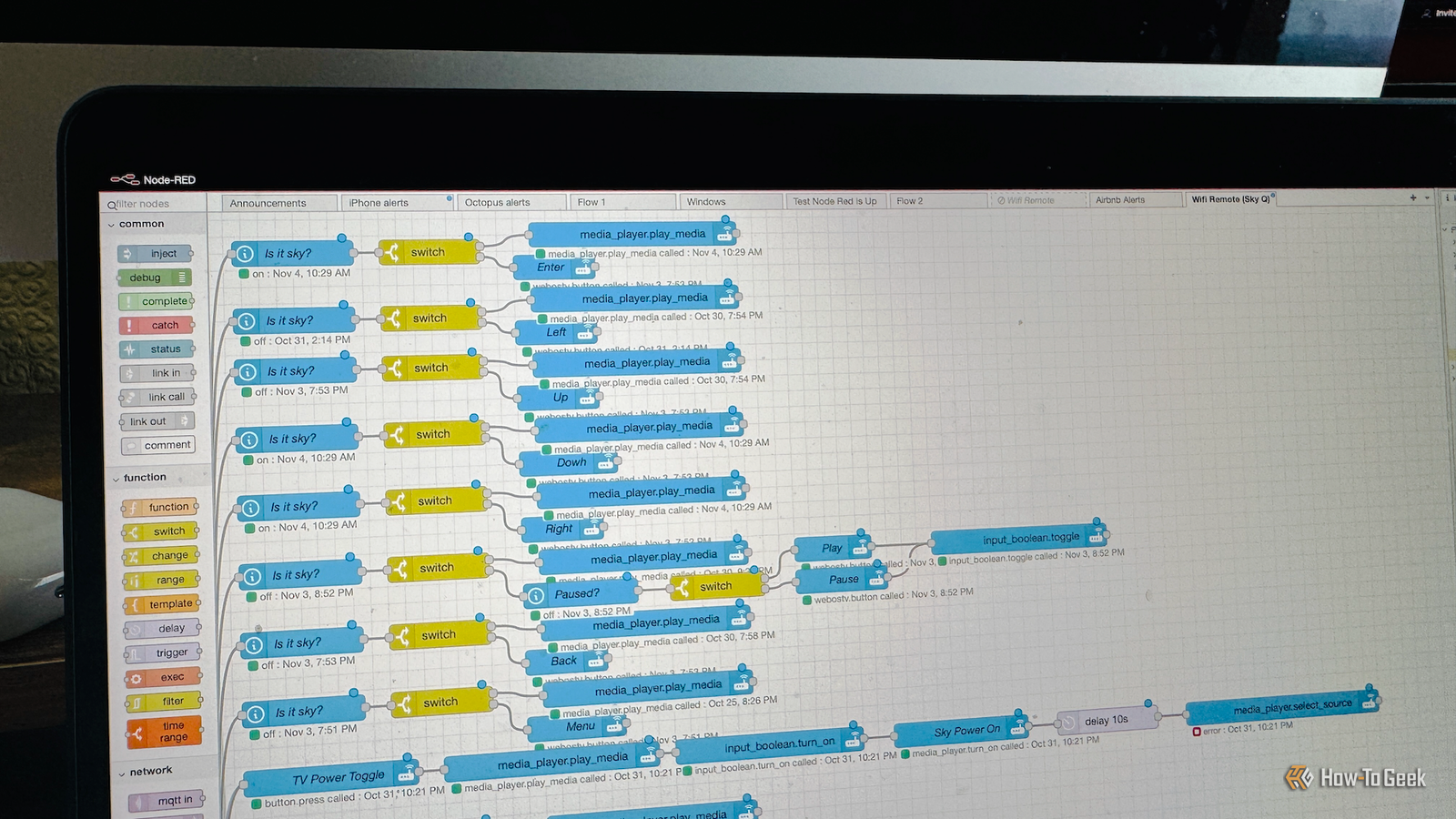
Published Nov 4, 2026, 12:01 PM EST Adam has a degree in Engineering and has a life-long interest in technology. He has been writing for over a decade for various print and online publications, with a focus on consumer tech. He joined How-To Geek in 2024 while working at Pocket-lint. As well as being a long-term fan of Apple products, he also has a strong interest in smart home tech, running a Home Assistant server at home to automate all his smart home devices. He believes that the ideal smart home should work with minimal interaction from the user, with automations running as if by magic rather than requiring you to push buttons on a control panel. You can find more of his work on Muck Rack. Node-RED is a visual programming tool that allows you to create complex automations without having to write code. It can be used for everything from industrial applications to controlling escape room experiences, but it can also be a really powerful tool for your smart home. Node-RED can control an entire escape room The visual programming tool lets you connect devices and services Node-RED is a flow-based programming tool that lets you create automations by connecting a series of nodes. Instead of writing code that says "if this, then that," you can add a node for "if this" and connect it to another node for "then that". The real power comes from the fact that you can connect each node to multiple other nodes, allowing you to build complex automations without having to write any code at all. Node-RED can be used for a huge range of different applications, since nodes can be purely logic, but they can also talk to external services. You can use a node to control an industrial machine, for example, and create a flow that shuts down the machine if its temperature rises above a set threshold. Node-RED can even be used to control entire escape rooms. Using extensions such as Node-REDscape, a flow can send messages to prop controllers such as ESP32 or Raspberry Pi devices, it can start and stop timers, display the remaining game time on an LCD display, react to the completion of game tasks, control sound effects, and more. Node-RED can work alongside Home Assistant You can build automations by connecting nodes Node-RED's flow-based system also makes it a great fit for building smart home automations. In the old days, when Home Assistant automations used to have to be written entirely in YAML, Node-RED offered an alternative way to create automations using a visual, low-code system. There are two ways you can use Node-RED with Home Assistant. You can install it as an app (add-on) which runs alongside Home Assistant, or you can install it as a standalone application in another container or a completely different device. Node-RED can communicate with Home Assistant through its APIs. Once set up, you can build automations in Node-RED that can get information from your sensors or smart home devices and send commands to control other devices. For example, you can have a node that gets the current temperature from a sensor. This can then be connected to two different nodes, with one node that performs an action such as turning on the heating if the temperature value is below a threshold, and another that turns on the AC if the value is above a different threshold. There are multiple different nodes that can handle logic, act as triggers, perform actions, and more. If there's an automation you want to build in Home Assistant, you can almost always create it using Node-RED. My most complicated automation would have been a nightmare without Node-RED Visual flows make complex automations easier to deal with Before the days of Home Assistant's visual editor, creating automations in Home Assistant required writing YAML, but those days are long gone. The automation editor is now a very capable tool that you can use to build complex automations without writing any code, so why would you need Node-RED at all? There are still times when the visual nature of Node-RED can be more useful if you're building a complex automation. I have an automation set up in Node-RED that I'm not entirely sure I could have built in Home Assistant's automation editor without losing my mind. It's an automation that is effectively the brain for the universal remote that I set up. It uses a Wi-Fi remote to control multiple AV devices, including my TV, surround sound system, set-top box, and more. This means that the buttons on the remote have to perform different actions depending on whether I'm trying to control the TV, the surround sound receiver, or the set-top box. Using Node-RED, each button has its own flow, with different actions depending on whether I'm using a smart TV app, the set-top box, whether the surround sound system is powered on, and more. Even with Node-RED, the flow is a spider web of connections, but the visual nature made it possible (if time-consuming) to build the relevant logic for each button of the remote. You don't need Node-RED for everything Home Assistant's automation editor can do a lot That's not to say that you need to use Node-RED for all your automations. I only have a handful of automations that run in Node-RED, with the vast majority having been set up using the native Home Assistant automation editor. Features continue to be added which make the automation editor more and more capable. However, there are some instances where Node-RED can make life a little easier. Highly complex automations such as my Wi-Fi remote can often be easier to get your head around when using a visual diagram of the automation. Node-RED can also make debugging complex automations less frustrating, as you can add debug nodes at any point in the flow to see the output of the previous node. While the automation traces in Home Assistant can be helpful, these debug nodes can make finding and fixing issues a little easier. You can also use inject nodes to test parts of an automation without having to wait for a real-life trigger. Node-RED and Home Assistant are a great match If you don't have any automations that are highly complex, then using Node-RED may not offer any huge benefits. If you're tearing your hair out trying to build a complex automation, however, then it's worth giving Node-RED a try. It can be a great complement to the native automation editor.
Node-RED is used to create escape rooms—here's why I use it for my smart home
Full Article
Original Source
Read the full article at Howtogeek →KhanList aggregates and links to publicly available news content. We do not host full articles from third-party sources. Always verify important information with original sources.