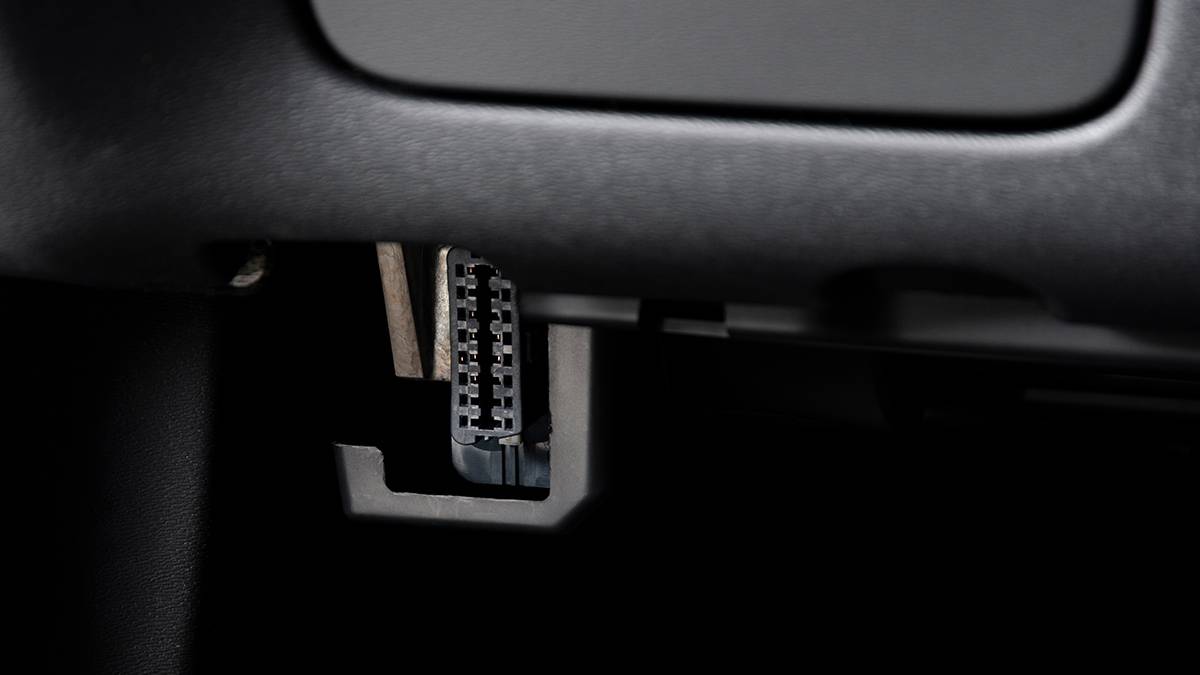
Published Aug 3, 2026, 1:00 PM EDT Adam Gray, a seasoned automotive journalist and content creator from the UK, joined the How-To Geek editorial team in January 2025. As an automotive journalist for How-To Geek, Adam breaks first-to-report news on the latest in automotive tech, as well as penning automotive features and reviews. Adam is also a contributor to one of How-To Geek's sister sites, TopSpeed, where he uses his media accrediation with manufacturers' press offices to gain access to the latest vehicles for subsequent review. Prior to joining How-To Geek, Adam worked on a freelance basis, contributing automotive content to a variety of business and lifestyle publications. His experience also includes time spent serving as senior editorial & auction content manager for SBX Cars, automotive content writer for Supercar Blondie, motoring editor for Portfolio North, and motoring editor - North East for Reach plc. When he's not putting the latest vehicle through its paces or testing out its tech, Adam can be found at his local ice rink playing ice hockey or at the Riverside Stadium supporting his beloved Middlesbrough FC. Adam also enjoys spending quality time with his three children: Ellie, Oscar, and Heidi. The OBD II port might seem like a convenient place to power a dash cam, especially with adapters that promise an easy, tool-free installation. But while it can work in some cases, it's generally not the best option for long-term use. For most drivers, powering a dash cam through a dedicated 12-volt outlet or a properly installed hardwire kit is the safer and more reliable approach. Here's why using the diagnostic port can create problems—and what you should do instead. Why the OBD II port isn't designed to power accessories It's meant for diagnostics—not as a permanent power source Credit: Lucas Gouveia/How-To Geek | Peyker/Gargantiopa/Shutterstock The OBD II port exists primarily to give technicians access to a vehicle's electronic systems for diagnostics and troubleshooting. It provides access to information from the engine, transmission, emissions system, and other onboard modules, making it an essential tool for servicing modern vehicles. While the port also supplies power, it wasn't designed to act as a permanent power outlet for aftermarket accessories. Leaving a dash cam connected full-time can interfere with diagnostic access, create unnecessary electrical load, and, on some vehicles, prevent control modules from entering their normal sleep mode. For those reasons, most installers recommend leaving the OBD II port free for its intended purpose and using a dedicated power source instead. Hardwiring is the best long-term solution A fused connection offers the safest and cleanest installation Credit: Adam Gray | How-To Geek A hardwire kit connects the dash cam directly to the vehicle's fuse box using a dedicated fused circuit, rather than drawing power through the diagnostic port. This gives the camera a stable power supply while protecting both the dash cam and the vehicle's electrical system. Most quality hardwire kits also include low-voltage protection. If the battery voltage drops below a preset level, the kit automatically cuts power to prevent the battery from being drained—a feature that's especially useful if you want to use parking mode. Hardwiring also creates a cleaner installation by hiding the power cable behind interior trim, avoiding loose wires hanging across the dashboard or windshield. A 12-volt outlet is the easiest alternative Simple to install without touching the vehicle's wiring Credit: Tyler Hayes / How-To Geek If you don't want to hardwire a dash cam, the 12-volt accessory outlet is the next best option. It's designed to power accessories, is protected by the vehicle's fuse system, and requires no modifications to the electrical wiring. Many newer vehicles switch the outlet off when the ignition is turned off, so the dash cam only operates while you're driving. Others leave the outlet permanently powered, allowing compatible dash cams to use parking mode if battery protection is built into the camera or power adapter. While the visible cable isn't as tidy as a hardwired installation, using the 12-volt outlet is still a far better choice than occupying the vehicle's diagnostic port. When is it okay to use the OBD-II port? Only if the manufacturer specifically designed it that way Credit: Adam Gray | How-To Geek There are some dash cam power adapters that plug into the OBD-II port, but they're designed specifically for that purpose rather than acting as generic power cables. Reputable manufacturers build these adapters with voltage regulation and battery protection to reduce the risks associated with drawing power from the diagnostic connector. Even then, they're usually intended for owners who want parking mode without accessing the fuse box, not because the OBD-II port is inherently a better power source. If your dash cam manufacturer recommends an OBD-II power adapter for your vehicle, it's generally safe to use. However, if you're choosing between an OBD-II adapter, a hardwire kit, or a 12-volt outlet, the latter two remain the better options because they leave the diagnostic port free and rely on circuits intended to power accessories. The bottom line Leave the diagnostic port for diagnostics Credit: Adam Gray | How-To Geek The OBD II port may look like a convenient place to power a dash cam, but convenience isn't the same as good practice. The connector was designed for vehicle diagnostics, not as a permanent power source for aftermarket accessories. A hardwire kit remains the best solution if you want a clean installation and reliable parking mode, while the 12-volt accessory outlet is the simplest option for drivers who prefer a plug-and-play setup. Both are protected by the vehicle's fuse system and are designed to supply power safely. Keeping the OBD II port free also means it's immediately available whenever diagnostic equipment needs to be connected—a small decision that can save time and avoid unnecessary complications later.
Never power your dash cam from an OBD II port—do this instead
Full Article
Original Source
Read the full article at Howtogeek →KhanList aggregates and links to publicly available news content. We do not host full articles from third-party sources. Always verify important information with original sources.