
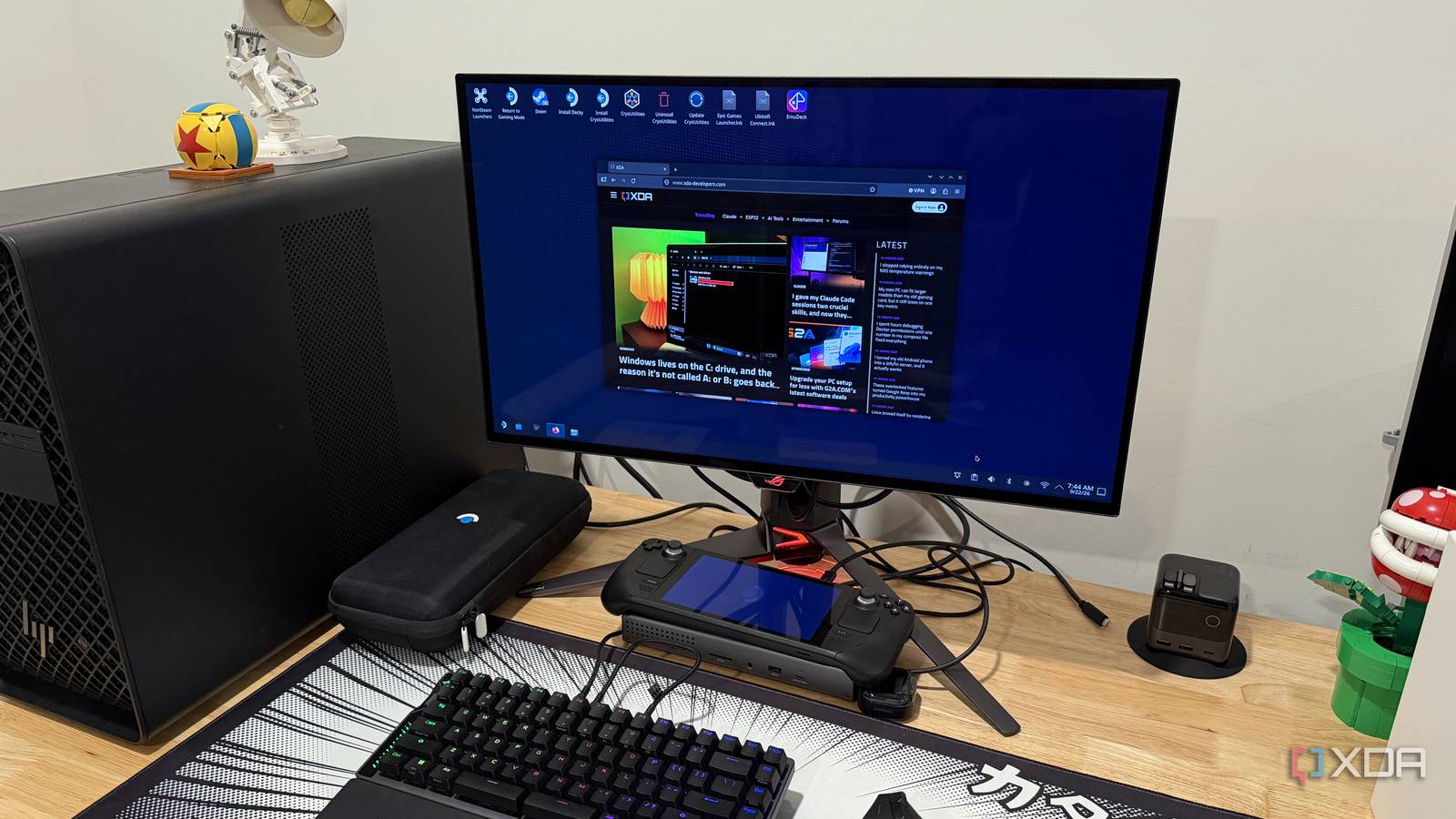
Published Sep 24, 2026, 9:00 AM EDT Maker, meme-r, and unabashed geek, Joe has been writing about technology since starting his career in 2018 at KnowTechie. He's covered everything from Apple to apps and crowdfunding and loves getting to the bottom of complicated topics. In that time, he's also written for SlashGear and numerous corporate clients before finding his home at XDA in the spring of 2023. He was the kid who took apart every toy to see how it worked, even if it didn't exactly go back together afterward. That's given him a solid background for explaining how complex systems work together, and he promises he's gotten better at the putting things back together stage since then. I've used many of the PC gaming handhelds over the last few years, and I still keep returning to my Steam Deck. The form factor feels good in the hands and is oddly lighter than many of the competition. While it has lower specs than the machines that came after it, it never feels underpowered given the screen resolution and other constraints. It's even good enough to use as a desktop, and that's how mine spends its days. The only thing is that it has only a single USB-C port, so it really needs a capable docking station to use it this way. The Steam Deck is already a desktop; it's missing the ports Desktop Mode has grown up I'm not the only person who uses their Steam Deck as a desktop replacement, or as a docked TV console, and I'm sure I won't be the last. It's a powerful device, even compared to many of the mini PCs on the market, and it brings versatility to the table. But it has one drawback for me: the single USB-C port has to do double duty for power and connectivity. While you could use your monitor's USB dock if it has one, I prefer having a dedicated docking station. The Steam Deck's USB port is 3.2 Gen 2 (10 Gbps), with DisplayPort 1.4 Alt Mode and USB PD; so it's not USB4/Thunderbolt. But you can use those fine, and it's really just a question of picking the dock that has enough ports for your needs. For me, I need at least one monitor output and Ethernet, ports for a keyboard and mouse, single-cable charging, and an SD card slot. That last one is a hard requirement, as I spent a lot of time ingesting photos, and I'd need a USB port and another adapter otherwise. The best part about docks for me is that most don't require any drivers to be installed, especially now that newer Realtek chipsets are supported in SteamOS. OWC Thunderbolt Go Dock 9/10 Ports 1x Thunderbolt (to host), 2x Thunderbolt downstream, 1x USB 3.2 Gen 2 Type-C, 2x USB 3.2 Gen 2 Type-A, 1x USB 2.0 Type-A, 1x HDMI, 2.5Gbps Ethernet, 3.5mm headphone jack, 1x SD card reader USB Power Delivery Yes, up to 90W The OWC Go Dock is a more compact Thunderbolt 4 docking station. It comes with multiple USB-C and USB-A ports, 2.5Gb Ethernet, HDMI, and an SD Card reader. The dock also has the power supply built in, which means you can worry less about the cables on your desk. Okay, you need a few more peripherals too But you knew this already It's good that you don't have to use the official Steam Deck Dock anymore for a consistent experience, but to keep it docked and still use it, you'll want a few more things. I use Bluetooth earbuds, so I don't need to use up another precious dock port, but I also have a mechanical keyboard and a wireless trackball that I use with it while docked. The trackball helps with my tendonitis, and I use a Bluetooth controller when I play games while it's docked. I still undock it most of the time when I want to play games, because it's not really powerful enough to run games on the 4K monitor, and it feels snappier on the built-in screen instead of going through the docking station's connections. The dock keeps it charged up as well, and then I don't have to worry about the battery when I do want to collapse on the couch with some of my favorite games. Even using a Thunderbolt dock on a non-Thunderbolt port worked fine Even at 4K and high refresh rates I've used my Steam Deck with the Razer USB4 USB-C dock, and the OWC Thunderbolt Go Dock, and it worked flawlessly with both. The only wrinkle was with the OWC, as the Thunderbolt 4 outputs weren't recognized by the USB-C port on my monitor, so it was limited to the fallback mode of DisplayPort Alt mode. And honestly, I think that's an issue with my monitor, not the dock or the Steam Deck. Switching to HDMI 2.1 from the dock gave me 4K at 144Hz, not quite the 240Hz the monitor supports, but that's a bandwidth limitation of the Steam Deck's USB 3.2 Gen 2 port. I only use one external monitor; it feels like trying to stretch the capabilities too far with more, and there's only one non-Thunderbolt display output on the dock I use anyway. As I've got an LCD Steam Deck, I have to wake the console from sleep with the power button instead of using the keyboard or mouse to wake it, but that's a limitation the Steam Deck OLED fixed if you have one. The Steam Deck's versatility is its superpower, not the portability I'm not going to pretend that the Steam Deck is powerful enough to replace the desktop for many users. But that's not the point. It's the closest thing that PC gaming has to the dual nature of the Nintendo Switch, and it can do productivity tasks. That's my favorite thing: Valve has created a versatile, customizable platform that lets users decide how they're going to use it. Mine just happens to be docked most of the time, but it's always there in case I want to unplug and veg out on the couch.
My Steam Deck is a desktop for most of the week, and a dock was the only thing it needed
Full Article
Original Source
Read the full article at Xda-developers →KhanList aggregates and links to publicly available news content. We do not host full articles from third-party sources. Always verify important information with original sources.