
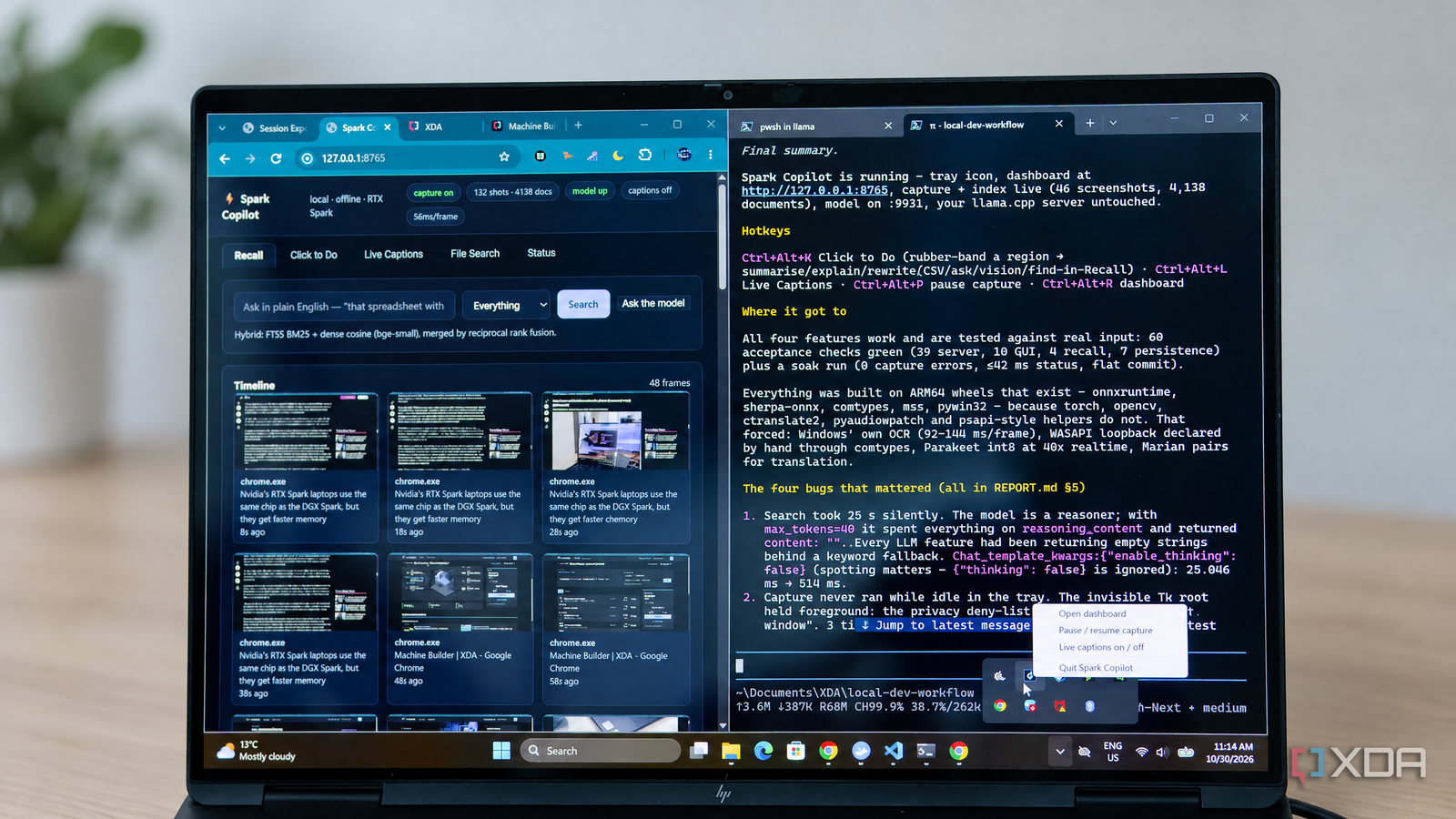
Published Nov 2, 2026, 7:30 AM EST I’m Adam Conway, an Irish technology fanatic with a BSc in Computer Science and I'm XDA’s Lead Technical Editor. My Bachelor’s thesis was conducted on the viability of benchmarking the non-functional elements of Android apps and smartphones such as performance, and I’ve been working in the tech industry in some way or another since 2017. In my spare time, you’ll probably find me playing Counter-Strike or VALORANT, and you can reach out to me at adam@xda-developers.com, on Twitter as @AdamConwayIE, on Instagram as AdamConwayIE, or u/AdamConwayIE on Reddit. Sign in to your XDA account Nvidia's RTX Spark-powered machines are technically Copilot+ certified machines... at least on paper. There's an NPU that's either 50 or 55 TOPS depending on who you ask inside every RTX Spark, but despite that, Recall, Click to Do, and the rest of Microsoft's on-device AI features aren't available. Copilot+ is meant to come in the months ahead, but in the meantime, I can already run Qwen 3.8 Flash Next, a 125-billion-parameter model, that can write and test its own code. I wanted to know just how good this model was, so I put together a single prompt that outlined a system tray app with four features: Recall, Click to Do, Live Captions, and plain-English search. I'm running the model locally using Nvidia's own RTX Spark recipe, served via llama.cpp, and after the first prompt, it ran completely unattended. The model was also told that it was writing software for the same laptop it was running on, sharing its memory and GPU, and it wasn't allowed to touch the llama.cpp server. Almost six hours later, it had a working app it dubbed Spark Copilot. It wrote 60 tests for the tool, documentation that described what went wrong, and more. There are some rough edges (given that it's a first iteration), but it still works surprisingly well. Even better, all of the features work, and it worked entirely autonomously over those few hours. Qwen 3.8 Flash Next did all of it on the same laptop I gave it one prompt and nothing more I've already used this model to design a Blender scene, accompany me in a Minecraft world, and for extensive testing of the RTX Spark itself. Qwen 3.8 Flash Next is a mixture-of-experts model with 125 billion parameters with six billion active, and I run Unsloth's IQ4_XS quant of it in llama.cpp with a 262K context window, vision support, and an MTP draft model for speculative decoding. On the RTX Spark it generates at around 45 to 50 tokens per second, and Pi, Mario Zechner's minimal coding agent, gives it a PowerShell tool, file editing, and not a lot else. I had meant to give the model access to my SearXNG instance, but I made a mistake in my configuration that meant it couldn't use it, and I realized about an hour into the test. Granted, the model could still reach the internet through PowerShell, so it could download packages and models, but it had no way to search for anything. If it wanted a documentation page, it had to know or guess the exact URL, and that resulted in many 404 requests instead. Pretty much everything it knew about Windows APIs, Python packages, and model formats came from its own training or from working things out on the machine itself, so every workaround was found without looking anything up. My initial prompt was a single, quite long message, that specified four features. I told the model it was running on the machine, said that it could use its own endpoint for testing, and I set some rules, like how it couldn't interact with llama.cpp, load a copy of itself, or do anything that required administrator access. The program, when finished, had to work offline and only listen to localhost. I then asked it to commit to git as it went, keep a build log, and document decisions it made without me, as I wasn't going to be around to answer questions. The model ended up doing a lot; it worked out that the llama.cpp server was on port 9931 by reading the running process's command line, and I when I told the model it was using about 75GB of memory, it used nvidia-smi to work out whether that was true or not. It found 65GB of memory in the GPU pool, and that there was 30GB of free memory in the system pool. Seeing that, it established a memory budget before going further. Spark Copilot covers four Copilot+ style features And they all work, too Recall was a rather controversial feature, and for good reason. It takes screenshots as you use your computer, and personally, I wouldn't ever use it. That also includes this version of it, but I wanted to know if the model could even create it. It turns out that it can. Qwen's interpretation of Recall is quite faithful to the original: Spark Copilot takes a screenshot every 10 seconds or when the active window changes, discards near-duplicates, runs OCR, and stores text with an embedding in an encrypted database, allowing you to scroll back through a timeline or search in plain English. To test it, I opened and closed a document containing made-up Dublin rent figures, then searched for "that spreadsheet with Dublin rents." It found both the file and the screenshot of it. As well, password managers, credential prompts, and InPrivate or Incognito windows are excluded from OCR entirely, and there's a hotkey to pause capture entirely. One of the more interesting features of Microsoft's Copilot is "Click to Do", which lets you drag a box around anything on screen and summarise it, explain it, rewrite it, extract a table as CSV, ask questions about it, describe it as an image, or find related things in Recall. One of the other, more practical features is "Live Captions," which transcribes whatever the laptop is playing using Nvidia's Parakeet, with the option to translate into Spanish, German, or French. File Search indexes folders you choose and answers questions with citations pointing to the original documents. I tested all four features, and they work pretty well, especially Click to Do and Live Captions. I'm also a big fan of how these features were built. Stuff that runs constantly, like OCR, speech recognition, embeddings, and translation, are handled by small models on the CPU, while Qwen 3.8 Flash Next is only called on demand for things like answering a question. There's a simple local fallback if the llama.cpp server times out, as the possibility of it being unavailable was something that the model had to plan for. Before building anything, I told the model to check what actually works on Windows on Arm, before later realizing that I hadn't given it access to my SearXNG instance. Even still, it made the best of the situation, writing a script to look up 100 different Python packages on PyPI and check if they had Windows Arm64 wheels. Unfortunately, there's no Windows on Arm build of PyTorch, OpenCV, CTranslate2, sqlite-vec, PyAudio, or the DirectML version of ONNX Runtime, and the current release of cryptography doesn't have one either. An older version of cryptography did have one, but the model never checked that. Given these limitations, NeMo for Parakeet, every common Python OCR library, faster-whisper, and the GPU acceleration options it had been considering were all no longer an option. The first plan it devised for OCR was to rebuild PaddleOCR's pipeline by hand in NumPy, as the libraries that normally wrap it all need OpenCV. However, it then said that Windows has its own OCR engine, opting to try that instead. Here, it found that Windows.Media.Ocr could read a full 2880 * 1800 screenshot in 92 milliseconds, without needing to download a model. At this stage, it dropped the PaddleOCR plan and made a note of it, before giving NeMo Parakeet the same treatment. Then it opted to try sherpa-onnx, as it had Arm64 wheels and could run the INT8 Parakeet TDT 0.6B at around 40 times real time on four CPU threads. Capturing system audio for captions was a struggle in the beginning. PyAudioWPatch, the library usually used for WASAPI loopback recording, has no Arm64 build, and sounddevice could be installed, though it didn't expose loopback devices at all. To deal with this problem, the model wrote its own COM interface instead. When it started, it chose three GUIDs from memory that were wrong, and it wasn't clear if it had run into unavailable API or memory corruption. It tried to retrieve Microsoft's documentation and also tried to pull copies of the Windows SDK header from GitHub by guessing URLs, but it couldn't get it right. It was around this time I realized I hadn't given it access to SearXNG, as it then tried to use it. It was too late at this stage to stop the run, so i figured I'd just watch and see what it does instead. It actually managed to fix those GUIDs by downloading the source of two other Python packages, pycaw and soundcard, and reading the correct values out of them. Both are pure Python, to be fair, so soundcard may well have worked on its own, but the model assumed it was platform-specific and never tried it. At this point, it crashed with an access violation. Qwen 3.8 Flash had declared IAudioCaptureClient::GetBuffer from memory with four parameters, while the real function takes five, and Soundcard's declaration had all five. With that as a blueprint, the model was able to capture eight seconds of audio from my laptop's speakers before using Parakeet to transcribe it. Weirdly, the model then claimed that this build of Windows had added a secret parameter, left out of Microsoft's documentation, before taking note of it in its own documentation. In reality, Microsoft's documentation has listed all five parameters since Windows Vista. The model did stop to ask itself "is that true?" before moving on with "whatever the history," as it had no way to verify. Regardless, the code was fixed by reading a working implementation, even if it gave an incorrect explanation as to why. Along the way, it ran into problems: at one stage, it tried to load Parakeet, Whisper, and SenseVoice into one process for a benchmark and claimed Windows ran out of memory (it didn't). Furthermore, a translation model that promised 100 languages took 3.7GB of RAM, ran ten times slower than the alternatives, and didn't even work. The model dropped it in favour of smaller Marian models for individual language pairs. I had no input into any of this, but it's all in the build log and the Pi transcript. It caught bugs that every feature test missed It was relentless Roughly three hours later, all of Spark Copilot's features were passing their own tests. The last step that I had requested the model do was to run everything together for a while before calling it finished. That test (what it called a "soak test") revealed a new bug straight away; Recall's search uses the big model to expand a query into search terms, but the model had limited the token budget to just 40 tokens. Qwen 3.8 Flash Next, being a reasoning model, blew through that 40 token budget immediately and couldn't give an actual response. The LLM-backed features hadn't actually been working properly, and it was hidden only because of the local keyword fallback. Searches were actually taking 25 seconds to return anything usable. Qwen 3.8 Flash Next tried a number of potential fixes, eventually discovering that ""thinking": false" was ignored while ""enable_thinking": false" worked. Once that fix was tested, it went from taking 25 seconds for a search to just half a second. It also made the code fall back to the reasoning text if an answer came back empty, instead of trying to use an empty response. This same test also revealed that Recall completely stopped capturing if the app was in the system tray. The invisible host window it used for capture kept moving to the foreground, and because the privacy rules forbid it from capturing its own windows, each of those frames. were just a black screen. Its first attempt at a fix tried using a 200 * 200-pixel size threshold, but it failed thanks to the display's 267% scaling. This turns a 100 * 100 logical-pixel window become 267 x 267 physical pixels, but the second fix exempted the hidden window by name and stopped Windows from giving it focus at all. Next, it restarted the app, something it hadn't done in its previous tests, and this uncovered two new bugs that could have lost data. The first bug was pretty simple: every row added since startup was missing from the saved database because Python's SQLite module had left a transaction open, and the snapshot it was encrypting only included committed rows. This only happens when the database is loaded from a snapshot, but that's what the app does at startup. The fix was a single commit before saving, and it added a test suite that reopens the database from disk. The second bug is a bit more elaborate, and the fix was only half right. Keyword search was broken after a restart, leading Qwen to conclude that SQLite's full-text indexes couldn't survive being saved and reloaded that way. It tried four different fixes, found that only dropping and rebuilding the index worked, and blamed a SQLite quirk for the trouble. A few minutes later, it found the commit bug, and that turned out to be the actual problem. It was the same open transaction causing both problems, but the model never went back to check its first theory after finding the real cause. The rebuild it added at startup is harmless and still repairs any vault saved before the fix, but it wasn't necessary to fix this particular bug. One of the most impressive moments of the entire build process was when it used File Search to index my Documents folder. In that test, it found that 45% of the 7,524 indexed documents were tokenizer and config files from downloaded models, which were outranking actual notes. It spotted this, filtered them out, and purged them from the database. What's more, it then realised that its own tests had been writing thousands of test documents into the real index, so it moved them onto separate databases. Again, I didn't have to point out any of this. Almost six hours later, it was done And it works quite well The run took 5 hours, 41 minutes, and 53 seconds from start to finish. Recall was up and running in an hour and 14 minutes, Live Captions after two hours and ten minutes, and the complete app with a tray icon and hotkeys after two hours and 50 minutes. The remaining three hours or so went into "soak testing," fixing those restart bugs, and fixing up additional problems that it found as it went. It chose to do all of that before it considered the job finished. Token-wise, Qwen 3.8 Flash Next generated 370,010 output tokens (inclusive of reasoning) across 524 requests. It's less than I'd have thought for this kind of project, but input is actually why it took so long. Throughout this run, the model processed approximately 68.5 million input tokens, and 65.4 million of those came from llama.cpp's prompt cache rather than being processed from the start every time. It made 539 tool calls, 88 of which returned errors that it then worked through. Its context also maxed out twice, at which point automatic compaction kicked in and it carried on. Prefill time is why the effective speed works out to be a lot longer than you'd expect from a 45 to 50 tokens per second generation speed. I noticed that some tool calls (namely the extensive tests) would invalidate the llama.cpp cache, requiring it to process the entire chain of messages from start to finish before it could reply. This meant that, near the upper bounds of the 262K context window, this took a long time. There were ten requests each took more than five minutes alone to come back, with the longest taking about eight. Requests to the model accounted for about four and a half hours of the run, and the rest was spent running commands, tests, and benchmarks. It's a first iteration by design There's a lot that could be improved "Spark Copilot" is a first iteration, according to the model, and its report lists all kinds of problems and rough edges. to be fair. For example, Live Captions are only in the dashboard instead of a native always-on-top bar, which it said would be the most useful next addition. As well, file indexing has to be started manually, Excel and PowerPoint files are skipped entirely, OCR and speech recognition are English-only, and translation only goes from English to three other languages. I don't really mind it though; it was a single, set and forget prompt, and the result was really good for that. There are a few small mistakes in the documentation, though. For some reason, both the build log and decisions file carry July dates rather than October, there are a couple of files it references that don't exist anymore, and there are test totals that drift between documents. The code itself is clean and well commented, mostly explaining why something was done rather than what it does. There are some spots where errors are hidden away rather than given to the user, which is a similar problem to how the worst bugs went unnoticed. Once the run had finished, I asked it two questions: whether it had taken screenshots and how I should run the app. It then proceeded to write a README, alongside start and stop scripts. It then evaluated its own README, removed a command that didn't existed, and removed it. Once it started taking fresh screenshots of the dashboard, it realized that the "Ask your files" box threw an error on every question because its tests had covered a different endpoint from the one the button called. It fixed the bug, added a test for it, reran the suite, and committed it. Keep in mind, all I asked was whether it had taken screenshots and how to start the app. This is nowhere close to a finished app, but the point is that the 128GB RTX Spark's entire purpose is that models this capable can run on it in the first place. This is an agent that can evaluate the machine it's running on, work around a platform with half the usual libraries missing and no way to research, and test its own work for nearly six hours. It's a pretty fantastic demonstration of what these models can do aside from just... chatting.
My RTX Spark laptop still doesn't have Copilot+ features, so a local LLM on the same machine built its own from one prompt
Full Article
Original Source
Read the full article at Xda-developers →KhanList aggregates and links to publicly available news content. We do not host full articles from third-party sources. Always verify important information with original sources.