
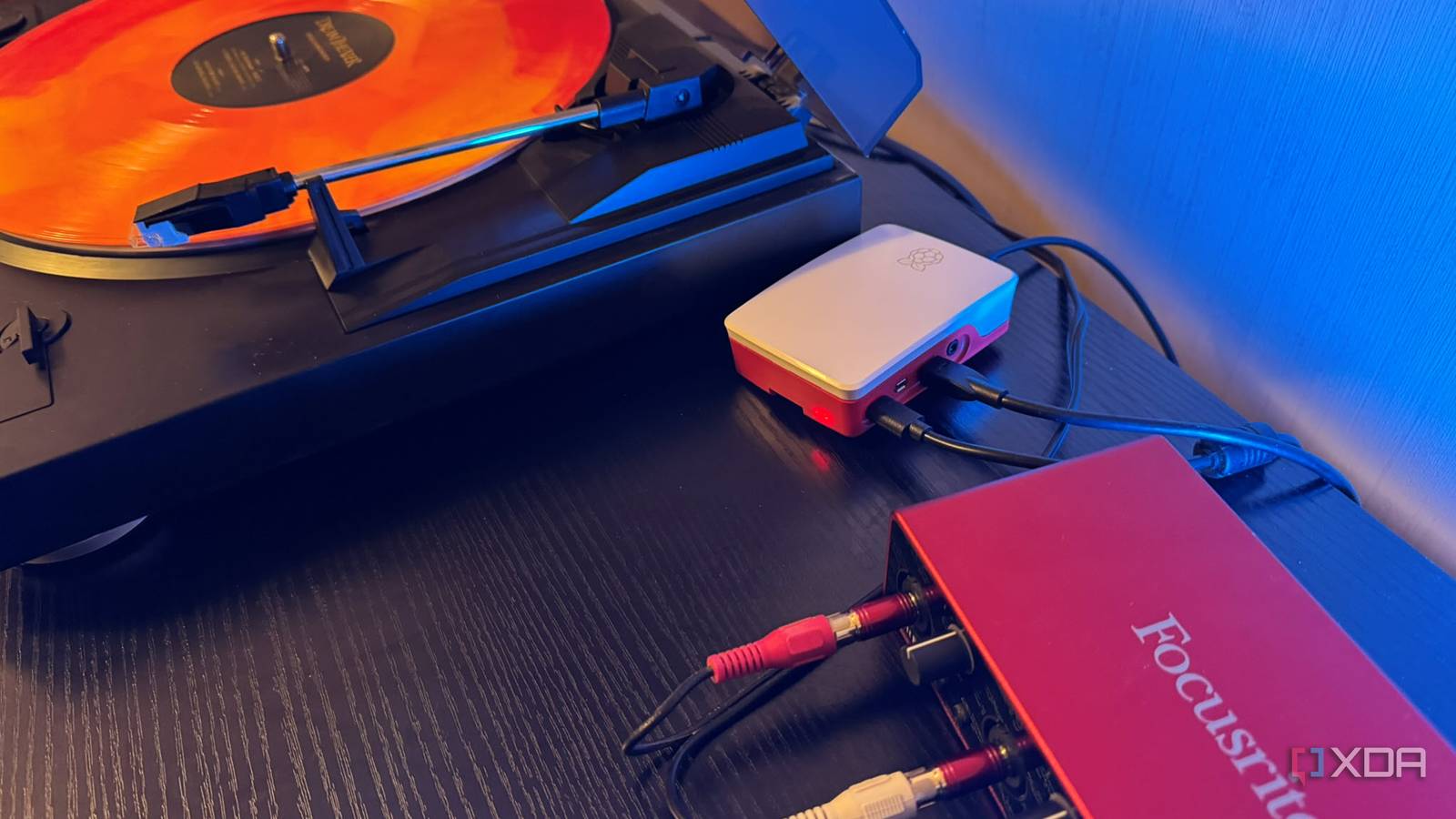
Published Nov 22, 2026, 6:00 PM EST Based in rural Minnesota, Brian Burgess worked in IT for 10 years before finding his passion for writing about consumer technology. Brian earned his degree in computer and network technology in 2000. He held various IT positions, including help desk support, router installations for IBM, database administration, and other associate network administration roles. He's been a personal technology journalist for 18 years and has written thousands of articles about Microsoft products and services, Android, iOS, streaming, and more. He has written for notable tech sites including XDA, InformationWeek, How-To Geek, Byte, groovyPost, and others. When he is away from the keyboard, you will hear him playing guitar, working outdoors, and watching Star Trek. I digitized my vinyl albums and added the files to my self-hosted servers for local and remote streaming. I used Audacity to record them and clean up the audio by removing crackles and hiss. The setup also requires a preamp (luckily, built into my turntable) and an audio capture device. It's great because I can stream the files to any device at home or on the go. But what about actually playing an album and streaming it throughout the house? The same essential setup is needed, but it also adds a Raspberry Pi with free, open-source tools. It sits behind or next to my turntable and streams records while they play. Setting up a system to stream vinyl while it plays on a turntable Some assembly is required Digitizing an album to FLAC or MP3 and putting the file on my server to play is one thing. But I want to play a record and stream its audio everywhere in real time. I was reminded of old console stereos with record players and built-in speakers. The music plays in a single room, but not throughout the house. It would be cool to make that happen, and with a Raspberry Pi, free software, and the right hardware, I discovered it's possible. First, let's talk equipment. Like digitizing albums, you need the right hardware to pull this off. Obviously, a record player and a Raspberry Pi are essential pieces of the puzzle. If your turntable doesn't have a built-in preamp, you'll need one to connect to. You also need an audio capture device. I used the same Focusrite Scarlett 2i2 that I used to digitize my vinyl. I can plug the turntable's RCA jacks into it via a pair of RCA-to-¼-inch adapters, and plug it directly into one of my Raspberry Pi's USB ports. Now, you might think all that equipment would be expensive, but it really isn't. The only reason I am using a higher-end Focusrite for audio capture is that I already bought it years ago for home recording. The most expensive piece for this type of setup is a reasonable record player, but if you already have one, cross that off the expense list. The other components will cost around $100, depending on what you get. Setting up my Pi to stream music throughout my home The software is all free and open-source Another thing I should mention is that you may need a microSD card for your Pi. I already had a container full of them, so I was good to go. I installed Raspberry Pi OS Lite on it and ran it on my Pi 4 (which I already had on hand). Then I connected to it from my Windows PC through SSH to install a couple of apps the Pi 4 needs to encode and stream vinyl on my network. DarkIce captures and encodes the music coming from the turntable through the audio interface and sends it to my streaming server. For the server, I used Icecast 2. It makes the audio from DarkIce available on my home network so I can listen to it from other devices and speakers. I could have used VLC to capture and serve the vinyl stream, but DarkIce and Icecast 2 each do one job and complement one another. Troubleshooting is easier, and I wanted to try something different. Once the apps were set up and configured, I started playing an album through my self-built system. I opened a web browser to the Icecast stream, and I could hear the live broadcast of my record's music coming through my speakers. The configuration was working. It isn't a fancy Jellyfin or Plex page; it's a minimal player with play and pause controls. That creates a delay between what's playing from the album and what's coming through the speakers, but it's useful if I need to step away briefly and don't want to lift the tonearm. Playing vinyl albums to devices and speakers on my network Streaming records from my Pi Once my Pi was running the right software, I could tuck it away behind my turntable or to the side and stream albums via live broadcasts on my home network. I could dial into Icecast from my phone and cast a record's live broadcast to different speakers. Also, while I didn't want to use VLC as a server, I used it as a client to easily connect vinyl broadcasts to various streaming devices connected to my AV receivers. I can also connect to the IceCast server from any web browser and cast media to speaker systems while vinyl plays. It's cool to listen to vinyl everywhere, but with my setup I didn't get the full audio quality vinyl is known for. It is encoded and streamed as MP3. DarkIce encodes the audio capture's digital signal to 192 kbps by default before sending it to the Icecast server to stream live over my network. However, I can open its config file and change the bitrate to 256 or 320 kbps to preserve music details. Playing records from my turntable everywhere is useful and fun With my record player, audio equipment, Pi, and free software, I can stream vinyl in real time to speakers and devices across my network. When I start an album, it's a live broadcast, and I can listen at the same time on different speaker systems in different rooms. You don't have to be nearby to flip a record or spin a new one. Still, it's a fun project that makes listening to vinyl I haven't pulled out in years easier.
My record player streams to every speaker in the house now, thanks to a Raspberry Pi hidden behind the turntable
Full Article
Original Source
Read the full article at Xda-developers →KhanList aggregates and links to publicly available news content. We do not host full articles from third-party sources. Always verify important information with original sources.