
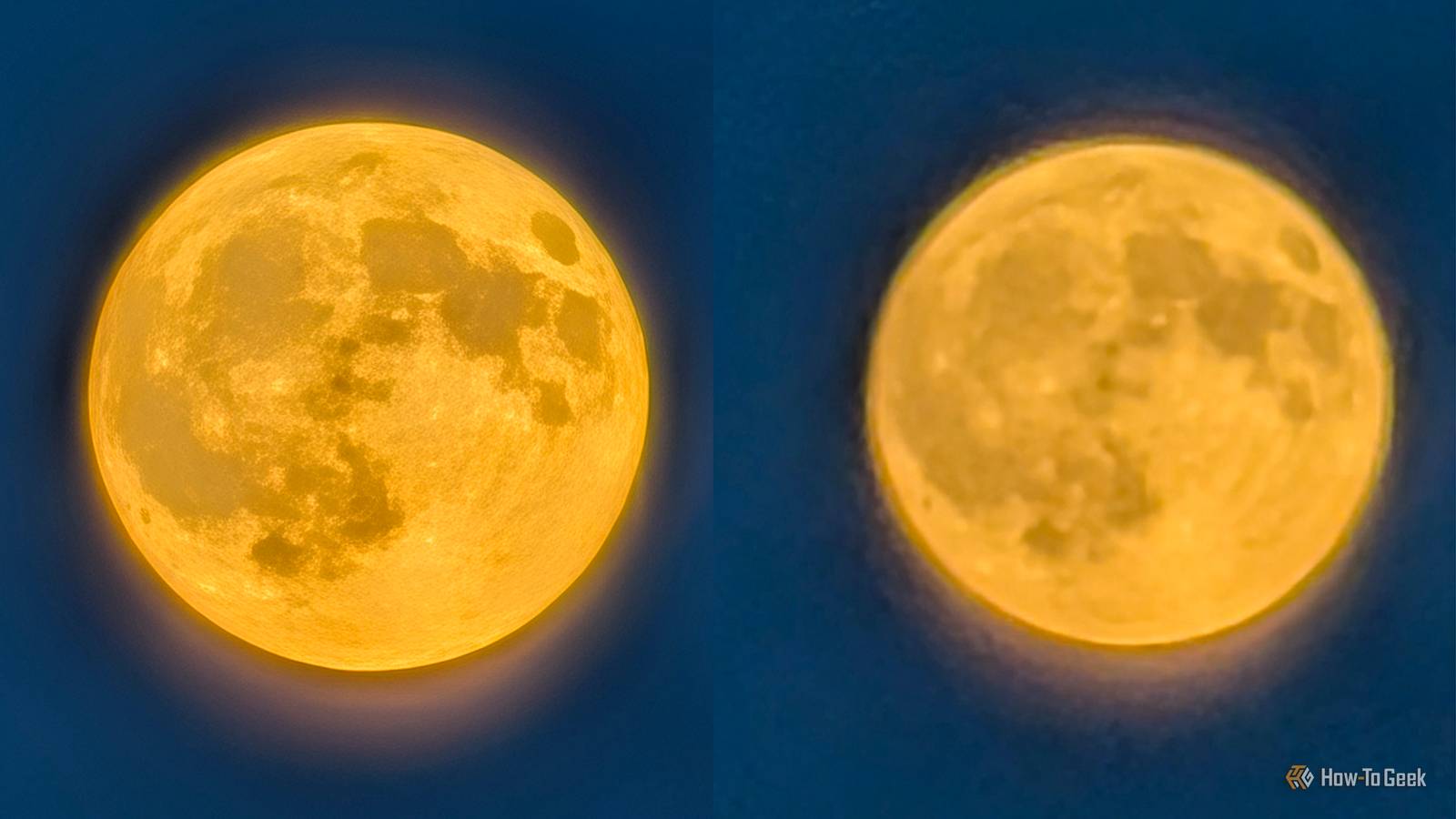
Published Sep 2, 2026, 9:00 AM EDT Ever since he got his first smartphone, the legendary Nokia 6600, back in 2005, Goran became obsessed with technology. This obsession had only gotten worse after he received his first gaming PC a couple of months later. He fell in love with video games in the early '90s, shortly after embarking on his gaming journey with the Sega Master System II and SNES. Since then, he has built dozens of PCs, played thousands of games, and authored hundreds of articles about PC hardware, gaming hardware, and video games. He knows everything there is to know about the PC gaming and PC hardware space, and while his console gaming knowledge isn't as comprehensive, he considers himself a console veteran. Goran has almost a decade of experience writing about tech and video games for numerous web publications including TechSpot, TechPowerUp, and EsportsHeadlines. He has been writing for How-To Geek since December 2022. When he isn't gaming or deciding which component of his PC to upgrade next, you can find him strolling around Novi Sad while listening to music and contemplating what to play next. Modern phones process the photos they take; that's a fact of life, with the computational photography algorithms being especially busy in photos taken by Pixel phones. Google built its reputation for photo quality in the early years of Pixel phones largely thanks to those algorithms, especially with the advent of Night Sight, which debuted on the Pixel 3. In some situations, AI processing can go overboard, hallucinating details that aren't there and creating photos that have little to do with what was actually captured by the camera sensor. In many cases, though, machine-learning processing can help you take better photos without any intervention on your part, which is why Pixel phones remain regarded as great point-and-shoot camera options. Photos you take with your Pixel can be modified beyond recognition by AI algorithms Sometimes, though, that's just what the doctor ordered Credit: Goran Damnjanovic / How-To Geek Google introduced Pro Zoom (then known as Pro Res Zoom) alongside the Pixel 10 lineup, with the feature kicking in at 30x zoom, when all those machine-learning computational photography algorithms go into overdrive, resulting in photos that are clearly AI-“enhanced.” In most scenes, using Pro Zoom can result in awkward-looking photos that are artificially cleaned up and filled with a bunch of details that simply aren't there in the original photos. But some scenes and subjects can greatly benefit from these hallucinations. A case in point is the photo of the Moon I took a few days ago on my Pixel 10 Pro, on a hot August evening. As you can see below, the original photo (right) is practically unusable. But the AI-enhanced photo doesn't look too shabby, and I wouldn't mind sharing it on social networks. The photo is a perfect example of when AI algorithms can be beneficial. Another example is the photo of a clock tower in my town that I took recently using 80x zoom. While the AI-enhanced photo is too clean for comfort, it looks good enough to share with friends and use on social media, and it shows how AI hallucinations can sometimes be a good thing (although in the vast majority of cases, they're quite the opposite). While I find most Pro Zoom photos to be nothing more than a party trick and a conversation starter, in specific situations, like when taking a shot of the Moon, having AI hallucinate details that aren't really there can give you a photo you can actually use. The Pixel AI processing can help you take better photos But it doesn't always come out ahead The AI processing that's an inescapable part of Pixel photos isn't always as obvious as it is when using Pro Zoom. For instance, I took the two photos below with the Pixel's default camera app (left) and Open Camera (right), which doesn't process photos as much, using the default camera settings and without Night Sight. While quite similar, the photo I took with the Pixel camera app looks a bit better because its HDR processing retains detail on the light pillars on the left, among other things. The machine-learning algorithms also add details to the building in the background and the shrubs encircling the fountain. Note that this time, the Open Camera photo is on the left and the Pixel Camera photo is on the right. But the excessive processing can be detrimental in some scenes. Below, you can see two photos of ivy sprawling across a red brick wall, with the Pixel camera photo on the left and the Open Camera photo on the right. I don't know about you, but I prefer the photo taken with Open Camera. While it's not as sharp and has less contrast, the colors pop more (especially the red bricks), and it looks closer to what my eyes saw when I took it. I've found this to be true for most daylight photos I take with the Open Camera app. They aren't as processed and are closer to what the scene really looks like. While they don't have as much contrast as the photos I take with the Pixel camera, they look more true to life, their colors pop more, and they're more pleasing to my eyes. While far from perfect, Pixel phones are still great point and shoot phones All you need to do is press the shutter button While the Pixel camera app falls short of Open Camera's less processed results in many daylight scenes, the biggest strength of Google's computational photography algorithms is that they deliver very good to great results in an immense number of wildly different conditions. Bright days, overcast days, rainy days, dusk and sunrise, scenes with high and low amounts of contrast, nighttime with less or more ambient light, photos of objects, people, and pets, landscape, nature, and urban photography—the whole nine yards. Thanks to machine-learning algorithms working tirelessly behind the scenes of every photo you take with your Pixel, Pixel phones are still among the best point-and-shoot camera phones around. You don't have to adjust ISO, exposure, or shutter speed; all you have to do is press the shutter button, and your Pixel will handle all those adjustments for you. And in many cases, the results will be among the best on the market. Google Pixel 11 Pro Brand Google SoC Google Tensor G6 The Google Pixel 11 Pro brings improved cameras, a faster Tensor G6 chip, and the HiLight notification LED to Android's official flagship phone. Pixel phones are not the best in business anymore, but they're still good enough for most people The fact of the matter is that the glory days of Pixels being the undisputed champions of mobile photography are behind us. Google has chosen to focus on software instead of hardware, which has resulted in other high-end phones, especially those ultra-high-end (and ultra-expensive) Chinese camera phones, beating Pixels in the area where they once ruled supreme. But as point-and-shoot phones, Pixels are still a great choice because they don't ask for any input from you and are capable of delivering often admirable results, considering the hardware they're equipped with, in almost any condition imaginable.
My Pixel phone's camera is hallucinating, and sometimes that's exactly what I want
Full Article
Original Source
Read the full article at Howtogeek →KhanList aggregates and links to publicly available news content. We do not host full articles from third-party sources. Always verify important information with original sources.