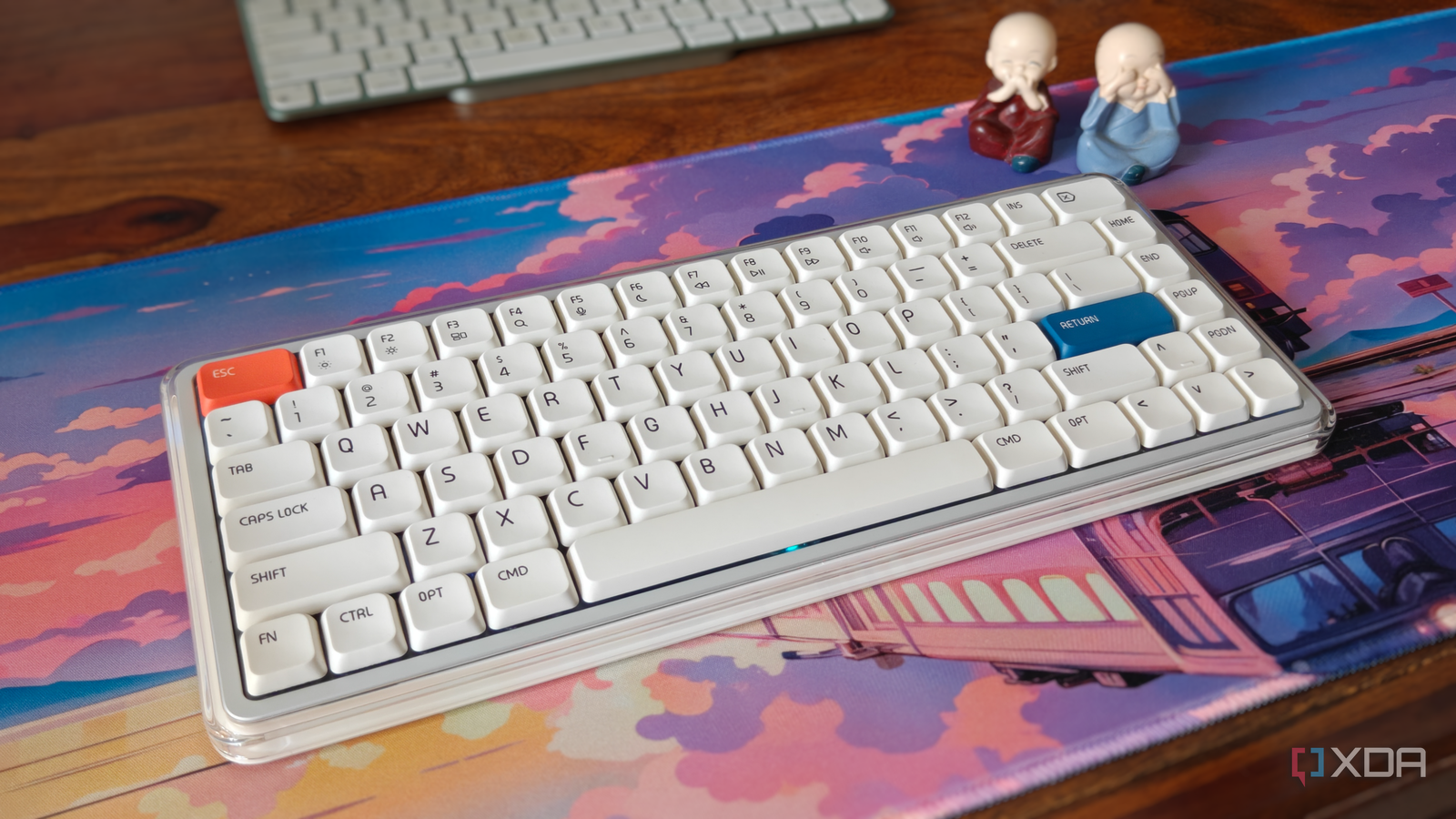
Published Jul 18, 2026, 11:00 AM EDT After a 7-year corporate stint, Tanveer found his love for writing and tech too much to resist. An MBA in Marketing and the owner of a PC building business, he writes on PC hardware, technology, and Windows. When not scouring the web for ideas, he can be found building PCs, watching anime, or playing Smash Karts on his RTX 3080 (sigh). I'm familiar with MelGeek's premium gaming and enthusiast keyboards, but the O2 for Mac is the first MelGeek board I've used. This variant is targeted toward Mac users who want a better and more feature-rich typing experience on their iMac or MacBook (or iPad or iPhone, if you want). When MelGeek offered to send it, I thought it would be a great way to get my partner into mechanical keyboards. After all, she's the one with an iMac as her dedicated work device, while I've been on Windows forever. After testing it for around 10 days, I'm more than satisfied with the typing feel, design, and feature set of this low-profile board. And my partner has finally realized that her Magic Keyboard isn't so "magical" after all. About this article: MelGeek sent the O2 for Mac to XDA, but had no input into the contents of this article. It passes the vibe check Unboxing the O2 for Mac, I was thoroughly impressed by the packaging and the design. This is a premium, low-profile, 75% mechanical keyboard designed to blend in with the Apple aesthetic. The transparent ABS build is fused with an aluminum alloy frame. The minimalistic white colorway with orange and blue accents fits seamlessly in my partner's iMac setup. Of course, any Mac keyboard needs to have dedicated macOS keys. The CMD, OPT, and CTRL keys, along with the secondary function keys, made the transition from the Magic Keyboard pretty smooth. My partner never had to ask me for help with the adjustment, since there wasn't one. Compared to the Magic Keyboard, the O2 is over 400g heavier at around 650g, but that's not a negative. In fact, it's standard for a keyboard like this, and I appreciate a bit of heft. The added weight brings a lot of extras compared to the Magic Keyboard, such as the backlight, side lighting on both sides, 5 layers of dampening, and a much bigger battery. The lighting is subtle, maintaining the productivity vibe while adding a bit of personality to the board. It has more magic than the Magic Keyboard The difference is stark I never quite understood how my partner was satisfied with the Magic Keyboard. It's one thing to use a scissor keyboard on her MacBook Air M1, but the standard Magic Keyboard (just like the Magic Mouse) always felt like a poorly made device to me. Where the Magic Keyboard is little more than a functional thin strip of a board with unimpressive switches, the O2 is a complete departure in terms of looks, materials, and typing feel. The rounded edges and ABS low-profile keycaps retain the Apple-esque nature of the board, while the RGB lighting, magnetic feet, and premium materials elevate the experience. The typing feel is excellent — the 5-layer dampening and linear switches result in a soft and creamy sound. The gasket mount takes typing seriously and gives the board much-needed feedback without being too loud. The Magic Keyboard is way more silent, but I can't say much else about its typing feel. You may not care about the RGB lighting, but at least the option is there. You can turn both the backlight and side lighting off — that's what my partner did anyway. The lighting isn't distracting at all, and I preferred using the keyboard with green side lights and white backlighting during the evenings. You can customize the lighting using MelGeek's Hive web app from the website. The desktop app currently doesn't support the O2 for Mac. You can also remap the keys and build macros on the Hive web app, which is more my speed than my partner's. I tried the O2 on my Windows PC, too, and the remapping worked without issue. Besides macOS and Windows, the O2 also supports Linux, ChromeOS, and iOS. We used Bluetooth on the iMac, but the board also supports 2.4 GHz and wired connections with a 1000 Hz polling rate on either connection. My partner used the keyboard in Bluetooth mode with the lighting off, with no "low battery" indication yet. MelGeek says the O2 for Mac lasts for 24–28 days in this mode and over 100 days in the power-saving mode. You can switch modes from the Hive app. The Magic Keyboard lasts for over a month on a single charge and is more portable, but that's about it. For charging on the iMac and MacBook, MelGeek also provides a USB-C to USB-A adapter in the box. I'm glad my partner has bid adieu to the Magic Keyboard Mission accomplished After over 5 years of using the Magic Keyboard on her iMac, my partner has found a keyboard she likes better. I've tried moving her to mechanical keyboards in the past, but nothing ever stuck. Perhaps it's because the O2 for Mac is the first Mac-focused keyboard I've given her, or because its aesthetics are so good. Or the fact that it feels and sounds like a proper keyboard should. The Magic Keyboard has its advantages, but I feel it lags in way too many areas to be considered the best keyboard for an iMac. The O2 for Mac isn't "cheap" per se, but its $129 price doesn't feel unjustified either. You're getting a low-profile mechanical board that feels premium, sounds great, has a personality and good ergonomics, and comes without a learning curve for Mac users. If you're looking to switch from your Magic Keyboard, the O2 for Mac could be one of the top options. Keychron and NuPhy also have excellent Mac keyboards, with the latter ranking high on aesthetics, too. MelGeek's offering is priced competitively and might be the better choice for the right user. MelGeek O2 for Mac The O2 for Mac is a 75% low-profile mechanical keyboard designed for Mac users. Supporting up to eight connected devices with seamless switching, it fits right into the Apple ecosystem. It sounds great, looks great, and could be the replacement you've wanted for the Magic Keyboard all along. I've grown attached to low-profile mechanical keyboards I started my mechanical keyboard journey with standard-profile boards that were heavy, loud, and flashy. Gradually, I've found that I appreciate the balance struck by low-profile keyboards. They are subtle without losing what makes a mechanical keyboard great. Aesthetics, typing experience, features, and price — they're not really sacrificing anything. And with the O2 for Mac, my partner finally agrees.
My partner finally tried a mechanical keyboard — now she's ditching her "magical" keyboard for good
Full Article
Original Source
Read the full article at Xda-developers →KhanList aggregates and links to publicly available news content. We do not host full articles from third-party sources. Always verify important information with original sources.