
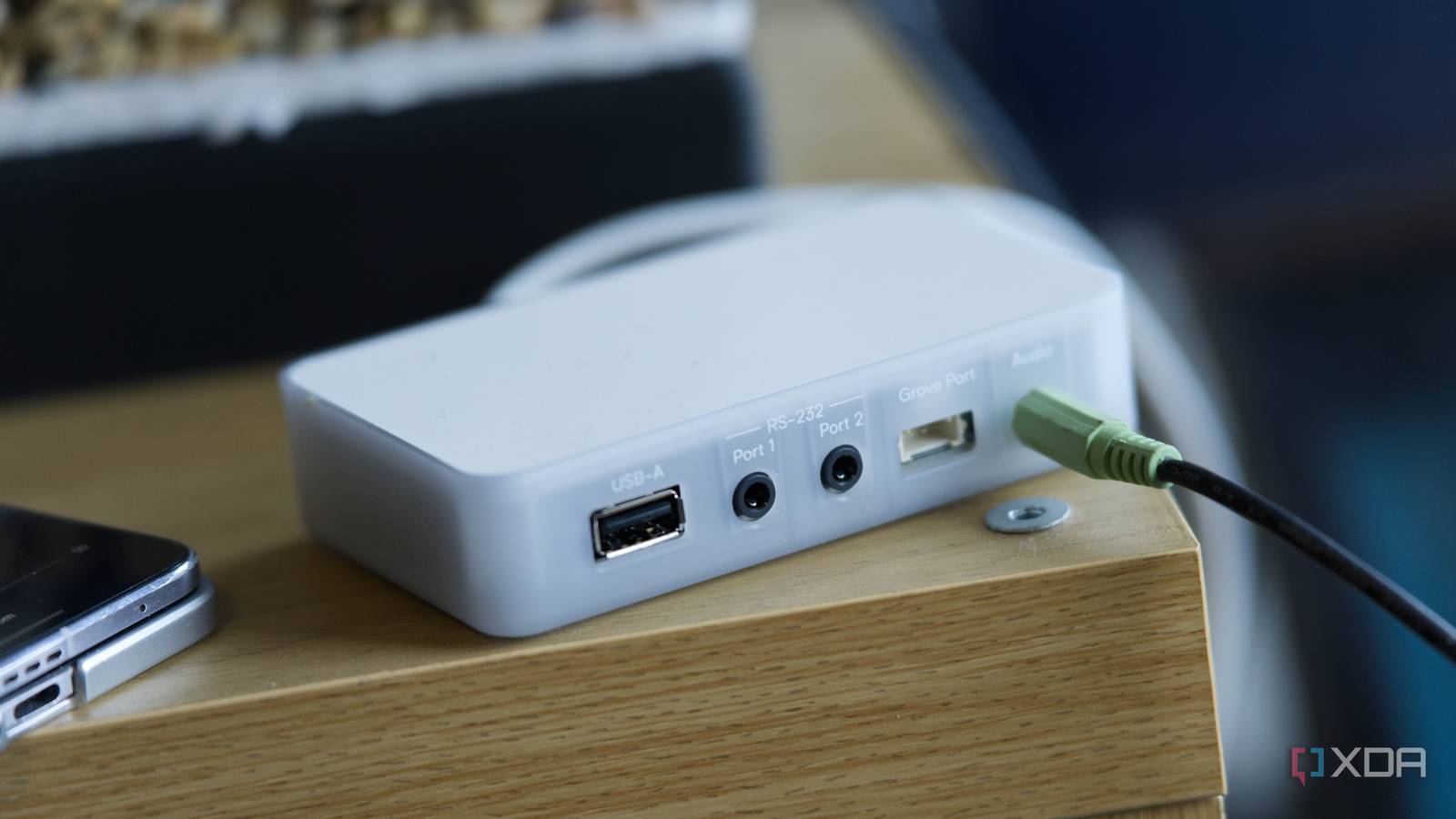
Published Nov 11, 2026, 3:30 PM EST I’m Adam Conway, an Irish technology fanatic with a BSc in Computer Science and I'm XDA’s Lead Technical Editor. My Bachelor’s thesis was conducted on the viability of benchmarking the non-functional elements of Android apps and smartphones such as performance, and I’ve been working in the tech industry in some way or another since 2017. In my spare time, you’ll probably find me playing Counter-Strike or VALORANT, and you can reach out to me at adam@xda-developers.com, on Twitter as @AdamConwayIE, on Instagram as AdamConwayIE, or u/AdamConwayIE on Reddit. Sign in to your XDA account A lot of perfectly good speakers are otherwise hard to integrate in a smart home, and even if they were smart for their time, they're often left stuck with whatever features they shipped with. Those features frequently don't age nearly as well as the speakers do, and the Huawei Sound X that I use at home is a good example of that. It sounds fantastic, but getting music onto it over a network relies on DLNA, and that can be a bit messy. The Home Assistant Connect AUX-2 provides a solution to those kinds of problems: it's a small $69 box from Nabu Casa, the company behind Home Assistant's official hardware, and I've had one plugged into the Sound X's 3.5 mm input for a while now. It turns any of your audio equipment with an analog or optical input into a Music Assistant player, while tossing in other smart home features, too. I've been using Spotify with mine, keeping it perfectly in sync with a Sonos Era 100 thanks to Sendspin, and I absolutely love it. The only thing you need to get it up and running is Home Assistant. It's a five-minute process, if that, to get it up and running, and it made it incredibly easy to get an older speaker working perfectly alongside a newer one. About this article: Nabu Casa sent us the Home Assistant Connect AUX-2 for the purposes of this article. The company had no input into its contents. Setup took me five minutes The Connect AUX-2 is a small, white, semi-transparent plastic box measuring 106 x 63 x 25 mm, with a set of ports on both sides. Inside, there's an ESP32-S3, a TI PCM5122 DAC for analog audio, and a W5500 Ethernet controller with support for Power over Ethernet. It runs ESPHome, complete with open-source firmware, so you add it to Home Assistant like any other ESPHome device, without needing a separate app or account. There's a single 3.5 mm audio jack that supports analog stereo, and there's optical S/PDIF through a mini-TOSLINK cable, with either output limited to 16-bit/48 kHz. Depending on what you plug in, it'll automatically detect the cable and switch to the right mode, though you can override this in Home Assistant. I've only tested the analog output, with a regular 3.5 mm cable connected directly to the Sound X. As mentioned, Power over Ethernet is here, but I'm powering mine over USB-C. You can still use Ethernet for networking, and there's 2.4 GHz Wi-Fi support, too. Connecting an Ethernet cable automatically disables Wi-Fi. You won't find an Ethernet cable or a USB-C cable in the box. Setup was incredibly straightforward. I powered it on, and the Connect AUX-2 was automatically discovered as a BLE device in Home Assistant's Devices & services page. From there, you configure it with Improv by providing network credentials, and you can either use the Home Assistant dashboard if you have a Bluetooth device enabled, or use the companion app on your phone. Once you add those, it'll show up as an ESPHome device that you can add to your home. You have 15 minutes after powering it on to complete setup, but if you miss that window, simply power-cycle the device and try again. Once configured, you can choose whether to enable features like Bluetooth proxying, Z-Wave, serial connectivity, or Sendspin. Once it's in your home, though, it's ready to use and doesn't require any additional configuration on the AUX-2. Music Assistant does the rest My old speaker now plays in sync with Sonos How the AUX-2 works is pretty simple: it doesn't deal with connecting to the likes of Spotify or other streaming services. Instead, you use Sendspin, the open standard from the Open Home Foundation for synchronized whole-home audio that works over your local network without a separate cloud service or account. Music Assistant acts as the source, sending audio to the AUX-2 and any other compatible players. It's free, integrates with Home Assistant, and automatically discovered my AUX-2 without needing to do any additional configuration. I've been using Spotify through Music Assistant, and the Sound X now appears alongside all my other speakers. Better still, I can create a group consisting of my Sonos Era 100 and the Sound X, so both can play the same music in sync, despite using completely different audio ecosystems. The synchronization has been great, and it's a much better experience than DLNA ever was on the Sound X. Everything is controlled from the same place, and both players are remembered as a group. Cross-ecosystem synchronization isn't handled by the Connect AUX-2 itself. Music Assistant uses Sendspin bridges to bring compatible AirPlay and Google Cast speakers into the same synchronized groups, which is how my Sonos Era 100, AUX-2, and even my Google Nest Hub can all play alongside eachother. There are some compatibility limitations, particularly with Chromecast devices, where Sendspin support is still experimental. Some speaker combinations may have issues, but mine have worked great so far. From the perspective of the Sound X, it doesn't even need to know that this is happening. As far as it's aware, there's something connected to its aux input, and that's about it. None of its network features are needed, and for older speakers that may not even have network features, that just doesn't matter at all. It does have some limitations Check which jack you're plugging into The AUX-2 has three physically identical 3.5 mm jacks, but only one is for for audio out. The other two are RS-232 serial ports carrying 5 V signals, and they could damage an amplifier, receiver, or powered speaker if connected by mistake. The ports are very clearly labelled, but be careful when plugging anything in just in case. This is also an output-only device, meaning that you can't just connect a turntable, CD player, or other device to it and stream audio your home. It also doesn't support Bluetooth audio, so you can't use it to stream to Bluetooth speakers. If you have a passive speaker, it'll still need a separate amplifier, and audio output is limited to 16-bit/48 kHz. That's more than enough for my Sound X, but it rules out higher-resolution playback if you have a more demanding hi-fi setup. The biggest limitation, though, is that you need Home Assistant and Music Assistant to have a streaming experience like I've described here. If you don't already run Home Assistant, a $69 box that also needs a centralized self-hosted server is a harder sell than a standalone streamer with its own app. If you're already running Home Assistant, though, installing Music Assistant is straightforward, and the AUX-2 fits right into your existing setup. For what it's worth, its biggest appeal is what it can do in terms of audio synchronization, and that will always need some kind of external service to manage. Audio is only one part of what it does Serial, Z-Wave, and Bluetooth too I've primarily been focusing on the audio capabilities of this device, but Nabu Casa calls it a smart home multi-tool for good reason. Its two RS-232 ports appear in Home Assistant as serial proxies, letting compatible integrations control devices over your network as though they were connected directly to your server. That includes LG TV via Serial, Samsung TV via ExLink, and Denon's RS-232 integration. You can also connect supported Modbus devices, such as solar inverters, using a compatible RS-485 USB adapter. The LG integration is especially interesting because control happens over a serial connection rather than the TV's network interface. You could block an LG TV from accessing the internet entirely and still control it through Home Assistant, which is especially given all of... that... controversy. The integration supports power, volume, mute, and input selection, so it covers all of the basics without a reliance on the TV's smart features. You'll need a compatible LG TV with a physical RS-232 port, sometimes a 3.5 mm jack labelled SERVICE or RS-232C, and you may need to enable serial control through a hidden service menu. The AUX-2's USB-A port also supports the Home Assistant Connect ZWA-2, letting you move your Z-Wave radio away from your Home Assistant server while keeping it connected over the network. If your server is tucked away somewhere like a cupboard or a rack, you can move the radio closer to your Z-Wave devices without needing to move everything to someplace else. Nabu Casa is working on network support for the Connect ZBT-2 Zigbee adapter, though it's still in development and the company says that it's recommended for most Zigbee networks just yet. As mentioned, the AUX-2 can also act as a Bluetooth proxy, which extends Home Assistant's reach for nearby Bluetooth Low Energy devices. It can handle up to three active connections at once, and passive sensors that just broadcast data don't count towards that limit. If you want to experiment further, it's completely unlocked and the firmware source is available on GitHub, so you can flash your own ESPHome build if you want, though the first installation needs to happen over USB. All in all, the AUX-2 does exactly what I'd want it to do. My Sound X can now play Spotify completely in sync with a Sonos Era 100 through Music Assistant, and I get to keep using a perfectly good speaker without needing to compromise or replace it. Granted, it's not a product for everyone, especially if you're not a Home Assistant user, but if you are and you have Home Assistant running, it's worth a look. All you need is an older speaker with an analog or optical input, and you get an easy way to bring that speaker into a modern multi-room audio setup. Home Assistant Connect AUX-2 The AUX-2 by Home Assistant is designed to integrate classic hi-fi audio equipment, serial-controlled gear, and wireless protocols into the smart home platform.
My old speaker now plays in perfect sync with my Sonos through Home Assistant, and all it took was a $69 device
Full Article
Original Source
Read the full article at Xda-developers →KhanList aggregates and links to publicly available news content. We do not host full articles from third-party sources. Always verify important information with original sources.