
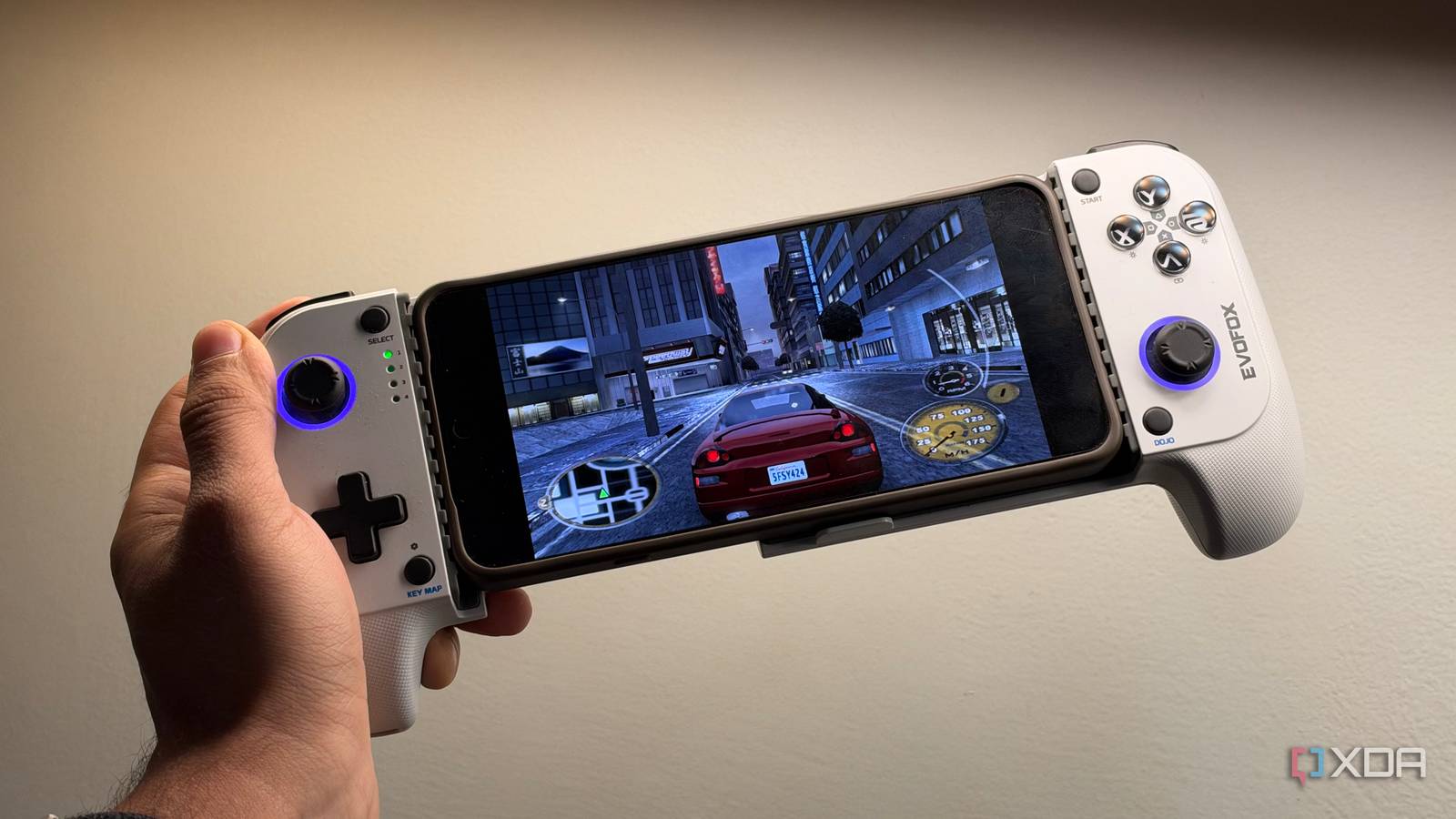
Published Nov 23, 2026, 6:01 PM EST Dhruv Bhutani has been writing about consumer technology since 2008, offering deep insights into the personal technology landscape through features and opinion pieces. He writes for XDA-Developers, where he focuses on topics like productivity, networking, self-hosting, and more. Over the years, his work has also appeared in leading publications such as Android Police, Android Authority, CNET, PCMag, and more. Outside of his professional work, Dhruv is an avid fan of horror media spanning films and literature, enjoys fitness activities, collects vinyl records, and plays the guitar. Lately, I've been on a bit of a nostalgia trip. Specifically, I've been wanting to play some of my favorite PS2 games, and my old Android phone is the handheld I reach for. My days run long and busy, so I could never really justify the cost of a dedicated Windows handheld. But I have more than a few Android phones lying around that, when coupled with a telescopic controller, offer exactly the retro gaming experience I've been looking for. Be it a quick round of Midnight Club 3 or a mission in Ace Combat, it's astonishing how far emulation on Android has come. NetherSX2 runs the games, and my telescopic controller gives me all the controls I need. It's a simple, cost-effective arrangement, but it's really all it takes to make the old phone feel useful again. A telescopic controller makes PS2 games feel at home Physical controls make racing and flying games easier The base installation is easy enough. You'll want to install NetherSX2 from Github or the Play Store. Additionally, you'll need a PS2 BIOS file, which you can dump from your own console, but it's also freely available with a quick Google search. Next, of course, you'll need the game. Ideally, you'll want to rip the game to a compatible format from your own disc, unless you plan to sail the high seas. That's the gist of it. While NetherSX2 offers plenty of ways to tweak the gameplay experience, things just work out of the box, and this is also where the telescopic controller comes in handy. The twitchy racing game truly benefits from your hand being able to quickly stretch out between steering, accelerating, and braking. And if you plan to make any progress in the title, playing via the touchscreen isn't going to cut it. In fact, I first tried it with just the touchscreen, and my thumbs covered enough of the picture that I ended up missing turns entirely. With the phone clamped securely inside the controller, the screen sits in a comfortable position, and the controls are familiar enough to facilitate easy gameplay. Much better. The same goes for Ace Combat, but perhaps even more so. When you're tracking planes around you or maneuvering around incoming attacks, you want full access to all the controls. This time, including the thumbsticks. That won't happen via the touchscreen. The telescopic controller gives you all the controls you need to turn your phone into a dedicated handheld that fits perfectly. The convenience of the telescopic controller is also why I prefer it. While practically any phone today is compatible with full-size gaming controllers, portability is part of the reason why I prefer this setup. My phone is obviously portable enough to slip into any pocket. The telescopic controller adds another dimension. Closed down, it fits into a jacket pocket or a small sling bag just fine, making the entire setup exceedingly portable. NetherSX2 makes my PS2 library easy to play Quick saves and settings for each game Of course, the heavy lifting here is done by software. Specifically, NetherSX2 makes it exceptionally easy to get going once you've got everything set up. You don't need to browse folders, as it gives you a sufficiently serviceable list of titles that you can tap to play. You also get quick save support, which is critical for on-the-go, start-and-stop play sessions. While all that is good, there are a few specific settings that I enjoy in the emulator. For example, you get both per-device and per-game settings. While the former is good for broader setup, like controller options and where to save states, the latter is handy for per-game fixes. If you're using an older phone for emulation, not every game is going to run perfectly from the get-go. In this case, you can drop the rendering resolution to eke out a few more frames for a more consistent gaming experience. You can also adjust advanced filters to tweak the look and feel if you're running a more powerful phone. On my 2026 flagship, I'm getting consistent performance at 4x the resolution and could probably push it further still. Elsewhere, there's support for patches, too. For example, there's a widescreen patch available for Midnight Club. This lets you fill out the frame on a modern widescreen phone, and the emulator can automatically apply these patches when available. That makes a big difference, as these patches are often critical to enabling the best possible performance, and you'll want to enable the auto-apply patches setting. Beyond that, though, the experience is as easy as it gets with emulators. You'll probably want to keep an eye out for battery and thermal management on your phone. However, most mid-range and above phones these days are powerful enough that this isn't really a struggle anymore. Giving my old Android phone a new life as a portable PS2 I've really come to enjoy this setup because it's given my old smartphone a job, and specifically a job that makes me come back to it daily. I'm enjoying the latest GTA, sure, but there's a wealth of old-school games still worth discovering from my childhood. And all it's taken is one app on my phone, a telescopic controller, and a game file to take that experience on the go at better-than-original resolution. Wild times we live in. NetherSX2 NetherSX2 is a PS2 emulator for Android phones. Related I spent more time tweaking emulator settings than playing games until this free app changed everything If you're turning your Windows 11 handheld into a retro gaming device, RetroBat is the best option out there.
My old Android phone became my favorite PS2 handheld, and it only took one app
Full Article
Original Source
Read the full article at Xda-developers →KhanList aggregates and links to publicly available news content. We do not host full articles from third-party sources. Always verify important information with original sources.