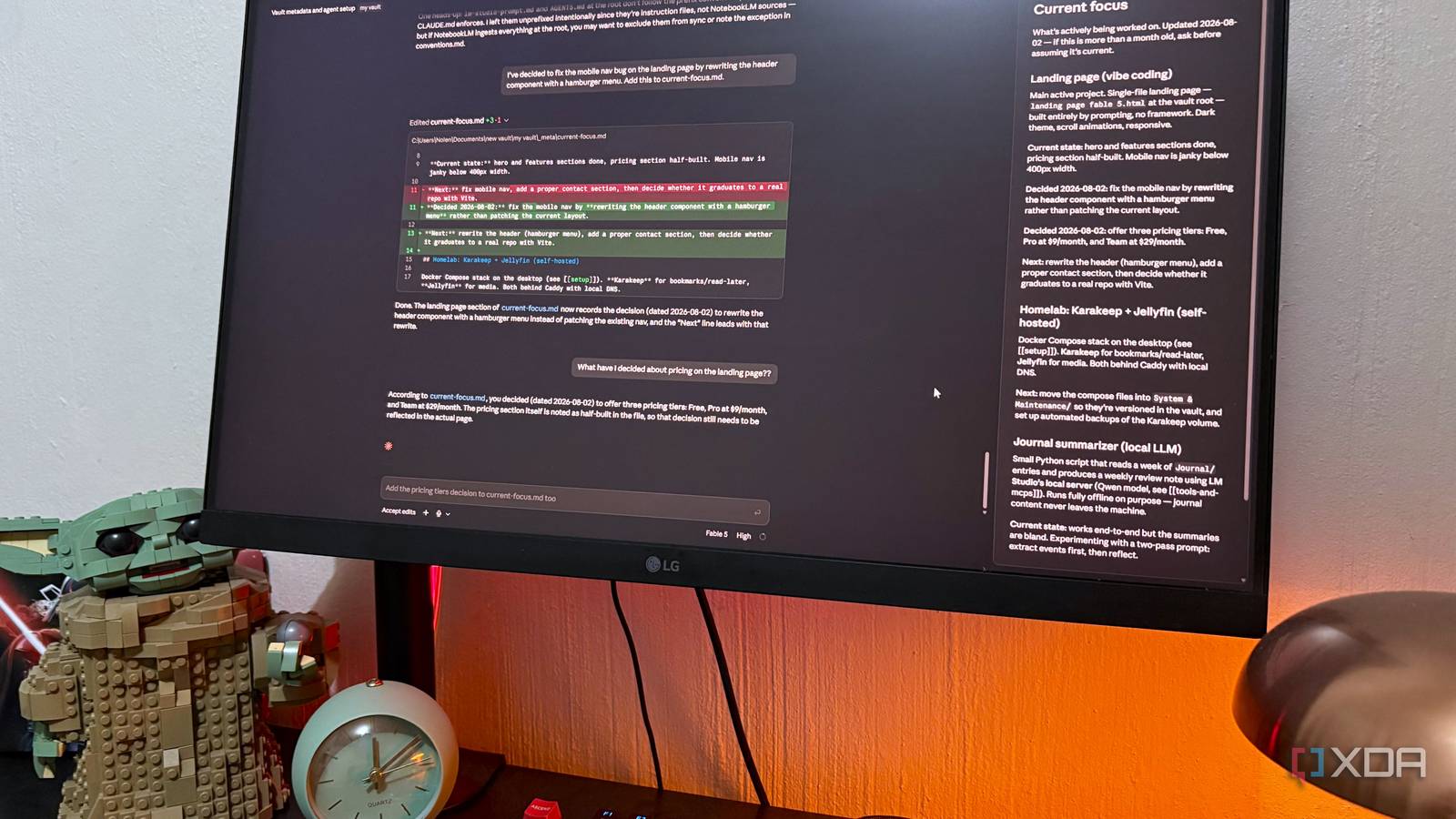
Published Aug 3, 2026, 3:30 PM EDT Nolen began their writing career in 2019, with three years dedicated to editing the Creative section at MakeUseOf. Their expertise lies at the crossroads of technology and creativity, covering areas like photography, video editing, and graphic design. Outside of work, you'll often find Nolen diving into a good book, writing their own stories, or playing video games. Coding tools are meant to make coding easier for everyone, but nobody tells you that they're not just for coding projects. They're basically just LLMs with shell and file access and the ability to do things on your behalf. If that's not the definition of a productivity tool, then I don't know what is - it's just a productivity system wearing a coding label. I've been pointing tools like Claude and Antigravity at my Obsidian vault for months to help me organize it. It handles stuff like fixing broken links, renaming, and all that type of janitorial work. The vault is being maintained by the coding tool as the maintainer. But lately I've been wondering about the other direction. If those tools all read files, and if they all need to know what I'm working on and how I like things, why am I telling them separately? Why not have one place they all check first, so the vault is the thing that onboards them? Want to stay in the loop with the latest in AI? The XDA AI Insider newsletter drops weekly with deep dives, tool recommendations, and hands-on coverage you won't find anywhere else on the site. Subscribe by modifying your newsletter preferences! Consolidating all my agent files under one roof The setup itself is barely worth calling a setup. I opened Claude Code inside my vault and had it do most of the work to set this up. What I went with was a "meta" folder at the vault root holding five markdown files. One for my machine specs, one for how the vault is organized. Then one for what I'm actively working on, one for which MCPs I have connected, and one for how I like agents to respond to me. Then at the vault root itself, three pointer files. CLAUDE.md for Claude Code, AGENTS.md for Codex (that's the file Codex looks for on startup) and lm-studio-prompt.md which is really just the same instructions written as a system prompt I paste into LM Studio manually, since it doesn't auto-load anything. They all say roughly the same thing: before doing any work, go read the five files in the "meta" folder. The other thing worth mentioning is that this isn't only for instructions. I mean, a folder with just instructions and nothing else would be pretty useless anyway. This is where my projects themselves now live. For example, a landing page I just vibe-designed sits at this same root, alongside my notes about it. So the tools aren't just onboarding themselves from the vault, they're working on stuff that lives there too. The tools come and go, but the vault stays In these screenshots, I wanted to show how it works with a little demonstration. So I made a decision about a landing page I vibe-designed in Claude Code, asked Codex about it in a different session, and Codex knew what I was talking about because it read the same file Claude Code wrote to. Then I ran a status query on Qwen 3.5 locally in LM Studio, and it summarized both decisions accurately because it read the same file thanks to my local filesystem MCP. And looping back to Claude Code, it was able to give me a detailed description of the changes I made to my project with Codex. The whole point is that it doesn't matter which tools I bring in and out of the vault, it's the vault that's the one source of truth, without requiring me to manually transfer any files or re-explain myself whenever a new agent comes into the mix. The main thing is that I can pick the tool that fits the moment instead of the tool I've already onboarded. Codex is genuinely faster at some things and Claude Code is better at other things, and now I don't have to pretend one is better than the other or be forced to pick one out of convenience. Chances are I'm going to bring my Antigravity projects in here too at some point. There's another perk: my Obsidian vault is not just a place for notes now. It actually carries the context across different sessions in different tools. This gives me true memory across my entire stack rather than pigeonholing my projects into each one at a time. Every fresh session everywhere used to mean re-explaining who I am and what I'm doing, and now that's one file that tells the tool everything. And then the last thing, which I'm least sure about, but it's that this makes the vault feel less like an inbox and more like a workspace where the tools live inside. I'm not maintaining a note-taking app on the side of my work, I'm working inside the same place I keep notes, and the tools are joining me there. This is just a different user experience that I never really thought of before. So why the Obsidian vault and not just a regular folder? Obsidian is still an app with unique features None of this actually requires an Obsidian vault. It's literally just a folder full of .md files which I could open in VS Code or Notepad. So why go into the vault? Well, I get the added benefit of bringing that entire work stack into the Obsidian UI now, and can also edit the file directly with minuscule changes that the AIs might have missed. The wikilinks really pull through here. When preferences.md says "see [[conventions]]" and I click it, I land on that file. When an agent reads that same line, it does the same thing, follows the link and reads the referenced file. So the vault isn't a flat pile of notes, it's actually navigable, for me and for whatever's reading it. There's also the added benefit of built-in features like the Graph view; I can see at a glance which meta file is doing the most work and which ones are orphaned. And the Bases plugin lets me query all this like a database eventually, basically turning "meta" into a queryable table. It's less about the tools and more about not losing the plot I used to keep instructions for these tools scattered across my PC. But this setup gives me one place to look and one place to update. It has my projects, the context, and hands off automatically to any tool I open next and point at it. Once again, Obsidian's local architecture proves itself useful for more than just notes. Obsidian OS Windows, macOS, Linux, iOS, iPadOS, Android Individual pricing Free normally; $4/month for Obsidian Sync
My Obsidian vault is now the shared memory for Claude Code, Codex, and my local LLM
Full Article
Original Source
Read the full article at Xda-developers →KhanList aggregates and links to publicly available news content. We do not host full articles from third-party sources. Always verify important information with original sources.