
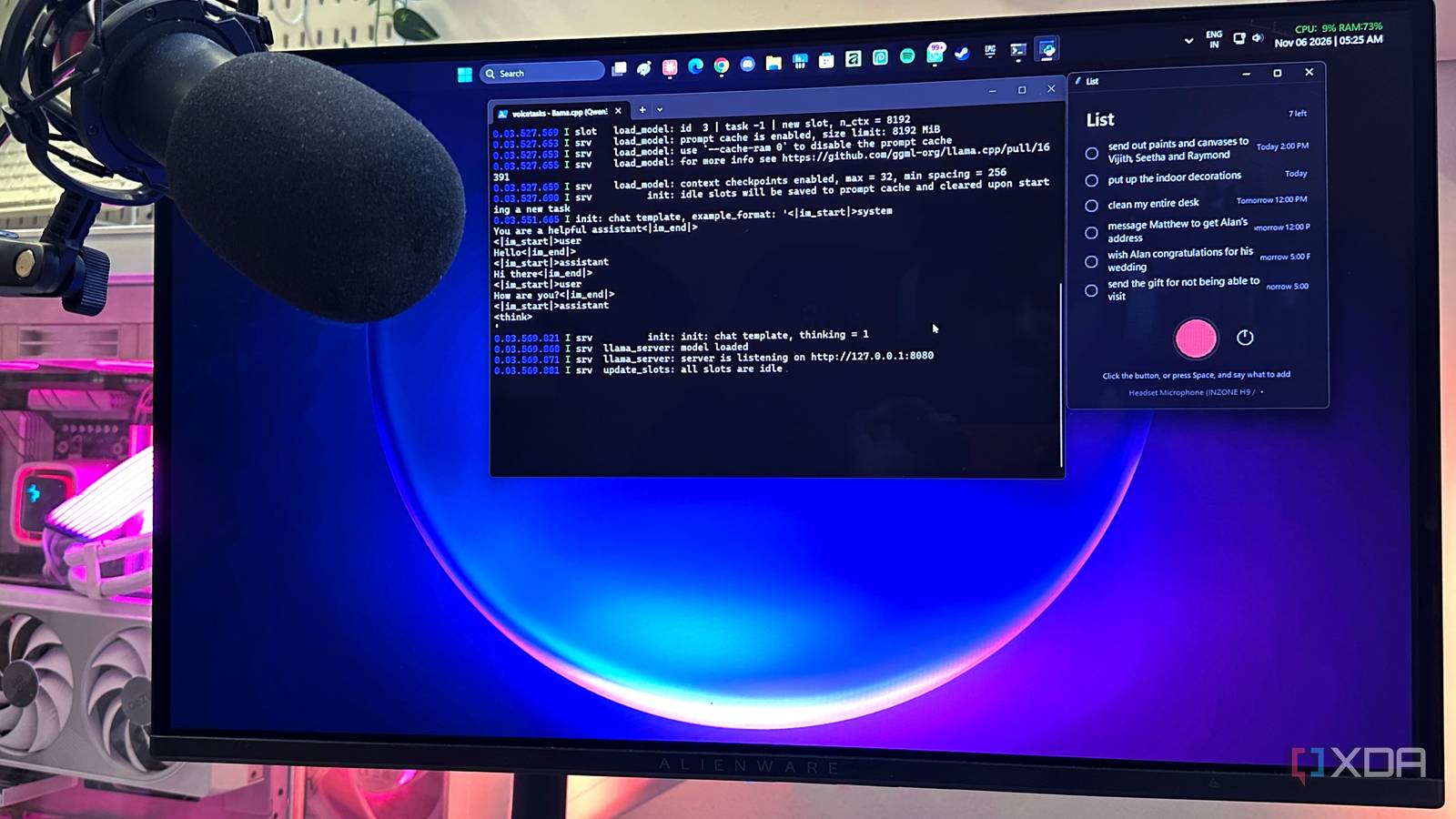
Published Nov 6, 2026, 2:00 PM EST Gaming has been Samarveer’s greatest passion, and the Literature graduate in him takes immense joy in dissecting games for their themes, messages, and impact. Samarveer holds a deep appreciation of gaming, and considers the platform to be the most immersive and impactful across all media. He can be found engaging with gaming communities online, always ready to debate the finer points of ray tracing or itching to write an 8-page collegiate thesis on any game that impacts him emotionally. My PC is usually a mess of windows, apps, browser tabs, and half-finished things I'm supposed to remember. In fact, if I had a dollar for every time a thought appeared while I was working only to disappear the next minute, I could probably hire an assistant to stay on top of every task for me. I'll think of something I need to do, tell myself I’ll get to it in a minute, and then spend the next hour wondering what it was. I've tried dictation tools, but they solve a problem I don't really have. I don't need my computer to type faster, after all. I need it to understand what I'm saying when I'm thinking out loud and turn that rambling mess into something useful. So I ended up building exactly that — a completely local voice-to-task system that listens, understands, and pulls the things I actually need to remember out of the noise. The one thing I didn't need was better dictation Two models do the job better than just one When I'm working, I have a browser window, Slack, Discord, an editor, file explorer, and whatever game or benchmark I'm testing scattered across two displays. A thought will inevitably appear somewhere in that chaos, I'll remember that I have to email someone, or test a setting later, or download something that I'll need the next day or a few hours later. I promise myself I'll remember it, of course, but that's pretty much a legally binding guarantee that I won't. The setup is surprisingly simple once I stopped trying to make one model do everything. When I record a voice note, Whisper transcribes it locally, and that transcript gets passed to Qwen running through llama.cpp. Whisper's job is strictly to hear me, while it's Qwen's job to figure out what I actually meant and turn it into proper structured tasks for me to be able to refer to. I use Qwen 3.5-9B with the Q4_K_M quantization, simply because it runs perfectly on my 12GB GPU without taking up too much space. Paired with Whisper, my to-do tasks are created, from start to finish, while using just 7GB of VRAM on my RTX 4070 Ti. One important part in the pipeline I ensured was that my LLM wasn't going to also play calendar administrator. As such, it just extracts the task, works out the intended timing, and then returns the structured data, while the actual date calculation happens all in code. This matters because I'd rather trust a few lines of deterministic code with "tomorrow" stamped next to it instead of an LLM that occasionally decides that tomorrow is a philosophical concept. The result is much closer to what I originally wanted. A voice note saying "I need to order snacks for the weekend party, thoroughly clean the house, and clean the air fryer" comes back as three separate items, with their times attached, and the list automatically sorted chronologically. I don't have to reinterpret my own voice note later. Cleanliness is the most important part of the process Too many moving parts would've made this entire thing useless Now, when I first drew a rough outline of this entire pipeline in my head, it had too many moving parts. I'd have to open the sound recorder app on Windows, talk into the mic about all my pending tasks and their deadlines, and then save the recording. I'd then have to prepare Qwen 3.5-9B on a llama server locally, before ensuring that I point the Whisper engine in the right direction to pick up the clip I'd just saved. That was three separate windows (recorder, terminal watching the model server, and the script itself), none of which talk to each other unless I personally walked the file from one to the next. Technically speaking, it worked, but in the way that a car with no seats "technically" drives. In practice, transcribing my voice notes became too much of a chore, which was ironic, since my original intent was to solve a chore. I had to make it all neater and condense it into one single package if possible so I'd actually use it past the novelty of the first day. As such, I wrapped it all up into one single Python file that started my server, connected the Whisper engine, enabled sound-recording, and transcribed everything while converting it into actionable items, all neatly packed into a GUI on my desktop. This was how I finally made the entire process usable, since I never had to juggle three separate PowerShell windows while keeping track of what prerequisites each function in the pipeline needed. The to-do items simply display in batches of six right on my desktop, like a sticky note I can drag and drop wherever I need. My GPU does the heavy lifting but the transcribing happens on the CPU It's much simpler this way I'd be lying if I said that it all worked in the very first try, because it did not. My audio libraries were impossible to find for faster-whisper, and the Whisper engine was unable to find my Nvidia math libraries, no matter how many times I downloaded them. Ultimately, I offloaded the entire process to my CPU, which only made practical sense in this case — while dealing with 20-30-second voice notes, the CPU itself finished in seconds, so I never felt the need to force my GPU to take over. It was pretty content serving up the models and holding them in its VRAM. Claude Code helped immensely here, helping me code iteration after iteration that eventually let me select the voice input method right in the GUI. It even gave me a toggle for off-loading both Whisper and Qwen models to completely free up my GPU without closing my voice-note-taking app, and just pressing the record button the next time would start up the server and the models again if I remembered something worth adding to my to-do list. Automation was never the point — I just want my thoughts to stay on my PC The biggest reason I kept this local is also the simplest — these are my thoughts, and there's no reason they need to leave my machine just to become a to-do list. I spend 14 hours on my PC, and my microphone is always right beside my desk. There’s no cloud API sitting in the middle and no subscription waiting to turn a tiny productivity problem into another monthly bill. The system isn't perfect, though. There's the occasional name that's misheard or mangled, and there's also a small warm-up pause when I bring the GPU back online. However, these are acceptable trade-offs for something that works. Single-model audio systems will eventually make this even cleaner, but for now, two specialised models are more than enough. llama.cpp Llama.cpp is an open-source framework that runs large language models locally on your computer.
My local LLM turns my voice notes into to-do items automatically, and nothing falls through the cracks
Full Article
Original Source
Read the full article at Xda-developers →KhanList aggregates and links to publicly available news content. We do not host full articles from third-party sources. Always verify important information with original sources.