
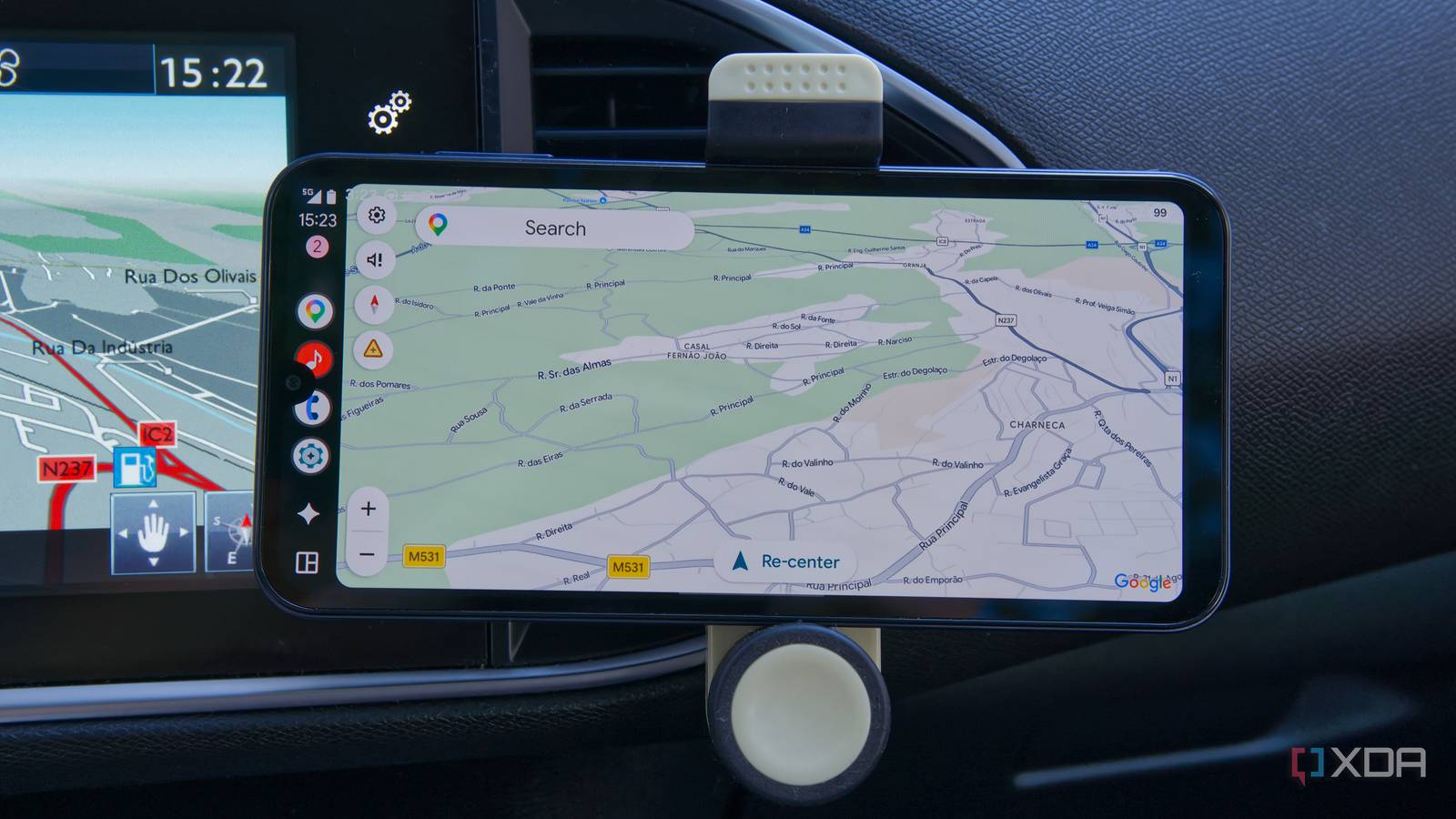
Published Aug 14, 2026, 3:00 PM EDT João has been covering the tech world for over 7 years, with a heavy focus on laptops and the Windows ecosystem. I also love all things tech and videogames, especially Nintendo, which he's always happy to talk about. Prior to joining XDA in 2021, he worked at Neowin: https://www.neowin.net/news/poster/jo%C3%A3o-carrasqueira/ I drive a relatively old car. It's from 2014, so it came out when phone integrations and internet services still weren't all that standardized in vehicles. It does have some of these features, but many of them seem to be locked behind paywalls, or they've just fallen completely out of date since the car was released. There just isn't much that's useful about my car's built-in software, so recently, Android Auto has become the only screen I really care to use inside my car. And you can do it, too, using an old phone and some software trickery. My car's GPS is just useless Slow and out-of-date The big problem my car has is the same that you might have with smart TVs: injecting these big expensive devices with "smart" features is often done in a half-baked way, and the computer chip inside them ages much faster than everything around it. My car works perfectly fine from a mechanical perspective, but the built-in software and GPS are very much from 2014. It feels slow to use, and despite updates being released for the mapping information for a few years, the latest release happened back in 2019. A lot has changed in the roads where I live since then, and the GPS just hasn't kept up. Not to mention a service like Google Maps has extra features like speed camera warnings that my car never had. This aging technology inside the car becomes a problem because the cost of replacing the entire car is very hard to justify just to keep getting map updates. And who knows how reliable those updates are, even within each car brand, compared to something like Google Maps, which collects data from nearly everyone. It makes sense to rely on your phone, which is much cheaper to upgrade and typically gets updates for much longer. That's not even touching the fact that car manufacturers love to charge extra for software features that should just be included. The map updates for my car required individual payments back in the day, which seems ridiculous when you're already paying thousands of dollars for a vehicle. Android Auto to the rescue Without spending a dollar Thankfully, this is something that can be fixed relatively easily, and you can go about it two ways. In a case like mine, you might buy a new head unit and either replace it yourself or have a professional do it so you don't risk damaging the car. But that can cost quite a bit, so instead, I turned an old phone into an Android Auto receiver. This is actually relatively easy to do using an app like Headunit Revived and its helper companion (called Wireless Helper). All I have to do is install Headunit Revived on my old phone and Wireless Helper on my main phone, then follow the instructions to link the two together. My old phone then becomes an Android Auto screen that lets me navigate using Google Maps. Google Maps is almost always up-to-date, not just in terms of the roads that exist, but especially with businesses that may be located in a specific place. And like I've mentioned, real-time alerts for things like speed cameras on the road, police road operations, or road closures and accidents make it such a useful navigation tool. Android Auto also lets me do more with my screen without being a distraction. Typically, I use it to control music playback, but there are plenty of apps that work with Android Auto and do even more or better. If you don't like Google Maps navigation, you can always use Waze (or others), and some video apps can also help you entertain other passengers that don't need to be looking at the road. My colleague Parth Shah has highlighted some particularly useful apps you may not have heard of, if you're curious. I can still use my car speakers No need to give up the audio You might think that using Android Auto this way instead of having it built-in is a problem for audio, but thankfully, Headunit Revived addresses this, too. Wireless Android Auto doesn't actually use just Bluetooth; it also relies on Wi-Fi, which is how the bulk of the connection happens. That means I can still use Bluetooth on my main phone to connect to my car's speakers, and route the audio that way while my old phone handles the display portion. I can control my music from Android Auto — which is smoother and more reliable than my car's display — but the audio still goes through the speaker system, so it's the best of both worlds. A dedicated head unit may be better Sometimes spending money is worth it Credit: All of this comes with the benefit of not having to spend any extra money. I don't need a particularly great phone to be my Android Auto display. In fact, the Samsung Galaxy A15 I'm using is atrocious as a phone, but for this use case, it's perfect, and I didn't have to spend a dime to get it working. If I opted for a dedicated head unit, I'd be looking at a cost in the low hundreds of dollars. But sometimes spending money can be worth it, and I can see the case for a proper head unit that supports Android Auto. The screen is likely to be bigger, at least in surface area, considering a lot of smartphones have overly tall screens now. Plus, using a phone as a dashboard does mean you have to find a way to hold it up. Speaking for myself, my car phone holder has proven woefully weak since I started using Android Auto regularly, so I may end up having to buy a different one. Then there's charging, too. You may need to keep a car charger and a USB cable in your vehicle at all times to keep your old phone running, and that might mean your main phone has to do without a charger in a time of need. Small factors like this may make a dedicated head unit an easier choice for some people. Android Auto is always the better choice For cars around the same era as mine, when Android Auto (or CarPlay) adoption wasn't really all that strong and car makers had terrible software, switching to Android Auto one way or another is the obvious choice. It's faster, more fully-featured, more current, and in some cases, even cheaper than using the built-in software. Newer cars have caught up to more reasonable standards, but the built-in software and hardware are always going to age faster than what's in your pocket and cost more to replace. Using Android Auto eventually becomes the best solution. Headunit Revived OS Android Price model Free (optional paid version in Play Store)
My car's built-in navigation is useless, so I made Android Auto the only screen I use
Full Article
Original Source
Read the full article at Xda-developers →KhanList aggregates and links to publicly available news content. We do not host full articles from third-party sources. Always verify important information with original sources.