
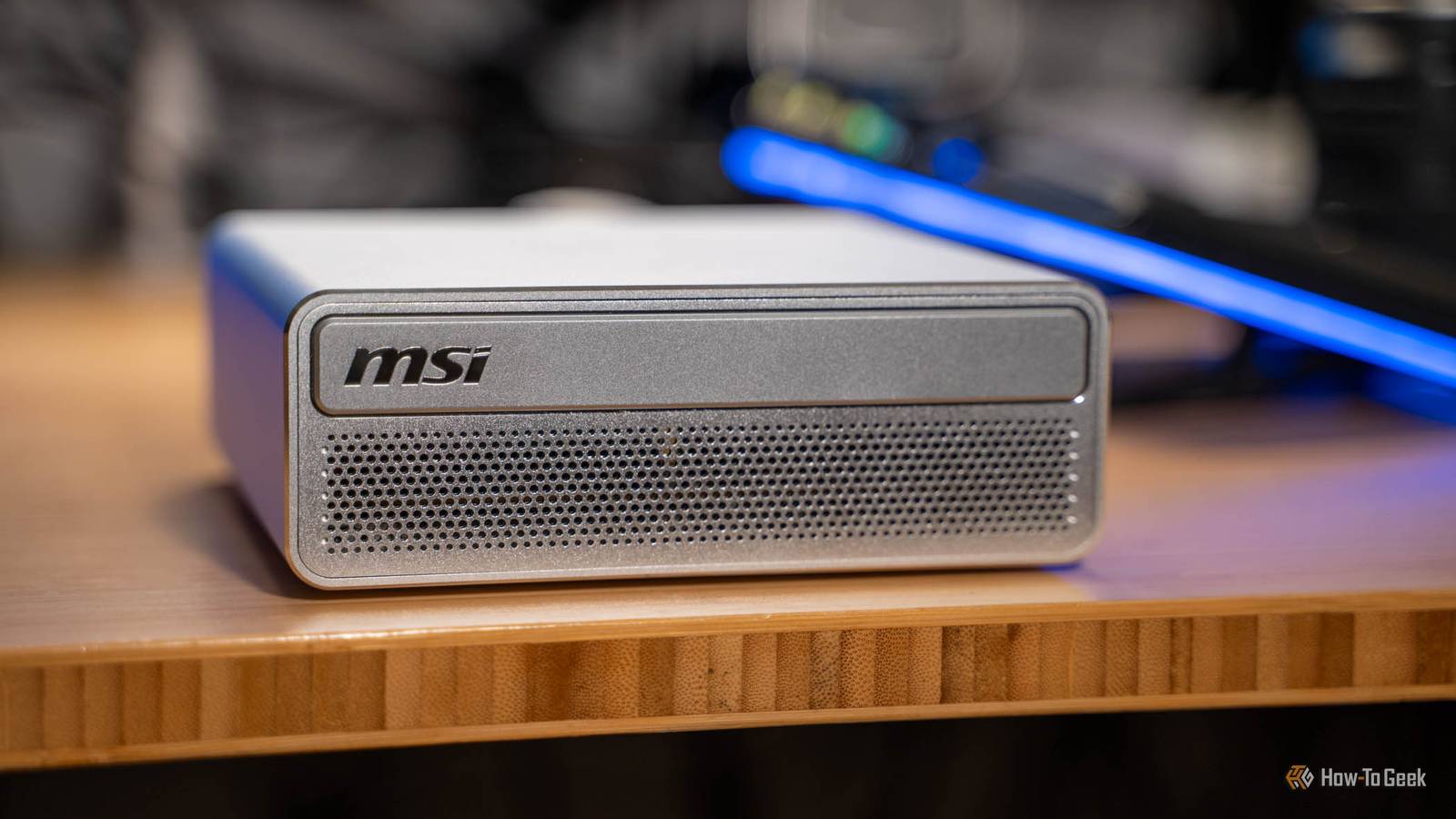
Published Nov 19, 2026, 2:30 PM EST Brilliant as a headless AI server, frustrating as a daily desktop. MSI's RTX Spark mini PC beats Strix Halo at local AI, but Windows on Arm holds it back As we close out 2026, running top-tier local models at home is becoming more and more feasible. I’ve spent the past week with MSI’s EdgeMesa N AI+ RTX Spark-powered mini PC and have put it through its paces. From running local agents to controlling my homelab and using local AI models, the RTX Spark in the EdgeMesa N AI+ is an extremely capable system. I even love how MSI put a bit of nostalgia on the front of the system with what looks like a CD drive. But, it’s expensive, coming in at $7,499 with 128GB of RAM and 4TB of storage. Is it worth it? I think it is for the capability it brings to the table. Here’s how I’ve deployed the MSI EdgeMesa N AI+ in my homelab and what I’m using it for so far. MSI EdgeMesa N AI+ RTX Spark Mini PC 8/10 Brand MSI CPU Nvidia RTX Spark N1X, 20-core Arm (10x Cortex-X925 + 10x Cortex-A725), up to about 4GHz Graphics Integrated Nvidia Blackwell RTX GPU, 6,144 CUDA cores Memory 128GB LPDDR5X-9400 unified memory, soldered (a 64GB version also exists) The MSI EdgeMesa N AI+ RTX Spark mini PC packs a punch in an extremely small form factor. With up to 128GB of RAM and 4TB of storage available, this tiny 1.2L PC is extremely capable of running top-tier local AI models. Pros & Cons 128GB lets large models run entirely on the GPU Runs several models at once with memory to spare Beats Strix Halo with CUDA, especially for image generation Tiny, nearly silent 1.2L chassis 10GbE and simple 240W USB-C power Very expensive Windows on Arm limits app and game compatibility No USB4, Thunderbolt or second NIC for clustering No official Linux option Price and availability MSI’s EdgeMesa N AI+ RTX Spark-powered mini PC comes in two versions. One has 64GB of RAM and 1TB of storage, and the other has 128GB of RAM and 4TB of storage. Pricing starts at $4,399 and the MSI EdgeMesa N AI+ is available at B&H Photo, Micro Center, and direct from MSI. Specifications Brand MSI CPU Nvidia RTX Spark N1X, 20-core Arm (10x Cortex-X925 + 10x Cortex-A725), up to about 4GHz Graphics Integrated Nvidia Blackwell RTX GPU, 6,144 CUDA cores Memory 128GB LPDDR5X-9400 unified memory, soldered (a 64GB version also exists) Storage 4TB M.2 NVMe PCIe Gen5 SSD (single slot) Ports 4x USB-C 20Gbps (3 with DisplayPort 1.4 Alt Mode, 1 is the power input), 1x HDMI 2.1b, 1x 10GbE RJ45, Kensington lock Display Up to four external displays (HDMI + 3x USB-C) Operating System Windows 11 Pro on Arm Case Compact aluminum chassis with anti-fingerprint finish Dimension 152 x 147 x 53mm (5.98 x 5.79 x 2.17 inches), about 1.2L (MSI lists 1.3L) Weight 2.91 pounds (1.32kg) USB Ports 4x USB-C 20Gbps (USB 3.2 Gen 2x2) Networking 10GbE, Wi-Fi 7, Bluetooth 5.4 Price $7,499 for 128GB/4TB, $4,399 for 64GB/1TB (MSI cut both prices from $7,999 and $4,699 this week) CPU Cooling Vapor chamber with dual turbo fans ("AI Pulse Cooling System") PSU External 240W USB-C power adapter NPU Copilot+ certified, but neither Nvidia nor Microsoft has published a separate NPU TOPS figure. Nvidia rates the whole chip at up to 1 petaflop (1,000 TOPS) at FP4 The EdgeMesa became the AI brain of my whole house It even took over my YouTube editing I have been blessed to be able to use a lot of different “AI-first” systems, including two Strix Halo units and now two RTX Spark systems. My first RTX Spark, the HP OmniBook Ultra 16, only has 32GB of RAM so it’s not quite in the same league as the EdgeMesa or my Strix Halo systems, but it’s still an AI-first computer. As such, I have had the distinct ability to benchmark these systems and I get to pick freely what ones I use for what purposes. I wasn’t sure what I was going to think about the RTX Spark when it first arrived, and I honestly wasn’t all that thrilled that it can’t run Linux officially. But, after using it on Windows for the past week, I have to say that installing Linux hasn’t crossed my mind once since it arrived. After just a week with the MSI EdgeMesa, I have now moved all of my local AI workload to the EdgeMesa and its RTX Spark with 128GB of RAM. I run it as a headless system with remote desktop enabled in case I need to access it for some reason. So, what all do I run on the EdgeMesa? Well, for starters, it runs two local models at the same time: Qwen3.8-27B and Qwen3.6 35B-A3B. I use Qwen3.8-27B as my main workhorse agent. I have it exposed on my network and over Tailscale through OpenCode so that way I can use it in apps like T3 on my iPad or other computers. Qwen3.8-27B is actually staggeringly capable. Way more capable than I expected it to be. I use 3.8-27B to run things like Hermes, do coding tasks, and talk with when I need solid reasoning and effort applied. Qwen3.6 35B-A3B, on the other hand, is a much faster, but not quite as smart model that I have running for when I integrate Home Assistant or if I need a faster model for simpler tasks or chats in Hermes. I think of the two models like Claude Sonnet and Claude Haiku from a few months ago. Not quite as capable as the latest Sonnet 5.5, and definitely not Opus 5.5, but they’re both very solid models for their size. I already mentioned Hermes, too, which is my AI agent of choice. I’m still working on dialing in my Hermes setup on the EdgeMesa, but Nvidia has some nice tutorials on how to get the most out of local agents and I love that I can use Hermes with a local model and not have to worry about whether I’m going to run out of tokens or not. I also recently started using Claude to handle my video editing. While my Strix Halo system is capable of handling the edits, I wanted to see if I could offload video editing to the EdgeMesa instead and it actually worked quite well. This is a workflow that I’m going to be deploying to my wife’s setup too, as she has a base model M3 iMac and it doesn’t handle video editing all that well. The EdgeMesa pulls the video footage from my NAS and then handles everything locally, from extracting the footage to making a log of what footage is available, running HyperFrames, and doing the full edit with ffmpeg. I have Claude Opus 5.5 driving the edit because it needs the touch of a frontier-class model, but eventually I hope to be able to use an offline model for that, too. While it’s about the same speed at editing as my Strix Halo system, taking around seven minutes to render out a 15-minute 1080p video, offloading the task to a dedicated system means that my main desktop doesn’t slow down during an edit. 128GB finally ended the memory juggling act I stopped checking whether a model would fit My review of the HP OmniBook Ultra left me a bit saddened by the AI performance of RTX Spark because 32GB of RAM drastically limited what models I was able to run. The EdgeMesa ships with either 64GB or 128GB of RAM, and the GPU can address up to 105GB of it. This means that I was able to fully offload all 88GB of Qwen3.8-flash-next onto the GPU and it worked perfectly. Now, the RTX Spark in the EdgeMesa shouldn’t be compared to a dedicated graphics card like the RTX 5090. The EdgeMesa has 128GB of RAM while the RTX 5090 has 32GB of GDDR7 VRAM. But, the RTX Spark has around 300GB/s of memory bandwidth, while the RTX 5090 has about 1.8TB/s (1,800GB/s) of memory bandwidth. What this means is models don’t run blazing fast on the system, but they definitely run fast enough to be usable. In my testing, most models I ran were at around 30 to 50 tokens per second on more capable models like Qwen3.8-27B or 3.8-flash-next. In real-world usage and not just benchmarking, I was seeing around 23 tokens/second in real Hermes calls with the models being exposed through LM Studio. However, my favorite part of having 128GB of RAM for models to live in is how many models I can have running at one time. I already mentioned that I’m running Qwen3.8-27B and Qwen3.6 35B-A3B at the same time and I still have around 40 to 60GB of RAM available to the rest of the system for other things like video editing to run without slowing my models down. It quietly beats my Strix Halo box once CUDA kicks in But Windows on Arm is its biggest limitation Now for the part of the review that you’ve been waiting for: how does the RTX Spark hold up against other systems like AMD’s Ryzen AI Max+ 395 Strix Halo? If you compare both systems on the Vulkan runtime, Strix Halo wins hands down. But, even though that might seem “fair” since it’s the same runtime, it isn’t actually a fair fight. The Spark is built around CUDA, and that’s really where the EdgeMesa shines. Comparing the RTX Spark on CUDA to the Strix Halo on its best backend shows that the Spark actually pulls ahead. Qwen3.5 35B-A3B runs at 65.7 tok/s on the Spark compared to 62.3 tok/s on the Strix Halo. gpt-oss-120b ran at 56.3 tok/s compared to 55 tok/s. Llama 3.3 70B was 5.73 tok/s compared to 4.54 tok/s. Image generation is where the Spark really pulled ahead though, with SDXL 1024px taking only 21.9 seconds per image compared to 37.7 seconds per image on the Strix Halo. Text generation speed is fairly close because both the Strix Halo and RTX Spark share a similar memory bandwidth, but prompt processing and things like image generation are where CUDA really pulls ahead. The one area where Strix Halo has an edge on RTX Spark is in the version of Windows each system runs. AMD’s Strix Halo platform is x86-based, which means it isn’t limited at all in the type of software that it can run. This is because Windows on x86 has been around for decades at this point and everything supports it. Nvidia’s N1X platform, however, runs Windows on Arm as the processor is Arm-based. This means that certain gaming anticheats simply won’t run. Some platforms like vLLM aren’t as fully supported because they’re just not as mature on Arm yet. However, the N1X does have quite a bit of power. I didn’t do tons of gaming on it, because that’s just not a use case I (or most people I’d assume) would have for this system. But, in supported games, it handled things extremely well. For instance, the EdgeMesa ran Forza Horizon 6 at 1440p at over 100 FPS with frame generation turned on, and over 60 FPS with frame generation turned off—both on the extreme preset. So, before you decide to buy a RTX Spark-based system over a Strix Halo, just make sure that your workflow works on Arm. Windows on Arm is the single reason why I couldn’t make the EdgeMesa my main desktop, as I rely on too many apps and features that aren’t native on Arm yet, and I really don’t want to have to deal with the emulation that comes with running x86 apps on Arm. I adore how tiny and silent this thing is I just wish it had a second NIC and faster ports MSI really designed the EdgeMesa N AI+ to be extremely small yet superbly capable. The overall system is only 1.2L and weighs 2.91 pounds. That’s right, it’s only a little over a liter and comes in at under three pounds, which is impressively tiny. MSI did make an interesting call on the design aesthetic though, as the front looks like there’s a CD drive slot for some reason even though there is definitely not. Nostalgia aside, I love how tiny the desktop is. It fits on my desk well without taking up tons of room, and it’ll fit even better over where the rest of my homelab gear once I move it to that area of the office. It takes up barely any space and it’s essentially whisper-quiet—I never even heard the fans kick on. For a power supply, MSI chose to use a 240W USB-C brick, which is honestly a great option here. I only powered my EdgeMesa with the official adapter but I’d assume any 240W charger should work just fine. For other ports, there are four USB-C 3.2 Gen 2x2 ports rated at 20Gb/s (though one is used up by the power supply), one HDMI 2.1, and one 10GbE port. Sadly, that’s all the external I/O available on this tiny desktop. There’s no USB4, no Thunderbolt, no dual NICs, and no 200G ConnectX link like the DGX Spark has. I really wish there were more port options here, or at least one faster port option to link multiple RTX Sparks together to run larger models, but it’s just not possible here. Should you buy the MSI EdgeMesa N AI+? At the end of the day, the MSI EdgeMesa N AI+ is a very expensive computer at $7,499 for the full 128GB RAM / 4TB SSD configuration that I reviewed here. Even with a several thousand dollar list price, there are still people out there who the EdgeMesa would be perfect for. I’d recommend the MSI EdgeMesa N AI+ to anyone who wants to run larger local models at home with infinite token generations. It won’t be the fastest system in the world, but it will run the models without breaking a sweat. At the time of review, I would just expect the type of models that can run on the EdgeMesa to be in the Sonnet or Terra family of models, and not Opus or Sol. If you want to cluster multiple units together, run x86-only software, or run Linux, then I’d skip the EdgeMesa N AI+ and any of the other RTX Spark systems. With no USB4, dual NICs, or 200G links, the RTX Spark is made more to be a standalone system than part of a larger cluster. MSI EdgeMesa N AI+ RTX Spark Mini PC 8/10 Brand MSI CPU Nvidia RTX Spark N1X, 20-core Arm (10x Cortex-X925 + 10x Cortex-A725), up to about 4GHz Graphics Integrated Nvidia Blackwell RTX GPU, 6,144 CUDA cores Memory 128GB LPDDR5X-9400 unified memory, soldered (a 64GB version also exists) The MSI EdgeMesa N AI+ RTX Spark mini PC packs a punch in an extremely small form factor. With up to 128GB of RAM and 4TB of storage available, this tiny 1.2L PC is extremely capable of running top-tier local AI models.
MSI EdgeMesa N AI+ review: 128GB of RTX Spark makes a quiet home AI server
Full Article
Original Source
Read the full article at Howtogeek →KhanList aggregates and links to publicly available news content. We do not host full articles from third-party sources. Always verify important information with original sources.