
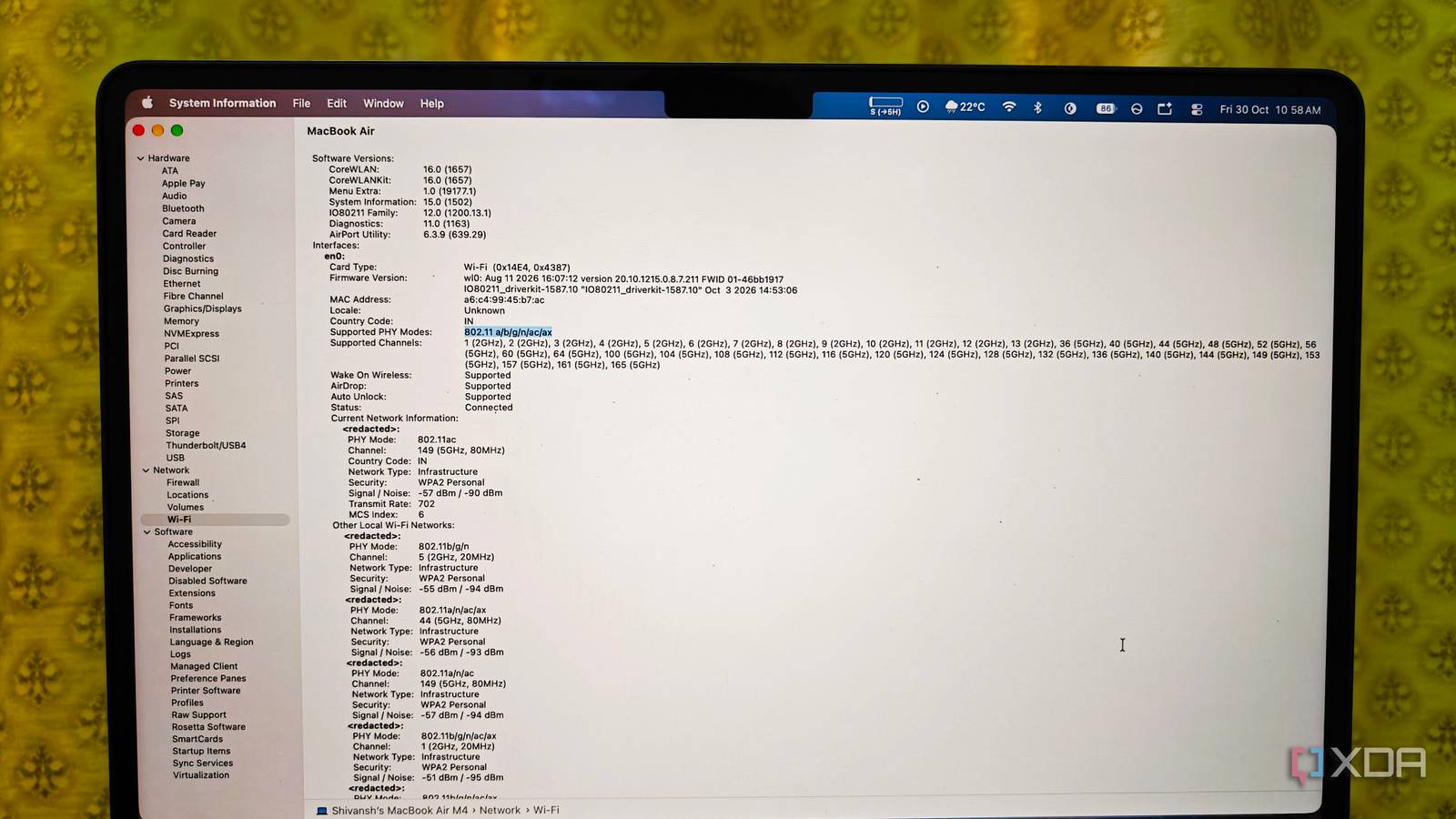
Published Oct 30, 2026, 1:01 PM EDT Shivansh began his tech journey as an avid reader of tech publications, which inspired him to launch his career in video media at Sillycorns. He has led content across multiple tech YouTube channels and Instagram accounts, crafted go-to-market (GTM) strategies for Vivo, and consulted on digital growth. Coming full circle to his roots in written media, he now delivers deep-dive tech journalism. Outside of his professional work, Shivansh loves watching movies, riding bikes, and playing cricket. Enthusiastic spending often makes us regret it. I recently came across such a case. I had an old Wi-Fi 6 router running a gigabit plan, and the speeds were fine too. But since Wi-Fi 7 kept fantasizing me, I upgraded to TP-Link Archer BE800, a Wi-Fi 7 router. I got it for about $330 during a sale, so I was happy even before seeing any improvement in connection speeds. Upon testing, at first I ran it under my TV, and my OnePlus 13R showed a 2,882Mbps link to it. Then I ran a speed test, and it said 924Mbps. The surprising part was that my old Wi-Fi 6 router used to manage 917Mbps from the same position, just 7 Mbps short of a Wi-Fi 7 router. Shocked, I kept testing speeds for 12 days, and the verdict was embarrassing. My gigabit plan was the ceiling all along Twelve days of speed tests, one very flat table I tested speeds the boring way, because boring is the only kind of test I trust. I logged five Speedtest runs per spot on my TP-Link Archer AX55 the week before the BE800 arrived, then repeated them on the new router. Again, the same TV cabinet and around 9 p.m., when half my building streams something. Here are the averages. Download in Mbps (five-run average) Archer AX55 (Wi-Fi 6) Archer BE800 (Wi-Fi 7) Wired, laptop with USB-C adapter 938 939 Desk, MacBook Air M2 803 812 Bedroom, MacBook Air M2 512 547 Desk, OnePlus 13R 917 924 Bedroom, OnePlus 13R 603 688 The wired row shows a gigabit plan at full stretch. Since Ethernet framing and TCP overhead shave about 6% off the top, roughly 940 Mbps is the best any 1Gbps line shows on a speed test. My ISP's fiber box also hands off through a single gigabit port, which means the BE800's 10G WAN port spent its whole stay plugged into a 1G port. Talking wireless: near the router, the OnePlus 13R gained 7 Mbps; with distance, the gap got bigger. My laptop can't use Wi-Fi 7's big features But the gap still wasn't big enough, especially for my old MacBook Air M2. It never even reached the plan's ceiling, and that's when I realized: it's my laptop, not the internet. Apple's own spec list puts the MacBook Air M2 on Wi-Fi 6 with 80MHz channels and a 1,200 Mbps maximum link rate, and real downloads always land well under the link rate. Option-clicking the Wi-Fi icon showed 802.11ax and a Tx rate of 1,201Mbps on both routers. Wi-Fi 7's two headline speed features need a Wi-Fi 7 device on the other end. Its 320MHz channels, double Wi-Fi 6's widest, only exist on the 6GHz band, and 4K-QAM packs about 20% more data into each transmission, according to the Wi-Fi Alliance. Apple only lists Wi-Fi 7 on its 2026 laptops, and Windows machines with Intel's AX-series cards are stuck on Wi-Fi 6 or 6E too. Check your own MacBook before you shop: Click the Wi-Fi icon while holding the Option key, then read PHY Mode. If it says 802.11ax, Wi-Fi 7 has nothing extra to give it. On Windows, run netsh wlan show interfaces and check the Radio type. 802.11ax means Wi-Fi 6 or 6E, while 802.11be means your laptop can use Wi-Fi 7. Where a Wi-Fi 7 router earns its price Mostly on traffic that never leaves your home Wi-Fi 7's extra headroom pays off on traffic that never touches your ISP, and even there I hit the same wall from a new direction. Copying a 20GB photo folder from my NAS ran at 112 MB/s on both routers, because the NAS has one gigabit port. A fast wireless link needs fast wired gear behind it, which is how multi-gig switches end up on the shopping list. So here's who I'd tell to buy one. On a multi-gig plan like AT&T Fiber's 2 GIG or 5 GIG tiers, the BE800's 10G WAN port finally has a job. With a 2.5GbE NAS or a gaming PC streaming to a Wi-Fi 7 laptop or handheld, local transfers can run well past a gigabit. A crowded apartment building is a fair case too. Since multi-link operation (MLO, as most techies call it) lets a device hold connections on two bands at once, it helps with steadiness more than raw speed. And if your router just died, buy Wi-Fi 7 without guilt. The dual-band Archer BE3600 sold for about $80 in an early October deal, which is Wi-Fi 6 money. It skips 6GHz, so there are no 320MHz channels, but on a gigabit plan you'd never notice. Router placement vs Wi-Fi 7 on a gigabit plan The placement won, and it wasn't close The number that kept bugging me was the bedroom. Two walls away, the MacBook got 512Mbps on the AX55 and 547 on the BE800, a gain I could barely feel. So I moved the AX55 out of the TV cabinet (behind my soundbar) and put it on top of the bookshelf, about four feet higher. The bedroom jumped to 671Mbps on the MacBook and 794 on the OnePlus 13R. For the laptop, that's more than four times the bump Wi-Fi 7 gave me, and it cost ten minutes and a bit of dust. I felt weirdly proud of a router and ashamed of myself for ignoring the oldest advice in router placement. When a Wi-Fi 7 router is worth it on a gigabit plan So here's the takeaway for you: if you pay for 2 Gbps or more, own 2.5GbE gear, or need a new router anyway, then Wi-Fi 7 is a good buy. On a gigabit plan with a Wi-Fi 6 laptop, it's not. But in case you have that insect to test it out, do remember that the return window is mostly 14 days long. It's long, but never long enough to keep delaying those boring tests.
Moving my Wi-Fi 6 router to a shelf beat my $330 Wi-Fi 7 upgrade in the bedroom
Full Article
Original Source
Read the full article at Xda-developers →KhanList aggregates and links to publicly available news content. We do not host full articles from third-party sources. Always verify important information with original sources.