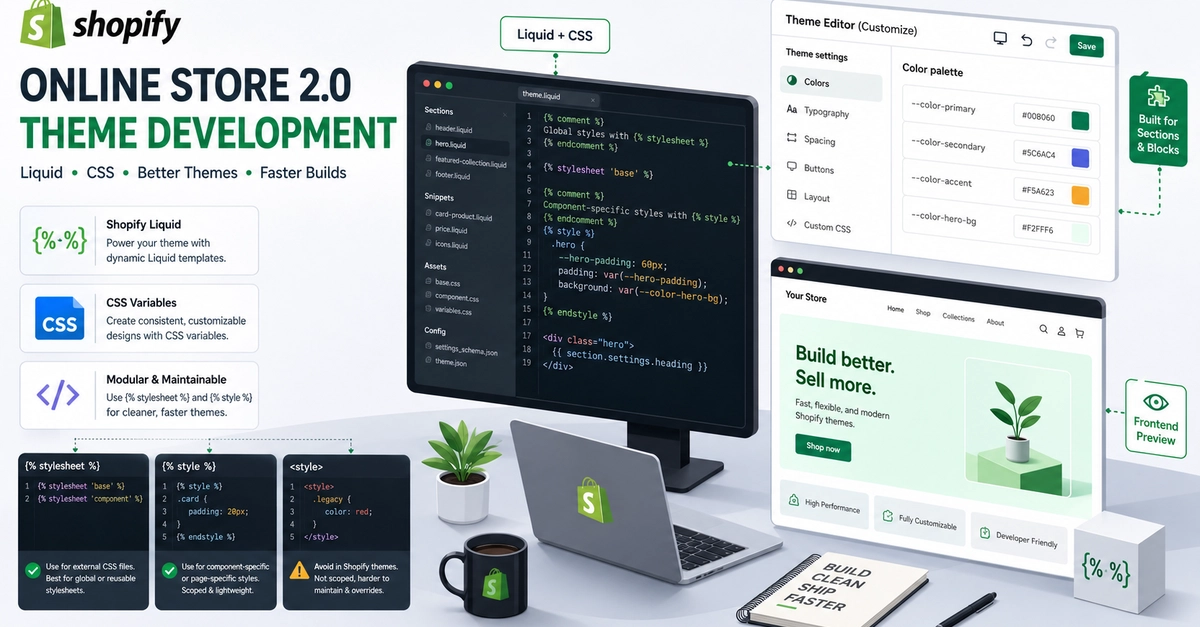
Shopify CSS Explained: {% stylesheet %} vs {% style %} vs If you've built a Shopify theme, you've probably used one of these: {% stylesheet %}; {% style %} Enter fullscreen mode Exit fullscreen mode They all write CSS. So why did Shopify create three different ways to do what seems like the same job? The answer isn't about syntax—it's about performance, scalability, and architecture. Let's explain it with something every developer understands. 🚦 Shopify CSS Is Like a Traffic Signal System Imagine your Shopify theme is a busy city. Thousands of cars (sections) move through it every day. Without traffic signals, every intersection would become chaotic. Shopify's CSS methods work the same way. Each one controls traffic differently. 🟢 Green Light — {% stylesheet %}; This is the city's central traffic controller. It creates one set of traffic rules and shares them with every intersection. Every section follows the same rules without creating duplicate copies. {% stylesheet %}; .product-card { color: var(--heading-color); padding: 20px; border-radius: 12px; } {% endstylesheet %} Enter fullscreen mode Exit fullscreen mode Why? Shopify bundles this CSS once, making it reusable across the theme. Best for Shared component styles Layouts Buttons Cards Grids Reusable UI Trade-offs ✅ Smaller HTML ✅ Cached CSS ✅ Excellent performance ❌ Doesn't support Liquid variables ❌ Can't use: {{ section.settings.heading_color }} Enter fullscreen mode Exit fullscreen mode 🟡 Yellow Light — {% style %}; Now imagine a traffic officer standing at a busy intersection. Instead of following fixed rules, they react to what's happening right now. That's exactly what {% style %}; does. {% style %}; .product-card { color: {{ section.settings.heading_color }}; } {% endstyle %}; Enter fullscreen mode Exit fullscreen mode Why? Every section generates its own CSS using Liquid values from the Theme Editor. Best for Theme Editor settings Dynamic colors Typography controls Spacing controls Merchant customization Trade-offs ✅ Supports Liquid ✅ Updates instantly in the Theme Editor ❌ Generates CSS for every section instance ❌ Larger HTML when many sections are rendered 🔴 Red Light — Raw This is like placing a temporary stop sign during road construction. It works. But it isn't connected to Shopify's CSS bundling system. .notice { color: red; } Enter fullscreen mode Exit fullscreen mode Why? It's plain HTML. No Shopify processing. No Theme Editor integration. Best for Small one-off styles Temporary experiments Static pages Trade-offs ✅ Familiar HTML ✅ Simple ❌ Not bundled ❌ No Shopify-specific features ❌ Easy to duplicate accidentally 📊 Architecture Diagram Shopify Theme │ ┌───────────────┼───────────────┐ │ │ │ │ │ │ {% stylesheet %} {% style %} Shared CSS Dynamic CSS Static CSS Cached Once Per Section Plain HTML Fastest Flexible One-Off Enter fullscreen mode Exit fullscreen mode ⚡ Performance Tip Use CSS variables to combine the best of both worlds. Enter fullscreen mode Exit fullscreen mode Then keep your reusable CSS bundled: {% stylesheet %}; .product-card { color: var(--heading-color); } {% endstylesheet %}; Enter fullscreen mode Exit fullscreen mode Now your CSS stays cached while each section receives its own custom value. Benefits: Less duplicated CSS Smaller HTML Better scalability Faster rendering 💡 Senior Developer Tip Don't ask: "Which CSS method should I use?" Ask instead: "Which responsibility belongs to which CSS method?" Architecture beats shortcuts every time. 🎯 Final Takeaway Great Shopify themes aren't built with more CSS. They're built with better architecture. Use: {% stylesheet %}; for reusable, cached styles. {% style %}; for dynamic styles powered by Liquid. only when plain HTML is all you need. The best Shopify developers don't choose one—they know when to use each. Have you used all three in your Shopify projects? Which one do you prefer and why?
Most Shopify Developers Use This Every Day. Almost Nobody Knows Why It Exists.
Full Article
Original Source
Read the full article at Dev →KhanList aggregates and links to publicly available news content. We do not host full articles from third-party sources. Always verify important information with original sources.