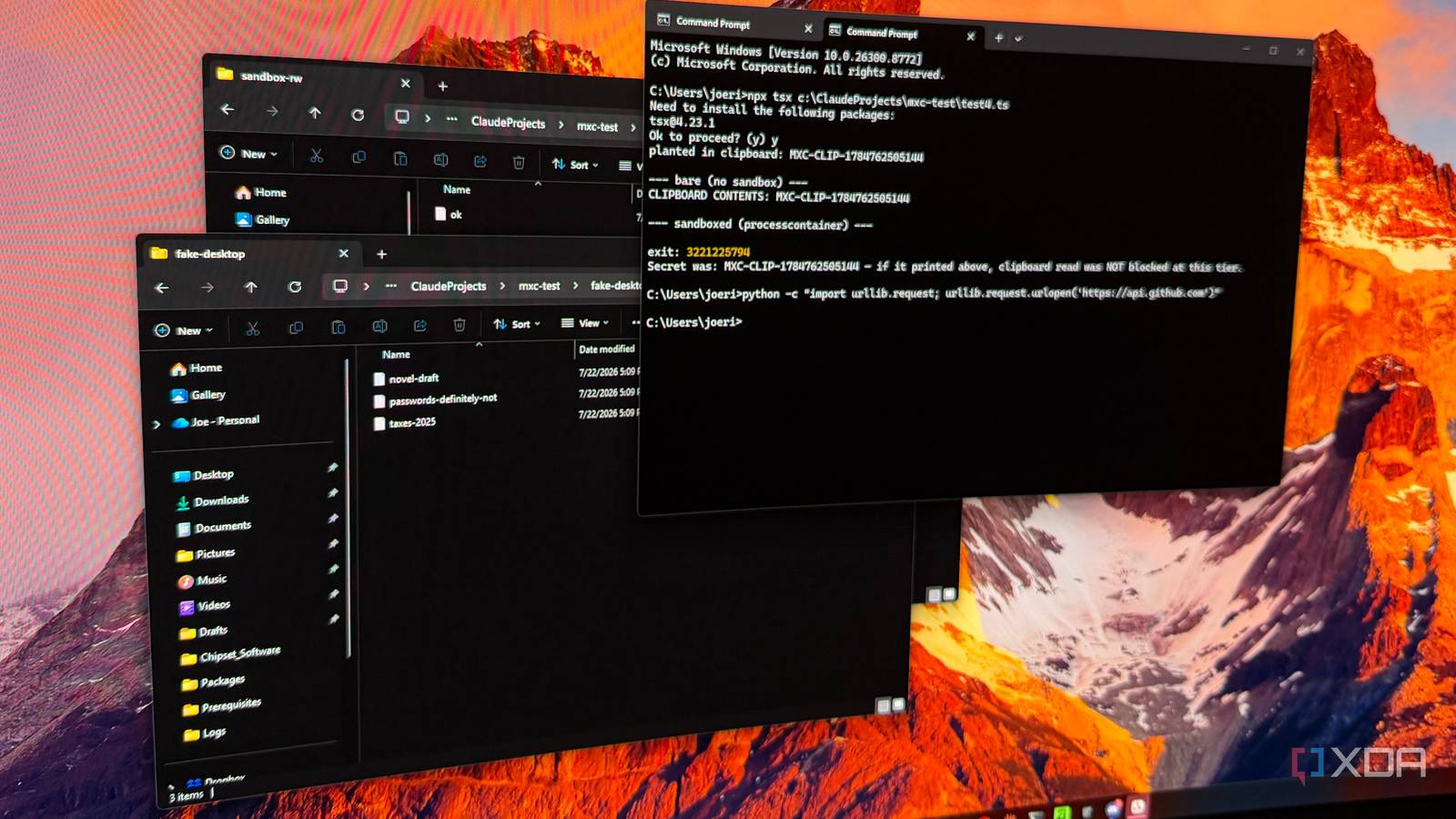
Published Jul 28, 2026, 12:30 PM EDT Maker, meme-r, and unabashed geek, Joe has been writing about technology since starting his career in 2018 at KnowTechie. He's covered everything from Apple to apps and crowdfunding and loves getting to the bottom of complicated topics. In that time, he's also written for SlashGear and numerous corporate clients before finding his home at XDA in the spring of 2023. He was the kid who took apart every toy to see how it worked, even if it didn't exactly go back together afterward. That's given him a solid background for explaining how complex systems work together, and he promises he's gotten better at the putting things back together stage since then. I run AI agents on my Windows machine every day, but I'm always wary about what they could do if I approve the wrong permissions. Claude Code lives in my terminal, my agents build new repos in WSL without me, and every session involves a language model writing code and executing it on the same machine that holds my tax documents. It's worrying, and that's what Microsoft is trying to fix with Microsoft Execution Containers (MXC), a policy-driven execution layer for AI agents announced at Build 2026 and now in early preview alongside the summer's WSL updates and Insider builds. You declare what an agent is allowed to touch, and Windows enforces it at runtime, either natively or inside WSL. Agents broke the old Windows security model The risky code doesn't exist until the agent writes it Traditional Windows security asks one question: should this program be allowed to run? That worked fine when programs were static things you installed on purpose. Agents torch that model, because the dangerous part is generated on the fly. No signature database catches code that didn't exist five seconds ago. MXC changes the process by adding declarative access control lists to the sandbox. That puts you in charge of which files, network, and local resources the agent can use, and Windows enforces those boundaries. Or, that's the general idea, but as it's in early preview, I wanted to see how well that worked. The sandbox environment has been designed well I tested filesystem, network, and delete commands that all went nowhere The first thing I bumped up against proved the tool was working as expected. On the fallback tier a normal machine gets, MXC's own quickstart helper generates a policy a standard user can't enforce. It tries to re-permission directories like C:\Program Files\Tailscale and fails with an access-denied error until you hand-trim the allow-list. I gave a sandboxed process access to one writable folder, and then asked it to create a file in that folder and on my desktop. The agent created a file where it was allowed to, and my desktop stayed clean. Then I recreated Microsoft's Build demo, "agent, delete everything," on a folder of decoy files. The container denied it at the first filesystem call, before touching anything: PermissionError: [WinError 5] Access is denied: '...\fake-desktop' fake-desktop after: [ 'novel-draft.txt', 'passwords.txt', 'taxes-2025.txt' ] The way network containment is implemented impressed me. With outbound access denied, I ran the same code in the sandbox and in a Terminal window. It couldn’t even resolve a hostname inside the container, because MXC doesn’t add a firewall; it never lets the agent know the internet is an option. The other cool thing is it isn't Windows-only. MXC has a WSL backend built on the new Windows Subsystem for Linux Containers (WSL-C), and after pre-pulling an image, I had a Linux container running under an MXC policy, spawned from a Windows binary, in under two seconds, with the same network-off rule enforced on the Linux side in the same JSON grammar as every Windows test. One policy model for Windows and WSL is the right solution. No more managing two sets of permissions, two container stacks, and making sure that everything agrees. Your inference and agentic tools are protected whether running as Windows or Linux code, and so is the rest of the device. Then I got to session isolation, the cleverest tier An agent that runs as its own disposable Windows user The tier I was most excited about is session isolation, which walls an agent off from your interactive desktop, clipboard, and input devices. Getting to it revealed how it works, and the mechanism is genuinely clever: MXC creates a throwaway Windows user and stands up a local login session for it. My debug log showed the agent running as windoze\h7-g3, a randomly named account that changed every run, logging in and out via a dedicated IsolationSession service — the same multi-user machinery behind fast user switching, repurposed as an agent cage. A quick net user showed OpenAI's Codex and Microsoft's Defender Application Guard leaving similar accounts behind — three vendors landing on the same primitive. That's a meaningful design choice. Instead of trying to filter individual API calls, session isolation leans on a boundary Windows has enforced between user sessions for two decades. When it's finished, an agent in its own session shouldn't be able to see your desktop, grab your clipboard, or inject keystrokes into your apps, because sessions already can't do those things to each other. It's the tier I most want to trust — which is exactly why I'll be testing every one of those claims properly before I tell you it works. For now, the architecture is right, and the plumbing runs; how airtight it is in this preview is a story for when the enforcement tiers are further along. It's not all smooth sailing This is a preview, after all, and it behaves like one The rough edges are real, and worth knowing before you lean on this. Anything touching the Windows UI stack dies on arrival at the process-isolation tier, and Python's C-extensions wouldn't load in-container until I ran permissively. That will mean policy decisions have to be made before deployment, which is a net benefit. MXC ships an audit mode meant to help: run permissively, record what the agent reaches for, generate the policy from the evidence. It runs and produces a trace, but the trace I got was raw, machine-wide telemetry with no obvious way to extract a per-agent policy from the shipped tooling. The feature that would onboard a messy real workflow isn't usable yet. There's a complexity risk, too — Windows already juggles Defender, Intune, AppContainer, Smart App Control, and a dozen overlapping controls, and MXC only pays off if the secure path becomes the easy one rather than another surface to misconfigure. It builds on the same foundation as Copilot and the other Windows AI agents, and whether it becomes a standard or another half-finished layer is still to be seen. But it's a 0.7.0 preview, and its own README tells you not to treat it as a security boundary yet. That's the right posture until the strongest tiers ship and get properly stress-tested. Install it, compile it, throw a misbehaving agent at it as I did; the walls that already hold are worth seeing, and watching an agent get boxed into its own throwaway Windows user is worth the compilation time alone. The approval button deserves a backstop. This one's real: it's just not finished being built. Agents earned the padded room that Windows is building for them I’ve spent plenty of time over the last year or so writing about what AI agents can do on a PC, and just as much time worrying about possible damage. MXC is the first time I’ve seen restrictions working in real time, instead of leaving things to vibes. The permission structure I tested worked as intended, and it extends into WSL, where most of my agentic code lives. It shows promise in enabling agentic workflows in a safer way, something that should have been possible before these tools rolled out.
Microsoft's new sandboxed WSL AI layer changes everything about how Windows runs agents
Full Article
Original Source
Read the full article at Xda-developers →KhanList aggregates and links to publicly available news content. We do not host full articles from third-party sources. Always verify important information with original sources.