
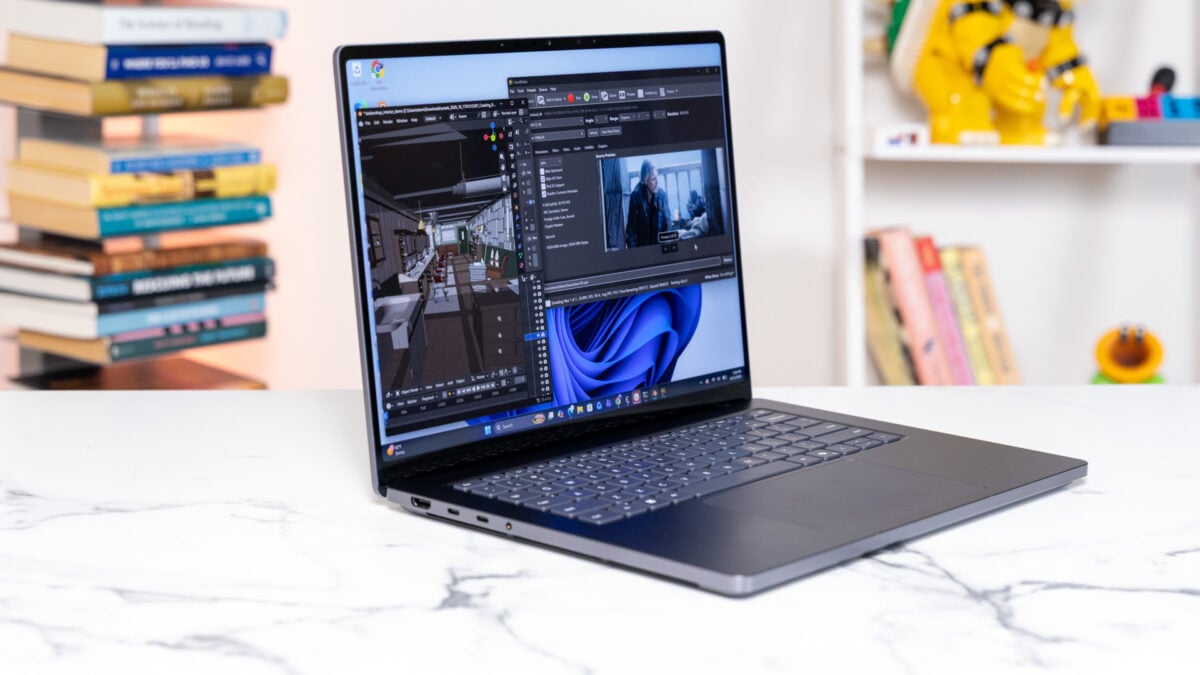
In my line of work, I have to listen to a lot of puffery from the mouths of people who are always trying to sell me something. From the first time I saw it at Computex 2026, Microsoft told me the Surface Laptop Ultra was a computer it always wanted to make. I’ve heard the line a dozen times before from a dozen brands. Now, after testing it for more than a week, I’m more convinced than ever this is Microsoft’s best laptop yet. This is the exact kind of no-holds-bar PC I’ve longed for. But let’s not get ahead of ourselves. Even at its enormous maximum Apple-like $5,900 price point, the Surface Laptop Ultra is not quite the MacBook Pro analog that pundits would have you believe. It’s heavier and thicker than Apple’s latest MacBook Pros. It’s also not as performant as the M5 Max MacBook Pro, at least not in terms of raw number crunching for both CPU and GPU capabilities. That matters, of course, but not as much when you consider the other benefits of this laptop and the wider Nvidia RTX Spark platform. These are high-performing laptops that don’t trade off battery life for the sake of pumping out that extra power. Microsoft Surface Laptop Ultra It's a super solid laptop with several unique capabilities. If you can get over the quirks of its ARM-based platform, it offers portability and power in one place. Solid-feeling shell Super bright screen Balanced speakers Fast facial unlock Haptic-filled trackpad Strong performance while not plugged in Battery life to handle a work day Super pricey for peak specs Software bugs and other quirks Emulation causes some hiccups Pretty heavy There are trade-offs aplenty. Nvidia’s still working through the rough edges of its ARM-based design. While there are more ARM-native apps on Windows 11 than ever—thanks in large part to Qualcomm’s efforts on its own PC chips—there will still be many apps and games that must run on emulation. And then, it’s not entirely seamless. In its current iteration, some heavy-duty apps—especially games—take longer to load than on any x86-based platform, and not just the first time you run them. That’s due to the need for x86 to ARM emulation. Similarly, there are some small hardware issues here that may give you reason to remain wary. These small quibbles aside, Microsoft also wants to push its latest “Ultra” PC as an AI-first experience. That doesn’t mean you need to be inundated with Copilot at every turn. Instead, this is a Windows 11 experience that wants you to experiment with running your own local AI agents. The Surface Laptop Ultra gave me the best excuse yet to actually dip my toes into local LLMs. I’m not yet an agent convert, but with this and other recent adventures like the M6 Mac mini, I can start to see the appeal. Whether you get into AI will be determined by what model of laptop you buy. There are two distinct versions of the N1X chip inside these devices. The base Surface Laptop Ultra starts at $2,600 for a version with 24GB of unified memory and a lower-end CPU and GPU. My review version, with the maximum 128GB of memory, 1TB of storage, and the top-end 20-core processor, costs nearly $6,000. I can’t argue anybody goes out and spends that money just for the sake of forcing OpenClaw to run commands. I will say that, no matter what price it is, this may be my favorite laptop I’ve used all year. Gray never looked so good The Microsoft Surface Laptop Ultra’s webcam isn’t spectacular, though the laptop does have some impressive facial biometric unlock speeds. © Raymond Wong / Gizmodo The Surface Laptop Ultra is a hunk of metal, and I mean that with as little innuendo as possible. Microsoft’s “Ultra” design maintains a relatively small 15-inch touchscreen, and the body is thin enough to fit inside my backpack with ease. It’s also dense for its size at 4.5 pounds. That’s nearly a full pound heavier than multiple variants of the 14-inch MacBook Pro and only slightly lighter than a 16-inch MacBook Pro. This laptop is also thicker than both of Apple’s designs at 18mm or 0.7 inches. © Raymond Wong / Gizmodo © Raymond Wong / Gizmodo While I have colleagues who demand only a thin and light design, I’m more used to hauling pounds and pounds of gear with me to the office or out to whatever reporting trip I’m away on. Compared to a similarly-scaled gaming laptop, the Surface Laptop Ultra isn’t actually all that more portable. Microsoft’s latest laptop is slightly heavier than a Lenovo Legion 5i I recently reviewed, though it’s thinner than that design. The latest rendition of the Razer Blade 16 is thinner and only marginally heavier. If I had to sacrifice a light body, I’d prefer it to have the same build quality as the Surface Laptop Ultra. The “Nightfall” color that Microsoft and Nvidia loaned for review is a better look than the “Platinum” version. It’s sleeker and stealthier. The all-aluminum chassis is supremely sturdy, with no discernible flex in the keyboard. There are also several small design decisions that enhance the look and feel of the laptop, like the screws to the bottom plate hidden under the feet, making the whole device seem that much more slick. A magnetic USB-C port has several benefits over MagSafe or Surface Connect. © Raymond Wong / Gizmodo As far as ports go, this laptop isn’t lacking much. There’s a single USB-A, an HDMI port, a headphone jack, and a full-sized SD card reader. There are two other USB-C on the left side, plus a single port on the right. This last port is actually one of the Surface Laptop Ultra’s best features. Remember the long Surface Connect port? Now Microsoft has made a magnetic USB-C. This makes trying to plug in your laptop in the dark a little easier. If you tug your laptop away from the wall outlet, it shouldn’t topple your power strip as well. While the magnetic port only works on the right side of the laptop, you can instead swap the magnetic end into the power brick and use the regular port to power your laptop or any other device. Smart, right? There is a downside to this design compared to Surface Connect or other ports like MacBooks’ MagSafe. You can’t unplug it by yanking up or down; it has to come straight out. Microsoft told me it dialed in the magnet strength so it’s equivalent to the Surface Connect. It’s a trade-off, but I would prefer to have the USB-C free than sacrifice it for some proprietary charging standard. One hella bright display Will it blend? Yes, of course it will. © Raymond Wong / Gizmodo If you think “Ultra” and then think “OLED,” you’ll have to dial back your expectations. The Surface Laptop Ultra is using mini LED, which is essentially an LCD screen making use of thousands of microscopic diodes as a backlight. It means this display can get very, very bright. And, although nothing can beat the contrast of organic light-emitting diode, the Surface Laptop Ultra still looks great. The 15-inch display maxes out at a 4K resolution, specifically 3,270 x 2,180 pixels. That also hits an impressive pixel density at 262 ppi (pixels per inch). It’s a great screen for getting work done, with text remaining clear and legible. For entertainment purposes, the display also supports a very strong HDR performance, maxing out at a stated 2,000 nits of peak brightness. When you enable HDR settings on the laptop, the screen can feel extra bright, more than enough that I could work next to floor-to-ceiling windows at sunset without any noticeable loss in quality. Yes, it’s a touchscreen display. © Raymond Wong / Gizmodo The system’s two side-facing speaker boxes are housed right next to the system’s intake vents, and while I initially worried this would produce odd results, the laptop sounds clear and full, good enough I wasn’t keen to put in my earbuds for anything but privacy. It’s not as if the laptop needs to be a party speaker, but I would have wished to have a little more bass as I watched Netflix or played some of my tunes. Good screen and good sound make the laptop a solid passive device, but what about its controls? The keyboard is fair, with spacious keys and a fair amount of travel making this feel like an upgrade over Apple’s age-old Magic Keyboard and slightly better than other laptop pads, such as HP’s lattice-less keyboards. There’s a subtle bounce to each key press, though I regularly prefer something more clacky. The trackpad is where things get interesting again. The Surface Laptop Ultra is using Microsoft’s latest “Precision Haptics” trackpad. Like all pads of this kind, it uses force feedback to simulate the sensation of a mechanical click. Microsoft’s special sauce is how it adds haptics to other actions as well, like when it gives you a subtle vibration when tiling windows. The sensation is more subtle than it sounds, but it does help when lining up images in PowerPoint or Canva’s Affinity app. Microsoft has said it’s working with Adobe to integrate it in Creative Suite as well. For now, the feature is nice, though I still feel like the tech giant could go even further with its rumbly trackpads. The performance question gets complicated Gaming performance may not be equal to other expensive laptops, especially those with a discrete GPU not running on emulation. © Raymond Wong / Gizmodo As much as I enjoyed typing away on the Surface Laptop Ultra, there’s a lot more going on under the hood to be aware of. My review unit configuration contains the 20-core Grace CPU alongside the 6,144 CUDA CPU cores. The reason to care is because both the CPU and the massive GPU are housed on the same chip, instead of relying on a separate “discrete” graphics processing unit. The added 128GB of unified memory acts as a shared memory pool between both CPU and GPU. More memory doesn’t necessarily result in better performance. The main reason you need that extra RAM is for AI. I ran this PC through all my typical benchmarks. That includes the general CPU tests from Geekbench 7. If you were trying to guess if the RTX Spark could beat an M5 Max MacBook Pro, you can keep dreaming. In terms of raw performance, the M5 Max chip still claims top spot with close to 44% better performance on Geekbench 7’s multi-core settings. That’s not telling the whole story. In Cinebench 2026, which tests the CPU’s rendering capabilities, Apple’s 18-core CPU managed only 11% better performance in multi-core scenarios. Haptic trackpad capabilities are nice to have, but I think they could go further. © Raymond Wong / Gizmodo I could see this discrepancy play out in my Blender test, where we time how long it takes each laptop to render a scene of a BMW. The M5 Max MacBook Pro was just over 20 seconds faster, whereas the Surface Laptop Ultra took just under 1 minute and 30 seconds. However, it’s still a strong showing nonetheless. It’s equivalent to the performance of higher-end Intel Arrow Lake chips built for extremely energy-hungry laptops. This machine is far more efficient than many other PCs. However, it’s only 5% better in Cinebench scores than an AMD Ryzen AI Max+ 395 chip inside a laptop like the Asus ProArt PX13. The real reason you’re buying any RTX Spark PC is the promise of that GPU power. The Surface Laptop Ultra shines in this regard, even though it’s still not the absolute best around. Nvidia’s largest laptop GPU managed to score 50% better than an Intel Core Ultra X9 388H inside an HP Omnibook Ultra 14 in 3DMark’s “Steel Nomad” benchmark. It was 37% better in that same test compared to the Asus ProArt PX13. © Raymond Wong / Gizmodo © Raymond Wong / Gizmodo It’s even able to compete with Nvidia’s other discrete laptop GPUs. It can actually beat the benchmarks of a Lenovo Pro 9i G11 with an RTX 5060 GPU in 3DMark’s “Speed Way.” However, even if the RTX Spark GPU has the same core count as a desktop-level RTX 5070 GPU, no single chip is going to achieve the same performance. Still, in ray-tracing heavy tests like 3DMark’s “Portal Royal,” the Surface Laptop Ultra was just 6% slower. That’s still pretty darn impressive! A MacBook Pro with Apple’s 40-core GPU is still more powerful, though that may be missing the point. In 3DMark’s “Steel Nomad,” Apple’s top Mac scores 22% better than Microsoft’s “Ultra” laptop. In game benchmarks, the situation is more wibbly wobbly. In the CPU-heavy game Warhammer III: Total War, the two laptops were practically equivalent in terms of performance benchmarks. The MacBook Pro was just slightly better in Cyberpunk 2077, but only just. And if it comes to gaming, the Surface Laptop Ultra and all RTX Spark PCs is more capable than a MacBook Pro. That’s partially because of this still being relatively early days for Windows using this PC’s ARM-based chipsets. The other part of it is Nvidia is still working out the kinks for its new brand of laptop chip. A more complicated Windows 11 experience The Surface Laptop Ultra is indeed capable of model training, though don’t expect to carry the equivalent of a data center in your bag. © Raymond Wong / Gizmodo I had just gotten done reviewing my first Googlebook, the Lenovo Googlebook 15, and I know what a truly underbaked experience looks like. The Surface Laptop Ultra isn’t nearly at that level of annoyance. It’s still a little wet under the gills. I experienced a few issues and glitches in my week with the laptop. There were some flashing screens, slow-to-load browser pages, and occasional bugs like a distracting scratching sound from the speakers when loading games or trying to listen to a Microsoft Teams call. The RTX Spark launch is a complicated one for PCs, with this chipset using the ARM-based microarchitecture that’s wholly distinct from x86. There are now a ton of apps that all support ARM, but for everything else Microsoft needs you to rely on its Prism emulator. This laptop finally enticed me to try running some agents of my own. © Raymond Wong / Gizmodo This can cause some awkward moments if you’re used to a clean Windows 11 experience. You may download an app for the first time, start to run it, and end up waiting for minutes at a time for just-in-time emulation to kick in. That’s especially true for many of the games I used to benchmark this laptop, with many taking several minutes to load and many spending even more to load shaders. Microsoft has promised its Advanced Shader Delivery service that will help games load quicker will be available on RTX Spark sometime in the near future. If you’re like me, you’re wondering what’s the point of a laptop where games all have to rely on emulation. Well, there are a few things to consider. Microsoft has said that Prism is more CPU dependent than GPU, meaning it doesn’t impact CPU-bound games nearly as much as you’d expect. The emulation hit to performance on some titles may be as low as 2 to 3%, based on Microsoft’s estimates. I can’t confirm that, though I will say the Surface Laptop Ultra is not exactly an ultra-premium gaming device. I played several titles, including the latest Gears of War: E-Day, and I could manage to get around 40 fps when running the game on high settings and using DLSS to get me a stable frame rate. I could smooth things out a bit with frame generation, but that feels a little sad considering this laptop costs as much as it does. Other titles, like Star Wars: Galactic Racer (a game that took several agonizing minutes to load every time I tried it), can manage graphics settings set to high with DLSS enabled. A discrete RTX 5070 GPU simply does better. That $3,016 Lenovo Legion 5i laptop I mentioned earlier can do well over 60 fps under the same settings as I tested the Surface Laptop Ultra. A serious battery life for a serious person The gray color is understated. Please, Microsoft, give me a red Surface laptop. © Raymond Wong / Gizmodo There’s one obvious caveat to all that. A gaming laptop like that Lenovo Legion 5i could barely run for more than a few hours on lower power modes before it demanded a charger. The Surface Laptop Ultra can make it through most of a workday when running on “best power efficiency mode” and with less than peak brightness. When playing games or running GPU-heavy tasks, like AI, the laptop lasts between two and three hours. And here’s the best thing about all of this design: I saw practically no difference in performance with the laptop on battery versus the laptop plugged into its 140W brick. You cannot say the same thing about most other systems, including other PCs with discrete GPUs as well as AMD’s Strix Point designs. Apple shares this capability with the RTX Spark, but only the RTX Spark can claim to use all of Nvidia’s ubiquitous DLSS upscaling to make these games run better. It’s why I personally think these laptops may be a better option for most people who want to have a powerful and portable PC that doesn’t sacrifice much. All that, plus a handy SD card reader. © Raymond Wong / Gizmodo Of course, gaming is not the primary use case for the Surface Laptop Ultra—AI is. When you first load up Windows 11, you’re greeted with a new “Get Started” splash screen that invites you to download AI agents like OpenClaw and Hermes. Microsoft promises each of these specific apps are built to run in the Windows 11 sandbox and to keep your data secure. So I finally took the plunge into the agentic age. I ran Hermes agent and managed to force it to run a separate Artificial Analysis AgentPerf AI benchmark for me. Of course, I wouldn’t use its scores as bible, but it did manage to get me on the right track to actually testing the AI performance of these devices. AI benchmarks are still a wild west. Models are changing rapidly on a weekly basis. I can confirm this laptop can run local AI models, letting the AI do the work in the background while you manage other parts of your job description. This is how I prefer to think of AI, as an on-device model that can provide unique help on specific tasks, not a panacea for all my woes. I never thought I’d say it, but I’m honestly happy to have a laptop that makes it easier to load up into these agents. My bigger task is figuring out what kinds of things I can use them for. I want more laptops like this one The Mac vs. RTX Spark question won’t be decided by one generation of chips. I’m just glad we’re getting a laptop that won’t quit when it’s away from a power cable. © Raymond Wong / Gizmodo RTX Spark is not a new idea. We’ve seen AMD release PCs with their own APUs (accelerated processing units) that push a massive CPU alongside solid GPU performance. The company still has Strix Halo PCs on the market, and it’s desperately trying to convince consumers to buy a Gorgon Halo PC running the latest Ryzen AI Max+ 400 series chips. Those PCs also run very expensive. On the flip side, Intel’s latest Core Ultra Series 3 processors have dominated the laptop landscape in 2026. Their chips are smaller and are built for lower-end workloads. However, some of those same chips feature some strong GPU performance enough for real-time rendering and gaming at resolutions around 1080p. You would think that these chips should cost less, but on average laptops with an Intel Core X7 Ultra 358H or Core Ultra X9 388H can cost well over $2,000, edging in on RTX Spark territory. Yes, it thicc. © Raymond Wong / Gizmodo PC prices are all sorts of screwed up, all thanks to the ongoing memory crisis. AI datacenters have siphoned up all the demand for memory, leaving tech companies as domineering as Microsoft and Nvidia, scrounging for RAM and SSDs. It’s become harder than ever to judge what category we can stick each PC in without any true “deals” to consider. Most consumers’ best bet is to look at a laptop they know can do the job they need, then scrounge for a version of that device that fits their budget. And that means the Surface Laptop Ultra sits in an odd space. It’s not the most performant laptop available today. It’s not the cleanest PC experience, either. It is, however, a laptop that can finally close the gap between performance and battery life. With all the wrinkles ironed out, the Surface Laptop Ultra is the laptop I wish I could carry with me for work, pleasure, or whatever the AI overlords think to do with my degrading body next.
Microsoft Surface Laptop Ultra Review: Complicated, yet So Damn Worth Getting Stuck In
Full Article
Original Source
Read the full article at Gizmodo →KhanList aggregates and links to publicly available news content. We do not host full articles from third-party sources. Always verify important information with original sources.