
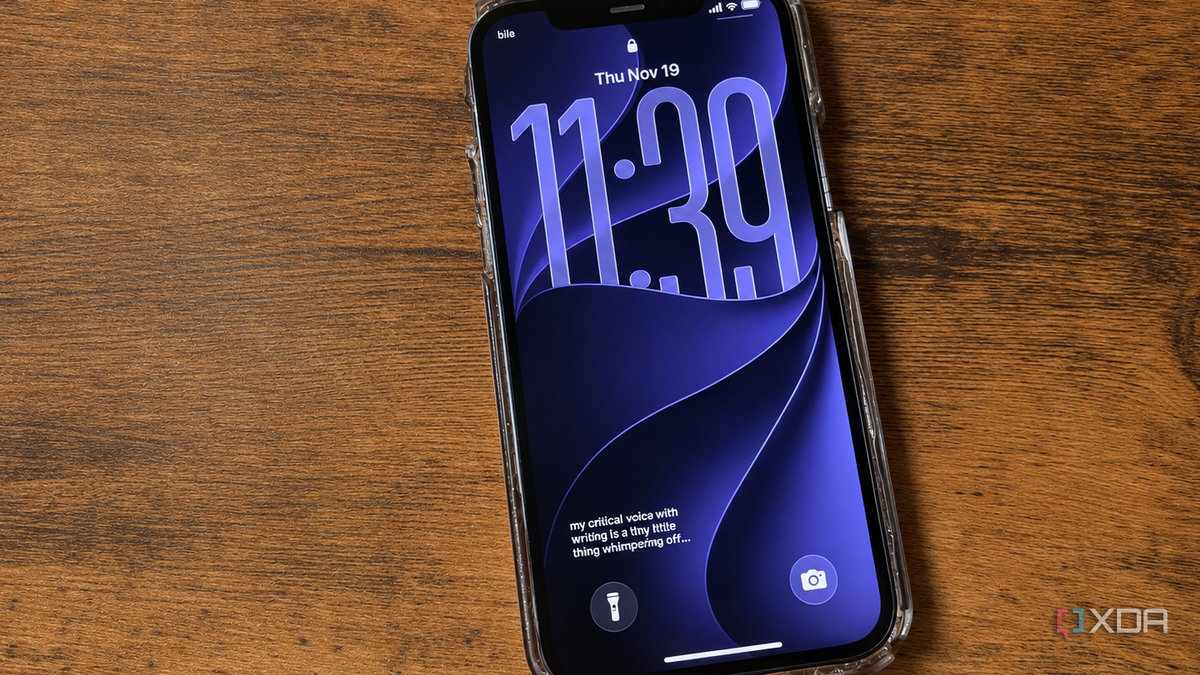
Published Nov 22, 2026, 7:30 AM EST Patrick is a seasoned writer with more than a decade of experience, specializing in any and all things tech. His work has been featured on platforms like CNET, Yahoo, Xfinity, and many other outlets. When not typing away, he can be found with his nose in a book. My favorite thing to do when I'm not busy with work, life, or anything else is to sit down with a good book, though these days it's often on my Kindle. I read a fair bit, and I've made a habit of highlighting notable lines. Sometimes, it's a good piece of information or an outstanding quote, but sometimes the highlight is just a particularly funny line. The problem is that I rarely revisit these saved snippets after the fact. That's where Marked comes in. This app lets users import saved highlights from Kindle, Kobo, Apple Books, and a variety of others. Once imported, a simple widget will surface those highlights on your iPhone homescreen. It's an easy way to revisit things that once stood out to you. My favorite passages finally made it out of my Kindle It helps me revisit the lines that made an impact Whether I'm reading fiction or nonfiction, highlighting outstanding excerpts is one way I engage more critically with the material. If it's fiction, I'll highlight a quote that demonstrates beautiful prose or a line that made me laugh. An example from the ninth book in the He Who Fights With Monsters series is, "There are only so many times a bloke can tell you he’s not eating people before you start to think he’s definitely eating people.” I'd forgotten about that line, but rediscovering it made me laugh just as hard as the first time I read it. For nonfiction, such as Dean Wesley Smith's Writing Into the Dark, I highlighted all the parts that held good advice for writing. One that stands out is, "You must get back to reading for enjoyment, for the sheer love of a good story told well." The Marked widget can fit on either my homescreen or my lock screen and display these saved quotes. It pulls one at random each day from my full repertoire, so I never know what'll show up. And that's part of the fun. It consolidates highlights from different apps Marked supports the most popular readers Marked doesn't care where the quote comes from. I can add highlights from Apple Books, Kindle, and even paperback books by manually adding them. There's also a feature that allows you to take a picture of a book and add highlights that way, but it's locked behind a paywall. I appreciate the fact that it brings all these different highlights together, as it's a better representation of my reading habits overall — not just a representation of whatever device I use. Adding highlights is as simple as clicking the + icon in the top-right corner of the app, then selecting from Import from a reader, Type or paste text, or sharing it from another app. That said, it's not a true import; adding highlights from Kindle requires emailing the export (an HTML file) to yourself, and then selecting that file in Marked. Kindle lets you choose the citation style when you export highlights, but I found that selecting anything besides "None" caused errors when I tried to upload it to Marked. I also had to export highlights from one book at a time, so the process can be rather time-consuming. It wasn't necessarily a bad thing, though; it made me more deliberate in what I chose to save. Marked helps me remember why a quote mattered The app lets you add notes to saved highlights One of my favorite features in this app is the ability to add a quick note alongside a highlight. The note won't appear on the homescreen, but if you tap the widget, you can see whatever you've written beside it. It's a sort of mini-journal — a reminder of why the passage stood out, such as great prose, a rhythm that resonated with me, or an example of phenomenal characterization. The best way to improve as a writer is to read the work of those who came before, after all, and adding a note alongside a highlight helps me remember why it mattered when I come back to it in the future. My favorite lines deserve more than a forgotten highlight I don't need every book I read to teach me something. Most of the time, I'm reading for the simple joy of it — but when I do stumble across a book that makes an impact, I want to remember the lessons it taught me instead of relegating the passages to a digital graveyard I might never check again. Using Marked to have those passages appear on a screen I'm already going to check every day is the perfect way to keep them fresh in my mind, and the reminders often prompt me to return to and re-read some of my favorite books. Marked Marked allows you to revisit saved eReader highlights from your iPhone's home or lock screen.
Marked turned my forgotten Kindle highlights into a daily lock screen habit
Full Article
Original Source
Read the full article at Xda-developers →KhanList aggregates and links to publicly available news content. We do not host full articles from third-party sources. Always verify important information with original sources.