
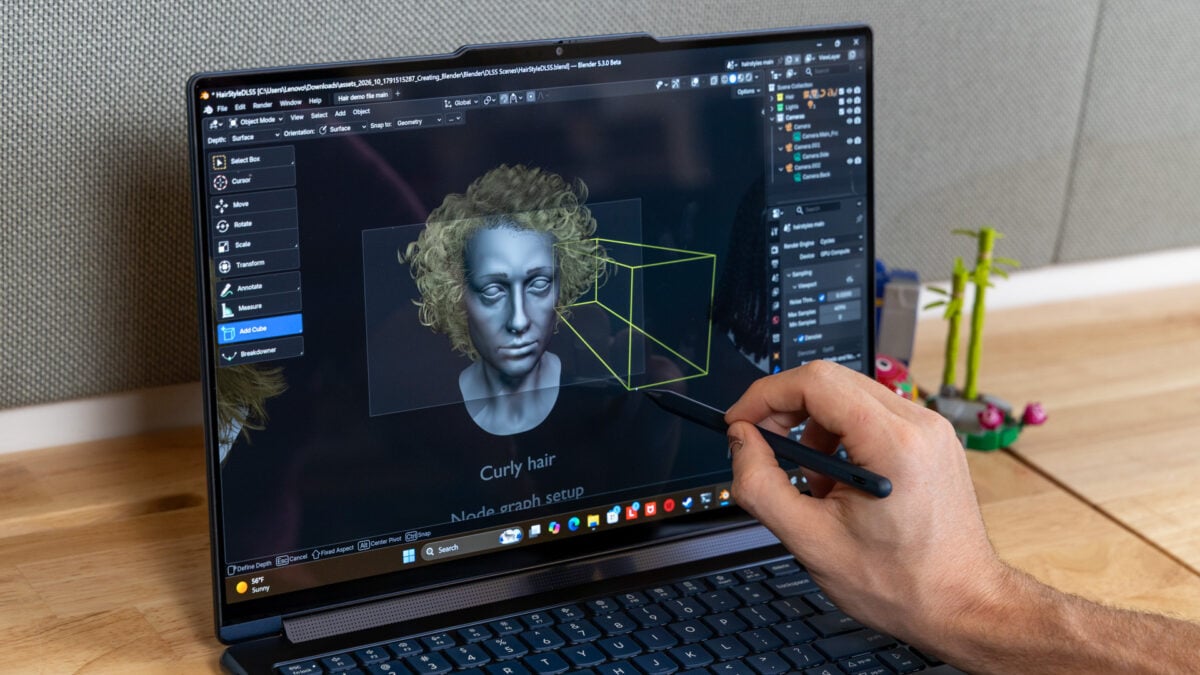
Some laptops sing. Some laptops dance. Some laptops, like the Lenovo Yoga 9n 2-in-1, do it all and somehow are still looking for the best stage to strut their stuff. There is so much about this convertible laptop that makes sense and even offers an ounce of innovation. It’s still an odd performer, not the least because its performance may not live up to its massive price point. The Lenovo Yoga 9n 2-in-1 is one of the newfangled RTX Spark laptops making use of an Nvidia-made N1X chip. The laptop starts at $3,000 for the base model with a lower-end 18-core CPU and a 5120-core GPU. The model Lenovo sent me for review contained the full 20-core CPU and higher-end GPU, plus 64GB of memory and 1TB of storage, and it currently costs $3,750. It’s the same model you can get from Best Buy. That’s not cheap by any standard. It means whoever buys this PC needs it to be their main device for everything. That’s for watching content, making content, gaming, and more. Lenovo Yoga 9n 2-in-1 It's a creative laptop that actually puts creators first with unique pen capabilities. It also sacrifices RTX Spark's peak performance. Beautiful, bright OLED screen Really strong sound stage Pen usable on screen and trackpad Performance allows for versatility Bad webcam Not as performant as other high-end laptops Numpad not necessary Heavy for its size You can say the same thing about the Microsoft Surface Laptop Ultra, the first RTX Spark PC I reviewed. That PC came with 128GB of unified memory and cost $5,900. That PC is a slightly cleaner experience and offers better performance than Lenovo’s latest high-end Yoga PC. In either case, the ARM-based N1X chip is still new, and that means there are still minor bugs, including awkward stuttering when using browsers, that make the experience feel worse than a $3,750 device should. And if you were looking for the absolute pinnacle of Nvidia’s proclaimed GPU performance, this laptop isn’t it. It trades versatility for peak performance, and in that way it may be worth your time. This is the first laptop I’ve seen where you can use a stylus on both the screen or the trackpad—treating it like a tablet or a drawing pad—all in one device. Better yet, the secret sauce of this chip is the promise of practically equivalent performance whether or not you have it plugged into an outlet. For a creative trying to do their best work away from home, this may be a PC worth pining over, whether you can spend way more than $3,000 or not. Some of the best sound you can get on laptops Smart speaker design keeps the sound from being muted. © Raymond Wong / Gizmodo If we’re to start talking about a creative-minded laptop, we need to ask whether it looks the part. Because I’ve used a Lenovo Pro 9i 16 G11 laptop and wondered how anybody could make a PC made for artists look so boring. The Lenovo Yoga 9n 2-in-1 isn’t the prettiest PC available, but its “Cosmic Blue” color helps it stand out despite seeming more green than blue in most lights. Easily the best thing about this laptop is the viewing experience. After wrangling other displays, a bright OLED screen with its excellent contrast is like a clean breeze wafting through a cracked window. Lenovo’s “Puresight Pro” OLED manages to hit a max 1,100 nits in HDR content (and yes, it supports Dolby Vision content), though even during regular use the luminance is what you need for working everywhere except for direct sunlight. Lenovo’s glossy displays tend to get reflective, but if you don’t mind glare, the latest Yoga offers a peak viewing experience. Better yet, the screen supports VRR (variable refresh rate) between 30Hz and 120Hz, which is enough for hitting a playable frame rate in games. The high-luminance spec also makes this a great display for writing on with the included Yoga Pen (more on that later). The one thing I have to note is that, compared to other RTX Spark laptops like the Surface Laptop Ultra or the Asus ProArt P16, this laptop maxes out at a 2,880 x 1,800 resolution, rather than 4K. If you were hoping to see 4K video during your editing process or have a peak Netflix and chill experience, this Nvidia-centric laptop isn’t your best option. It’s a low-quality webcam that you shouldn’t expect to make your Zoom calls look their best. © Raymond Wong / Gizmodo While Lenovo provides a physical privacy switch for the webcam, I didn’t find the video quality from the 9.2-megapixel webcam to be good at all. My image appeared muddy and flat in my Google Meet calls with sources and colleagues alike. Unlike the Surface Laptop Ultra, this laptop doesn’t have any option for Windows Hello facial recognition unlock. More than any of that, I have to give props to Lenovo for the sound quality. This 16-inch laptop includes six speakers, with two 2W tweeters and four 2W woofers, all built into the metal hinge found in the center of the laptop. No matter how you orient it, whether flat or in tent mode, the speakers are never covered up. The sound has more of a deep bass quality than you’ll find on many other similarly-sized laptops. If I were looking for any single device to watch my content on, I’d go for the Yoga 9n 2-in-1 first. I swear my num lock key hates me Do we really need a numpad? © Raymond Wong / Gizmodo Lenovo’s all-aluminum chassis isn’t made to be ultra-portable. It weighs in at just under 4.3 pounds, which is only slightly less than Microsoft’s heavy Surface Laptop Ultra. It’s also heavier than the previously mentioned Lenovo Pro 9i 16 G11. However, it’s a laptop slim enough at 0.7 inches that I can easily slip it into my backpack and schlep around with me. For all that, it is a design that’s easier to hold thanks to its sloped sides and smooth finish. It feels as premium as its price tag suggests, even if I can’t suggest that anybody spend more than $3,000 on a laptop that’s not the peak of mobile performance. What’s less useful is how squashed the keyboard feels at times. The inclusion of a full numpad may seem handy, but the ergonomics aren’t as precisely tuned as they need to be. For instance, throughout the more than a week I spent typing on it, I kept hitting the num lock key every time I tried to backspace. © Raymond Wong / Gizmodo © Raymond Wong / Gizmodo I’m not sure which kinds of specific users need the extra numpad buttons, but I don’t think they fit with the entire Yoga design ethos. What’s stranger is that this laptop’s sister device, the 15-inch Lenovo Pro 9n, doesn’t have the numpad. As for ports, that’s what you should expect from this kind of laptop. There are two USB-A and two more USB-C (USB4 with up to 40Gbps transfer speeds). Plus, you have HDMI 2.1, a headphone jack, and a SD card reader. It’s all pretty blasé, but the reason you get this laptop is for the pen features. I’m here to tell you that they work surprisingly well. Don’t lose your pen. Seriously, don’t The Yoga Pen Gen 2 feels slick with relatively low latency on the screen. © Raymond Wong / Gizmodo The extra-large haptic trackpad feels just as bouncy and smooth as you’d expect, but the main reason it’s there is to facilitate the Yoga Pen Gen 2. Like many recent laptops from both Lenovo and Acer, the laptop lets you use the pen on the trackpad as a kind of pseudo drawing pad, complete with hover sensing. The pen may take one or two taps before it wakes up to control your PC, but other than that, it works without many issues. The trackpad and pen cursor are essentially 1:1 with the screen, so if you tap the pen in the top or bottom corners of the pad, that’s where your pen cursor will show up. Unlike many of these similar laptops, Lenovo’s Yoga 9n 2-in-1 lets you use the pen on the screen as well. The second-gen Yoga Pen has a feel that’s very, very close to the Apple Pencil Pro. It just lacks many of those haptic features that make Apple’s premium stylus feel more tactile. For all that, Lenovo’s pen features tilt and up to 8,192 levels of pressure sensitivity. It may take a second before the pen swaps between the pad and screen, but it still offers relatively low lag, enough that I could imagine treating this laptop as a pseudo Windows tablet for various drawing endeavors. A drawing pad and a tablet. What more could you want (except for a more tactile pen)? © Raymond Wong / Gizmodo The one downside of this design is there are so few places to put your pen. Lenovo includes a magnetized rubber case inside the box that you can stick to the back of the laptop lid. While it will keep tight when you shake the laptop around, the pen can easily be pried away by the wayward swipe of some clumsy coffee shop patron, and you probably won’t even notice it had gone missing. It’s best to keep the Yoga Pen squirreled away most of the time, rather than risk losing it and having to spend more than $60 on a replacement. So what am I actually doing with my 2-in-1 RTX Spark PC? Gaming is not peak on the Yoga 9n 2-in-1. © Raymond Wong / Gizmodo Nvidia billed RTX Spark as the everything platform—or—because you know it’s coming—the platform built for local AI. Oh, it’s certainly capable of all of that, but you need to comprehend just how much use you’re going to get out of these $3,750 laptops versus another device that may cost much less. For starters, let’s analyze how good these laptops are for 3D modeling in a program like Blender. In our Cinebench 2026 benchmarks, which test the CPU’s rendering ability, the Yoga 9n 2-in-1 did 21% better than the Intel Core Ultra 9 386H chip inside the Lenovo Pro 9i 16 G11. This plays out in my Blender tests, where it takes the Nvidia chip nearly 20 seconds less to render a scene of a BMW using the CPU only. At the same time, an Apple M5 Max MacBook Pro does this same Cinebench 2026 test close to 19% better than Lenovo’s latest creative laptop. In terms of pure CPU performance, an Asus Zenbook A16 running a Qualcomm Snapdragon X2 Elite Extreme chip actually handles our Blender benchmark 20 seconds faster than the top-end N1X. Not to mention, that laptop costs less than half of what the Yoga 9n 2-in-1 demands. If it were only about CPU performance, Nvidia’s chips would seem like they’re lagging behind the curve. Windows 11 now has a welcome screen incentivizing you to download Hermes agent, though that means you can also download a local model to run through some workflows if you’re so inclined. © Raymond Wong / Gizmodo This plays out in our Handbrake test, where we transcode a 4K movie to 1080p. The Lenovo 2-in-1 laptop did the task a minute and 15 seconds slower than Apple’s highest-end chip. Nvidia’s chip is fully capable, make no mistake, but it is not offering the pinnacle of performance. The next question is, how well does the GPU do? In this case, Lenovo’s design hits a max TDP (thermal design power) of 70W. Compare that to the Microsoft Surface Ultra, which targets 110W of TDP, and this laptop is not making the most use of its Nvidia-made Blackwell GPU. I saw this among all my 3DMark real-time graphics benchmarks. In tests like 3DMark Speed Way, the Lenovo laptop underperformed by around 13%. In 3DMark Port Royal ray tracing heavy tests, the delta was closer to 19%. That’s significant if you hoped this machine to be an uber-powered creative workhorse and backup gaming device. Microsoft’s latest Ultra laptop is running with 128GB of unified memory, twice what’s inside the Yoga 9n 2-in-1. That doesn’t make as big a difference as you may imagine. I can push up to 48GB of the unified memory to the GPU, and that doesn’t change much about these benchmarks I ran under the default 32GB of GPU memory. It’s relatively slim, though still pretty heavy. © Raymond Wong / Gizmodo The GPU difference is even more noticeable in games. For instance, in Cyberpunk 2077, I was able to hit around 44 fps at High default graphics settings, whereas the Surface Laptop Ultra could do more than 52 fps. Running the same resolution in benchmarks with Total War: Warhammer III, I saw a difference of nearly 10 fps, where the Lenovo laptop was only netting 43 fps. You can make up the frame rate difference with Nvidia’s DLSS, and that’s no bad thing. Nvidia’s upscaling technology is still some of the best available, and it’s now featured inside apps like Blender for real-time denoising, which may indeed be handy depending on your workflow. I would be more happy with the performance if this laptop didn’t cost $3,750. However, if it comes down to relative price points, a 14-inch M5 Max MacBook starts at $4,100, and that’s without opting for the version with 40 GPU cores. A Surface Laptop Ultra with this same chip and memory config costs $4,300. I know it’s going to come up, so let’s talk about AI work as well. This machine with 64GB of RAM can indeed run some mid-range AI models, like Qwen 3.8 27B, with relatively fast speeds, enough to run some agentic workflows in the background. I’m having fun with these on-device capabiltieis, and though RTX Spark is solid for a mobile workstation, it’s not the peak. You’d still need a version with 128GB of unified memory to be safe using even larger models. So we’re not talking about the crème de la crème of RTX Spark performance. At the same time, the N1X GPU can still stand on a somewhat even playing field as a laptop with an RTX 5060 discrete GPU. So if we’re considering portability, there are loads of other reasons to still consider this laptop. Maybe it’s a good thing this isn’t peak performance Just don’t lose that stylus. © Raymond Wong / Gizmodo One of the benefits of running at a lower power envelope is you don’t need the thermal setup to be as beefy. Even when topping off GPU load, Lenovo’s Yoga 2-in-1 doesn’t sound off above a library whisper. That means if you plan to take this laptop onto any planes to get some work done, you won’t be disturbing your neighbors nearly as much as you may with a more powerful laptop. There’s another benefit to this design compared to a laptop running an x86 chip like AMD’s Ryzen AI+ Max 300 series. These laptops do not lose out on performance when running off a plug. If you’re thinking of this as a mobile workstation, you can actually call this device “mobile.” As for whether you could get a full day’s work out of it, it will depend on what you’re using it for. In my tests, I could run the PC for a little more than eight hours on best power efficiency mode at moderate brightness settings. That’s continuous work with a browser, blogging like hell during that entire time. In other circumstances, when I’m pushing the PC more, longevity may be closer to six or seven hours, maybe even less. If you’re running games or pushing the GPU, you can’t expect to play for more than three hours, at best. That’s not to say any other laptop can claim otherwise. The Yoga 9n 2-in-1 additionally benefits from running extremely cool, despite the low fan noise. You can feel effectively no heat rising from its keyboard and palm rest. It’s good enough for 1440p gaming, but only with the help of DLSS. © Raymond Wong / Gizmodo If you read up to now and just thought this was an expensive high-end creator’s laptop, then you’d be missing out on some of the smaller quirks of RTX Spark. In my recent tests, I found that I had odd moments of stuttering when surfing pages on Chrome. Then there are the compatibility issues. For instance, I downloaded Call of Duty: Modern Warfare 4 through the Xbox app with the intent to see how well it runs on emulation with RTX Spark. The result was a crash to desktop before I could even load the launcher. That’s because these laptops are still waiting to receive support Activision Blizzard’s Ricochet anti-cheat system. Nvidia still lists support as “coming later.” And let’s not forget other apps that still aren’t fully supported on ARM. Many Adobe apps, like Photoshop, run natively. Others, including InDesign and Illustrator, still require you to run them through Microsoft’s Prism emulator. I can’t guarantee all these apps will run as serene as they would on any other x86-based system. Nvidia has been providing driver updates in the week since the RTX Spark launch through the Nvidia app. Things are getting better, but your mileage may vary. This is a strange laptop in many ways, even if there are so many things that make it appealing. I wish I could tell you how the base model performs, but in this case I can only say that the highest-end Lenovo Yoga 2-in-1 can do a beautiful job on any stage it sits on. It’s just the kind of performance that costs a ton and still may not appeal to everyone.
Lenovo Yoga 9n 2-in-1 Review: More Pen, Less Performance
Full Article
Original Source
Read the full article at Gizmodo →KhanList aggregates and links to publicly available news content. We do not host full articles from third-party sources. Always verify important information with original sources.