
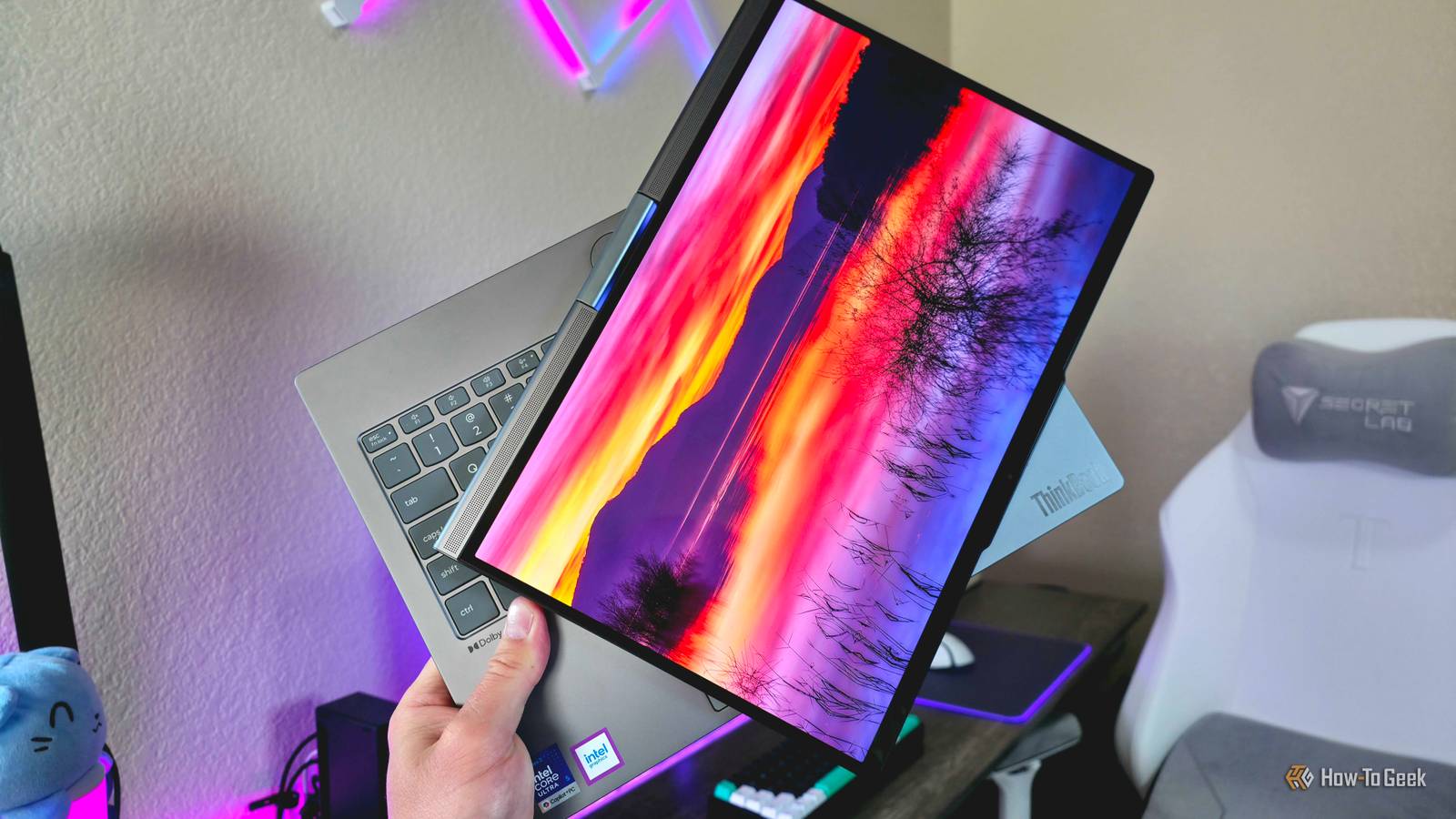
Published Nov 25, 2026, 5:30 PM EST I love that Lenovo keeps bringing concepts to life, but the ThinkBook Plus Auto Twist probably doesn't deserve your money. I need Lenovo to keep experimenting, even if you shouldn't buy this particular laptop Name a show or conference where technology and automotive companies gather, and you're likely to find a smorgasbord of cutting-edge concepts and fanciful experiments that normal consumers will never have the opportunity to buy, let alone use. Lenovo is one of the few companies that regularly brings at least a few of its most creative ideas to market, and many of those experiments manifest in the Lenovo ThinkBook Plus family. The most recent addition to the lineup is a laptop that attaches its display with a complex 2-axis motorized hinge, allowing the display near-complete vertical and horizontal freedom to follow you wherever you go. It's a fascinating idea, and Lenovo's iconic ThinkBook hardware is as solid as ever — but there are enough concerns and burning questions here that only a minuscule number of people should even consider buying this laptop. Lenovo ThinkBook Plus 14 (Gen 7) Auto Twist 6.5/10 Operating System Windows 11 CPU Intel Core Ultra 5 325 (8-core) GPU Integrated Intel Graphics RAM 32GB LPDDR5X @ 7,467 MT/s I'll be the first to praise Lenovo for continuing to experiment with interesting laptop designs and technologies, and I love that the latest ThinkBook Plus exists. The Auto Twist does have some intriguing ideas, too, and most of the core hardware is expectantly excellent — but that's not enough to forgive the half-hearted execution, higher price tag, and potentially compromised reliability. Ultimately, no one but the most affluent or passionate tech enthusiasts should realistically consider this laptop. Pros & Cons ThinkBook's industrial designs never fail to impress Bright, responsive, and versatile OLED display The 2-axis motorized display hinge can be cool You're paying extra for a few questionably useful features Display features are inconsistent Motorized hinge does not instill durability confidence About this article: Lenovo provided the ThinkBook Plus 14 (Gen 7) Auto Twist unit for this review. The company did not have any input into this article, nor did it see its contents prior to publication. Price and availability The Lenovo ThinkBook Plus Auto Twist is, at the time of writing, only available in the same configuration I reviewed, which retails for $2,199 with an 8-core Intel Core Ultra 5 325, 32GB of memory, and 512GB of storage. Apart from its display and memory, the ThinkBook Plus Auto Twist's specs feel decidedly mid-range, making its price stand out even more compared to something like the Lenovo ThinkPad T14 (Gen 7) I reviewed. It does make sense that you're paying a premium for the unique display features, and I have already seen the Auto Twist go on sale for as low as $1,899. Even then, that's a lot to pay for any laptop. Specifications Operating System Windows 11 CPU Intel Core Ultra 5 325 (8-core) GPU Integrated Intel Graphics RAM 32GB LPDDR5X @ 7,467 MT/s Storage 512GB PCIe Gen 4x4 NVMe M.2 2280 SSD Display (Size, Resolution) 14-inch, 16:10, 2880 x 1800 Display type OLED, 30-120Hz VRR, 500 nits (SDR)/1,100 nits (HDR), Dolby Vision & DisplayHDR True Black 1000, glossy, multi-touch Battery 75Wh, 100W USB-C charging Ports 2x Thunderbolt 4 (40GBps, DP 2.1, PD), 2x USB-A (10GBps), 1x HDM 2.1, 1x 3.5mm audio Dimensions 313 x 233 x 15.9-23.9mm Weight ⁓1,400g Form Hybrid w/ motorized display hinge Colors Luna Grey Audio 4x stereo speakers, 4x microphone array, Dolby Atmos tuning Webcam 10MP IR, electronic privacy shutter Connectivity Wi-Fi 7 2x2, Bluetooth 5.4 Starting Price $2,199 The Auto Twist doesn't have enough "auto" for me I see Lenovo's vision, but Lenovo didn't push the envelope enough Every Lenovo ThinkBook Plus is defined by its "gimmick," so I won't beat around the bush. This year, Lenovo released the Auto Twist with a 2-axis motorized hinge that allows the display to open/close vertically and rotate horizontally. Combine that with the 10MP infrared-supported camera to track your position, quad-microphone array, and dual-speaker soundbar, and you get the ultimate display for presenters and movie watchers that can move with you... in theory. In practice, the experience leaves a lot to be desired. At least the issue doesn't lie with the screen itself. Lenovo outfitted the seventh-generation ThinkBook Plus with a 2.8K, 120Hz, 14-inch OLED panel that's delightfully crisp, smooth, responsive, and color accurate. It also gets plenty bright for practically every lighting condition, and the viewing angles are strong enough to deal with all the odd positions this display is liable to be in. There's also an ambient light sensor for automatic brightness and color correction, but I didn't notice it kick in nearly as often as it probably should have. As for what this laptop's headlining feature is capable of, there's a modest list of features. You can press the side-mounted power button to have the Auto Twist automatically open itself; you can press a hotkey in the function row to toggle "auto tracking," letting the Auto Twist follow your movements to keep the screen centered on you; you can open the Plus Center application to enable voice tracking with various commands, register yourself as a user with facial recognition so the Auto Twist will only track you, and access a handful of settings; you can manually move the display into a variety of positions. Vertically, you get about 180 degrees of adjustment, which is perfectly fine, but horizontal rotation is oddly limited — just over 180 degrees to the left, but only around 90 degrees to the right, so you also have to keep in mind what direction you move around the Auto Twist. Either way, you get three primary postures: traditional laptop mode, a "share" mode that faces the screen outward, and tablet mode that inverts the display and closes it. There's no way to switch between modes with the press of a button, but you can use the voice commands with the "Hi, Tiko" wake word to do so... which is convenient when they actually work. Even when they do, there can be odd glitches, like the Auto Twist not reorienting the display properly when you go from tablet mode to laptop mode. When you rely on the inconsistent auto-tracking feature, be prepared for the Auto Twist to regularly lose you before its slow, choppy motorized hinge can keep up — and tracking only worsens in low-light settings. The setting to have the Auto Twist close itself when shutting down or going into hibernation never reliably worked, either. More fundamentally, there's a real concern about long-term durability, and you'll regularly have to manually manipulate the Auto Twist's display, which is always accompanied by an off-putting whirring. Even when closed, the horizontal rotation is never locked, so the lid can shift and slide over the keyboard. Outside the display, it's (almost) all classic ThinkBook This laptop doesn't bet everything on its display gimmick The motorized display does add some weight and thickness, but Lenovo kept the penalty down while also delivering the ThinkBook experience we all know and love. The industrial aluminum chassis feels rock solid apart from the motorized hinge, and the weight is well-balanced despite the heavier display. You get a healthy array of ports for all your connectivity needs, including two Thunderbolt 4 ports, two full-sized USB-A ports, and an HDMI 2.1 port. I do wish Lenovo had put one Thunderbolt port on the right for more convenient charging and docking, but that's a minor complaint. The keyboard is typical Lenovo excellence with an intuitive layout and comfortable typing action, but the backlighting isn't particularly strong, and the function row keys are tiny to accommodate the two additional hotkeys for the display features. The mechanical touchpad is also smaller than many other 14-inch laptops because the display hinge shifts everything down. Even with its compact dimensions, though, the touchpad is responsive and premium-feeling. I appreciate having a fingerprint sensor in the power button (in addition to the Windows Hello facial recognition), but the power button lies almost flush with the laptop frame, so I constantly missed the target when trying to sign in. That's the end of my nitpicks, fortunately, as Lenovo delivered with its accurate and sharp 10MP webcam, the microphones are clear and do a good job of capturing your voice even from a distance, and the quad speakers (split between the base and display) deliver a wide, full soundscape for a 14-inch laptop. Aggressively mid-range internals can hold you back You're paying a lot for the display, not the performance or endurance Aside from 32GB of quick, soldered memory, the ThinkBook Plus Auto Twist boasts a rather unassuming specs sheet. It's powered by an 8-core Intel Core Ultra 5 325, and the single M.2 2280 slot is filled with a fast-but-small 512GB SSD. That's not a lot of power for $2,000, but the ThinkBook Plus admittedly does run incredibly smoothly with typical workloads. To get the numbers out of the way, the Lenovo ThinkBook Plus (Gen 7) scored 2,388 (Single), 11,445 (Multi), and 22,981 (GPU) in Geekbench 7, and 468 (Single) and 2,559 (Multi) in Cinebench 2026. Those are respectable numbers for this hardware, and Lenovo's thermal system does a good job keeping the Auto Twist cool under load with reasonably quiet fan noise. Two additional cores over something like the HP OmniBook 5 14 (2026) I reviewed definitely make a difference, and the Auto Twist's 4-core GPU is capable of casual gaming, hitting 48FPS in Forza Horizon 6 at 1200p, on Low, and with Intel XeSS enabled. It may not be impressive at this price point, but I'm not disappointed by this laptop's overall performance. With a beefy 75Wh battery and impressive 100W USB-C charging, the ThinkBook Plus Auto Twist has more promising on-paper endurance than performance, and it can deliver a consistent 9–12 hours of real-world usage... as long as you're not using its unique display features. Turning on facial tracking, using voice commands, and otherwise engaging the motorized display takes an alarming chunk out of the Auto Twist's battery, cutting down expected life by as much as 4–6 hours in my testing. That's not altogether unexpected, but it is yet another compromise you must accept if you want a laptop with a 2-axis motorized display. If you are that person, though, I have to ask: who are you? You should buy the ThinkBook Plus Auto Twist if: You're willing to pay extra for a quirky laptop no one else has. You can see yourself regularly using the unique display features. You love being on the experimental side of technology. You should not buy the ThinkBook Plus Auto Twist if: You want the best performance bang for your buck. You need guaranteed durability for years to come. You don't see the point of the motorized display. When I review a product, I ask myself who the product is for, and how well the product fulfills its role for that person. The Lenovo Googlebook 15 was lambasted in my review because — despite generally fantastic hardware — Googlebook OS utterly fails to fulfill its role for the people at whom Googlebooks are aimed. For the Lenovo ThinkBook Plus 14 (Gen 7) Auto Twist, there are plenty of hiccups with the execution, but the greater concern is that it's difficult to even pinpoint who is meant to buy a laptop with a motorized display that can rotate to follow you. Previous ThinkBook Plus ideas had more merit. A secondary E-Ink display is perfect for habitual note-takers; a rollable display is a dream come true for hardcore multitaskers. The situations where you may want the Auto Twist are few, far between, and nebulous enough that the various compromises that come with this display are nearly impossible to swallow. That's before you consider that — like all previous ThinkBook Plus experiments — there may never be a second-generation Auto Twist to address hardware flaws, nor is Lenovo likely to invest in post-launch firmware and software updates to fix issues and add new features. All that to say... I love that this exists. I love that you can actually buy it. I love that Lenovo is experimenting with the decades-old laptop form factor so openly. I even love plenty of things about this laptop — it's incredibly cool. I just can't recommend that you actually buy it unless you're at least as nerdy as I am (and likely far more wealthy). Lenovo ThinkBook Plus 14 (Gen 7) Auto Twist 6.5/10 Operating System Windows 11 CPU Intel Core Ultra 5 325 (8-core) GPU Integrated Intel Graphics RAM 32GB LPDDR5X @ 7,467 MT/s I'll be the first to praise Lenovo for continuing to experiment with interesting laptop designs and technologies, and I love that the latest ThinkBook Plus exists. The Auto Twist does have some intriguing ideas, too, and most of the core hardware is expectantly excellent — but that's not enough to forgive the half-hearted execution, higher price tag, and potentially compromised reliability. Ultimately, no one but the most affluent or passionate tech enthusiasts should realistically consider this laptop.
Lenovo ThinkBook Plus 14 (Gen 7) Auto Twist review: Amazing that it exists, but you shouldn't buy it
Full Article
Original Source
Read the full article at Howtogeek →KhanList aggregates and links to publicly available news content. We do not host full articles from third-party sources. Always verify important information with original sources.