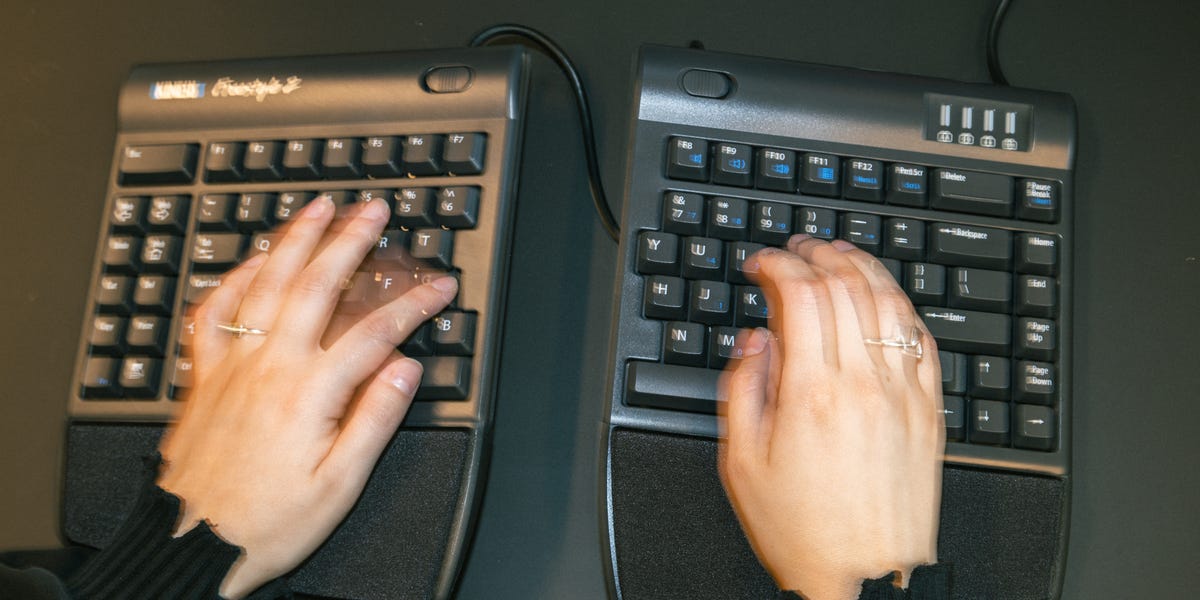
6 min readThe Kinesis Freestyle2 was my introduction to split keyboards. With a split chassis, splay (rotating each half inward or outward), and tenting, it offers three ways to tailor its position to better conform to your body, rather than the other way around.Split keyboards feel like a big change to most users. Not only do they look different, but once you get all the features going, your hands will rest in a very different position than they normally would while typing. While the Freestyle2 doesn’t pull any major punches, or feature software that guides you into that transition, its simplicity and modular design make it an appealing option if you’re just getting started with split keyboards.This was the first (of a few) split keyboards I’ve tested over the past few months, after graduating from a few beginner-friendly ergo models. While there is a real learning curve, it didn’t take me too long to figure it out, and I definitely noticed a difference in how my upper body felt after a long day of typing once I did. While that’s far from scientific, I think it’s a good sign that the design’s effective and may be meaningful for office workers looking to walk away from the office with a little less (muscle) tension.ProsComfortable to useThree customizable lifter levelsConnector piece to convert back to standard layoutDoesn’t require a long adjustment periodConsWired design keeps you tethered to your deskKey SpecsPowerUSB-AConnectionWiredDimensions19 x 12.5 x 3.5 in.Extra FeaturesKeyboard connector, cushioned palm supports, risers for tentingWhat Exactly Is a Split Keyboard?Split keyboards are an advanced form of ergonomic keyboard, designed to mitigate the long-term impact of typing by encouraging a more natural typing position that doesn’t strain your muscles over time.Traditional keyboards force you to squeeze your shoulder blades together to bring your hands to the keys, and twist your forearms so your hands face down. The motions don’t take any meaningful toll on your body over the course of an hour, a day, or even a month. But over decades, these motions can strain your muscles, which plays a role in developing musculoskeletal disorders like carpal tunnel syndrome. They also “tent,” sitting with the keys out to the sides, so you don’t have to twist your wrists.The split design minimizes that impact by allowing you to reposition its pieces, separating them so you don’t have to bring your arms together to type.While it seems like a huge change compared to the keyboards we’re used to, the Freestyle2 sits comfortably between more introductory ergo keyboards, including the Logitech Ergo K860 and Logitech Wave Keys, which offer some more ergonomic features, but compromise on others, and more specialized ortholinear and columnar keyboards that completely rearrange key placement, requiring you to completely retrain how you type on them.The Freedom to Stop ReachingWinston ZhouI gradually separated the halves until my hands and forearms aligned with my shoulders, elbows resting comfortably at my sides.At first glance, the Freestyle2 looks a lot more complicated than it actually is. Instead of a single block, the keys are split across two separate halves, connected by a flexible cable. You can spread the two pieces up to 9 inches apart (or up to 20 with the optional extended separation model).The keyboard itself is relatively understated. It has a slim profile for a split design, and it didn’t take up any more space on my desk than a standard keyboard. The halves are made from lightweight plastic, so they’re easy to move around. The keyboard is all black, and doesn’t have backlighting. It’s fair to say this keyboard prioritizes function over aesthetics.Despite its unconventional appearance, the Freestyle2 didn’t force me to completely relearn where every key lives. (Though I did initially struggle with having “B” and “N” keys on both halves of the board.) I started with the two halves positioned fairly close together, then gradually widened the gap over the course of a week until they aligned naturally with my shoulders. Since this was the first fully split keyboard I tried, I felt like easing into the separation would make acclimating as seamless a process as possible. Ultimately, the layout is mostly the same as any other keyboard. The “tricky part” is simply a matter of retraining muscle memory. I was typing comfortably within a day, and my speed was nearly back to normal within two.As for whether it actually relaxed my muscles: The difference was subtle at first, but after several long writing sessions, I could feel that my shoulders were less tense at the end of each workday. And when I returned to typing on my laptop keyboard, the difference was even more apparent. I actually felt cramped bringing my arms together.Familiar Keys Feel FineThe Freestyle2 features low-profile keys with dome-style membrane switches. (In other words, it’s not a mechanical keyboard.) I know the keyboard heads won’t be happy: You don’t get the crisp response or the satisfying “thunk” you expect from mechanical keys, but I was fine with their quiet, soft touch because I was never overly aware of my own typing, which is what I ultimately want. And that also means this keyboard is very office-friendly. You aren’t going to annoy a coworker with any loud clacking.The Accessories Elevate (Literally)The Freestyle2 can be purchased bare-bones as just the keyboard and tether cable, but many of the ergonomic benefits come from optional attachments that add additional customization. The core keyboard separates to unclench your shoulders, but you need to attach a lift kit to engage tenting, which pitches each half of the keyboard on its side, up to 15 degrees, to minimize wrist and forearm twisting.Winston ZhouThe lifters tent the keyboard 5, 10, and 15 degrees.Typing on the tented keyboard requires more of an adjustment than learning to use the split sides because your hands angle differently than they do with a flat keyboard. During testing, I started typing on the Freestyle2 in a standard, flat configuration to start, then played with the lifters until I found an angle that best matched where my elbows, arms, and wrists naturally fell. I’d recommend new users do the same: It helps make the adjustment period a little smoother.Likewise, optional palm rests add additional cushioning for those who spend the majority of their workday at a desk, and they give your wrists and arms a comfortable resting place in the tented position.I consider the lift kit and palm rests to be absolutely essential for the keyboard, which is why I recommend the $150 “complete” version of the Freestyle2. That said, there is a more basic $100 model that doesn’t come with the attachments, and you can buy them after the fact for about $50.I did have one technical issue. This is a wired-only keyboard, which connects via USB-A. Split keyboards are pretty big, so it probably shouldn’t be an issue for most folks. (You aren’t carrying this thing around with you.) Still, anyone hoping for a cleaner or hands-free setup may be a bit disappointed.Who Should Buy the Kinesis Freestyle2 Ergonomic Keyboard?The Kinesis Freestyle2 proves that ergonomic keyboards don’t have to be overly complicated to make a difference in how you work. Combined, the fully split design, tenting kit, and cushioned palm rests offer a level of comfort that standard and curved keyboards can’t quite match, without radically altering the typing experience.Admittedly, it is an investment, both in terms of time and money. At over $140, the Freestyle2 is far from the most expensive ergo keyboard, but you’re spending about as much as you would on a mid- to high-end mechanical keyboard. Split keyboards with those luxuries are out there, but cost considerably more. (Case in point: Kinesis makes the gaming-focused Freestyle Edge RGB Plus, with RGB lighting and mechanical keys with removable switches.)Still, I think this is a great fit for writers, programmers, office workers—anyone who wants to feel better after spending a full day at a desk. If you’ve been curious about fully split keyboards but worried they might be difficult to adapt to, the Freestyle2 is a good starting point for those ready to move on from a traditional ergonomic keyboard and build a desk setup that’s better tailored to the way they naturally work.Shop the Kinesis Freestyle2 Ergonomic KeyboardThese Ergonomic Keyboards Are Also Worth a LookPerixx Periboard-512Kinesis Advantage360Kinesis Freestyle Edge RGB PlusAmber is a Reviews Editor with bylines on Popular Mechanics, Runner’s World, Bicycling, and Best Products sites. Specializing in kitchen gadgets, small appliances, lifestyle, and consumer tech, she brings hands-on testing and a detail-oriented approach to every review. In her free time you can likely find her trading trinkets at an EDM festival, searching for hidden gems at thrift stores, or cuddling with her two cats.Mike Epstein is a Senior Commerce Editor at Hearst Enthusiast Group, producing reviews for buying guides Popular Mechanics, Runner’s World, Bicycling, and Best Products. Prior to joining Hearst, he was a video game and technology critic for over 10 years, with bylines at IGN, Gamespot, Variety, Lifehacker, Kotaku, GamesRadar, Flavorwire and Digital Trends, among others. Now, he’s a jack of all trades, helping reviewers share everything they know about all kinds of technical gear, from snowblowers, to running shoes and bicycles, and every kind of gadget imaginable.
Kinesis Freestyle2 Split Keyboard Review: A Focused Design Makes it Easy to Loosen Up
Full Article
Original Source
Read the full article at Popularmechanics →KhanList aggregates and links to publicly available news content. We do not host full articles from third-party sources. Always verify important information with original sources.