
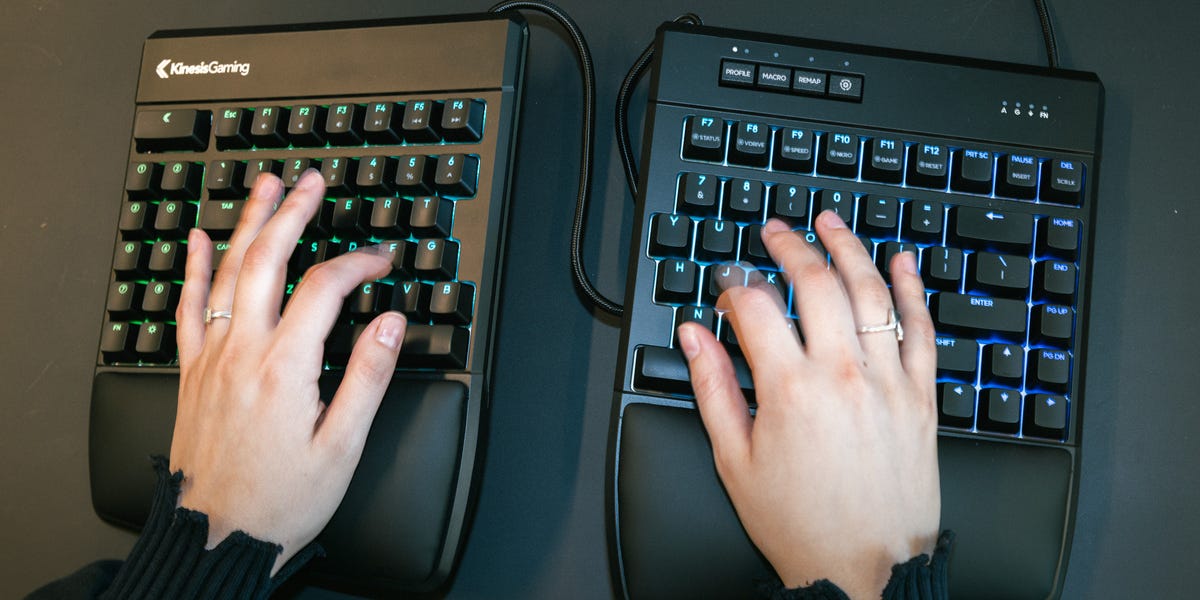
6 min readWhen I first tested the Kinesis Freestyle Edge RGB Plus, I was less focused on its gaming credentials than on whether it could make the hours I spend typing every day more comfortable. That may seem odd, given that Kinesis touts it specifically as the first full-split ergonomic keyboard for gaming, but it turns out that what’s good for a gamer is good for pretty much everybody.That’s because the biggest thing that makes the Freestyle Edge RGB a “gaming” keyboard is that it features mechanical switches, which improve how it feels to push the keys, whether you’re gaming or typing. Mechanical keys are common in conventional high-end keyboards, but rare among the most popular ergonomic models. That’s a shame, because this keyboard feels better to type on than most of the ergo keyboards I’ve tested, including Kinesis’s standard Freestyle2 split keyboard.And on the ergo side, you have a fully customizable split design with tenting and cushioned armrests, providing a natural position as you play (or work, in my case). Regardless of what you’re doing, this is a luxurious upgrade for ergo keyboard fans who want the best ergonomics without compromising on the comforts you get with a luxury keyboard.ProsComfortable layoutRGB backlightingComes with lifting kit includedConsDoesn’t have a numbered keypadKey SpecsPowerUSB-AConnectionWired (the Bluetooth is available for purchase)Dimensions10.25 x 15.5 x 1.25 in.Extra FeaturesCushioned palm supports, risers for tenting, RGB backlighting, hot-swappable key switches, Mac keysSplit Design Affords Comfort and FlexibilityThe Freestyle Edge RGB Plus is a fully split tenkeyless keyboard, with a two-piece body connected by a 20-inch braided cable. Splitting the keyboard in half allows you to spread the keys apart so you can type without spreading or tightening your shoulder blades. (Of course, it also allows you to incrementally build your way up to a natural typing setup if you’re new to ergo keyboards.)Like Kinesis’s other high-end split keyboards, the Edge RGB Plus also comes with a lift kit, which allows you to “tent” the keyboard, raising the inside edge of each side so you don’t have to twist your wrists. Lastly, it includes cushioned palm rests that keep your arms comfortable without flexing. All combined, this design does just about everything an ergo keyboard can do to keep you from straining your muscles over the course of a work (or game) day.Winston ZhouThe fully split keyboard is tethered together by a braided cable, so you can reposition depending on your needs.The Freestyle Edge RGB Plus wasn’t my first experience with a fully split keyboard, so I adapted to its distinctive typing experience with relative ease. My experience with the Freestyle2, my first full split, is probably more in line with what new Edge RGB owners will experience as they transition to a more ergonomic setup.I experimented with putting the halves at different distances for the first few days and found a comfortable configuration within a week. These days, I keep the keyboard sections 8 inches apart, and though it might seem far if you’re used to a cramped laptop keyboard, it’s where my hands and forearms are able to stay straight instead of angling inward, keeping my elbows comfortably at my sides.As for tenting the keyboard, the lifters can raise the keyboard 5, 10, or 15 degrees. You can also use it completely flat. (It makes things easier when you’re first starting out.) I’d recommend working your way up from 5 to 10 to 15 to find the right angle for your body.As you might expect, it takes some getting used to. Your muscle memory expects certain keys to be in specific places, and a fully split layout can briefly make even familiar shortcuts feel a little strange. But because the key layout itself is pretty conventional, I didn’t notice a steep drop-off in my typing speed. There were errors here and there, but after a couple weeks I found a good flow without having to look down at the keyboard constantly.Satisfying (But Not Distractingly Loud) Mechanical KeysThere is a whole subculture devoted to mechanical keyboards. And making the switch from the Freestyle2 to the Freestyle Edge RGB helped me see why people care so much about mechanical keys, which have a physical mechanism that “actuates” (or activates) the key when you press it. They have a satisfying amount of resistance that gives confirmation that my keystroke has registered.Winston ZhouThe mechanical keys have a bump when you press down on them to let you know your keystroke has registered.The Edge RGB Plus features either tactile or linear Gateron Pro switches. Tactile keys generally have a firmer press, which makes them better for typing and everyday computing. Linear keys feel a bit more like a “hair trigger,” which helps in games that require twitch reflexes, like first-person shooters.I tested the tactile version and could immediately feel that the mechanical keys had a smoother response than the Freestyle2’s membrane switches. Each press felt more intentional, but the keys weren’t resisting my fingers, and keystrokes didn’t feel stiff or heavy. There’s a soft, sticky mechanical clack that is relatively muted and doesn't feel distracting like actual clicky keys.It’s the kind of difference you might not think about, but you’ll notice it if you type for hours and hours every day. Since the ergonomic keyboard field is fairly small, having mechanical keys feels like a huge advantage for the Edge, whether or not you’re using it for gaming.Whatever you pick, the Edge RGB Plus has hot-swappable switches, which means you can replace the mechanisms underneath each key with another set if you want a different feel. Obviously, this also comes in handy if you want to hold on to the keyboard for as long as possible: Break a switch? No problem. Just swap it out.Built for Gamers, Useful for EveryoneBeyond mechanical switches, the Edge RGB has a set of fun and (sometimes) useful gaming features. True to its name, it features per-key RGB backlighting, which you can customize to whatever color you want, or use custom lighting sequences. I enjoyed using them, and they’re subtle enough that they didn’t feel distracting in a well-lit office setting.You can save up to nine color schemes on the keyboard’s internal storage, as well as custom macros, or keyboard shortcuts, which are another gaming keyboard staple. Kinesis allows you to tune these settings using onboard controls or with its SmartSet configuration app on Windows or macOS.It also features a “Game Mode,” which disables keys that might interrupt your game (like the Windows key), and N-key rollover, a gaming-forward feature that makes sure every key activates, even if you press multiple keys at once. These are very basic functions available on most modern gaming keyboards, to the point that we wouldn’t normally mention them, but they are noteworthy on an ergonomic keyboard, since they rarely cater to gamers.Premium Keyboard, Premium PriceAt $199, the Freestyle Edge RGB Plus isn’t exactly inexpensive, but you get the complete ergonomic keyboard package. This is a fairly specialized keyboard, and honestly doesn’t feel pricey in that context. (My editor said that he’s tested far more expensive keyboards, which didn’t have a lift kit or specialized layout.)The only feature that feels like it’s missing, considering the price, is wireless connectivity. Competitive gamers often prefer wired keyboards, but the wire may feel restrictive for the average person. And at $200, it feels like Bluetooth should at least be an option.Who Should Buy the Kinesis Freestyle Edge RGB Plus?That’s a pretty small caveat, though. Ultimately the Kinesis Freestyle Edge RGB Plus has a lot to offer, especially when you look at the wider field of ergonomic keyboards. Even for someone who isn't a PC gamer, the Freestyle Edge RGB Plus is very comfortable to type on for long stretches. And while its ergonomic features come with a learning curve, the benefits are among the best I’ve found.Given the price and the complexity of the ergonomic features, this is not where I’d recommend new ergo keyboard users start their journey. Using a unibody model like the TK first makes the full split easier to handle. And even the Freestyle2 feels a little more approachable, even if it lacks the same luxury features. But once you know that the split keyboard life is what you want, this is what I’d buy to get the very best typing and a great ergonomic setup.Shop the Kinesis Freestyle Edge RGB Plus Split KeyboardMore Ergonomic Keyboards We RecommendAmber is a Reviews Editor with bylines on Popular Mechanics, Runner’s World, Bicycling, and Best Products sites. Specializing in kitchen gadgets, small appliances, lifestyle, and consumer tech, she brings hands-on testing and a detail-oriented approach to every review. In her free time you can likely find her trading trinkets at an EDM festival, searching for hidden gems at thrift stores, or cuddling with her two cats.
Kinesis Freestyle Edge RGB Plus Split Keyboard Review: Made for Gamers, Great for Everyone
Full Article
Original Source
Read the full article at Popularmechanics →KhanList aggregates and links to publicly available news content. We do not host full articles from third-party sources. Always verify important information with original sources.