
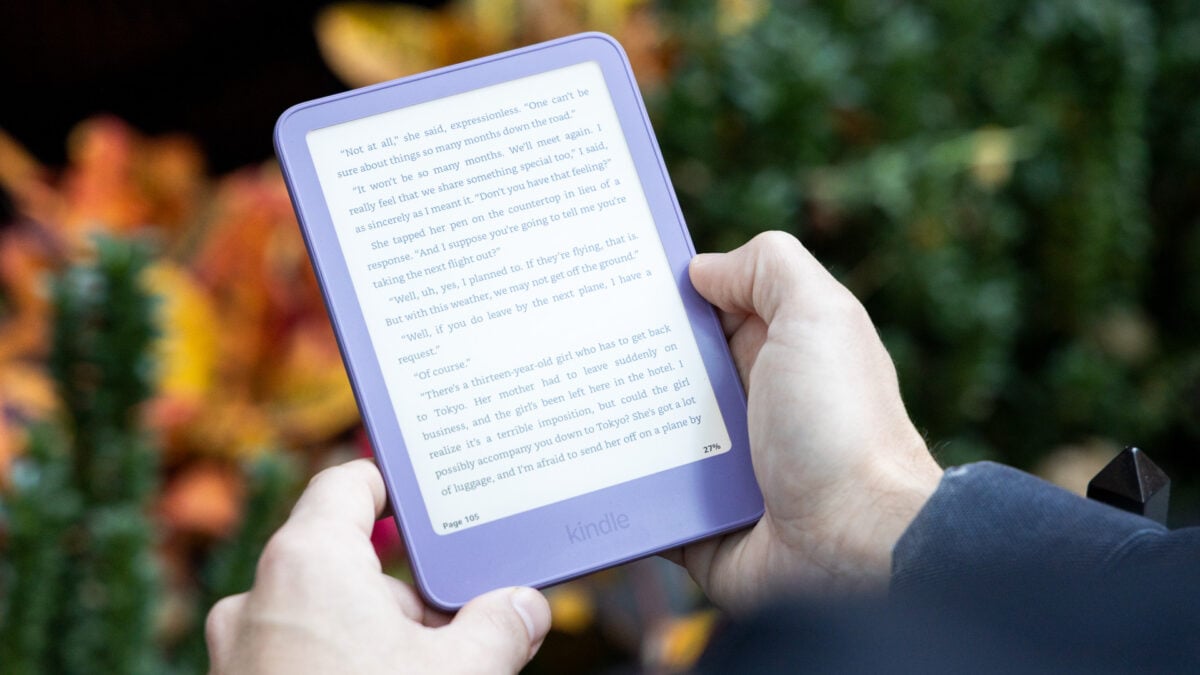
Year after year, Amazon adds just a little something to each of its existing Kindles to make the popular e-reader enticing to both existing users and potential new ones. This year the big upgrade is a screen that sits flush with the Kindle’s body—all previous models had a dip between the two, prone to collecting crumbs and other unwanted detritus. The new body is quite nice; a quick IRL look at this updated model makes it immediately clear that it’s the prettiest Kindle ever. (The new “Ube” color, which Amazon provided to Gizmodo for this review, is particularly cute.) You might assume the smaller bezels here would make accidental screen taps more frequent, but Amazon’s thought ahead here, and resting your thumbs on the edge of the screen won’t actually trigger page turns. The 2026 Kindle is a great entry-level e-reader, perhaps the most accessible on the market—and the ad-free version’s $170 price is pretty standard for a device of this size. But it’s also plagued by an inherent issue that’s dogged Amazon’s popular e-reader line for many years now: it’s boring. Kindle (2026) The 2026 Kindle is a lightweight, streamlined reading experience, but it comes with all the limitations of its predecessors. Sleek, lightweight build Display is excellent for long reading sessions Easy-to-use UI Good battery life No warm/cool adjustable light Almost identical internal specs to previous models Amazon ecosystem buy-in Nothing innovative to enjoy Brand new body © Raymond Wong / Gizmodo The 2026 Kindle is almost certainly the best basic Kindle Amazon has ever made. For those who have owned or used a Kindle before, it will feel very familiar, though Amazon added a few simple design tweaks that make it just a bit sleeker than before. And not just in looks, either. Amazon downsized the new Kindle by just a tad—enough to make its weight match its new body. The new Kindle weighs in at 140g, about 18g lighter than the 2024 model. That might not sound like much on paper, but this thing really is super light, especially without a case on. For reference, an iPhone 18 Pro weighs about 211g, while the iPhone Air weighs 165g. This is the kind of device you can throw in your bag and not even realize it’s there. © Raymond Wong / Gizmodo It’s also just a bit shorter and narrower than its predecessor, though it keeps the same 6-inch screen. While this will make it easier for some readers to stow this in a small bag for on-the-go-use, I did find it to occasionally feel a little too small in my (not-very-large) hands. Whether holding the Kindle with one hand or two, I sometimes had to adjust my grip away from what felt most natural so that my fingers wouldn’t rest on the screen. I could see a world where my natural grip would evolve if I used the Kindle for more than a couple of weeks—but all this to say, beware the small bezels, large-handed readers. I found that adding the new fabric-like folding Kindle Cover definitely helped with any grip issues I had, though that also adds $40 to your total investment here. The new fabric-like Kindle Cover. © Raymond Wong / Gizmodo Like the 2024 model, the new Kindle charges via USB-C (fairly quickly, at that), and Amazon says it can last about six weeks on a single charge. This is rated on about 30 minutes of usage per day with lower brightness settings and wireless connections turned off. In my two weeks of testing, in which I read closer to an hour per day with the brightness set towards the high end—and I didn’t turn my Wi-Fi off—I ended up with about 30% of my battery life remaining. It’s plenty for the average reader. © Raymond Wong / Gizmodo The new Kindle’s strongest suit is really how easy it is to read on. The screen itself is very similar to the one used on the 2024 Kindle, which means you’ll be reading at 300 DPI. Amazon says it has better contrast and deeper blacks, and while in most instances I didn’t notice this change, I did really enjoy how text renders on the screen. This, really, is the most important part of any e-reader, at least in my book. I want to be able to read for hours at a time without straining my eyes, and the Kindle very much makes that possible. And I did notice that—as Amazon claims—page-turning is indeed much quicker than in previous Kindles. The company says the speed difference is up to 30%, and while I don’t have the means to test that, I will say this is one of the fastest e-reading experiences I’ve ever had. E-readers are finally catching up to mimicking how it feels to flip through a compelling novel as fast as possible to find out what happens next. See Kindle at Amazon Same old limitations © Raymond Wong / Gizmodo My only qualm with readability here is the adjustable front light. It’s plenty bright, and I never ran into any issues with seeing the screen, whether in harsh overhead light or a dim bedroom. But here’s the thing: the front light doesn’t have a warm setting. It’s cold light or nothing. This definitely lends a more digital feel to the reading experience. Of course, you could always buy the Kindle Paperwhite if you want a warm light—but this does, in 2026, feel like a basic quality-of-life feature that should be included in the base model, too. The light also doesn’t automatically adapt to your environment, so you’ll need to tap through a couple of menus to adjust it on the fly. My other issue with the hardware here (and it is a very personal one) is that there are no physical page-turn buttons, which has been the standard on Kindles for many years now. But what bugs me is that Amazon did finally release a case this year that does add usable buttons—just not for the base Kindle. It’s only available for the more expensive Paperwhite and Colorsoft models, and it’s an extra $80 at that. © Raymond Wong / Gizmodo The Kindle software is exactly the same as what’s shipped on past models, so if you’ve owned a Kindle before, you know what you’re getting here. You have a Library section with all your e-books, a Home screen that suggests various other e-books for you to purchase, and well… that’s about it. You can also browse your Goodreads shelves, access a very basic web browser, and modify settings. There’s also not a ton going on with the reading software here—which is, I’d argue, for the best. You can highlight text, look up words in the dictionary, add notes, bookmark pages, and adjust font size and themes. The Kindle’s reading experience has always been quite streamlined, and it’s better off for that; the focus is on the reading itself. © Raymond Wong / Gizmodo Another factor to consider—and this is with any Kindle, not just this one—is that by far the easiest way to build and manage an e-book library on one is by simply purchasing books through Amazon. (Or, if you’re really reading a ton, by using the subscription Kindle Unlimited program.) The only storefront available on the Kindle itself is Amazon’s, which incentivizes buying books from the company, and the process of putting other e-books on a Kindle is not the most intuitive. You can’t just drag and drop .epub files onto a Kindle like you would on other e-readers—though it is possible to add those to your device via the web-based Send to Kindle feature. There’s no built-in Libby or Overdrive app, either, so you can’t check library books out directly on your Kindle. © Raymond Wong / Gizmodo Basically, if you don’t want to buy e-books from Amazon, you’ll have to use a computer (and some finagling) to move your library onto a Kindle. Amazon isn’t exactly locking you into its ecosystem here, but it is greatly incentivizing using it by making it extremely easy to do so. It’s also important to note that most e-books purchased via Amazon use Digital Rights Management (DRM) to ensure they can only be read on your device. This essentially renders those purchases unusable on devices made by other companies. It’s something to keep in mind if you think you might ever leave your Kindle for another e-reader, or even if you want to be able to read new purchases across multiple devices now. The market is innovating; Amazon’s not © Raymond Wong / Gizmodo All told, the new 2026 Kindle 6-inch is a solid, if predictable and kind of boring, e-reader. If you’re looking for a lightweight e-reader with a streamlined, fast reading experience without many bells and whistles, this is the perfect e-reader for you. It’s admittedly not a huge upgrade from the 2024 Kindle (other than the body, its specs are nearly identical), but older Kindle owners looking for something new will find a lot to love here. © Raymond Wong / Gizmodo Those looking for something that plays more with form factor or features—or that just offers more flexibility in library management—won’t find all that much to be excited for here. The new Kindle looks nice and is extremely easy to use, but Amazon’s not innovating here at all. That can be a tough sell when companies like Boox and reMarkable (amongst many others) are finding new form factors and features to keep their e-readers interesting. It doesn’t help matters that the basic Kindle is now $40 more than the last one was at launch—actually, they both are, after Amazon hiked prices up last summer. See Kindle at Amazon
Kindle (2026) Review: Flush and Fine as Ever
Full Article
Original Source
Read the full article at Gizmodo →KhanList aggregates and links to publicly available news content. We do not host full articles from third-party sources. Always verify important information with original sources.