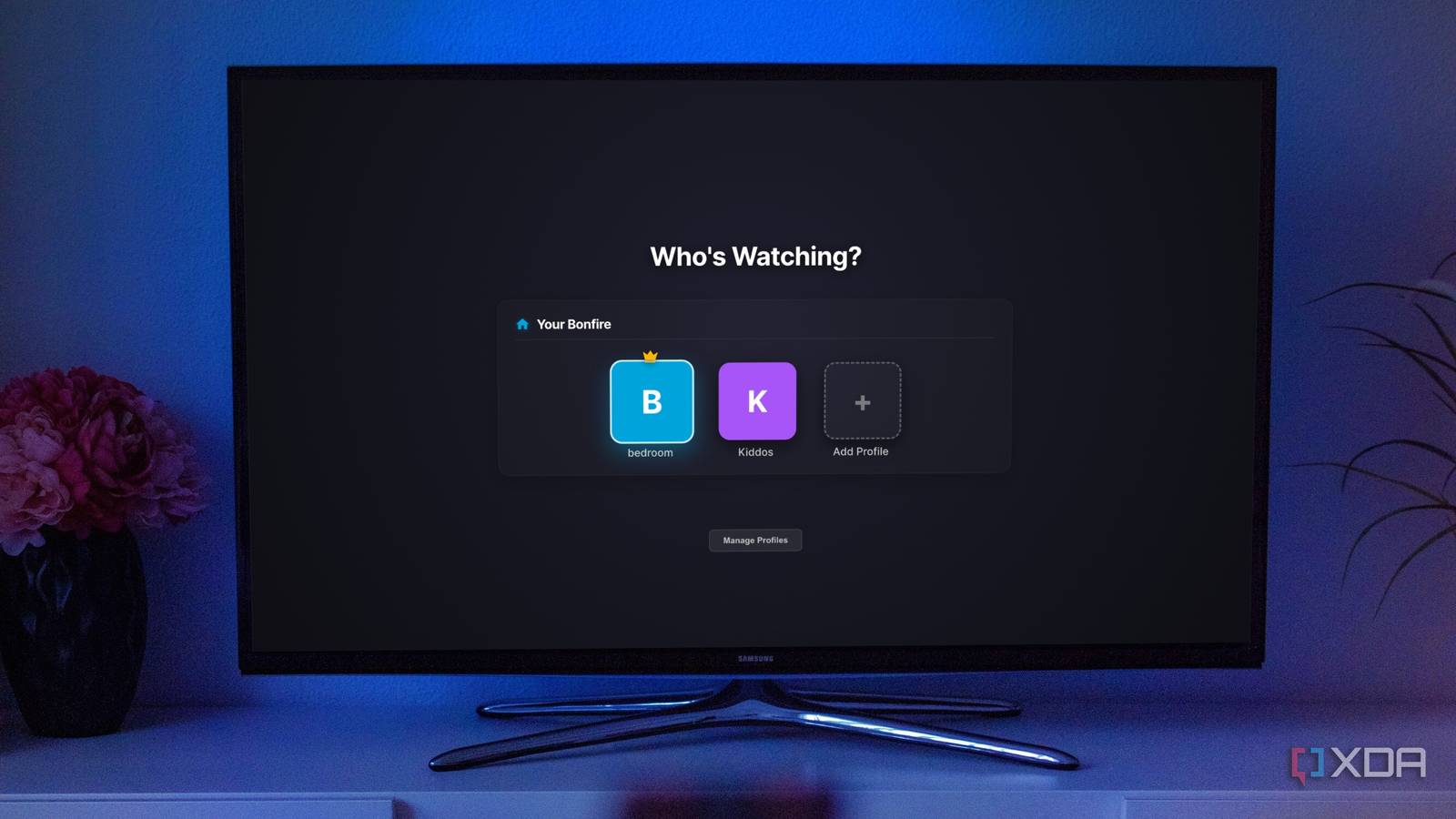
Published Aug 2, 2026, 3:00 PM EDT Jeff's been involved in the IT industry since before the Internet and spent more than 20 years working in technical support, system administration, network administration, and consulting roles. He holds an undergraduate degree in English, a Master's degree in English with a focus on professional writing and editing, and another Master's degree in Computing & Information Systems. After teaching university English and computer science for a few years, Jeff launched his writing career. He's written for Macworld, Tom's Hardware, groovyPost, The Mac Observer, and more before beginning here at XDA. Jellyfin gives server owners a lot of control over individual users, but the way those users are presented still feels strangely formal for a media server running in someone’s house. Everyone gets a separate account, even when they’re sitting in the same living room and watching on the same television. It works, and I used that system myself when I needed to keep part of my library off shared screens, but it always felt like more account management than the situation called for. Bonfire/JellyProfiles fixes that by placing several isolated profiles under one Jellyfin account, which is much closer to how people actually expect a shared streaming service to behave. Separate Jellyfin accounts solve the wrong household problem User management works until somebody reaches the shared television Jellyfin’s existing user controls are genuinely useful. An administrator can limit library access, set parental ratings, restrict remote connections, and keep each user’s watch history separate. None of that is the problem. The problem is that Jellyfin treats every person as a completely separate login, even when several of those people are sharing one television and one remote. The usual answer is to create a Jellyfin user for everyone in the house. Each person then signs in to that account separately, which may involve picking a username, entering a password, or using Quick Connect. That isn’t especially painful on a laptop or phone that stays signed in for months at a time. It feels much clumsier on a television, where changing viewers can turn into a small login process before anyone has even decided what to watch. I ran into a version of this when I wanted to stop one part of my Jellyfin library from appearing on shared devices. A second user account solved the access problem immediately, so I can’t pretend Jellyfin gave me no workable option. It also left me with another account, another password, and another identity to manage for what was basically one privacy setting. The fix worked, but it made the server feel more administrative than personal. Bonfire turns one login into several useful identities Each profile keeps its own history access and restrictions Bonfire/JellyProfiles takes the profile model people already understand from commercial streaming services and adds it to Jellyfin. One Jellyfin account can contain up to five profiles, each with its own viewing history, library access, and parental restrictions. Instead of fully signing out and starting over, you sign in to the main account and choose the person who’s watching. That sounds like a small interface change, but it removes the exact bit of friction that makes separate users annoying on a shared device. The separation behind those profiles is what makes the plugin more than a nicer account picker. A child’s profile can be kept away from certain libraries, while another adult’s profile can maintain its own Continue Watching row and episode progress. Two people can work through the same series without one of them constantly moving the other person’s place. Bonfire isn’t simply changing the avatar and name on a shared session, because it uses Jellyfin’s existing user system underneath. The plugin also includes enough protection to keep quick profile switching from weakening those boundaries. Individual profiles can use PINs, and the optional local network bypass can reduce the number of prompts people see at home. Profiles can also be limited to certain devices, which is useful when one profile belongs on a bedroom television but shouldn’t appear everywhere else. I expected a basic profile picker, but the access controls make Bonfire feel much more deliberate than that. The plugin makes Jellyfin feel less self-hosted Good interface design removes chores users stopped noticing entirely Running Jellyfin already comes with a certain amount of maintenance. I’m used to managing containers, libraries, permissions, metadata, and the occasional plugin that decides it needs attention at an inconvenient time. That’s part of the deal when you run your own media server. The rest of the household shouldn’t have to feel any of that when they sit down to watch something. Bonfire’s profile selector helps hide that administrative layer. It appears when a supported client starts, and it can be opened again when somebody else takes over the remote. Custom images and avatar colors make profiles easy to recognize without turning the screen into a list of server accounts. Directional-pad navigation matters too, because something designed for a television needs to behave properly with a remote instead of merely working in a browser. That change makes Jellyfin feel more natural on a shared screen. Without Bonfire, every person is treated as a separate server user who happens to log into the same hardware. With it, everyone starts from one familiar place and selects their own profile. The administrator keeps the permissions and account isolation underneath, while everyone else gets a cleaner way into the library. Bonfire still has some distinctly plugin-shaped rough edges Client support remains the largest obstacle to universal profiles The biggest issue is that Bonfire doesn’t work across every Jellyfin client. It supports Jellyfin Web, the official Android app, and Jellyfin Media Player because those clients use the web interface or wrap it closely enough for the plugin to appear. Native apps such as Swiftfin, Findroid, Jellyfin for Roku, Infuse, and several television clients need separate support. That leaves some very common living-room setups outside the profile system. That limitation matters in my setup because I use Infuse on an Apple TV. Bonfire can improve profile switching in a browser or in Jellyfin Media Player, but it can’t change the way Infuse handles Jellyfin users. A household using several client types could therefore have proper profiles on one screen and traditional account switching on another. The plugin fixes the problem in supported clients, but it doesn’t make the problem disappear everywhere. Bonfire modifies Jellyfin’s web client to add the profile interface. Docker containers and some Linux or Windows installations may block that change unless Jellyfin has permission to edit its index.html file. Check the plugin’s setup instructions before assuming the installation has failed. Installation is also a little messier than installing a typical server plugin and restarting Jellyfin. Bonfire patches Jellyfin’s index.html file so it can inject the profile interface into compatible clients. Docker containers and some locked-down Linux or Windows installations may not permit Jellyfin to modify that file automatically. The project provides commands to fix those permissions, but this is still the sort of extra step that reminds you the feature is being added from the outside. Those limitations strengthen the case for native support The plugin already proves the underlying idea works well Those compatibility gaps don’t convince me profiles are a bad fit for Jellyfin. They mostly show what happens when a community plugin has to work around clients it doesn’t control. Native support could expose profiles consistently through Jellyfin itself and give official clients a proper way to implement them. Bonfire’s uneven reach is an argument for putting profiles in the core product, not for leaving the current account system alone. The plugin also proves Jellyfin wouldn’t need to throw out its existing user model to make this work. Bonfire builds profiles on top of isolated users, which preserves separate histories, access rules, and restrictions. The front end becomes friendlier, but the permissions underneath remain familiar to anyone already administering a Jellyfin server. That’s a practical design, and it avoids creating a second, weaker permissions system just for household profiles. Even with the current client limits, Bonfire can still be worthwhile when most viewing happens through supported apps. Five profiles are enough for plenty of households, PIN protection addresses the most obvious privacy problem, and device restrictions add a surprising amount of control. The permission adjustment may be irritating during setup, but it doesn’t need constant attention afterward. Once it’s working, the plugin removes a repeated annoyance instead of creating another maintenance job. Bonfire/JellyProfiles fixes a problem Jellyfin has technically worked around for years without really solving. Separate users provide isolation, but they don’t provide a comfortable experience when several people share the same television. Bonfire keeps the individual histories, library restrictions, and parental controls while stripping away the repeated login process. It makes Jellyfin easier to use without taking control away from the person running the server. The unsupported clients and patched web interface keep Bonfire from being the perfect answer, but those problems come from its position as a third-party plugin. The core idea is already solid: quick profile switching, separate watch histories, restricted libraries, PIN protection, and recognizable avatars all belong in a household media server. Jellyfin shouldn’t require users to install a plugin and modify web-client files to get something this basic. Bonfire has already done enough to prove profiles should be part of Jellyfin itself.
Jellyfin became so much better after I installed this profile plugin
Full Article
Original Source
Read the full article at Xda-developers →KhanList aggregates and links to publicly available news content. We do not host full articles from third-party sources. Always verify important information with original sources.