
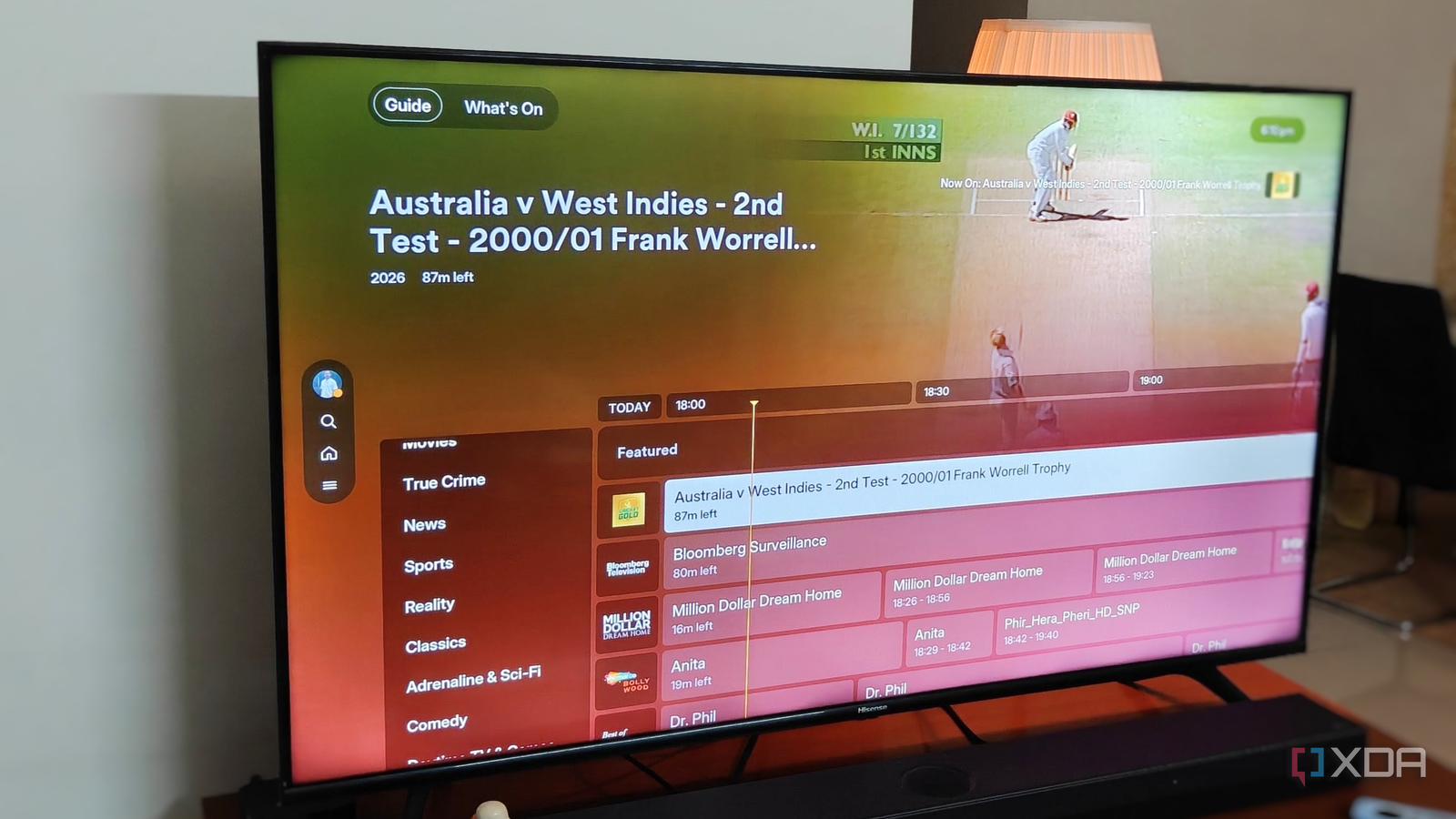
Published Nov 17, 2026, 6:00 PM EST After a 7-year corporate stint, Tanveer found his love for writing and tech too much to resist. An MBA in Marketing and the owner of a PC building business, he writes on PC hardware, technology, and Windows. When not scouring the web for ideas, he can be found building PCs, watching anime, or playing Smash Karts on his RTX 3080 (sigh). I got into media streaming pretty late, but ever since, Plex has been the only media server I've used. For all its faults, I've never felt that I was missing anything. Yes, it's not open-source, and many features are behind the Plex Pass, but my local streaming from a PC to a single TV has never needed those features. The free plan is more than enough for my needs, and after years as a Plex user, I only recently discovered everything it offers. From a breadth of live TV channels and custom media collections to music streaming and photo apps, the free Plex plan is actually better than most people give it credit for. Its features may not be unique, but combined with its slick UI and no-nonsense usage, it's still one of the best media servers out there, at least for local-only streaming. Live TV channels Plex had way more free stuff than I thought It's impossible to miss the free shows and movies Plex keeps pushing, but the live TV aspect is what I completely missed out on during the first few years. It functions exactly like many other live TV setups on streaming servers like Jellyfin and Emby, as well as on streaming apps like Tubi, Roku, and more. However, its interface is what sets it apart, especially after the recent redesign. I was surprised by the myriad options available in the live TV section when I was bored with my streaming watchlist. Vintage shows and iconic sports matches alongside live poker, movies, news, and cartoons kept me flipping through channels like it was the early 2000s. This feature doesn't enhance my local media streaming, but it offers an alternative when I don't want to doomscroll on YouTube or my own library without settling on anything. OTA broadcasts with a tuner and antenna Tune into free broadcast channels Watching over-the-air (OTA) broadcasts may remind you of a time you fondly remember, but you can do it within your Plex app, too. Of course, you'll need to buy a TV tuner and antenna to do it, but it's worth mentioning for people who like to do a bit of everything on their TV. And what's better than doing it on the same app that has your local media, free on-demand movies and shows, and live TV channels? Most people use a compatible USB TV tuner and an antenna for the respective broadcast standard in their region. Plex will show the broadcast channels in your region alongside its free, ad-supported streaming channels. Note that you won't get DVR recording or program guide functionality without the Plex Pass. Creating custom collections Make your large library easier to browse Credit: Credit: Although many nice-to-have features are restricted to Plex Pass users, the free plan still lets you create custom collections, so searching your media library isn't a pain. Once your collection grows past a point, manually browsing your movies or TV shows can become ineffective. By grouping similar content into curated collections, you can easily find, say, movies from the same franchise or by the same director. Plex's default categories and collections don't always cover everything; hence, custom collections fill the gap. You can even add filters to let Plex create smart collections on the fly, such as grouping recently released or unwatched media into different collections. This reduces the friction of selecting something to watch after you drop on your couch after a tiring day. Plexamp for streaming your own music Listen to your local collection in a new way Music streaming apps like Spotify and YouTube Music are fine, but the Plexamp app (separate from the Plex app) offers a better way to enjoy your local music collection. The free plan is useful enough to consider it as a serious alternative for your local collection. YouTube Music lets me upload my own music, but those tracks aren't part of its recommendations. Plexamp offers this feature, plus advanced discovery and organization. You also get visualizers and integrations with Android Auto and Apple CarPlay. And remote streaming of your music library remains free, too. The paid plan adds an equalizer, offline downloads, and sonic analysis to identify similar-sounding tracks from your library. That said, the free plan makes for a robust music streaming app on its own. Plexamp Plex Photos for your local photo collection The free tier may be enough for some people Another separate app, Plex Photos, lets you stream your local photo collection from your PC or server to your iOS or Android smartphone. While you can create a photo library inside the main Plex app, the dedicated Plex Photos app offers a much better experience. Depending on the version of your main Plex app, you may not see photo libraries in it at all. Plex Photos organizes your collection by timeline and uses a dynamic view and custom folder banners. Unlike the main app, which treats photos as standard media files, Plex Photos is built for an enhanced photo-viewing experience. The paid version unlocks automatic backup to your server, AI auto-tagging, and remote access. Plex Photos Plex Pass is overpriced, but you may not need it at all If you're like me and only stream your movies, music, and photos on your local network, you probably don't need Plex Pass. I don't even use hardware transcoding, as all my movies and shows play directly on my Apple TV. Plex's free tier offers almost everything you need for local media streaming, and not just for movies and shows. With the Lifetime Plex Pass now priced at $750, not many people will be willing to jump. OS Windows, macOS, Linux Individual pricing Free, $6.99/month, $250/lifetime Plex is the premier home media server software for replacing your streaming subscriptions.
I've used Plex for years without paying a dime, but somehow missed these free features
Full Article
Original Source
Read the full article at Xda-developers →KhanList aggregates and links to publicly available news content. We do not host full articles from third-party sources. Always verify important information with original sources.