
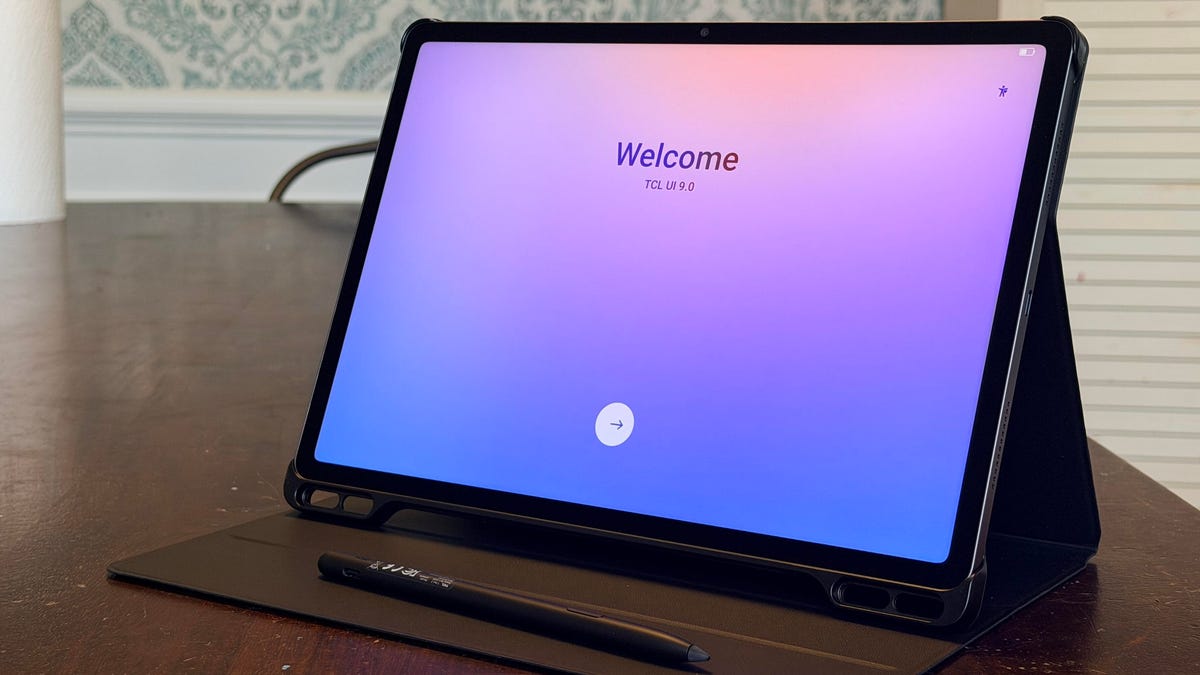
TCL Tab A1 Plus Nxtpaper pros and cons ProsBeautiful matte display is easy on the eyes.Its texture is comfortable for graphic work with the stylus.It's very affordable.Versatility to change to color and ink paper display.Up to 120Hz refresh rate. ConsAt 500 nits peak brightness, the display may be harder to see outdoors. View now at Amazon Follow ZDNET: Add us as a preferred source on Google.The arrival of the TCL Tab A1 Plus Nxtpaper in time for back-to-school shopping is more than opportunistic -- it just makes good sense. TCL has continuously produced tablets that rival the iPad in performance while staying squarely in the $300 price range -- and I should know, I've tested multiple of them. Also: The iPad mini's biggest update in 5 years is expected this fall - here's what we knowAs a smart home reviewer who dabbles in tablet reviews, I've tested all of the latest iPads and multiple tablets from Honor, OnePlus, Samsung, and Lenovo. Yet my everyday tablet of choice is the TCL Nxtpaper 11 Plus thanks to its ability to handle everything I need. In fact, testing the TCL Tab A1 Plus Nxtpaper felt like an upgrade in more ways than one. Best tablet deals of the week Deals are selected by the CNET Group commerce team, and may be unrelated to this article. I use the new A1 Plus tablet daily for light work like writing, notetaking, transcriptions, image editing, and graphic design. For entertainment, this tablet has been my new go-to for streaming media, playing mobile games (including quick rendering in Minecraft), and reading.The Tab A1 Plus Nxtpaper features an octa-core processor with the 4nm Snapdragon 4 Gen 2, 256GB of storage with a microSD expansion of up to 2TB, 6GB of RAM, and a large 10,000mAh battery. The TCL Tab A1 Plus Nxtpaper comes with a flip case and stylus. Maria Diaz/ZDNETThe Nxtpaper technology is still one of my favorite things about these TCL tablets, and one of the biggest reasons why I prefer them over my iPad. I'm a big reader, so I appreciate the Tab A1 Plus Nxtpaper's ability to transition to a color paper and ink paper display with the press of a button. The transition is smooth, like second nature, and effectively turns your work or entertainment tablet into an e-reader. Maria Diaz/ZDNETFor back to school, this gives you a large 12.2-inch display that looks a lot like E Ink to read text books or work on word processors without eye strain. Many of us have unfortunately grown accustomed to the eye strain associated with working on a computer all day. Add in the fact that we spend a lot of our free time looking at our phones, and eye strain has become a common ailment for even young children. Also: Samsung Galaxy Z Flip 8 vs. Z Flip 7: Is the new flip phone worth the upgrade?The Nxtpaper display also helps with eye strain by reducing harmful blue light outputs and flickering, while using a color-rich matte display that prevents glare. Maria Diaz/ZDNETColor reproduction is another of my favorite features about TCL's Nxtpaper displays. These opaque screens reproduce rich, vibrant colors that look beautiful when streaming media or even something as simple as playing Minecraft with your kids (if that's your thing). Also: 5 smart home gadgets I actually recommend, after years of testingGoing from an 11-inch display to the 12.2-inch screen with a 2.4K resolution felt like a good upgrade without feeling too large and heavy. The larger display gives you extra workable real estate to split screens and multitask, design, or stream. ZDNET's buying advice Maria Diaz/ZDNETI can comfortably carry and hold the Tab A1 Plus Nxtpaper tablet all day as needed for work, then comfortably transition to entertainment, and later end the night reading a good book in the Kindle app – all with a single device. For a limited time, you can get the TCL Tab A1 Plus Nxtpaper with a stylus and flip case for only $280. Add in a bluetooth keyboard, and you can ditch the laptop for school, instead gaining a tablet that can do it all: work, play, study, and multitask. Featured reviews
I've tested dozens of tablets - this $300 TCL is a back-to-school powerhouse
Full Article
Original Source
Read the full article at Zdnet →KhanList aggregates and links to publicly available news content. We do not host full articles from third-party sources. Always verify important information with original sources.