
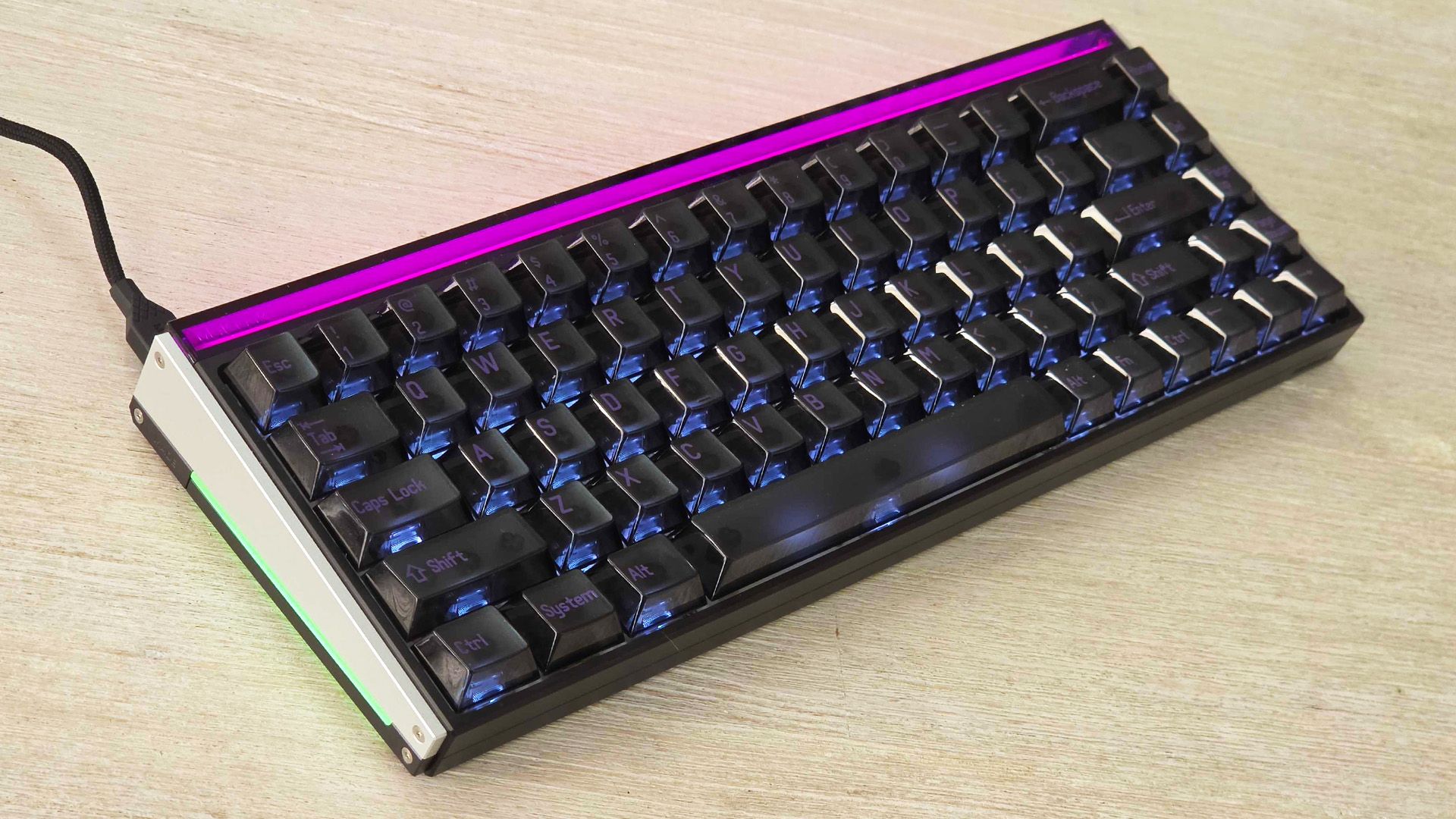
(Image credit: Tom's Guide) I’ve been through a handful of magnetic‑switch boards over the last few months, and in that time I’ve figured out what I actually want from them — precise actuation, a clean, non‑ringy acoustic, and a weighty, stable case that keeps the sound consistent. MelGeek’s Made68 Ultra V2 is the closest to that sweet spot I’ve tested so far: the magnetic action hits the right balance of smooth and snappy, the chassis keeps resonance in check, and the overall sound leans towards deep and satisfying rather than bright or clacky.It also looks the business, with a simple yet stylish vibe that’s undeniably aimed at gamers — its translucent keycaps and personalised lighting are testaments to that — but still manages to bring a level of refinement and precision that’d let it slip onto the desk of the average ultra‑modern professional without looking too out of place.As someone who hardly ever uses a numpad, 75% keyboards are typically my favourite layout. However, the Made68 Ultra V2’s 65% layout doesn’t feel compromised to me — it’s compact without feeling cramped, and every key is within easy reach for smooth, accurate typing.As for gaming, the Ultra V2 delivers all the high end features you’d expect from a keyboard with Hall effect switches, along with some sweet AI-powered lighting control options that give the board a personality all of its own.While I can think of a couple of small additions that would make it the perfect keyboard for me, I could easily see myself using the Made68 Ultra V2 as my daily driver for years to come — here’s why.It sounds fantastic and feels remarkably precise (Image credit: Tom's Guide)The Made68 Ultra V2 I tested arrived with magnetic KOM Lite switches pre-installed, which lend the board a slightly lighter, more relaxed character. They land in a good middle-ground between creamy and snappy, leaning more towards a brighter sound than a deep thick one. The magnetic action feels smooth and predictable, with switches that provide a consistent, uniform press across the layout. That said, there’s no plasticky clack — just a clean, crispy sound that’s easy to settle into.A big part of that comes down to MelGeek’s 6‑way silicone dampening and the use of a silicone gasket mount. I prefer it to the “foam everywhere” approach that some keyboards employ — the board feels cushioned without being mushy, and the silicone layers do a great job of minimising resonance. You get a firm, planted bottom‑out rather than a soft bounce, and the sound stays tight even when you’re typing furiously.Get instant access to breaking news, the hottest reviews, great deals and helpful tips.Compared to some of the creamier magnetic boards out there, the Made68 Ultra V2 is more focused on a clean, consistent feel. I recently tested GravaStar’s Mercury V60 Pro, and while I did prefer that keyboard’s deeper, chocolatey thock, the Ultra V2’s calmer, more controlled tone is admittedly easier to live with day‑to‑day — and far less distracting to those around you.Exceptional gaming performance (Image credit: Tom's Guide)As great as the Made68 Ultra V2 is for typing, it truly soars for gaming. Its magnetic switches provide adjustable actuation and rapid trigger functionality as expected, and you can really dial them into your ideal settings using MelGeek’s browser-based Hive 2.0 software. You can drop actuation right down to 0.1mm for quick reactions or push it higher if you prefer a firmer, more deliberate press. The board tracks movement with 0.01mm precision, so even tiny lifts or taps register straight away.Rapid Trigger is just as sharp. Keys reset the moment you lift them, even slightly, thanks to an adjustable RT range that goes all the way down to 0.01mm. At those extreme low settings it can feel a bit too sensitive — you’ll occasionally fire an input just by brushing a key or shifting your hand. Thankfully, you can tailor it to your liking — in my experience, bumping actuation or RT up even a fraction gives you a more controlled feel without losing the speed that makes magnetic switches great for fast‑paced games.Latency is properly low, with 8,000Hz polling, a 16,000Hz scan rate, and a listed 0.125ms response time. In practice, the board keeps up whether you’re flicking through menus or right in the thick of a battle, instantly responding to your inputs in a clean, predictable manner.AI-powered lighting and personalisation (Image credit: Tom's Guide)You can take personalisation even further with the hardware itself. The Ultra V2’s light bar can be customised to match whatever theme you’re running, though its purple tint does prevent certain colours from showing as intended. MelGeek also sells 3D‑printed light guide panels, which (in theory) let you shape how the RGB spreads across the sides of the case, as well as swappable side panels which can be easily screwed on, though both products have been sold out on MelGeek’s website for as long as I’ve been testing the Ultra V2.The board’s AI‑powered lighting layer sits over the top of the usual RGB controls, adding a bit of smarts without turning the whole thing into a light show. Instead of cycling through random effects, it reacts to what you’re doing and keeps the lighting feeling relevant rather than noisy. In practice, it tends to make small, practical adjustments as you move between tasks or games, giving the keyboard a sense of personality without demanding constant tinkering.Hive 2.0 gives you solid control — per‑key colours, simple dynamic effects, macros, profiles and all the usual tuning options are there, even if the lighting system itself is still pretty limited compared to what the hardware could do. You can set up game‑specific profiles (and cycle through them using a physical ‘mode’ button underneath the lightbar on the right side), adjust brightness curves or just keep things simple with a single clean theme, and once you’ve saved a profile the board switches between them quickly and reliably. If you want more traditional control of the Ultra V2’s RGB, Hive 2.0 handles that too, though it’s a bit more basic than competing software, with only per‑key static lighting and no support for layered or multi‑zone effects.Real‑Time Game Sync (VCT) is the arguably the flashiest part of the package, but it’s handled with a light touch. Instead of blasting the whole board with rainbow effects, it reacts to in‑game events, like health changes or the use of skills and abilities, making your game feel more immersive without pulling your eyes off the screen.Two small misses (Image credit: Tom's Guide)On a board that otherwise nails fundamentals, there are two design choices that stand out as avoidable compromises. First, there’s no dedicated volume knob or rocker. Once you’ve used a physical control, its absence sticks out straight away. Sure, you can bump the volume up or down by holding Fn and tapping the arrow keys, but I can’t imagine anyone on this blue planet choosing that over a simple knob — it’s one of those small conveniences that matters more than you expect, especially when you need to drop the volume in a hurry.Second, the stock transparent keycaps are a mixed bag. They look distinctive, but they don’t diffuse RGB softly — the LEDs appear more direct and clinical than the warm glow you get with thicker, opaque PBT caps. On top of that, the transparency and dark purple text can make the keys harder to read if you do ever need to look down. And while I love how the Ultra V2 sounds, the clear caps don’t help the board reach its full potential — I haven’t had a chance to test it myself, but I bet that swapping to a denser PBT set will deepen and tighten the sound even further than it already is.The Made68 Ultra V2 is a refined, well‑built keyboard that prioritises consistent feel, controlled acoustics and high-level gaming precision. It may not be the loudest or most characterful option, but it has consistently delivered one of the most comfortable and dependable typing experiences I’ve had recently. If you value typing comfort, stability and a mature build, it’s worth considering — just be prepared to use shortcuts for volume control or different keycaps if those two omissions matter to you.More from Tom's GuideHere’s why you should only buy a magnetic keyboard for gamingThe GravaStar Mercury V60 Pro is almost perfect except for three finicky detailsCorsair’s Vanguard Pro 96 keyboard has convinced me that magnetic switches aren’t just hype Stephen Lambrechts is the Managing Editor of Tom's Guide AU and has written professionally across the categories of tech, film, television and gaming for the last 15 years. Before Tom's Guide, he spent several years as a Senior Journalist at TechRadar, had a brief stint as Editor in Chief at Official Xbox Magazine Australia, and has written for such publications as APC, TechLife Australia, T3, FilmInk, AskMen, Daily Telegraph and IGN. He's an expert when it comes to smartphones, TVs, gaming and streaming. In his spare time, he enjoys watching obscure horror movies on physical media, keeping an eye on the latest retro sneaker releases and listening to vinyl. Occasionally, he also indulges in other non-hipster stuff, like hiking.
I’ve been using MelGeek’s Made68 Ultra V2 for three weeks and I’m in love with its magnetic switches, slick styling and clean sound
Full Article
Original Source
Read the full article at Tomsguide →KhanList aggregates and links to publicly available news content. We do not host full articles from third-party sources. Always verify important information with original sources.