
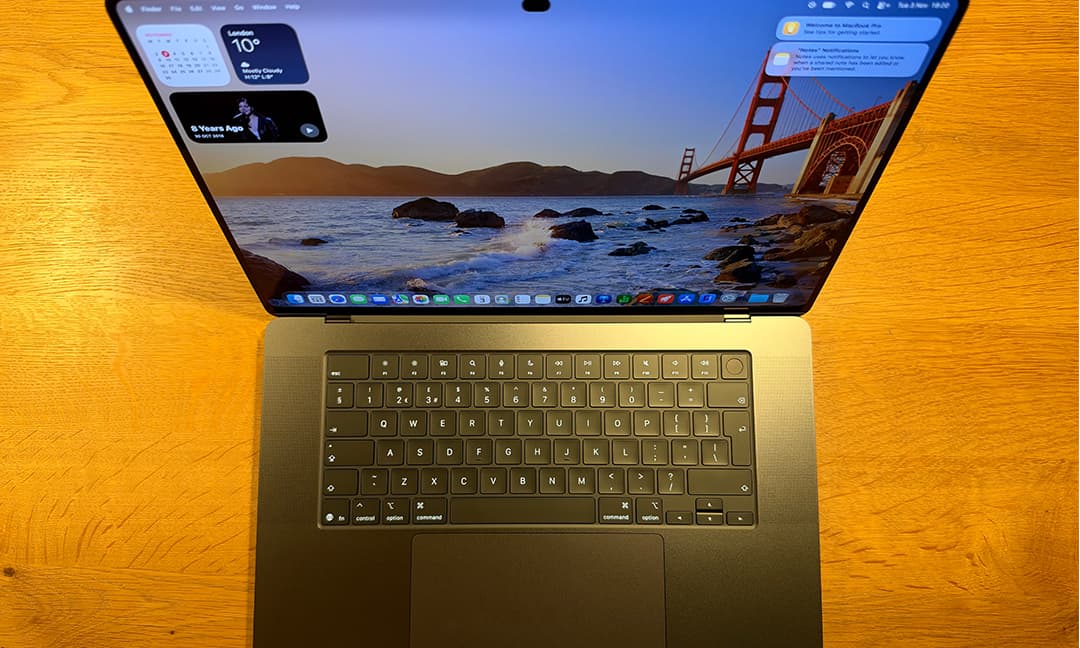
Apple is on a release spree. After the HomePod mini last week, the latest MacBook Pro goes on sale on Friday 6 November, alongside the new iPad mini. There’s more to come next week with the HomeView smart home device and the latest Apple TV 4K streaming box. There’s also a new iMac and entry-level MacBook Pro. But, as a technology critic of more than two decades, it’s the MacBook Pro with PROLED XDR that is most intriguing. PROLED means there’s an OLED display on the laptop – a first for the Mac. There’s also another big first: after years of saying the company had no interest in a touchscreen on its laptops, this one comes with touch. The reason given is that so many people have got used to touchscreens on iPhones and iPads that touch capabilities are now expected by some users. But the company is keen to stress that this is still primarily a keyboard and trackpad device, with touch as an extra input when you want it. There’s one other big change: the Apple logo. You may remember that years ago, the logo on the laptop lid was backlit, so you could see someone using a MacBook from the other side of a dimly lit room. That was replaced by a gleaming metallic logo. Well, the backlit Apple is back – in improved form. The price premium for OLED and touch is noticeable, so is it worth the extra, or should you stick to the more affordable MacBook Pro models without them? How I testedI studied everything from battery life to the display and touchscreenDavid Phelan/The StandardLaptops are straightforward but time-consuming to set up, as they update software and transfer your data. I looked at both these elements to see how smooth they were. I checked out the big new features that are unique to these MacBook Pro models. First, the OLED screen, looking at how bright it is – often OLED’s Achilles heel. Second, how useful touch really was, and how well implemented by Apple. I also studied the new-look Apple logo and the other updates to the laptop’s design, such as the thinner build and lighter weight. I considered the laptop’s performance: this is a Pro, so does it live up to the name by being fast, even for demanding programs? Finally, I looked at the battery life to see if it lived up to Apple’s claims. MacBook Pro with PROLED XDR Apple ★★★★★What we love: Stunning display, lighter weight than before, and touch is a useful extraTake note: Expensive, and no Face IDDesignIn many respects, the new MacBook Pro looks very similar to the previous model. It comes in the same two colours, Space Black and Silver. But the first, and I’d say most exciting design change is the return of the backlit Apple logo. This was something that set Apple apart from most of its rivals and was much-loved by Mac fans. Here, it looks better than ever. Apple has redesigned it so that when the laptop is closed, the logo looks almost black on the Space Black model. In other words, it’s almost indistinguishable from the other Apple laptops. Open it, and the light bursts into action. It’s a simple light, separate from the OLED screen on the other side. It looks great and is sure to delight Apple loyalists. The new laptop is noticeably lighter than the other MacBook Pro models in the range. It’s also thinner, but this is a much smaller change, and you’d be hard-pressed to spot the difference unless old and new were right next to each other. The rest of the design is the same: a flat lid with cliff-sharp sides and rounded edges. Similarly, the sumptuously comfortable keyboard and spacious trackpad are just like they used to be – an excellent design that still looks cutting-edge.DisplayDavid Phelan/The StandardApple has coined a new word for the laptop’s OLED screen: PROLED XDR. OLED screens offer the benefits of exceptional contrast and deep black colours, made possible by the lack of a backlight that crosses the entire screen because each pixel is independently lit. Those benefits are in clear evidence here. The screen is detailed, with rich but entirely natural colours. But if there’s a downside to OLED it’s that it’s not as bright as LED LCD screens. Not so good if you want to use the laptop in bright rooms or outdoors, then. Apple has overcome this problem with what’s called Tandem OLED, where there are two light-emitting layers, not just one. The result is a screen that’s much brighter. I had no trouble seeing what was on-screen in really bright light. Apple boasts exceptional contrast with this display, 10,000,000:1. It’s one of the things that contributes to how great the screen looks. And then there’s touch. Apple decided that because it was building a display from the ground up, it made sense to build in touch sensitivity at the same time – but with neat extras. If an open web page is in the right place on the screen, you can scroll just by swiping your thumb up or down the display as easily as you would on a phone or on the Mac trackpad. Of course, it looks great when you pinch to zoom in or out of a photo on screen. This is a more intuitive and intimate experience when you touch the photo directly rather than through a trackpad. All that said, I think I’ll continue to overwhelmingly use the keyboard and trackpad for most of my interactions. Touch is a bonus, not a replacement. The Dynamic Island has come to the Mac for the first time. Instead of a rectangular cut-out at the top of the display which houses the camera, there’s now just a lozenge shape. Like on the iPhone, the Dynamic Island uses artful animations to grow and change shape. When you’re playing music, for instance, imagery for the current track appears alongside. Up to two Live Activities such as these can be shown at a time. This is useful, just as it is on the phone.PerformanceDavid Phelan/The StandardI’ve been testing a high-end MacBook Pro, one with the fastest chip, the Apple M5 Max. It’s incredibly fast and responsive, even when demanding programs are running at full tilt. Performance is more than just speed; it’s also about sustaining that speed over a period of time. When processors speed up, they can get hot, and that can slow things down again. A chip like the M5 Max and the M5 Pro are capable of running power-hungry apps at speed and at length. Even if you don’t use advanced programs, you can appreciate the performance when using games with deluxe graphics. Or simply having scores of browser tabs open at the same time. Battery LifeThe processor is also efficient and, as such, can deliver long battery life. Apple claims it at up to 22 hours on the 14-inch model and up to 24 hours for the 16-incher. Both figures are increased from the previous MacBook Pro models. Either way, you can feel confident leaving your charging brick at home. Processor: Apple M5 Pro or M5 Max Display: 14.2in, LED-backlit, 3,024 x 1,986 native resolution Storage: 1TB/2TB/4TB/8TB (with M5 Max)/16TB (with M5 Max) Dimensions: 31.08 x 21.63 x 1.5cm Weight:1.38kg Colour: Midnight, silver Is the Apple MacBook Pro with PROLED XDR worth it?The MacBook Pro with PROLED XDR has an impressive display that is completely immersive, richly detailed and gorgeous. The addition of touch capability is useful and has Apple touches that make it worthwhile, even if you find you’re mostly using it as you did before, through the trackpad and mouse. The processors available for the new laptop are Apple’s most powerful, and they are screaming-fast. The return of the glowing Apple logo is a nice touch. This is an expensive laptop, but it looks astonishing, performs at speed and just keeps going. It looks better than other OLED laptops, integrates touch more elegantly and is a joy to use. Is this the best laptop Apple has ever made? Easily. Is it the best laptop out there? I think so.
I've been testing Apple's MacBook Pro OLED – and this new feature surprised me
Full Article
Original Source
Read the full article at Standard →KhanList aggregates and links to publicly available news content. We do not host full articles from third-party sources. Always verify important information with original sources.