
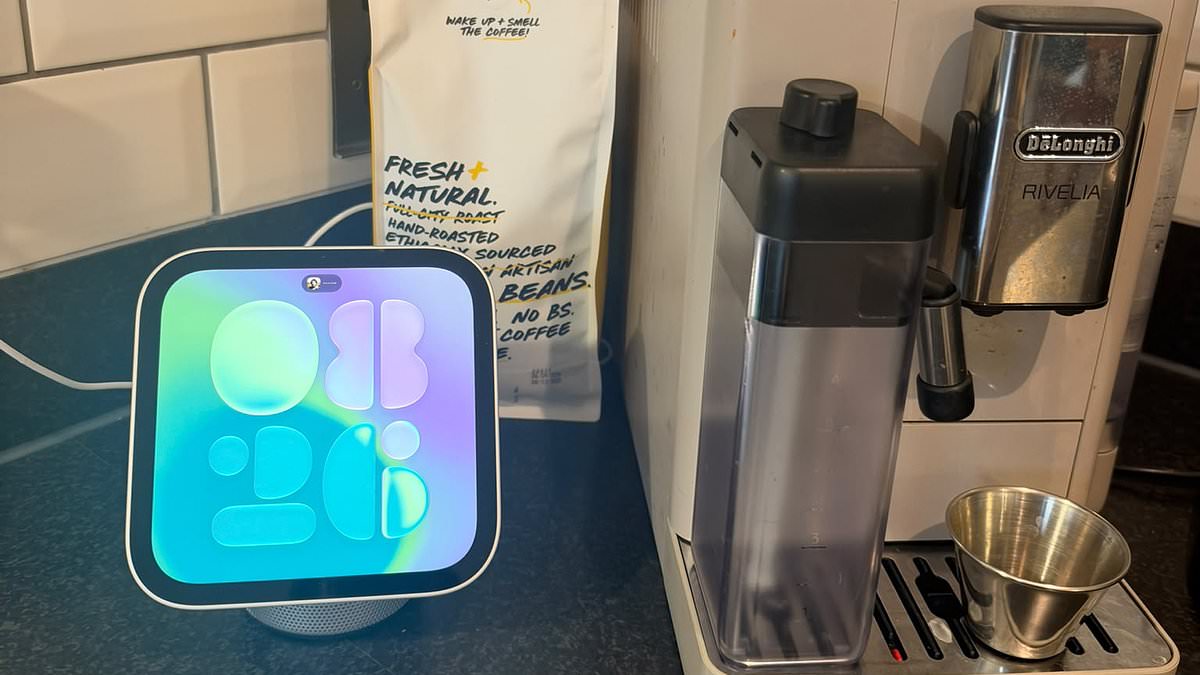
Daily Mail journalists select and curate the products that feature on our site. If you make a purchase via links on this page we will earn commission - learn moreApple's £299/$299 HomeView finally goes on sale this week – one month after its announcement left fans divided.Described by Apple as a 'smart home management' system, the gadget recognises different family members' faces and brings up a personalised display for each person.While many die–hard Apple fans were immediately desperate to get their hands on it, others were more sceptical, dismissing it as little more than a 'glorified iPad'.So, does the HomeView deserve a permanent spot on your kitchen counter?Ahead of its release on November 13, the Daily Mail's Science & Technology Editor, Shivali Best, spent several days getting to grips with the £299/$299 gadget.If you've already bought into the Apple ecosystem and your go–to apps are things like Apple Music and Messages, I think it's a no–brainer.However, if you're hoping for easy access to third–party apps such as Spotify, WhatsApp and Ring, this smart home hub probably isn't the one for you. It's a great size – small enough to pop next to my coffee machine, but large enough so I'm not squinting at the screen – and the adjustable hinge means I can easily tilt the screen so it's visible at any angle In true Apple style, the HomeView is absolutely stunning. I opted for the silver, free–standing version, in which the seven–inch display sits atop a domed speaker baseDesignApple HomeView: Key specs Price: £299/$299Colours: Countertop version is available in space grey, silver, starlight, or rose pink. The wall mounted version comes in space grey and silver. Users: Compatible with up to six users AI: Siri AI and Apple Intelligence Availability: Pre-order from today, on sale from 13 November In true Apple style, the HomeView is absolutely stunning. I opted for the silver, free–standing version, in which the seven–inch display sits atop a domed speaker base. It's a great size – small enough to pop next to my coffee machine, but large enough so I'm not squinting at the screen – and the adjustable hinge means I can easily tilt the screen so it's visible at any angle. One slightly annoying feature is the fact that the HomeView needs to be plugged in at all times to operate. The matching charging cable is fairly discreet, but if – like me – you have limited plugs in your kitchen, the need to constantly occupy one with the HomeView is a bit irritating. Alongside the free–standing version – which also comes in Starlight, Rose Pink, and Space Grey – there's the option to buy a wall–mounted model. Rather cheekily, Apple claims this also costs £299, despite the fact that this version requires a mount and power solution to operate – at an additional cost. These range in price from £54.95–£119.95, meaning customers opting for the wall–mounted model face a total bill of up to £418.95. With just two of us in my household, my husband and I both took quick scans of our face to set up our profilesFacial recognition The HomeView uses facial recognition to recognise up to six people, bringing up a personalised display depending on who's looking at it. With just two of us in my household, my husband and I both took quick scans of our face to set up our profiles. With an always–on display, it's not immediately clear when the HomeView switches between profiles. However, sure enough, when I went up to the device and tapped on the Messages app, my messages were shown on screen. When my husband then looked at the screen, my messages would disappear, with an error message reading 'Recognition required to open Messages.'As a couple who are fairly open about what's on our phones, the ability to quickly switch between profiles isn't something we particularly need.However, if you live with flatmates or family members who you'd rather keep away from your private content, this feature could prove far more useful. The device itself does not have an App Store, so you can't download apps to specifically use on it. Instead, HomeView only comes with built–in native apps, including Apple Music, Messages, Calendar, FaceTime, and Safari I was initially excited to see the Spotify app on my screen, but quickly realised this has limited functions. I can browse my recently played podcasts and playlists, but there's no search function – meaning I have to reach for my iPhone whenever I want to find something newApp availability Where the HomeView did disappoint me, however, was in the app availability. The device itself does not have an App Store, so you can't download apps to specifically use on it. Instead, HomeView only comes with built–in native apps, including Apple Music, Messages, Calendar, FaceTime, and Safari. Crucially, third–party apps are not downloaded directly onto HomeView, and only a select few work on it at all. I was initially excited to see the Spotify app on my screen, but quickly realised this has limited functions. I can browse my recently played podcasts and playlists, but there's no search function – meaning I have to reach for my iPhone whenever I want to find something new.What's more, Siri struggled with even the simplest voice commands to find songs or artists on Spotify. Sometimes, I was left staring at the Siri bubble on screen; other times, Siri asked for permission to access my Spotify data, only to respond with the rather unhelpful: 'I'm having a bit of trouble here'.Other third–party apps that I use all the time were missing entirely, including WhatsApp and YouTube. While YouTube videos are accessible via Safari, they aren't optimised for the square screen, appearing awkwardly cropped or surrounded by large black borders, making for a pretty poor viewing experience. Siri struggled with even the simplest voice commands to find songs or artists on Spotify. Sometimes, I was left staring at the Siri bubble on screen; other times, Siri asked for permission to access my Spotify data, only to respond with the rather unhelpful: 'I'm having a bit of trouble here'Ultimately, if you're fully ingrained in Apple's ecosystem, and only listen to music through Apple Music, message your friends through Messages, and make video calls through FaceTime, the HomeView is great for you.But don't expect to get very far if you're not all–in with Apple. Recipe modeDuring Apple's demonstrations of the HomeView at its New York launch event, one of the features it really hyped up was recipe mode.Apple explained that this would allow you to find a recipe in Safari, before tapping a 'Start Cooking' button to view it in a streamlined format that's easy to follow.There would even be the option to set timers directly from the recipe, by tapping on instructions such as 'bake for 45 minutes', for example.My experience with the HomeView suggests that, on certain recipe sites, this feature works brilliantly.On both BBC Good Food and Allrecipes, I could quickly jump straight to a recipe's method, without having to endlessly scroll through the usual spiel about its history and background.On both BBC Good Food and Allrecipes, I could quickly jump straight to a recipe's method, without having to endlessly scroll through the usual spiel about its history and background In what seems to be a recurring theme for me, the feature simply wouldn't work on my go-to recipe site – MobHowever, in what seems to be a recurring theme for me, the feature simply wouldn't work on my go-to recipe site – Mob.The 'Start Cooking' button doesn't appear, and with the website not optimised for the HomeView's square screen – and the Mob app nowhere to be found – navigating recipes is actually pretty tricky.Scrolling and tapping through the instructions is nowhere near as easy as it would be on an iPad.Siri AI One of the big selling points of the HomeView is Siri AI, which Apple claims can answer questions on 'virtually any topic'. In practice, it's very hit and miss. On some occasions, after asking it a question, the AI would take several seconds to respond. Although its answers would usually be spot on, this delay makes it feel rather clunky, and I found myself getting impatient and often simply Googling the answer myself.Other times, the HomeView would display the Siri bubble animation as if it was thinking, but would remain silent, forcing me to swipe it away and start again. Hopefully these are just teething issues, but it's not quite the 'seamless' experience that Apple promised. The HomeView is priced at £299 in the UK and $299 in the US, although if you want the wall-mounted version, there's the extra charge for the mount and power solutionPriceThe HomeView is priced at £299 in the UK and $299 in the US, although if you want the wall-mounted version, there's the extra charge for the mount and power solution. While this isn't too expensive in comparison to other recent Apple devices (I'm looking at you, £2,000 iPhone Duo...), it is considerably more expensive than most comparable smart displays from Amazon and Google.Amazon's Echo Show 11 is £219.99, while Google's Nest Hub can be picked up for less than £100. Should you buy it? Ultimately, whether the HomeView is worth buying really depends on how deeply embedded you are in the Apple ecosystem, and how many smart devices you have around your home.While I use several Apple products, including an iPhone and an Apple Watch, most of the apps I rely on day to day are made by third-party developers – meaning they're not available on the HomeView.I also live in a modern flat with a built-in intercom, so I have little need for a smart doorbell.If you do have one (provided it's not made by Ring, whose devices aren't compatible with the HomeView), or other smart home gadgets such as connected lights and blinds, I can see the appeal of being able to control everything from a single device in your kitchen.But for my household, at least, an iPad propped up on a stand is still a far more practical option.
Is the HomeView a smart home revolution or just a glorified iPad? SHIVALI BEST tests Apple's £299 device to find out if it deserves a spot on your kitchen counter
Full Article
Original Source
Read the full article at Dailymail →KhanList aggregates and links to publicly available news content. We do not host full articles from third-party sources. Always verify important information with original sources.