
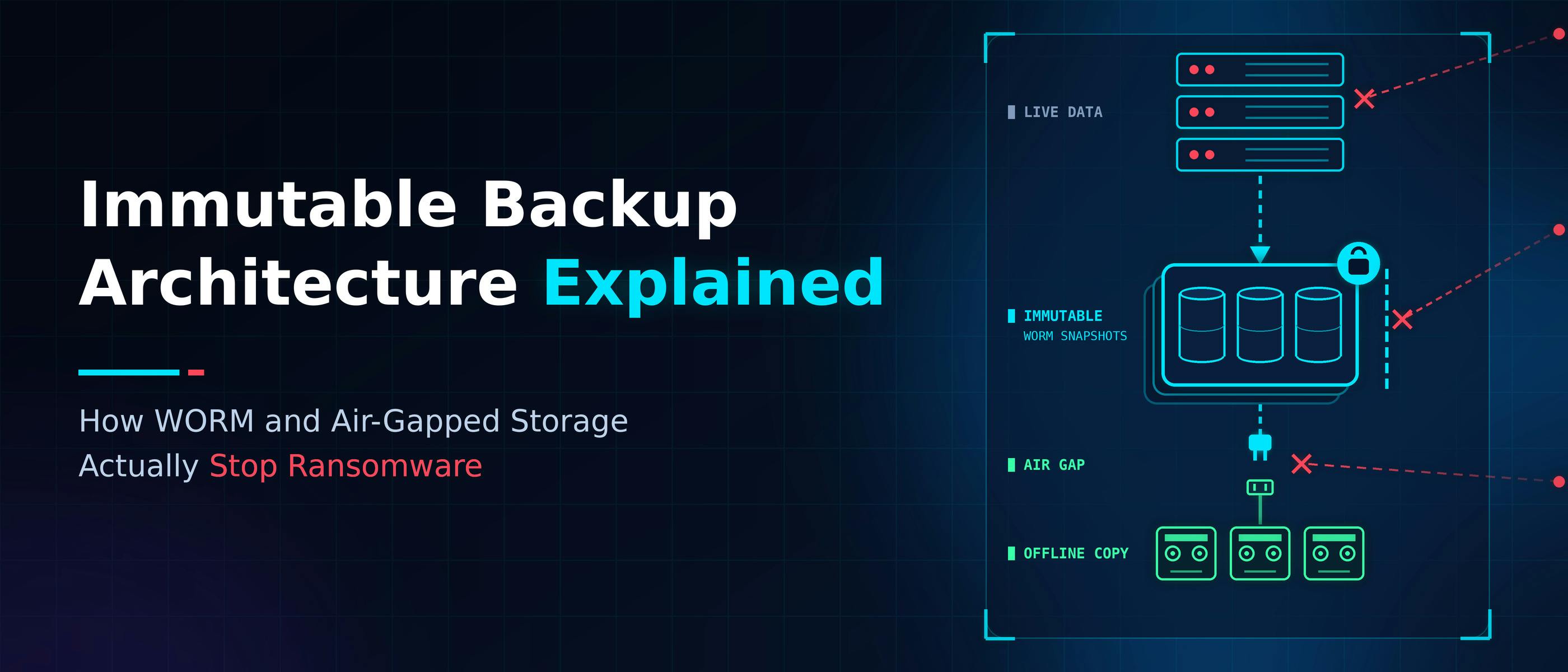
A ransomware operator doesn't need to break your encryption to win. They need one thing: a credential with enough privilege to reach the backup environment, then either delete the recovery points outright or encrypt them alongside production. At that point, the incident stops being about unlocking data and becomes a question of whether there's any way back into production at all. That's why backups get hit first. If a working recovery copy exists, the org doesn't have to pay, and attackers know that better than most defenders do. So the copy itself becomes the more valuable target, sometimes more valuable than production data. Saying "we have backups" was never actually answering anything.The question is whether a compromised production identity can reach far enough into that backup environment to control it. In most environments it can, because immutability ships as a checkbox, the backup console gets treated as a management tool instead of a real target, and the identity chain from production to backup admin to storage admin usually traces back to one provider by default, not by decision. The architecture below follows one stolen production credential through a properly built environment to see exactly which layer stops it, and why. The First Wall: Can the Attacker Delete the Backup? An attacker with valid backup administrator credentials can log into the console without tripping anything, because nothing about the login looks wrong. They can see the repository. They can issue a deletion request through the same interface a legitimate admin would use. A properly configured immutable repository rejects it anyway, not because the request looked suspicious, but because it fell outside the retention window. The retention window doesn't check who's asking. What Immutability Actually Enforces Real immutability lives at the storage layer, not the backup application. That distinction matters because a lot of what gets marketed as "immutable backup" is actually a setting inside the backup software itself. If an attacker gets enough privilege inside that same application, they can just flip the toggle back off. WORM stands for write once, read many. Once you've written the object, it stays as-is, nothing can overwrite or delete it until the retention period runs out. Older implementations enforced this with literal write-once media Modern platforms enforce it through retention metadata the storage layer checks before honoring any delete or overwrite call S3 Object Lock in Practice Amazon S3 Object Lock is a useful reference point because retention is evaluated at the object level, before any delete or overwrite is allowed to proceed. The mode you configure decides what that guarantee is worth. In governance mode, users holding a special bypass permission can still delete or overwrite, which makes it a soft lock that suits internal retention policies and a weak barrier against ransomware. In compliance mode, nobody can delete or overwrite during the retention period, including the account root user, so it behaves like a real time lock. Azure’s immutable Blob storage draws a similar line between unlocked and locked time-based retention policies. An unlocked policy exists for testing and can be shortened or removed, while a locked policy cannot be deleted. On any platform, confirm which mode is configured before treating “immutable” as a guarantee. The Backup Is Immutable. Why Can the Attacker Still Reach It? Immutability and air-gapping solve two different problems, and conflating them is where a lot of backup strategies quietly fail. Immutability controls whether a write can be altered Air-gapping controls whether an attacker can reach the copy at all Offline tape is genuinely disconnected, but if someone can reconnect it, authenticate with a privileged account, and rewrite the data before the next backup cycle, the air gap never provided the protection it looked like it provided. Object storage with Object Lock enabled is the opposite case: reachable over the network, but unalterable once written. Any air-gap design that doesn't specify who's allowed to reconnect the copy, and under what authority, is missing the part that actually matters. Who Actually Controls the People Who Control the Backup? Most security attention goes to the repository. That's usually the wrong place to be looking. Sitting above the repository is a management server that can start and stop backup jobs, change retention policy, and kick off deletion, and if that console runs on the same identity as production, the repository underneath can be perfectly immutable while everything around it stays wide open. Real separation comes down to: Different identity, not just different login. A domain admin account, a backup admin group, and a storage admin account shouldn't all trace back to the same identity provider. Three usernames aren't three boundaries if one compromise takes down all of them. A break-glass path, kept genuinely rare. Emergency access needs to exist for real incidents, but it should stay tightly controlled and get used sparingly, never quietly become the everyday admin shortcut. A second signature on anything destructive. Deleting a protected backup shouldn't be a one-person action. Quorum-based deletion requires an independent second administrator to approve it before it goes through. That last one is where a stolen credential finally hits a wall. It can log in fine. It can see the repository sitting right there. It can even kick off a deletion request. What it can't do is finish the job alone, because the workflow stops and waits on a second, separately authenticated approval. The credential works. It just isn't enough on its own. The Repository Looks Healthy. The Application Is Still Down Backup dashboards get dangerously reassuring at this point in the chain. The repository is healthy, the backup completed, checksums match, replication succeeded. Then someone actually tries to start the application, and: 1. DNS doesn't resolve 2. A database log is missing 3. A certificate has expired 4. A secret isn't available The backup was fine. The recovery wasn't. A backup answers one question, do we have the bytes. A restore test answers a different one, can we turn those bytes back into something running. That's really what the "0" in 3-2-1-1-0 is getting at. A green dashboard isn't proof of anything, a recovery point that's actually been restored and confirmed working is. Automated restore testing gets you there, spin the backup up somewhere isolated on a schedule and check if the application comes back online, not just whether the job finished. Manual checks might cover the handful of systems everyone worries about. They won't cover everything ransomware is willing to touch. Mapping the Recovery Boundary The recovery boundary is the point where a compromised production identity stops being able to control the recovery copy. Tracing the credential through the architecture shows where that point sits. The backup management console is reachable with a stolen production credential whenever identity isn’t separated from production, and it can be used to change things unless immutability is enforced below it. The immutable repository is also reachable over the network, but the retention lock blocks any alteration or deletion. The offline copy stays out of reach until someone reconnects it under separate authority, and the restore and verification environment is isolated by design. The attacker isn’t stopped at production. Every credential picked up along the way becomes insufficient for the next step in the chain. What the Recovery Boundary Costs None of this comes free. Every layer that stops a stolen credential also slows down a legitimate recovery or adds something new to manage and pay for, and that tradeoff is the real cost of the architecture, not a footnote to it. Slower Recovery for Air-Gapped and Offline Copies Air-gapped and offline copies take longer to bring back online than a live target. A vault that only opens on a scheduled window won't meet an RTO measured in minutes. Retention Windows Have a Real Cost Line Data sits in place for the length of the lock even if storage needs or vendors change later. That's a budget line item, not just a security decision. Every Boundary Adds Operational Weight Every independent authority, approval step, and offline copy is one more thing someone has to manage, document, and rehearse. The administrators absorbing that friction daily are usually the first to push back on it. A perfectly isolated vault nobody knows how to retrieve from isn't resilience, it's an inaccessible copy. An unrehearsed one is arguably worse than having no plan at all, because it creates confidence nobody's actually tested. Where the Stolen Credential Finally Runs Out The credential here started with one compromise and should have run out of road at each layer, unable to alter the immutable copy, unable to reach the offline copy, unable to authorize its own reconnection. Even then, the organization still had to prove that copy could become a working service. A boundary that stops deletion but not recoverability has only solved half the problem. The real test for any backup architecture is whether a stolen credential runs out of authority before it runs out of targets. Surviving an audit doesn't tell you that. Most environments fail quietly here, not from missing technology, but because identity separation never gets built with the same care as the storage layer. Harden the storage first, harden who's allowed to touch it just as much, and that's a recovery boundary an attacker can't just talk their way through.
Immutable Backup Architecture Explained: How WORM and Air-Gapped Storage Actually Stop Ransomware
Full Article
Original Source
Read the full article at Hackernoon →KhanList aggregates and links to publicly available news content. We do not host full articles from third-party sources. Always verify important information with original sources.