
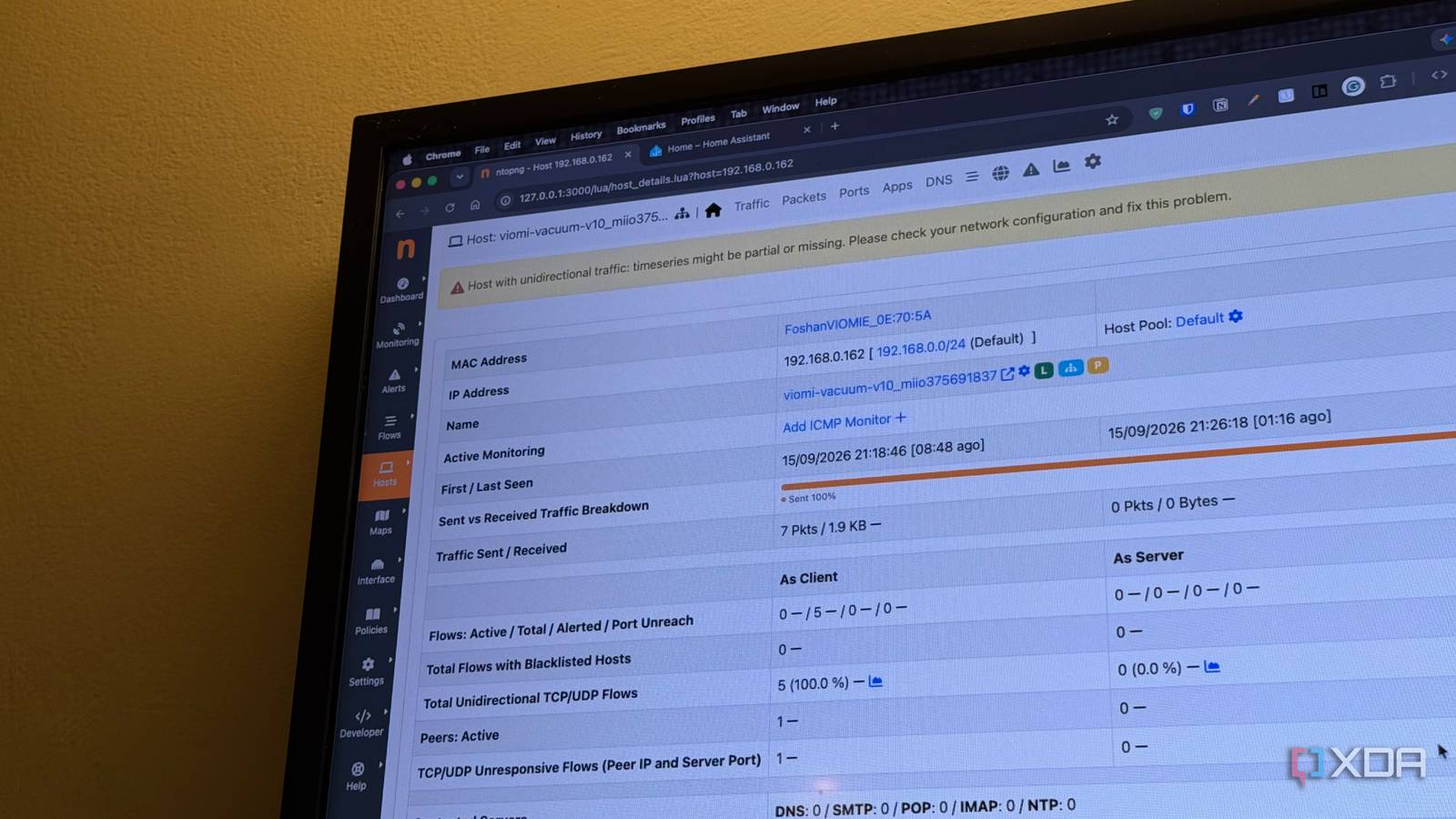
Published Sep 16, 2026, 7:31 AM EDT Dhruv Bhutani has been writing about consumer technology since 2008, offering deep insights into the personal technology landscape through features and opinion pieces. He writes for XDA-Developers, where he focuses on topics like productivity, networking, self-hosting, and more. Over the years, his work has also appeared in leading publications such as Android Police, Android Authority, CNET, PCMag, and more. Outside of his professional work, Dhruv is an avid fan of horror media spanning films and literature, enjoys fitness activities, collects vinyl records, and plays the guitar. I have a lot of smart home and IoT devices on my home network, and what I'm perpetually scared of is them talking to external servers without me knowing exactly what they're up to. That fear isn't entirely unfounded. Recent reports confirm that modern LG TVs can scan a local network and collect information for various devices on my network. In fact, it might even be listening in on conversations. That's far from ideal. Network settings rarely give you enough insights on what's happening. I know the TV is connected, but beyond that, it's basically a black hole when it comes to what it is connecting to, how much data it is transmitting, and which settings affect which parts of the network data. I wanted deeper insights on what my LG TV in particular, and IoT devices in general, were up to. So, I installed ntopng on my network. The tool gives me a clear view of what every device is doing without sending my network data to another monitoring service. Instead of guessing what my IoT services are up to, I can actually look at their traffic. That's powerful. I use ntopng to see what's happening on my network Keeping tabs on what my LG TV is up to The biggest reason I like ntopng is that it turns network activity into something I can visualize and understand. The tool passively monitors traffic and shows me data like active hosts, flows, throughput, and other information through a web host. With the right equipment, it can even capture data flow information from network equipment. Unfortunately, I don't have supported hardware for that. But, for my purposes, the host view is where it's at. I can directly tap on a device on my network and immediately see how much traffic it is generating, when it was last active, which protocols it used, and which connections are currently open. Ntopng has extensive options to see exactly what the devices are up to. This means you can view activity and even roll back to see exactly when the device was active on the network and what it was up to. Suffice it to say that the tool is more powerful than you'd imagine. This is also where the LG TV situation gets interesting. When I'm streaming something, I expect to see network traffic. But when I'm not, any network activity is understandably suspicious. I know it's going to connect once in a while to check for updates, but anything more than that is grounds to investigate. Especially if there's a noticeable amount of data being uploaded. Using ntopng, I can see the exact destinations and flows associated with the device and get a better idea of what kind of data traffic is being generated. I can see what my devices are actually doing on my network Real-time traffic makes unusual behavior easier to spot Credit: My TV is just one such example, but I'm equally suspicious of the plethora of small and large devices on my network. A smart speaker could be generating background traffic all day long, and a security camera could be beaming over footage and telemetry. A lot of these traffic bursts aren't actually problematic. They are usually just doing an uptime check or grabbing a software package. But sometimes, the traffic cannot be explained. Seeing this traffic flow in real time makes it much easier for me to understand what the devices are up to. If it happens once, it's probably not an issue. But if a camera is uploading hundreds of megabytes at 3 am every night, that's definitely suspicious. Part of understanding what my network is up to is identifying the traffic. That's where the application view comes in. Ntopng uses its nDPI engine to identify individual application protocols. This dashboard can identify network traffic and tell me which hosts are responsible for it. So, if I've been streaming music from my NAS for the last hour, the application view can help me identify that. Overall, Ntopng helps me piece together a clearer picture of what my network is up to. If a device uses more bandwidth than usual, I can look at the traffic and application information instead of guessing. This is doubly true because you don't need to actively monitor any of this. Ntopng can be set to active monitoring so that it retains traffic information and provides historical views. This means you can set it and forget it and come back to the tool only when you need to diagnose something. There's plenty of additional functionality here if you want to get into the weeds. For example, the flow view shows communication between two hosts and includes information such as protocols being used, the duration and throughput, and more. Elsewhere, you can even set up alerts to inform you when an unusual volume of data passes through the network, or if a new device connects to the network. I don't need to trust every smart device blindly Maybe my LG TV is doing something nefarious, or maybe it's not. That's part of why I installed Ntopng. The fact is that in 2026, I can't blindly trust any internet-connected device on my network. Smart home devices are designed to be convenient, but that convenience often means that they communicate with services outside my control. While I can't control what the software on my TV is doing, I can absolutely see what's happening on my network and take action based on that. That's the real value of installing a tool like Ntopng for me. Ntopng Ntopng is a self-hosted network monitoring tool that gives me a detailed view of the devices, traffic, applications and more on my network.
I’m paranoid about my LG TV snooping on me so I installed this self hosted security tool
Full Article
Original Source
Read the full article at Xda-developers →KhanList aggregates and links to publicly available news content. We do not host full articles from third-party sources. Always verify important information with original sources.