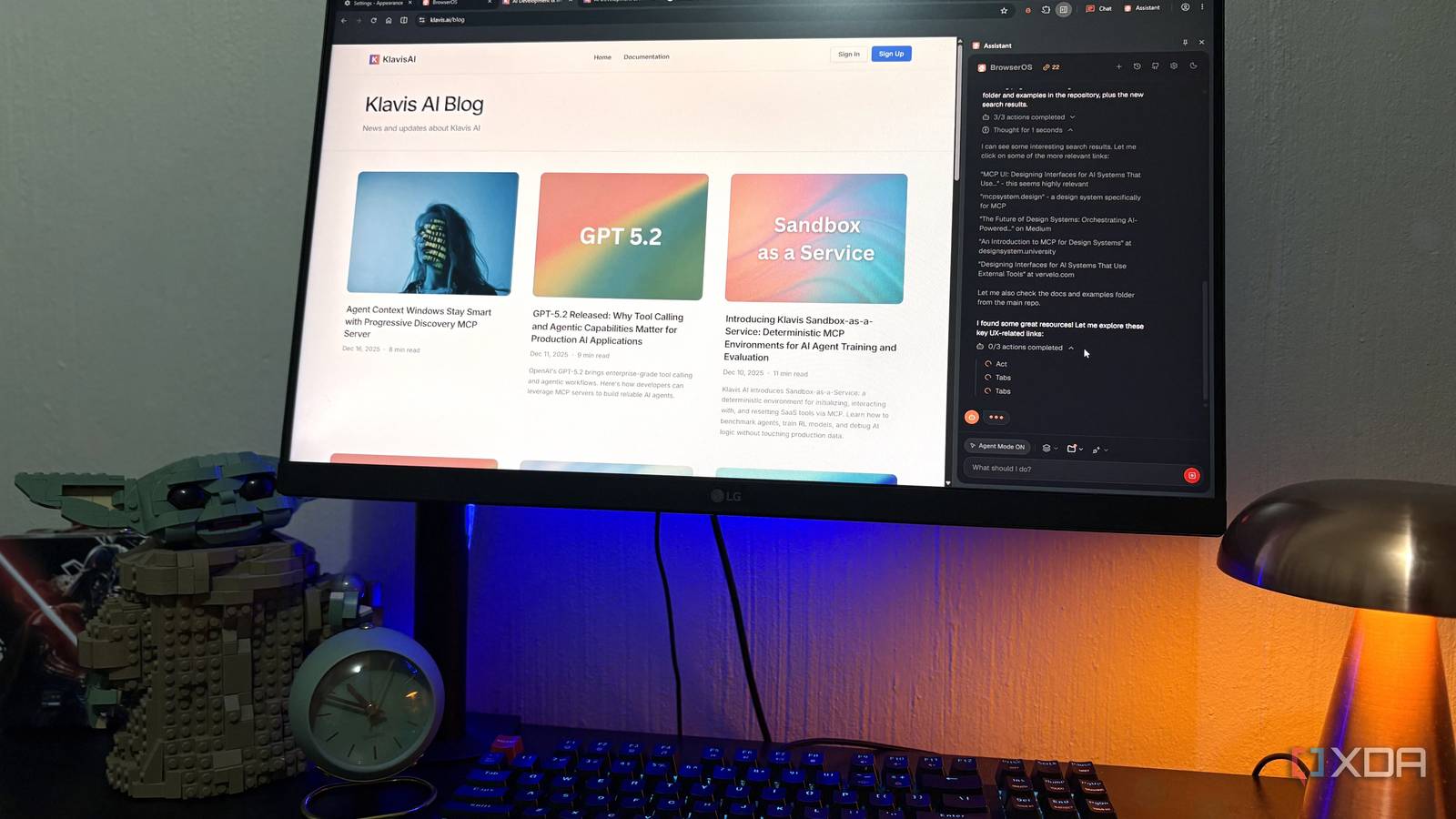
Published Aug 2, 2026, 10:30 AM EDT Nolen began their writing career in 2019, with three years dedicated to editing the Creative section at MakeUseOf. Their expertise lies at the crossroads of technology and creativity, covering areas like photography, video editing, and graphic design. Outside of work, you'll often find Nolen diving into a good book, writing their own stories, or playing video games. Chrome pretty much does exactly what it needs to. It loads webpages fast, all the extensions (usually) work, everything syncs if you're signed in, and it now has the AI mode. There's not much I'd expect a regular browser to handle beyond that. But that's the thing, a regular browser is a pretty passive tool. You have to handle all the navigation and coordination yourself while the browser just kind of sits there. BrowserOS changes that. It's a Chromium fork, so all your extensions, bookmarks, and passwords can come over, but the AI features bring it to life more than any AI mode does for Chrome, and it changed my perspective on what a browser should be… No more hopping to another tab BrowserOS is an open-source browser built on Chromium, so you can bring all your extensions and other goodies straight over from Chrome (and also Brave, since that's my secondary browser). There's not much to it on the surface level; you get a regular browser with the usual configurations. What makes BrowserOS different is its AI. And there are actually three different AI surfaces in this browser. The first surface is the Assistant. You've probably already heard about AI assistants non-stop at this point, but the phrase is pretty vague depending on the context. In BrowserOS, the assistant is a docked side panel and it can see whatever tab you're on. So instead of my usual routine of copying a URL, tabbing over to a new tab with AI mode or Gemini, pasting, asking my question, and tabbing back and forth, I just open the panel and ask. It reads the page in seconds and gives me what I need. Unfortunately, the free tier does have a credit cap for the assistant - you get 25 credits a day on the default BrowserOS-hosted model, which is honestly pretty decent for light work. But I did burn through it pretty quickly on my first day of testing the browser. You can also plug in your own API key with a provider, so if you already have an account with, say, Anthropic, that would probably end up costing you less than paying for BrowserOS. The really cool thing is that it accepts local models too, so you can end up with a completely free setup and no credit cap if your hardware can swing it. Furthermore, the assistant has some neat workspace gems I've come to appreciate. For example, you can @ a specific tab or @ multiple tabs to ask your question across several open tabs. I also want to touch on the second AI surface called Chat. Admittedly, I haven't really touched this one as much. It's not BrowserOS's AI, it's a docked sidebar that loads the actual UI of bots like ChatGPT, Claude, Grok, Gemini, etc. So if you already pay for one of those, you can actually use it side-by-side with whatever tabs you have. Agent mode does the work Describe in plain language, walk away, and come back to a result Agent mode is the third AI surface of BrowserOS, and you'll notice it in two areas. It has a dedicated window in the left panel from where you can open it in its own window. Or you can simply toggle it on in the Assistant panel to use it through that surface. The agent mode is what it sounds like; it makes BrowserOS agentic, meaning it can handle tasks on your behalf. Suddenly the AI can open tabs, click, type, scroll, and chain steps together across multiple sites. Basically, it stops answering questions and starts doing tasks. Where this actually shows up in a normal day is anything that's technically simple but tedious. I'm talking about pulling info from a site that makes you click through five pages, filling out forms, or doing research that normally means opening a dozen tabs and cross-referencing. Agent Mode does that for you. Here, I instructed it to find the UX flows of a specific website and explain them to me, and watched as it handled the browser on its own for a few minutes and came back with its report. There are also 40+ built-in MCP connectors for apps like Gmail, Notion, Slack, and Calendar, so tasks can cross the browser and your real accounts if you want them to. Moreover, you can schedule tasks, which means your browser genuinely does work while you're not there. You can set something to run every morning, like summarizing your emails or compiling the latest AI news, while you tend to something else. One thing to know before you try this: the docs are direct about the fact that Agent Mode needs a strong model. Local LLMs aren't up to it yet. You'll want Claude Sonnet, Gemini, or GPT plugged in with your own API key, because Agent tasks eat credits fast on the free tier. Local file access The feature that made me realize this isn't just Chrome with AI Both Assistant and Agent have a workspace picker at the bottom of the panel that lets you point it at a local folder. Now, the AI has the context of the entire folder alongside whatever page you're working on. Obviously, it's critical to be mindful of what you give it access to; but on the flipside, this means you get an AI-powered browser and a whole knowledge base as part of the conversation. This is a major boost for research stacks in particular. I personally have it pointed at one of my NotebookLM folders where I keep local copies of my sources, and it managed to consolidate and cross-reference that with current research. You probably get it at this point; whatever's in the folder becomes part of not just the conversation, but the entire browsing session. Chrome isn't broken, but there's no reason to go back Chrome still does what a browser is supposed to do. But BrowserOS does things a browser wasn't supposed to be able to do at all. The AI runs on my own keys or my own local model when I want it to, my extensions all came with me, and the folder-attached Assistant unlocked something I've been trying to piece together with other tools for a while. I'm not telling anyone to switch tomorrow. I think I'm just past the point of pretending a normal browser is enough. BrowserOS
I'm finally ditching Google Chrome for an open-source browser, and its AI does what Chrome can't
Full Article
Original Source
Read the full article at Xda-developers →KhanList aggregates and links to publicly available news content. We do not host full articles from third-party sources. Always verify important information with original sources.