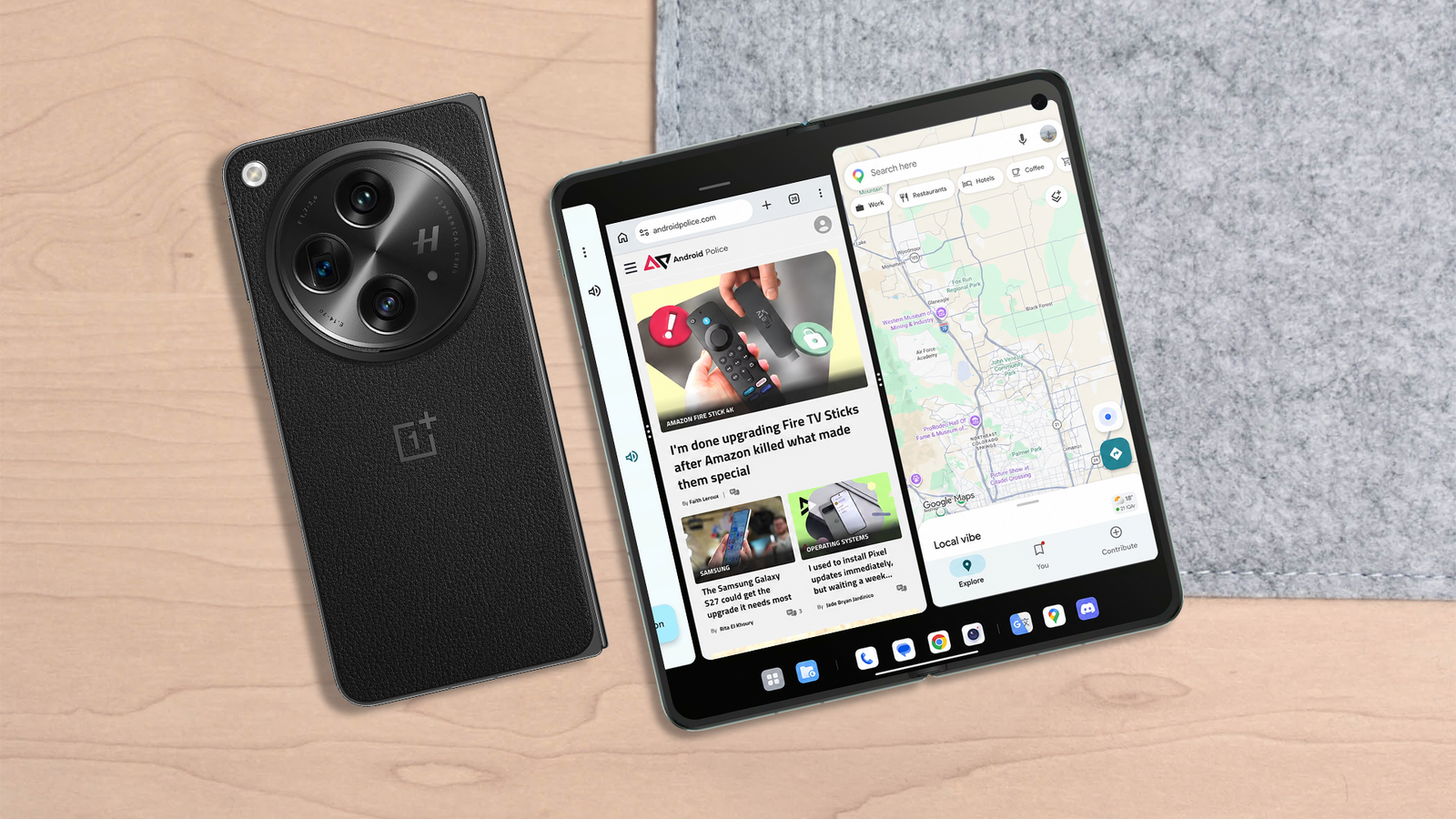
Published Jul 30, 2026, 11:15 AM EDT Khumail has been writing about tech, gadgets and games for almost a decade. You can find his work on international print magazines like Stuff and What Hi-Fi, and even on websites like 91mobiles. He built his first gaming PC at the age of 16 by watching YouTube videos and troubleshooting thanks to Reddit. He's been writing smartphone reviews since 2016, along with PC, games, TVs, audio hardware and motorcycle reviews. He has a bachelor's degree in management with a major in marketing which helped him organise and host What Hi-Fi shows for audiophiles to experience luxury home entertainment systems. I am sure you’re no stranger to multitasking on Android. The Samsung Galaxy Z Fold 8 lets you open more than three applications at once, so you can take advantage of the massive inner display. However, when you open four or five applications at once, the multitasking windows start to look like a horrifying stack of error messages from the Windows XP era. The OnePlus Open dealt with this issue in a smart way, and I am sure Samsung can take a few notes (pun intended). The Samsung Galaxy Z Fold 8 now comes in two sizes: a wider passport-sized frame and a traditional taller aspect ratio. While both lovely foldables have their use cases as per the screen real estate, the OnePlus Open did something two years ago that went beyond the traditional windowing on mobile devices. Is the OnePlus Open Canvas better than Samsung’s floating windows? One aged better than the other The OnePlus Open Canvas extended multitasking beyond the physical borders of the smartphone. Unlike Samsung’s approach, OnePlus took a more reserved but sensible path to multitasking with the Open Canvas. It only allowed you to open three apps at the same time on the inner display, but it understood that apps can run in parallel without being on the display. Instead of squeezing everything in the inner display, the OnePlus Open Canvas pushed the third app towards the periphery. I could pull this app into the context window with a single tap, and that felt faster than opening and closing app bubbles. Compared to Samsung, having only three apps on the screen might sound like rookie numbers. However, Open Canvas lets you pin multiple app groups on your home screen and keep two such groups in your taskbar, effectively creating a six-app multitasking environment without overlays. I have used the OnePlus Open for nine months, since it launched in 2023, and then switched to the OnePlus Open Apex Edition in 2024. It also won our award for the best foldable in 2023. The OnePlus Open was a very capable foldable smartphone and, in the hands of a power user, it can push past the limits of traditional Android multitasking. Multitasking for the love of the game Running a game, YouTube video and voice chat, all at once Multitasking on the Samsung Galaxy Z Fold 7 My obsession back then was to rank up fast on Pokémon Unite, and the OnePlus Open handled gaming, Discord and YouTube exceptionally well. OnePlus never let you overlap windows over each other for the sake of opening them. I was opening Discord and YouTube in the traditional 9:16 aspect ratio, and then had Pokémon Unite open at the top in 16:9 aspect ratio. The bigger window always gets pushed outside the view, but you can bring it back with a single tap. This meant I could play the game, manage my Discord chats, and watch YouTube videos for tips and tricks. Something I cannot do on Samsung foldables without minimizing apps into floating bubbles. One UI on Samsung foldables will overlay the newly opened apps on top of the existing ones. This method not only blocks you from looking at the content but also looks cluttered. The biggest flex a foldable can have is productivity App groups are useful Open Canvas did wonders for my productivity. I was managing Google Sheets in 16:9 aspect ratio while coordinating with the team on Slack and WhatsApp in 9:16 windows. After you create your desired app groups, this system flies. The apps in the group open together and launch into the assigned positions with a single tap. This system of multitasking really spoiled me after I started creating multiple groups and switching between them like a caffeine-induced Tony Stark from Iron Man 2. Even aspect ratios can be adjusted for every app in this three-way split screen. You can have all three apps open to their maximum supported size or have three apps open in a typical 9:16 smartphone aspect ratio. Maybe open YouTube Shorts, TikTok, and Instagram Reels at the same time for some competitive doomscrolling? Just a thought. Are Android 17 app bubbles the future? Credit: Lucas Gouveia / Android Police OnePlus knew it got Open Canvas right with its first and only foldable, which is why you can find this feature on its tablets starting from the OnePlus Pad 2. While I can continue raving about the OnePlus Canvas, OnePlus packed its bags and exited US and European markets. It’s very unlikely that OnePlus will make another foldable because its sister brand Oppo has been making the successor. I am just happy OnePlus Canvas exists on Oppo Find N series smartphones, albeit under a different name. As for Samsung, the latest Galaxy Z Fold 8 and Z Fold 8 Ultra need better multitasking windows. Multitasking on Samsung foldables isn’t bad, but it doesn’t declutter my screen as elegantly as OnePlus’ Open Canvas. The latest Android 17 App Bubbles feature might be a saving grace for the Korean giant. Still, I prefer my app windows to be organized and opened with purpose, which is why having endless apps overlaying each other might not only be an eyesore but also hinder my productivity.
I wish Samsung copied this multitasking feature from the OnePlus Open
Full Article
Original Source
Read the full article at Androidpolice →KhanList aggregates and links to publicly available news content. We do not host full articles from third-party sources. Always verify important information with original sources.