
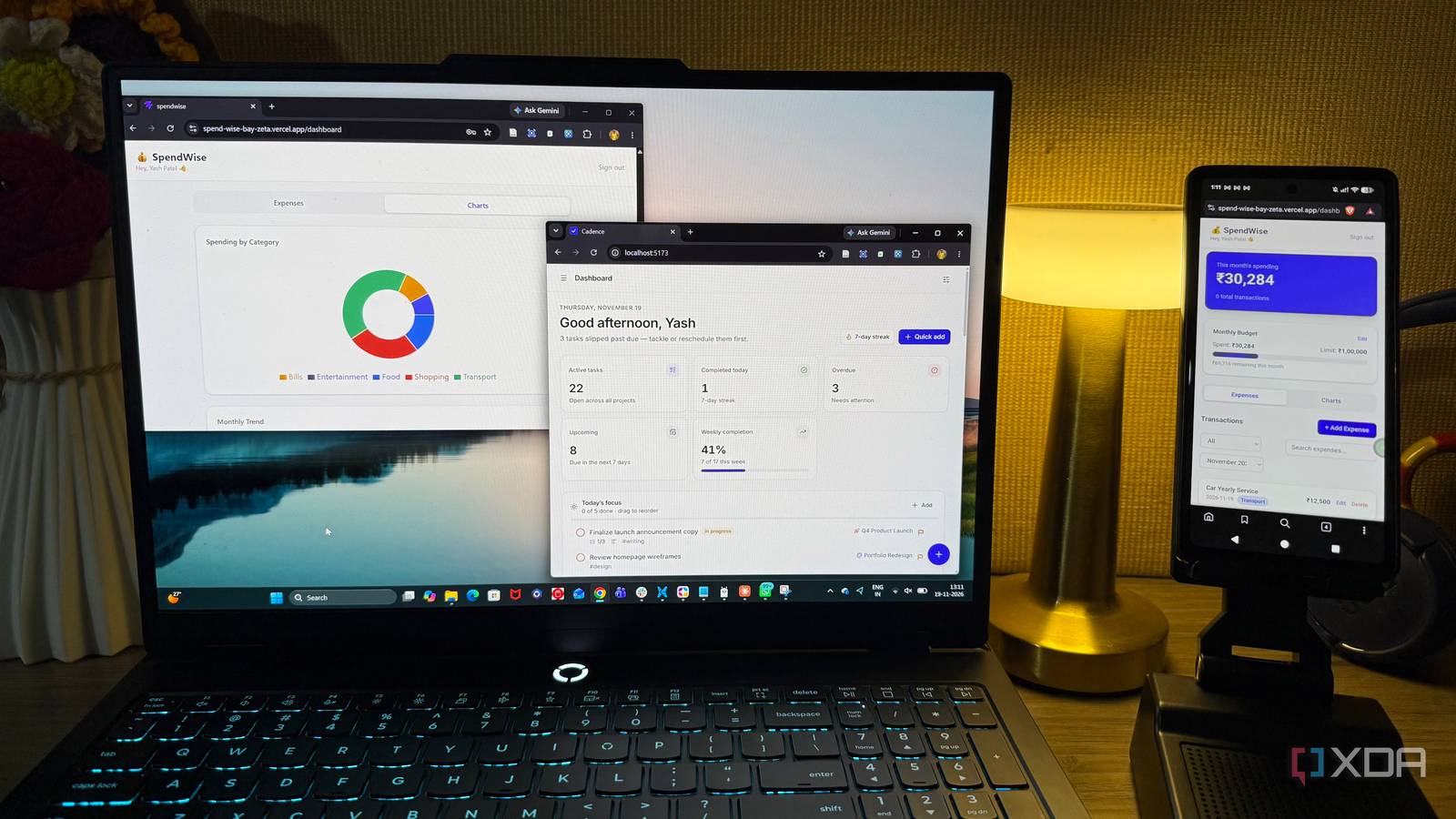
Published Nov 25, 2026, 4:00 PM EST Beginning his professional journey in the tech industry in 2018, Yash spent over three years as a Software Engineer. After that, he shifted his focus to empowering readers through informative and engaging content on his tech blog – DiGiTAL BiRYANi. He has also published tech articles for MakeTechEasier. He loves to explore new tech gadgets and platforms. When he is not writing, you’ll find him exploring food. He is known as Digital Chef Yash among his readers because of his love for Technology and Food. I've always found it frustrating when a software tool almost fits my needs but misses a few things that matter to my workflow. Adding another subscription or switching between multiple apps isn't always the answer. With AI coding assistants, there's now another option: building the tools myself. I experimented with this approach and created a handful of small applications and browser extensions to handle everyday tasks using Claude Code (Opus 5.5). Some turned out more useful than I expected. Budget and expense tracker app A simpler way to keep my spending in check Managing everyday expenses shouldn't require navigating a complicated financial dashboard. That's the idea behind Spendwise, a personal budget and expense tracker I created to keep tabs on my spending. Most expense-tracking apps offer more features than I need, and some put basic functionality behind paid plans. This one focuses on the essentials. Adding a transaction takes just a few moments. I can categorize purchases, set monthly budgets, and see how much I've spent without manually sorting through individual entries. Visual summaries offer a useful breakdown of spending habits, making it easier to identify categories where my money goes. The uncluttered dashboard also keeps important information within easy reach. I also hosted Spendwise on Vercel, so I can access it from my desktop or phone. This makes it convenient to record purchases on the go instead of waiting until I'm back at my computer. AI handled the development process, including the interface and underlying functionality, turning a simple idea into a working expense tracker. Personal task management dashboard A dashboard built around the way I plan my day My daily workload involves more than keeping a list of unfinished tasks. Projects have deadlines, priorities change, and some responsibilities repeat every week. Cadence addresses these different requirements by combining task management, projects, calendar planning, habits, and notes in one dashboard. The homepage acts as a snapshot of my workday. It displays active and overdue tasks, upcoming deadlines, completed items, and weekly completion statistics. There's also a Today's Focus area where I can rearrange tasks using drag-and-drop. I can also switch between three views depending on how I want to manage my workload: a sortable task list, a Kanban board, or a calendar with month, week, and day layouts. Individual tasks come with plenty of room for detail, including priorities, subtasks, descriptions, tags, reminders, and recurring schedules. Projects have their own progress indicators and deadline tracking. I deliberately kept Cadence local-first. It doesn't require an account, server, or external database. Everything is stored in the browser's IndexedDB, while JSON import and export provide a straightforward way to manage backups. It's a complete personal workspace without the overhead of maintaining a cloud service. Useful Chrome extensions Browser utilities for my everyday tasks Chrome extensions are an important part of my productivity workflow. Whether it's finding information while browsing or capturing screenshots for my articles, I rely on several small utilities throughout the day. However, after running into privacy issues with extensions changing ownership, I decided to take a different route and vibe-code my own alternatives. LensSnap and SnapNest are two such creations. LensSnap focuses on visual search. It lets me select any part of a webpage, image, or video frame and search for it using Google Lens. There are additional options for shopping searches, copying captures, and saving them as PNG files. A small history panel also keeps recent captures within reach. When visual search isn't the goal, SnapNest takes care of capturing what's on the screen. It supports region selection, full-page captures, and individual webpage elements. Its built-in editor goes beyond basic cropping, offering gradients, custom backgrounds, annotations, and blur tools. This is particularly handy when preparing images for articles without opening a separate editing application. A better home for connected notes and ideas Over time, my notes became more than just a place to store random thoughts. I wanted a way to connect ideas, organize research, and quickly revisit information I'd saved earlier. That led me to build Verso, a personal knowledge management app inspired by Obsidian, Notion, Apple Notes, and Craft. Its rich-text editor supports headings, checklists, tables, code blocks, images, and file attachments. Markdown storage and Obsidian-style wiki links make it easy to connect related notes, while the graph view visualizes those connections. Backlinks, daily notes, reusable templates, nested folders, and tags offer plenty of flexibility for organizing research and personal notes. Full-text search makes finding older information quick, and the command palette provides shortcuts for creating notes, navigating folders, and managing the workspace. It also supports importing existing Obsidian vaults, making it easier to bring an existing collection of notes into Verso. What started as experiments became part of my routine Not every feature I build needs to be perfect, and not every experiment needs to replace an established application. What matters is that these projects have given me a better understanding of the software I use every day. I've also discovered how much can be achieved with a clear idea and the right AI coding assistant. It's made experimenting with software far more approachable, even for projects that once seemed too ambitious to attempt.
I vibe-coded my own productivity tools to replace the software I used every day
Full Article
Original Source
Read the full article at Xda-developers →KhanList aggregates and links to publicly available news content. We do not host full articles from third-party sources. Always verify important information with original sources.