
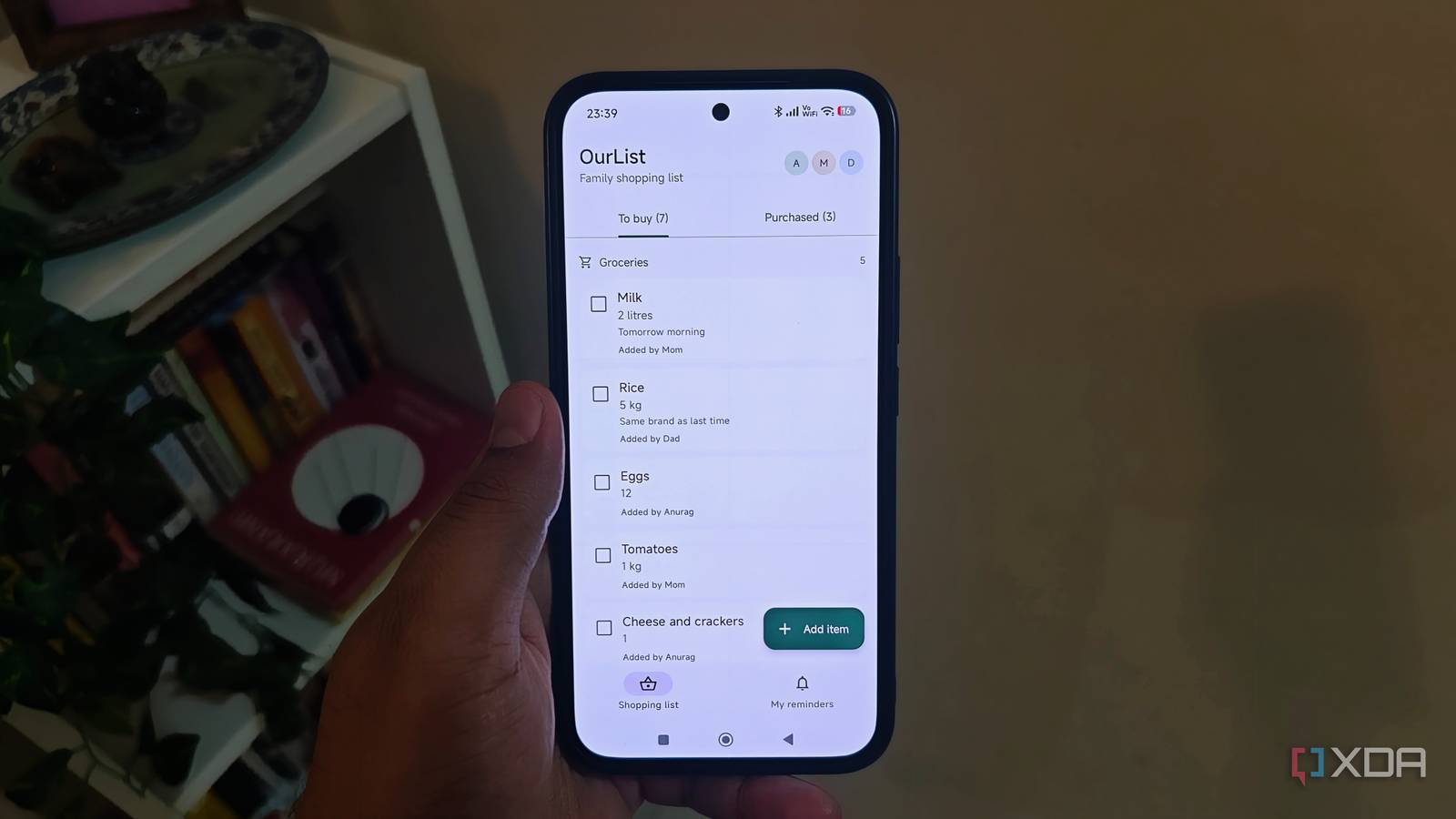
Published Oct 31, 2026, 10:30 AM EDT Anurag is an experienced journalist and author who’s been covering tech for the past 5 years, with a focus on Windows, Android, and Apple. He’s written for sites like Android Police, Neowin, Dexerto, and MakeTechEasier. Anurag’s always pumped about tech and loves getting his hands on the latest gadgets. When he's not procrastinating, you’ll probably find him catching the newest movies in theaters or scrolling through Twitter from his bed. Most of my projects with Claude Code are things I want to use myself, whether that’s adding a feature to a self-hosted app or building a tool for a specific task. This time, I wanted to make something for my family. I ended up building a shared grocery list with reminders for things that need to be picked up at a particular time. There are already apps for this, of course, but I wanted to try building an Android app around the few features we needed. Everyone gets access to the same list, with quantities, notes, and reminders attached to the items. It’s a fairly modest project, and that’s part of why I picked it. I gave Claude Code a small brief A shared list for the family I started by asking Claude Code to build an Android app where everyone in my family could add groceries to a shared list, specify quantities, and mark items as purchased. I kept the initial brief focused on those actions. I used Opus 5.5 to build the whole thing and hit my five-hour usage limit twice during the process. The app uses Kotlin and Jetpack Compose for the interface, with Firebase handling sign-in and shared data. I initially considered self-hosting a backend, but there wasn’t much reason to maintain a server for this. The app connects directly to Cloud Firestore, which stores the shopping list and syncs changes across our phones. It also supports offline access, so you can add something without a connection and have it sync once you’re back online. I went with Firebase’s free Spark plan, which doesn’t require a payment method. For a grocery list shared between a few family members, its free quotas should be enough. Everyone signs in with their Google account, and access rules restrict the list to our family. A grocery list that only exists on my phone is easy enough to make in a notes app. With this one, anyone can add something when they notice we’re running out, and whoever goes shopping can check the list. Quantities and notes sit alongside each item, so “rice” can include the pack size or brand instead of leaving the person buying it to ask. I also connected Claude Code to GitHub to keep track of changes. I can ask it to review and commit its work with a clear description, and go back to an earlier version if an update breaks something. Reminders make the list more useful Remembering what to buy and when Adding something to a shopping list doesn’t mean I’ll remember to check it before coming home. That’s why I wanted reminders alongside the shared list. I can set a reminder for an item and have the phone notify me around the time I expect to go shopping. The quantity and notes are already in the app, so I don’t have to piece together what I’m supposed to buy from a separate reminder and a message. These are personal reminders scheduled on the phone. The shopping list is shared with everyone, but setting a reminder for myself doesn’t send a notification to the entire family. Someone else can check the same items and decide when they want to be reminded. I prefer that arrangement to having every addition trigger an alert on everyone’s phone, especially when an item doesn’t need to be bought immediately. I also kept the reminder system separate from Firebase. Firestore handles the shared data, and Android handles the notification on the device. Once a reminder is scheduled locally, the phone doesn’t need to contact a server at that moment to display it. That keeps this part of the app useful without adding a service whose only job is to send notifications. I’m keeping remotely assigned reminders out of this version. Having someone create a reminder on my phone without me opening the app would require push delivery and additional backend logic. For now, I can open the family list, see what we need, and set my own reminder before heading out. This barely costs me anything to run Free tiers cover what we need Almost every service I’m using for this app has a free version, and there are only a few of us using it. We’re storing grocery items, quantities, and notes, so there isn’t much data involved either. Firebase’s free tier gives us enough room for this kind of usage, and I don’t expect our family shopping list to outgrow it. GitHub also lets me keep the source code in a private repository for free. Beyond the Claude subscription I already use, I haven’t needed to pay for anything extra to build this. The main expense has been my usage allowance, which I exhausted twice. That’s a reasonable trade for something I find useful. I keep forgetting to pick things up, and having an app remind me is helpful enough on its own. My family can also log what we need as they notice it, instead of relying on me to remember everything they’ve asked for. I have more reasons to build I’m already thinking about what else I can make for us. Having Claude Code handle the implementation makes these small projects easier to take on, especially when the running costs are negligible.
I used Claude Code to build an Android app that my family actually uses every day
Full Article
Original Source
Read the full article at Xda-developers →KhanList aggregates and links to publicly available news content. We do not host full articles from third-party sources. Always verify important information with original sources.