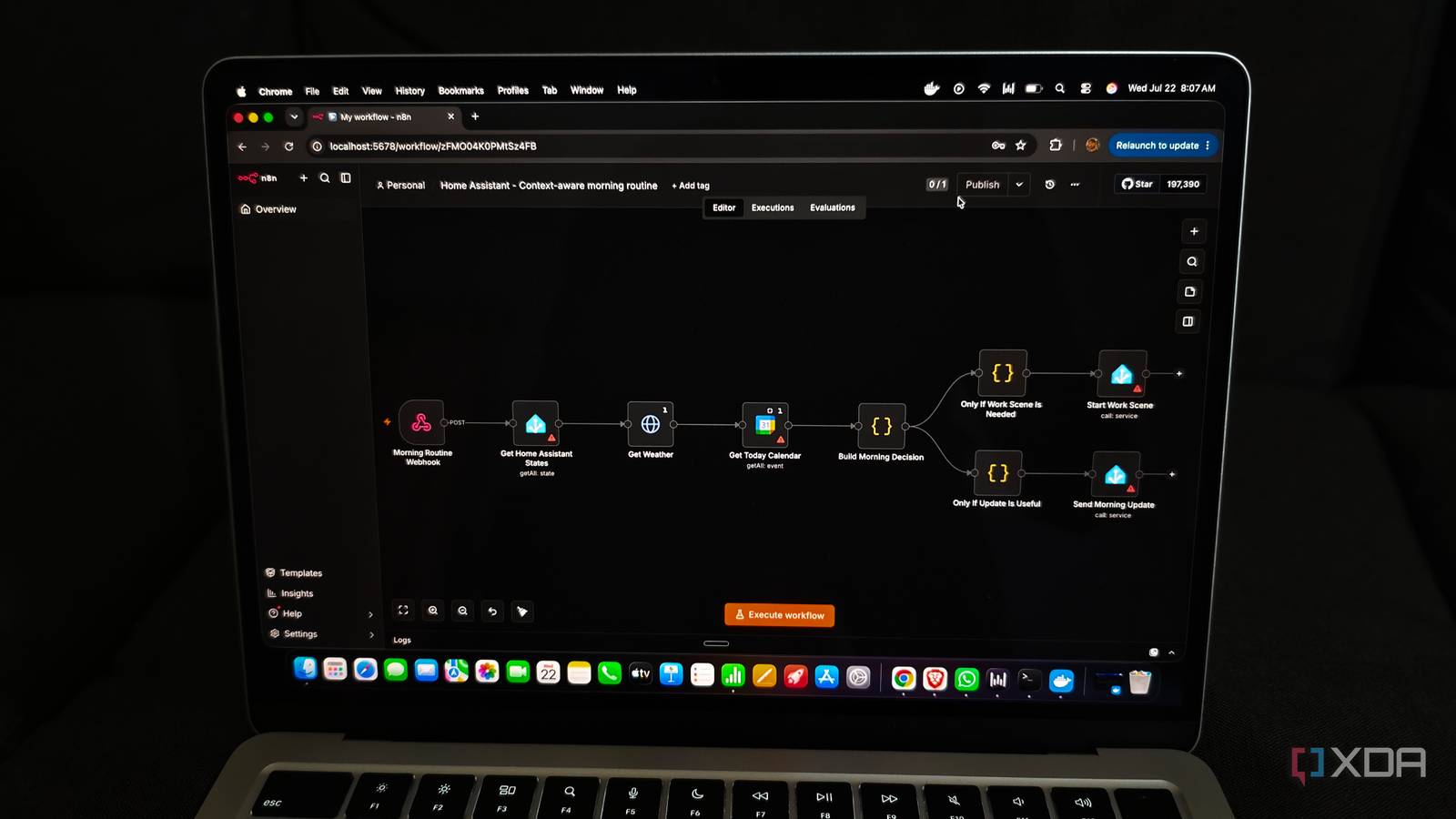
Published Jul 23, 2026, 8:00 AM EDT Anurag is an experienced journalist and author who’s been covering tech for the past 5 years, with a focus on Windows, Android, and Apple. He’s written for sites like Android Police, Neowin, Dexerto, and MakeTechEasier. Anurag’s always pumped about tech and loves getting his hands on the latest gadgets. When he's not procrastinating, you’ll probably find him catching the newest movies in theaters or scrolling through Twitter from his bed. Home Assistant is excellent at making smart devices react to things. However, these automations only work well when the trigger, conditions, and actions remain simple. For example, turning off the light when you step out of the room, switching on the washing machine at a certain time, or turning on the lights when you are near your house. Home Assistant almost always gets these automations right. But it's 2026. We are increasingly seeing agentic ways of doing things. People are making their agents order food, file taxes for them, and whatnot, so why do your automations remain simple? I wanted to take things up a notch in my home, so I paired Home Assistant with n8n. Now I am running a lot more complex automations that are essentially running my house. Getting n8n and Home Assistant to talk to each other There’s already a node for it I expected connecting n8n with Home Assistant to be the difficult part, but there is already a Home Assistant node built into n8n. You only need the URL of your Home Assistant instance and a long-lived access token, which you can generate by going to your profile in Home Assistant. I added both as credentials inside n8n, and it was able to access my Home Assistant instance immediately. The node gives n8n access to most of the information it needs. It can fetch the current state of a particular entity, get all available states, call a service, create an event, check logs, and even grab an image from a camera. This means n8n can check whether someone is home, whether a light is on, what temperature a sensor is reporting, or whether a particular device is available. Once it has made a decision, it can call the relevant Home Assistant service to turn something on, change a setting, or send a notification. I also needed a way for Home Assistant to start workflows inside n8n. For this, I used the webhook node. It gives you a URL that Home Assistant can call whenever an automation is triggered. Home Assistant sends a small JSON payload containing information about what happened, such as which sensor changed state and what its new value is. n8n receives that information and continues the rest of the workflow. This creates a two-way connection between both platforms. Home Assistant can tell n8n that something has happened, and n8n can pull more information, contact other services, process everything, and send an action back. Once this connection was running, building more complicated automations was mostly a matter of deciding what information each workflow needed and what Home Assistant should do with the result. My morning routine no longer runs on a timer I now have more flexibility One of the first automations I changed was my morning routine. Earlier, it would start at a fixed time and perform the same set of actions every day. That works if every morning looks the same, which obviously isn’t the case. Sometimes I wake up early, sometimes I have a meeting, and on some days there is nothing important that needs my attention. Home Assistant now waits for the first movement in the house during my usual morning hours and then sends that event to n8n. From there, the workflow checks my calendar, pulls the weather forecast, and gets the current state of a few devices and sensors from Home Assistant. It can see whether I have an early meeting, whether rain is expected, whether the temperature is already getting uncomfortable, or whether I have left a window open. What happens next depends on the information it finds. If I have an early meeting, it can start my work setup and make sure the room is comfortable before I sit down. If rain is expected and a window is open, it sends me a notification. n8n also combines the useful information into a short morning update instead of sending separate alerts for everything. n8n makes automating almost anything stupidly easy You can use it to automate anything, not just your home Once I had a few workflows running, I started looking at every repetitive thing I do and wondering whether n8n could handle it. In most cases, the answer was yes. It already has nodes for hundreds of popular services, and if a service is missing, you can connect to its API using the HTTP Request node. You can also add some JavaScript or Python when the data needs more processing than the regular nodes can handle. This means automation does not need to begin and end inside the same application anymore. An email can start a workflow that updates something inside Home Assistant. A power sensor can create a maintenance task and remind me about it later. A calendar event can change what happens around the house before the event begins. You can also bring an AI model into the workflow when you need to summarize information, understand unstructured text, or decide which branch should run next. The visual editor also makes experimenting with these ideas much easier. I can add another service, move some data around, test the workflow, and see the output from every step without building an entire application for it. Once one workflow works, parts of it can be reused elsewhere as well. n8n has lowered the effort required to automate things so much that I now notice manual work a lot more. If I am repeatedly checking something, copying information between services, or performing the same action after the same event, there is probably a workflow waiting to take care of it. You can now take home automations to another level We are seeing a rise in smart appliances, and they are capable of a lot more than earlier-generation products. Even if you can’t afford to replace every appliance in your house with a smart one, you can always build your own.
I use n8n to handle the automations Home Assistant quietly can't, and my house runs itself now
Full Article
Original Source
Read the full article at Xda-developers →KhanList aggregates and links to publicly available news content. We do not host full articles from third-party sources. Always verify important information with original sources.