
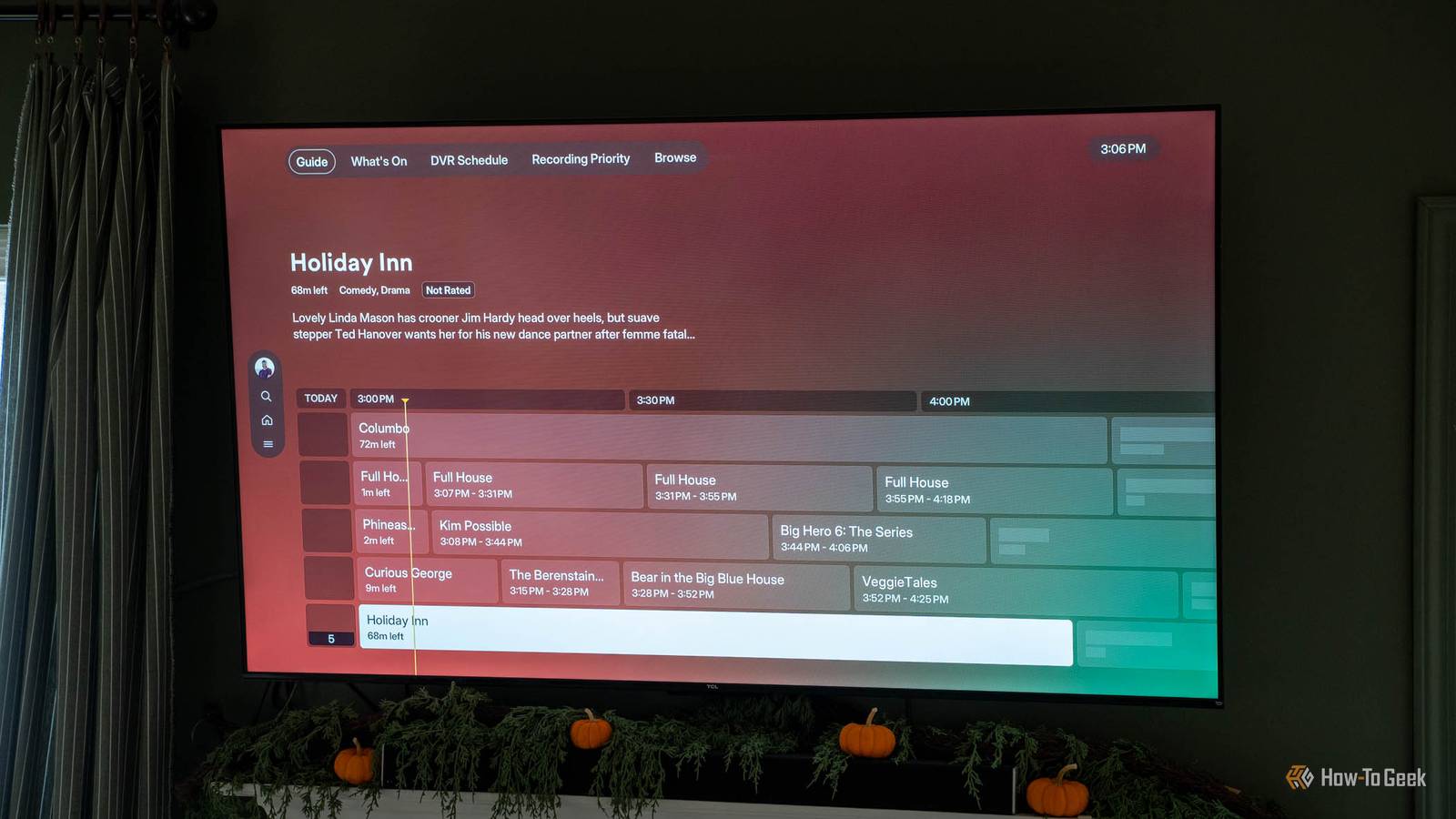
Published Nov 28, 2026, 1:30 PM EST Patrick Campanale has been in the tech space for well over a decade, specializing in PC/gaming news and reviews, as well as maker-focused products to build small businesses. With a start in technology back in 2010 surrounding the Palm/webOS ecosystem, Patrick spent his formative years developing mobile applications as well as blogging for various publications, eventually leading to starting his own website in 2014. After running a technology blog for a few years, he stepped out of that role and into the world of high-end custom PC manufacturing and building, with a focus on YouTube video production and overclocking. Then, in 2017, Patrick joined the 9to5Toys team as an editor/writer/reviewer with over 14,000 articles being published during his time there, ranging from deals and roundups to in-depth reviews on the latest technology, video games, 3D printers, and more. In his free time, Patrick loves to create projects from wood using various robots and methods, including leveraging the technologies of CNCs and lasers. If Patrick isn't working on a computer or playing video games, he's likely in his 2-car garage workshop creating something unique. In addition to all this, Patrick is also the media director at his local church where he feels God has called him to serve, and he loves every minute of it. I love that Plex lets me choose what content I watch without anyone else interfering, but, sometimes, I long for the nostalgia of old cable TV. Instead of paying Xfinity over $100 a month or signing up for yet another streaming service, I decided to just use Tunarr and Plex to recreate the experience on my terms. Tunarr is the Plex add-on I’ve always wanted I love on-demand content, but sometimes having a TV channel decide what I’m watching is just nice I’ve written about Tunarr before, but it’s the time of the year when holiday movies basically play in my house on repeat. Instead of using Plex normally and selecting each movie, I decided to enlist the help of Tunarr once again. If you’ve never heard of Tunarr, it’s a simple app that takes the content already in a Plex library and turns it into a TV channel within Plex. It also works with Jellyfin, I just prefer Plex personally. Either way, inside of Tunarr, you give the channel a name and tell it what movies or TV shows to shuffle through. So, I picked a bunch of Christmas movies that my wife and I already love to watch and created a Holiday Classics channel within Plex. It’s 24/7 Christmas movies and there’s always something different on. Of course, I can still go to Plex and pick Jingle All the Way or Elf if I want something specific, but I can also just pick the channel if I want random movies to play in the background throughout the day. It’s easy to set up Tunarr All it takes is a new Docker container and a little configuration While I already had Tunarr set up in my media stack, if you’ve never used it, it’s actually simple to deploy. You start by just launching it like you do any other Docker container—I use Docker Compose files on my Ugreen NAS. Just make sure to mount your Plex media as read-only to the container so it has the ability to browse your movie and TV show files. Then, within Tunarr you create a new TV channel and give it a name and optionally set a logo. I like using logos with mine because it just makes the channel feel more “official”. From there, select what movies or TV shows you want to play on the channel. Christmas movies are easy because they’re just all movies, all the time. But, you can definitely mix movies and TV shows on the same channel, and even have the channel play a movie at a specific time every day if you want. Now I have a holiday movie channel that plays random movies 24/7 I never have to worry about what’s going to come on next since I picked the content of the channel There are some Christmas movies I love, and some I’m not a fan of. I’m personally not a big Hallmark movie fan. They all have the same plot and it’s just not my cup of tea, so I’ve excluded those movies from my own personal Christmas movie channel. I love that I get to pick the content because it lets it feel completely custom. Customizability and choice are one of the reasons that I run my own media server. Nobody can tell me what I can have on it, and I’m the one in charge of it. I also love that I don’t have to watch ads—though I have actually chosen to add ads back to my Christmas movie channel. Why do I have ads on my 24/7 Christmas movie channel? Well, I’ve written about it before, but I actually have come to realize that TV channels back in the day gave us built-in bathroom or snack breaks that ad-free viewing simply doesn’t give us. So, I’ve hand-picked a bunch of holiday-themed ads that play on the Christmas movie channel in Plex and it’s really fun to see some of these nostalgic ads come up when watching movies with my wife. It’s also fun to just leave the channel running in the background throughout the day. Movies change every hour and a half to two hours, so throughout the day we might catch glimpses of several different movies as we both work from home as journalists. It’s fun to just stop in the living room for a few minutes when grabbing a cup of coffee or glass of tea and watch a little of a movie, and then catch another part of the movie during the next refill break. Self-hosting puts me in control of the experience I know that there are actual TV channels or online streaming services that provide a similar experience, but they're not customizable. I love being able to curate what movies play so I can remove what I’m not interested in. I could have the entire channel be nothing but Elf, The Santa Clause, and Jingle All the Way if I wanted it, but I’ve added a few more titles than that for variety—but only the stuff I actually want to watch.
I turned my Plex library into a 24-hour holiday movie channel, and it feels like cable used to
Full Article
Original Source
Read the full article at Howtogeek →KhanList aggregates and links to publicly available news content. We do not host full articles from third-party sources. Always verify important information with original sources.