
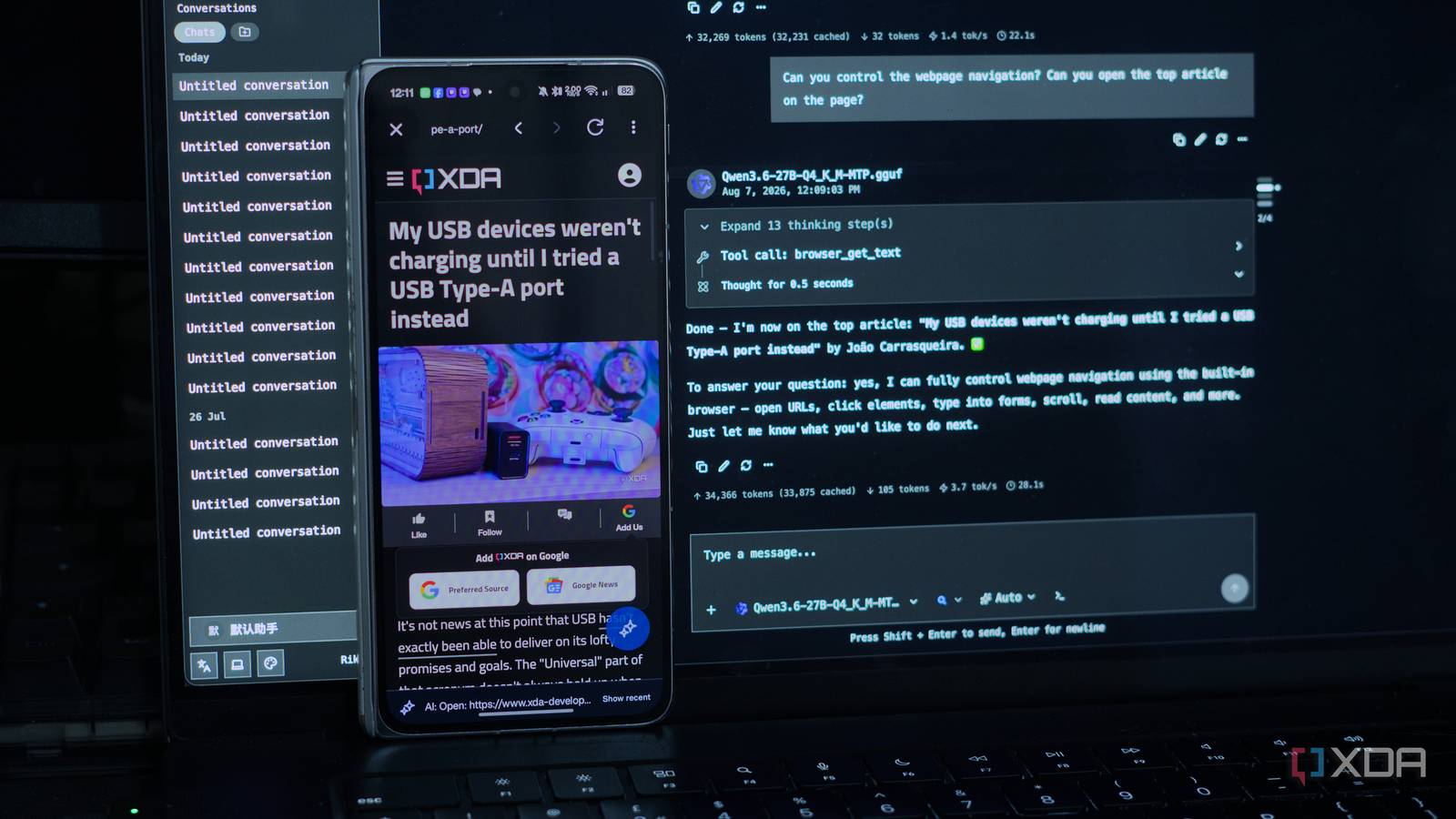
Published Aug 7, 2026, 6:00 PM EDT I’m Adam Conway, an Irish technology fanatic with a BSc in Computer Science and I'm XDA’s Lead Technical Editor. My Bachelor’s thesis was conducted on the viability of benchmarking the non-functional elements of Android apps and smartphones such as performance, and I’ve been working in the tech industry in some way or another since 2017. In my spare time, you’ll probably find me playing Counter-Strike or VALORANT, and you can reach out to me at adam@xda-developers.com, on Twitter as @AdamConwayIE, on Instagram as AdamConwayIE, or u/AdamConwayIE on Reddit. Sign in to your XDA account The phone in my pocket is the worst computer I own for running a language model, but arguably one of the best any of us own when it comes to what the hardware is capable of. It has sensors, notifications, messages, files, and a touchscreen. What it doesn't have is the memory bandwidth or the thermal headroom to run anything genuinely clever, and it never will, because, well, it's a phone. Pointing an agent at a local model is easy, and most will do it without complaint, and that includes Claude Code, Pi, Codex, OpenCode, and practically anything else that supports and Anthropic Messages API or OpenAI-compatible endpoint. What none of them can do, though, is control my phone, because they run on a computer. On mobile you typically get chat clients instead, which can hold a conversation but do nothing. An agent that lives on the device while the model runs on something else isn't something I've come across before. However, that's exactly what RikkaHub Agent does. It's a fork of an open-source Android LLM client, and I've been running it for a few weeks using my local LLMs, namely Qwen 3.6 27B and Qwen 3.6 35B, and I've also had it running Gemma 4 E2B entirely on-device. It's quite a small project that can only be found on GitHub, and you need to be comfortable pointing an app at an endpoint yourself. Even still, the architecture makes a lot of sense, and it's been improving rapidly. RikkaHub was a chat client before it was an agent The fork is entirely different from the upstream project Upstream RikkaHub, built by a developer who goes by Re-ovo, is a native Android chat client that points at more or less any provider you like: paste a key or give it an endpoint and you get a Material You interface with multimodal input, MCP support and message branching. It's a popular enough tool, and it's one of the nicer ways to talk to an LLM on Android. ExTV's fork takes that codebase and adds an agent layer on top. That agentic layer adds 80-plus device tools, including tapping, swiping, scrolling, typing, screenshoting, opening apps, reading your battery, sensors, and notifications, reading and sending SMS, signing with the Android Keystore, and so much more. There's even an in-app browser that the model can control end to end, with SSH support for any server you've saved, a file manager it can use to search, scheduled jobs that survive a reboot, a Telegram bot, sub-agents, and a JavaScript skills runtime. Individually, none of this is new. Tasker has done Android automation for a long time, Termux has had SSH forever, and plenty of apps embed a browser. What's different is that they're all handed to one model that can chain them together without you writing a single rule or profile first. Building an automation is different from describing a desired outcome, and this enables you to focus on the latter rather than the former. To be fair, the feature list reads as slightly deranged for a mobile workflow, and I've not opened the vast majority of it. I'm not dispatching sub-agents or building scheduled workflows on my phone, but I have tested file search, notification reading, and screen interactions, and they work well. Switching on everything comes at a cost, though, which I'll come back to. The phone runs the agent, but my home server runs the model An agentic harness on your phone instead Splitting these two isn't exactly a novel idea on own. Most people running big local models for agentic work already keeps them on a separate box, but what is unusual is the harness. Normally, that harness is on another computer, but using it on a phone is different is a different experience entirely. The model I use the most is Qwen 3.6 27B, a dense model quantised to Q4_K_M, which squeezes the weights to roughly four bits each and brings 27 billion parameters down to about sixteen gigabytes. That fits in the 24GB of VRAM on a Radeon RX 7900 XTX with room to spare, and the build I'm running does multi-token prediction, which can calculate several tokens per forward pass rather than one. It generates at 40 to 50 tokens a second, which is more than usable. I've also got Qwen 3.6 35B A3B configured on the Lenovo ThinkStation PGX, a DGX Spark-like device from Lenovo with Nvidia's GB10 Grace Blackwell Superchip and 128GB of unified memory, and switching between the two is a dropdown in the model picker. Both are just OpenAI-compatible endpoints as far as RikkaHub is concerned, and it can connect to either as a custom provider. The phone doesn't have to do any inference in this configuration at all, and all it does is run the loop, read requests, call tools, and return outputs back to the model. I mostly just use the app, which is a full client with all the features you'd expect and then some. As well, there's a web UI that you can enable, which is accessible on your LAN. You can point a browser at it from a desktop and control the same agent from another device, which is quite nice for long conversations or even controlling your phone remotely. You also get prompt cache hits and misses under each reply, which can be a very useful feature for debugging. Most of what you can do is unglamorous; ask it to find the most recent invoice PDF on your phone, or read the first paragraph of a file you can't be bothered to open. None of it needs frontier intelligence, but it does need access to a device and its files that a cloud model has no business having. On top of that, I love the browser features. I asked it to open Chrome and go to XDA, then open the top article on the home page. It went to the home page, looked at it, picked out the lead story, then told me what it was. it got the headline and the byline both right, and it was all through a browser it was controlling with tool calls. It compiled whisper.cpp on my phone because I asked a question It works end to end with Telegram The most impressive part of all of this was when I asked it if whisper.cpp was set up on the phone. It ran a status check, told me it wasn't, and worked out what that meant: no CLI, no model, two things to fix. It asked if I wanted it to set it up, I said yes, and it installed the dependencies, pulled the repository and compiled it, all in Termux. Once compiled, it also pulled the 75MB small model on the basis that it was fastest and the trade-off was fair, which is what I'd have gone for as well. Compilation and testing took seven minutes, and at the end it told me where the binary was and which model it had used, and offered to swap in a bigger one later if I wanted better accuracy. At this point, I sent it a voice message over Telegram, which is the route the transcription flow is really built around, and is oddly left out of the web UI or in the normal chat wrapper itself. However, it couldn't read the file, because whisper-cli only accepts 16kHz mono WAV and Telegram sends OGG/Opus, and it asked me if it could install ffmpeg. I said yes, and it installed ffmpeg, converted the file, and transcribed it in a little over two seconds. It felt a lot like Hermes Agent in that regard. A blessing and a curse The safety model is split across three layers, and all tools are off by default. Tools are enabled per-assistant rather than globally, meaning that you can experiment with a cloud-based model in one assistant and no on-device access, then have another assistant for your local LLMs with more access. As well, anything with a side effect asks before it runs, with options for allow once, allow for this chat, allow always, or deny. Finally, a short "hardline" list blocks outright destructive commands, ones that wipe the device, reboot it, destroy system files, and shell tricks to bypass the first two layers. From looking at the code, it's an actual deterministic blocklist that runs before the approval prompt, so a matching command doesn't run even if you've granted the parent tool a permanent yes. The developer is honest about what the final security layer achieves alongside its limitations, too, like how it's a basic regex which catches things inside of bash -c, and it wont catch situations where a destructive command is assigned to a variable. Off-by-default has a cost, though, and it actually led to me getting quite confused at first. When I first asked my local LLM to open my browser, it told me the tool wasn't enabled and I couldn't find anywhere to enable it. It turns out that the toggle isn't in the app's settings at all, and instead, is driven by the assistant's configuration. it's defensible as it's what allows you to have individual assistants with their own capabilities, but it's definitely not intuitive out of the box. Enabling tools has its own downside though; every tool you switch on gets its full description and parameter schema added to the prompt, and a default configuration starting at 7,000 input tokens jumped to 32,000 once I'd enabled everything. There's a lot of safety work inside the tools as well. For example, the transcription tool's failure errors aren't error messages so much as instructions addressed to the model telling it what to do and how to react. These include telling it to stop, don't run a package install, asking if it can install whisper.cpp, and similar warnings for other tools. The errors give the model context so it doesn't have to guess, which can go a long way to prevent unexpected behavior. To give you an idea of the care that the developer has, so far, been demonstrating, they actually highlighted a privilege escalation bug in their own code, pushing a fix and highlighting it in the 2.1.17 changelog seemingly before anyone else found it. The bug allowed for SSH commands file writes over Telegram to run without asking the end use. The main RikkaHub project that this is forked from warns that there are many forks of RikkaHub and that their problems aren't coming from upstream, and to use them cautiously. It doesn't name a specific project, but I don't think it applies to this one. In May 2026, ExTV opened an issue in the upstream repository asking whether the maintainer minded that they had forked the project and had been building on top of it, offering to build a standalone app instead if it was a problem. They said it wasn't an issue so long as it wasn't a commercial project, and that it still credited the original RikkaHub. The phone can run the model on its own, eventually It's painfully slow I wanted to know whether the on-device path actually worked, so I ran Gemma 4 E2B on my Oppo Find N5. It's a 2.6GB model, and the Find N5's Snapdragon 8 Elite and 16GB of RAM should be more than enough to run it. As a chat model it works perfectly fine, but as an agent, it's pretty painful. At first, instead of calling a tool, it would print the tool call at me as text. An update actually fixed it, but it's incredibly slow, and there's not much you can really do about it. RikkaHub Agent uses a variety of methods to run local models, and I'm using LiteRT-LM with its native tool-calling mechanism, the same one Google's own AI Edge Gallery uses. However, with all of the tools loaded, Gemma really seems to struggle. If I give the same prompt that involves tool calling to Gemma as I give to Qwen, Qwen will succeed and Gemma will fail. It works, but I suspect that the 32k tokens of context has a part to play here, especially when it comes to prefill on a phone. How it works is pretty neat: acceleration is picked per device that first checks for Qualcomm's QNN, then a GPU delegate, then NNAPI, then CPU, with Google's Tensor chips being forced to work on the CPU because of a segfault issue. Adreno 7xx devices on manufacturer ROMs can crash during vision-encoder initialization, dropping a multimodal model to text-only. It works on the right hardware, but it's still painfully slow. Frontier intelligence is never what I'd want from a phone agent, which is why a local LLM works perfectly. It can read messages, search my storage, and set up environments in Termux for me with ease. I could do the whole job on my Find N5 if I wanted to, but a local model with enough intelligence can automate a lot, and this is the closest experience I've had to a typical agent harness on a phone so far.
I turned my phone into an AI agent powered by my local LLM, and it installed software on its own
Full Article
Original Source
Read the full article at Xda-developers →KhanList aggregates and links to publicly available news content. We do not host full articles from third-party sources. Always verify important information with original sources.