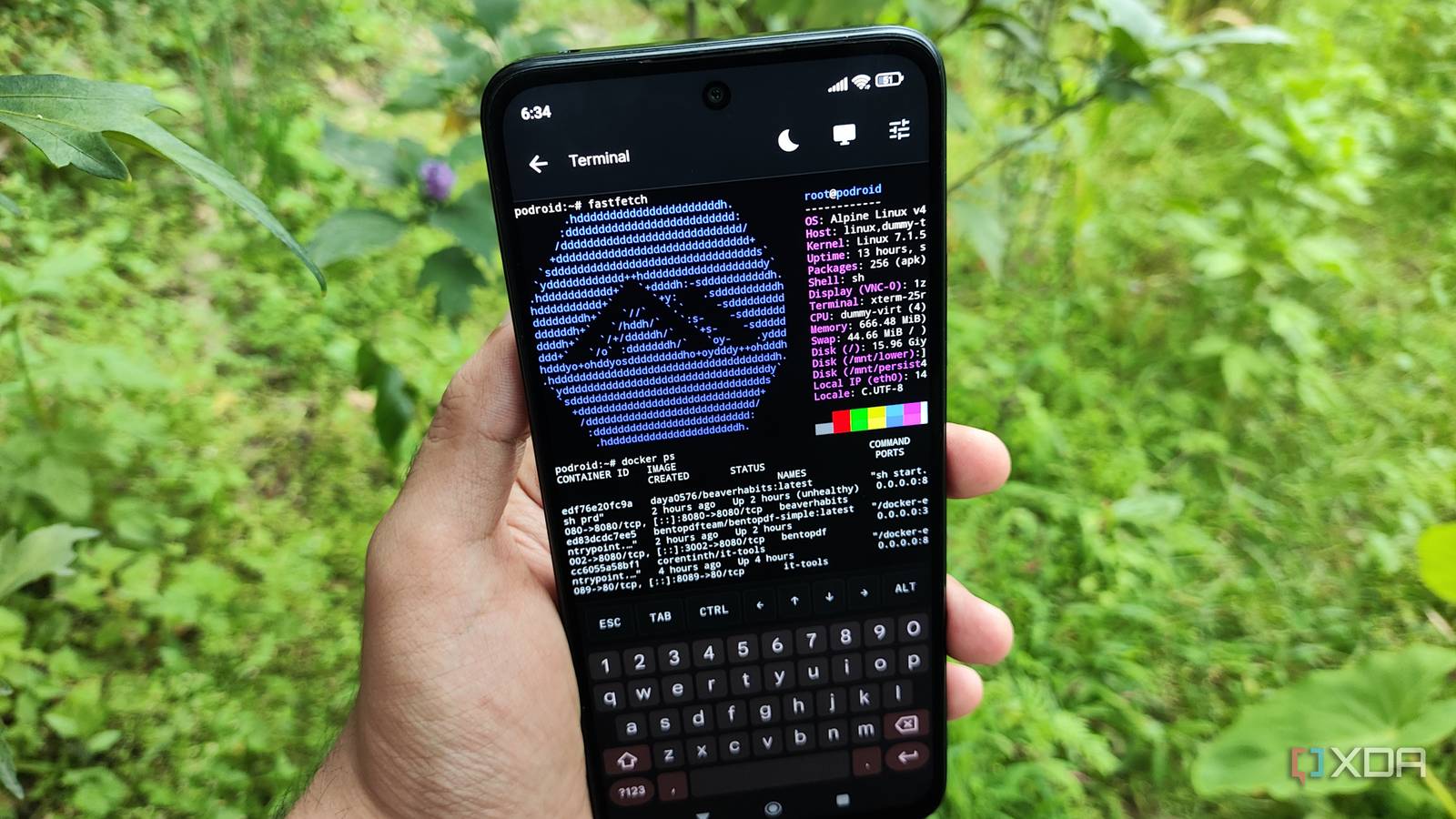
Published Aug 13, 2026, 1:30 PM EDT Ayush Pande is a PC hardware and gaming writer. When he's not working on a new article, you can find him with his head stuck inside a PC or tinkering with a server operating system. Besides computing, his interests include spending hours in long RPGs, yelling at his friends in co-op games, and practicing guitar. I’ve always been a fan of repurposing old hardware into usable components for my home lab. However, integrating Android phones into this collection has always been a bit of an issue, and it has nothing to do with their computing prowess. Between modern apps causing problems on rooted Android devices and the custom ROM scene becoming dry, tweaking smartphones from no-name brands to repurpose them into home servers is a lot less viable than it used to be until a few years ago. But if we were to leave rooted devices out of this equation, there are a few tools that can bypass these restrictions and deploy cool FOSS services on smartphones. Of course, there are certain caveats with this arrangement, but as long as I avoid containers that require access to privileged ports, I can run pretty much most of my self-hosted stack on my old smartphone. Unfortunately, running Docker on a rootless Termux instance is next to impossible As someone who got addicted to Termux after using it to emulate PC games on Android with Mobox, this terminal emulator was my first choice when I decided to build my portable self-hosting Android workstation. PRoot, for example, lets me run conventional Linux flavors on Termux, and I had no issues running simple CLI tools like BentoPDF.sh on my makeshift Debian and Fedora PRoot environments. Likewise, most of the tools available in LinuxServer’s PRoot apps repository work well out of the box, and I also found a couple of repos that let me run Nextcloud and other useful services directly on Termux. That said, I couldn’t go around deploying the majority of my application stack on this system because Docker or Podman containers aren't really feasible on Termux unless I rooted my phone. And before you come at me with pitchforks for not rooting an old Poco M6 Pro (the 4G variant, no less), hear me out for a second. Since this phone is plagued with MediaTek's proprietary source code and limited kernel releases, none of the custom ROMs I could find for it are actively maintained. Clearing bloatware used to be my biggest reason for rooting my phones, and since the Shizuku + Canta combo lets me get rid of the extra clutter anyway, I really don’t want to risk bricking my phone trying to root it, especially when it still works just fine. As for containerized services, Podroid satisfies that self-hosting itch (for the most part). Podroid single-handedly turned my old phone into a container-hosting behemoth And it’s pretty easy to use, too Docker failing to deploy a Pi-hole container Rather than relying on PRoot environments, Podroid runs a full-fledged virtual machine on my phone – one that’s built on the king of ultra-light distros, Alpine Linux. Better yet, this virtual machine already ships with Docker, Podman, and LXCs, so I didn’t have to spend extra time trying to configure these container runtime environments. Deploying the virtual machine is just as simple thanks to the menu-based interface on Podroid. That said, I had to run the podroid-forward add android_port vm_port command (or add the port mappings within the Settings menu) to use their web UIs. Unfortunately, Podroid doesn’t support network mapping for system ports, meaning it won’t work for Pi-hole and other services that require access to ports under 1024. But apart from this caveat, Podroid has yet to let me down. Podroid also offers some QoL features for my containerization misadventures It runs well on old phones, too Podroid may be a rather obscure tool, but it packs enough features to make it accessible to complete beginners. Modifying the allocated resources (besides storage) is as simple as heading to the Settings menu and changing a few toggles. Since Podroid includes USB passthrough provisions, I can slap any old USB adapters into my phone and use the right command to pair them with the containers running on its VM. I also love how Podroid supports SSH access and lets me share the Downloads folder on the phone with my virtual guest collection. On top of that, it has a neat backup facility that lets me export container images and data to my phone. That way, I can redeploy my FOSS tools without any issues if my experiments end up breaking the virtual machine. It even has an X11 desktop, so I don’t need to configure dozens of packages just to tinker with GUI-heavy apps. As for Podroid’s performance, I’ve allocated 2GB RAM and 4 CPU cores to its Alpine VM, and it's enough to run plenty of tools. Just to be on the safe side, I increased the virtual machine's RAM to 4GB, and I've had no issues running BentoPDF (the proper web UI-based app, not its CLI counterpart), ConvertX, n8n, BeaverHabits, and nearly a dozen other apps. I can use my self-hosted stack on my phone without needing another server node I’ll be the first one to admit it: despite Podroid’s neat containerization tools, it can’t replace dedicated home servers for certain projects. Pi-hole and other apps that require access to privileged ports are a good example, and the same holds true for Raspberry Pi-centric projects that need GPIO pins for additional sensor modules. But when it comes to running simple FOSS containers that I need for everyday tasks, I can rely on the Podman and Docker containers running on my smartphone-powered Podroid instance. Podroid
I turned my old phone into a portable Docker server, and now I carry my self-hosted apps everywhere I go
Full Article
Original Source
Read the full article at Xda-developers →KhanList aggregates and links to publicly available news content. We do not host full articles from third-party sources. Always verify important information with original sources.