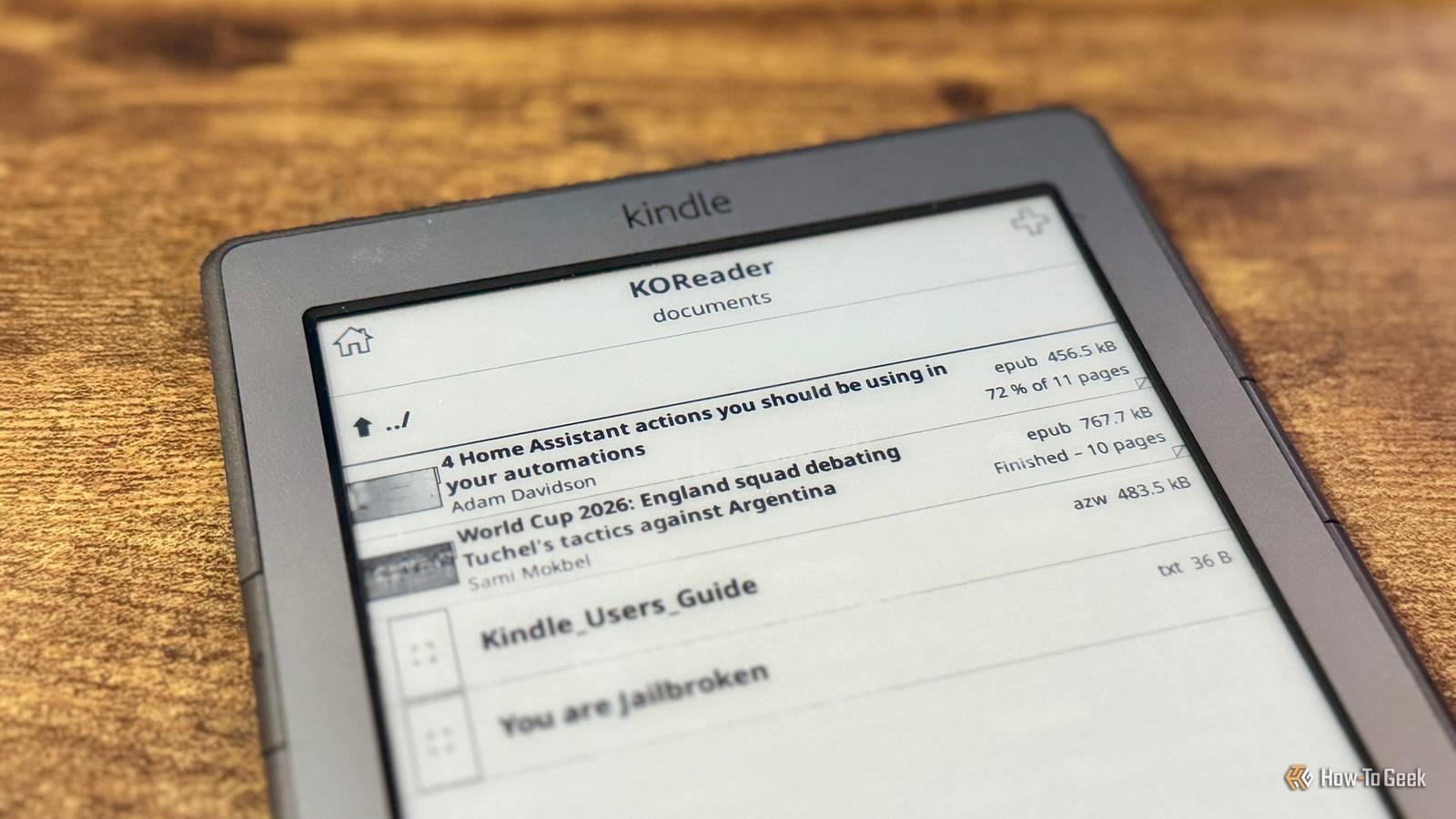
Published Jul 19, 2026, 8:15 AM EDT Adam has a degree in Engineering and has a life-long interest in technology. He has been writing for over a decade for various print and online publications, with a focus on consumer tech. He joined How-To Geek in 2024 while working at Pocket-lint. As well as being a long-term fan of Apple products, he also has a strong interest in smart home tech, running a Home Assistant server at home to automate all his smart home devices. He believes that the ideal smart home should work with minimal interaction from the user, with automations running as if by magic rather than requiring you to push buttons on a control panel. You can find more of his work on Muck Rack. Life is busy, and I don't always have time to sit and read articles when I discover them. Pocket used to allow me to save these articles and read them later, but it's sadly long gone. I decided to set up a Pocket replacement using a mini PC and my Kindle. Pocket was great, and then it was gone Mozilla killed the simple read-it-later tool Credit: Mozilla Pocket started life in 2007 as Read It Later, a browser extension that let you save web bookmarks and then access them later. If you found an article you wanted to read, but didn't have time, you could save it with a single click in your browser and then open the article later on any device. The extension became hugely popular, was rebranded as Pocket, and by 2015, it had been added as a tool in Firefox. In 2017, Mozilla acquired Pocket, and for a while, all was good. In 2025, however, Mozilla shut down Pocket, pulled the app and extension from stores, and killed the API, which was used by many third-party integrations. Pocket was no more. Mozilla claimed that it was killing Pocket because "the way people save and consume content on the web has evolved," but the reality is that there are still plenty of times when I find a great article that I don't have time to read now but would definitely like to read later. My wife chooses to save these articles as one of her 500 open tabs, but I wanted a simpler way. Beelink S13 PRO CPU Celeron FCBGA1264 3.6GHz Graphics Integrated Intel Graphics 24EUs 1000MHz The Beelink Mini S13 Pro desktop PC is a ultra-compact computer powered by the Intel N150 processor. Shipping with 16GB of DDR4 RAM and a 500GB SSD, this micro desktop is perfect for a variety of workloads. From running simple server programs to replacing your old PC, the Beelink S13 Pro is up to the task. A self-hosted service can replicate Pocket Wallabag lets you save articles to your own hardware When proprietary software dies, the good news is that you can often find a free and open-source equivalent that you can host yourself. That's exactly the case with Pocket. Wallabag is a self-hosted read-it-later service that you can run for free. It extracts the content you want to read later, stores it in an archive on your local hardware, and lets you access that content from your phone, in a browser, via an RSS reader, or on an eReader. Just like Pocket, Wallabag extracts clean article text and removes any distractions, so you can focus on reading the article without wading through ads or other web features. I set up Wallabag to run in Proxmox on my mini PC. It took a little fiddling to get it correctly configured, but before too long, I had it up and running. If you don't want to self-host Wallabag, you can use wallabag.it, a paid cloud-based version of Wallabag with an affordable subscription, with the money going to support the development of the software. Reading the articles is a joy on my jailbroken Kindle KOReader makes it simple to access saved articles While reading articles on my phone or a computer is fine, I wanted to be able to read them distraction-free. I've jailbroken my old Kindle 4 and done all sorts of weird and wonderful things with it, so I wondered if I could set it up to access the articles stored in Wallabag. I'd expected that it might be complicated to set up, but I was in for a pleasant surprise. The excellent KOReader document viewer app that I use to read eBooks on the jailbroken Kindle already has a Wallabag tool built in. All I had to do was provide the details of my Wallabag server and KOReader could connect directly to it. Although I only needed to enter five fields to set up the server, it was a slow and painful task. The Kindle 4 does not have a touchscreen, so entering text involves navigating your way around a virtual keyboard using the navigation buttons, which is painfully slow. The client ID and secret for my server were both about 50 characters long, and entering them took forever. Finally, however, after fixing a couple of typos, I was connected to my Wallabag server. I was ready to start reading my saved articles. Wallabag is a genuinely useful Pocket replacement I'm never stuck for something to read Credit: Adam Davidson / How-To Geek It took a little setting up, but now that it's up and running, it's a real joy to use. I added an extension to my browser that saves the current page to my Wallabag server. When I find a story that I want to read later, I just click the extension icon in the toolbar, and the article is saved. When I'm ready to read, I can open KOReader on my Kindle. There's an option in the KOReader settings to download new articles from the server. By selecting this option, any new articles I've saved are transferred wirelessly to my Kindle. I can then open any of the saved articles and read them on my Kindle. After I've read an article, if I mark it as finished, then the next time I sync with the Wallabag server, the article is moved to the Wallabag archive and deleted from my Kindle, freeing up space for new articles. Self-hosting to the rescue once again The problem with proprietary software is that you have no control over it. If a company decides it wants to kill that software, there's nothing you can do. Self-hosted, open-source software, however, can remain available for as long as you're able to keep hosting it. Now I'm off to read some articles I saved earlier.
I turned my old Kindle into a self-hosted Pocket replacement
Full Article
📰 Original Source
Read full article at Howtogeek →KhanList aggregates and links to publicly available news content. We do not host full articles from third-party sources. Always verify important information with original sources.