
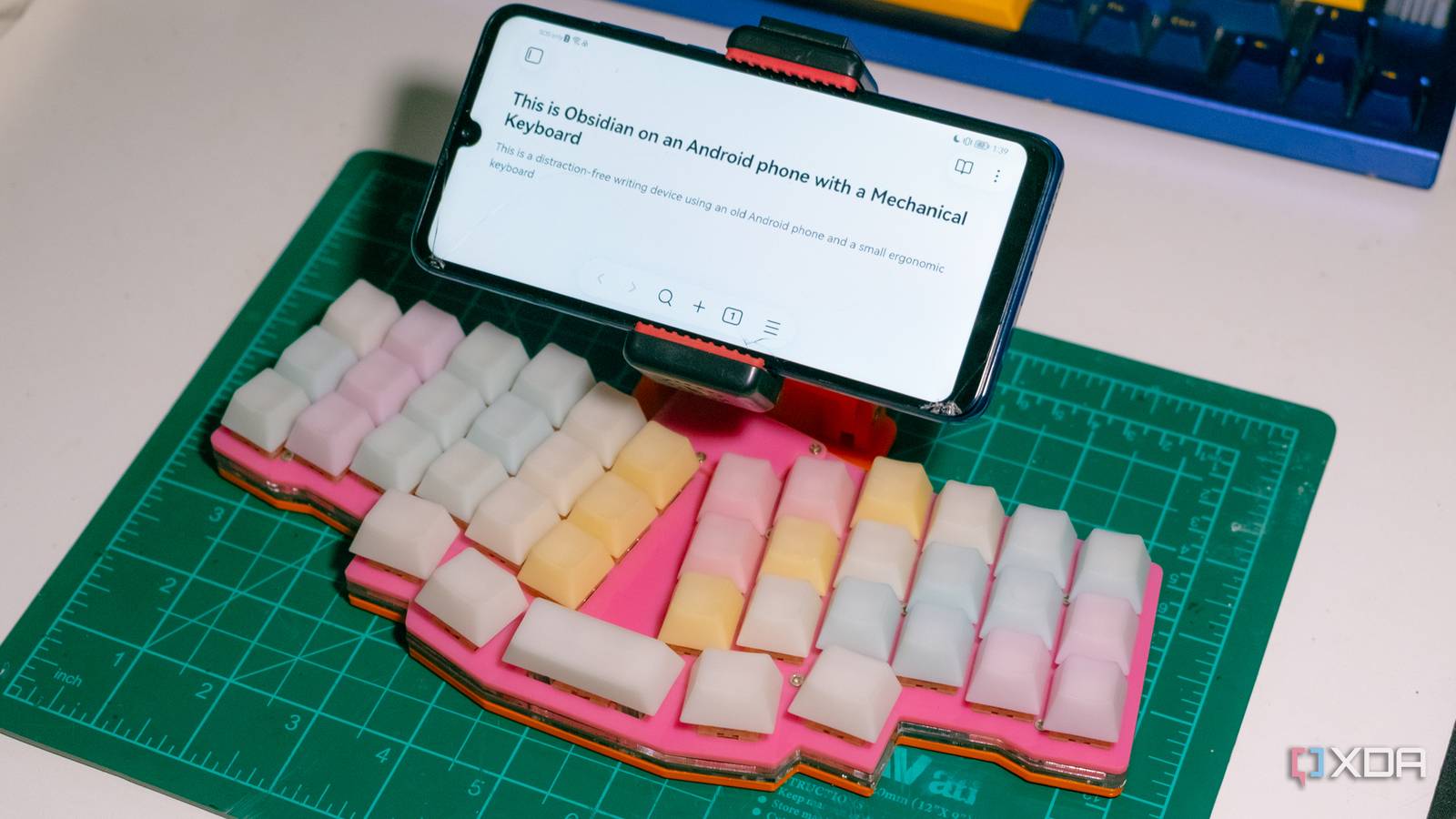
Published Aug 17, 2026, 8:00 PM EDT Jhet has gamified his life as a skill collector. He has skills ranging from woodworking and leatherwork all the way to CAD and electronics. He loves optimizing and customizing his experience with his stuff; fixing, modifying, and optimizing them to fit his needs. He has previously written for MakeUseOf.com and showcases his projects on his TikTok and YouTube channels. He is also an avid PC gamer with over 4000 hours in various FPS games and aim trainers. Whenever I feel I’m in the right headspace to start working on my essays and writing scripts, I’m usually away from my PC. I needed something portable, accessible, and nice to type on. I dug through my drawers for inspiration and had a lightbulb moment when I found my old phone, which I've tried to repurpose multiple times. None of those purposes have ever stuck long-term, but I think a distraction-free writing device might finally be the project that will make it thrive in its final years. Making a smartphone distraction-free It’s distraction-free if you’re mindful about it A smartphone doesn’t have to be distracting with the right approach. Obviously, this phone won't be my daily driver. It’s not going to be the one I reach for when I want to check messages, scroll social media, or take calls. Just like how you can have a distraction-free environment on your desktop, you can do the same on a smartphone. To make it distraction-free, I factory-reset it and installed only relevant note-taking and writing apps. I also put all the undeletable bloatware that isn’t relevant in a small folder a few pages away, with a few blank pages in between. I also changed the display colors to monochrome to reduce the screen's impact. You can go further with a custom ROM — ones that “dumb-ify” your phone. This phone’s bootloader is locked now, and the manufacturer no longer offers unlock codes, so I spared myself the trouble and cost. A good keyboard is important Enjoying the experience gets you in the mood to write There’s a delicate balance between obsessing over perfection and finding something good enough to work with. While I love my Keychron Q1, it’s incredibly heavy, and at that point, I may as well lug around a typewriter. For the ultimate portability, I borrowed my friend’s Reviung41, a column-staggered, unibody ergonomic keyboard that’s incredibly tiny. Thanks to him, I don’t have to spend money to find out whether this type of keyboard is for me. It only has 41 keys, but thanks to the thumb keys, I can expand its usability through layering and key combinations. There are plenty of keyboard layouts to choose from; super compact ortholinear keyboards, split ergonomic keyboards, heck, even the Logitech K400 might be good for you. Testing the concept and figuring out how to make it a usable device Taking my experiences and turning it into a design I first tested it with my big, heavy Keychron Q1 and a small phone tripod. I honestly thought the screen was a bit small at first, but after remembering how small the screens are on dedicated distraction-free devices like the BYOK and FreeWrite, it seems like a luxury in comparison. I played around with it for a bit and noted down what I wanted to make it enjoyable to use. I wanted it to be portable; I'll strive to make writing possible almost anytime, anywhere. I also wanted to use it without my glasses; as it stands, it’s a bit too far. I will try to make it so the phone hovers above my hands without getting in the way of typing. The latter would also make it easier to touch the screen, removing the need for me to bring a mouse. After all, I don’t want to make it a laptop. Designing and 3D printing the folding mechanism The friction hinge may be the greatest thing I’ve done Thanks to the community around the Reviung41, I found a bottom plate and skipped copying it. The most difficult part of this build is the hinges. There aren’t many elegant solutions to 3D-printed friction hinges — ones that hold themselves in a place like a laptop hinge. The hinges are inspired by GoPro-style hinges that you can tighten with a bolt. Instead of a nut, it will use a heat-set threaded insert with a countersunk M3 bolt to go through it. There are two joints in total, with two hinges per joint for stability. And I am very proud to say that the friction hinge worked on the first try. I can also adjust the torque to balance ease of adjustment with enough strength to hold the phone's weight. If you’re worried about the hinge getting loose over time, I designed it so it doesn't unscrew itself while moving. The threads and the bolt are unaffected by the movement of the hinge. I haven’t found anyone else making a friction hinge like this online while looking for inspiration, so I may have just done something significant; I just don’t know it. What it’s like to use a DIY distraction-free writing device in practicality Surprisingly usable, but not without its flaws Typing on it and carrying it around are the two most important aspects of this device, and neither experience is perfect. It’s honestly very enjoyable to type on; I’m still not used to my friend’s Reviung41, but on the little practice that I’ve had with it, it’s quite fun. However, this could have been any keyboard, so it doesn’t really matter. What’s more significant is working with a keyboard this small. If it only has 41 keys, it’s going to need some layers. And besides my bad typing habits that slow me down on this ergonomic layout, remembering where the symbols are on the other layers can be a bit of a learning curve, too. I find myself forgetting where the dash is or needing to press the layer shift key to access escape; stuff that will take a bit of getting used to. Carrying it around is like carrying a small, thick book around. It’s not as thin as a laptop, but it doesn’t take up as much space either, so it can fit in a handbag or a sling. Of course, a thinner keyboard and a proper folding case would improve the situation massively. Another thing is the wired connection. Unfortunately, unlike my Keychron Q1, I can’t use a USB-C to USB-C cable directly because the ProMicro dev board can’t establish an OTG connection; that means I have to use a dongle, and the only one I have is huge. This can be easily remedied with a different, compatible keyboard, however–or just going wireless. This is only the beginning of this device It’s not the prettiest thing, but it absolutely gets the job done and scratches that itch for me. The moment I assembled it, I used it to write the rest of this article just to see how feasible it really is. I would consider this a good proof of concept and a first working prototype. In the future, I am going to improve the design and make it sleeker with low-profile switches, a wireless connection, and a proper folding case.
I turned my old Android phone into a distraction-free writing device
Full Article
Original Source
Read the full article at Xda-developers →KhanList aggregates and links to publicly available news content. We do not host full articles from third-party sources. Always verify important information with original sources.