
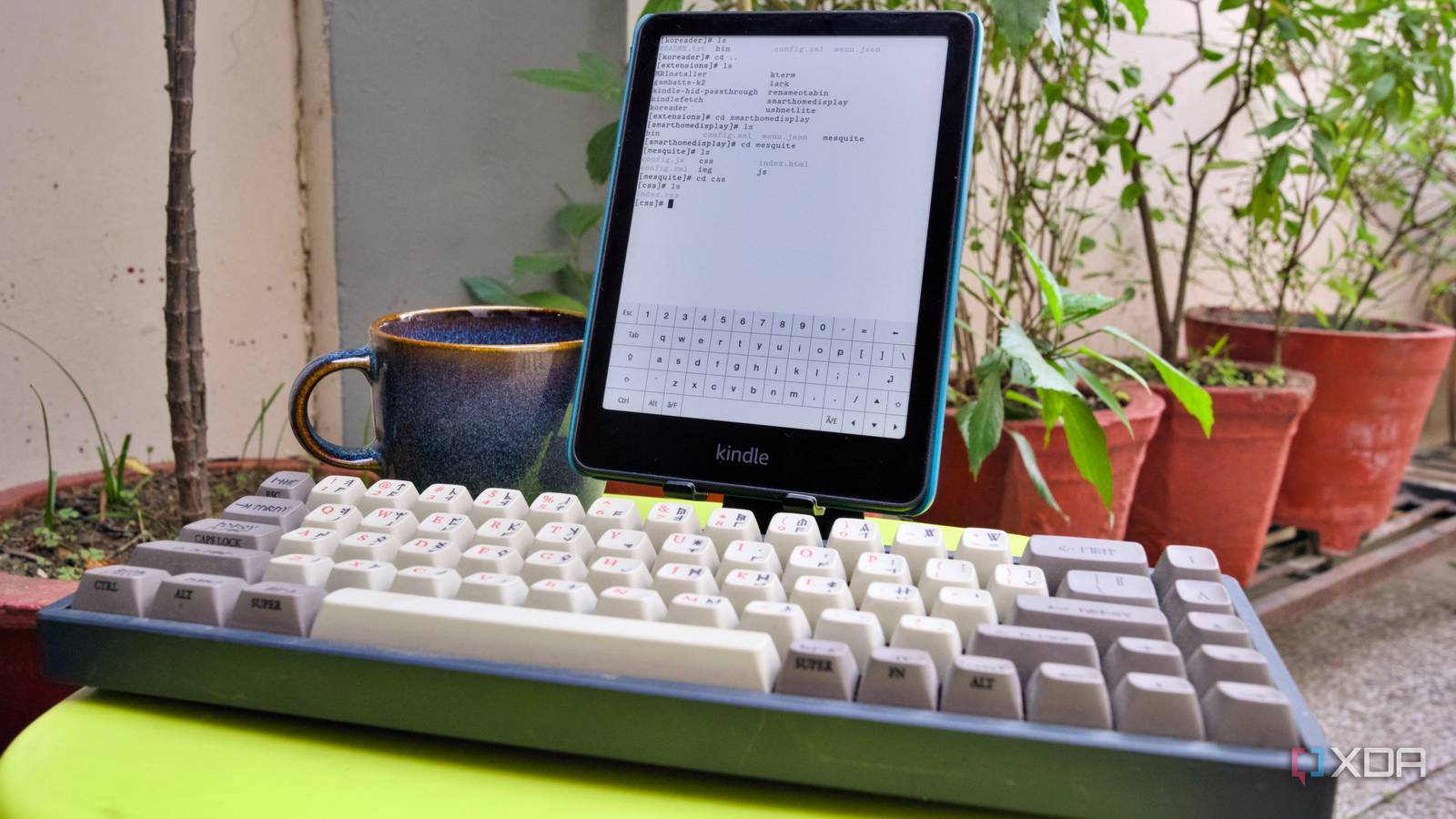
Published Sep 4, 2026, 2:30 PM EDT Samir Makwana is a technology journalist and editor from India since past 18 years and his work appears on MakeUseOf, HowToGeek, GSMArena, BGR, GuidingTech, The Inquisitr, TechInAsia, TechWiser, and others. He has written news, features, and gadget reviews for national technology media publications. His passion is to help people with their technology problems and gadget purchases. For that, he has worked for some of the biggest international technology publications, covering news, explainers, how-to guides, listicles, and product-buying guides. He has worked as an editor and managed teams since 2015. His expertise broadly covers computers, smartphones, game consoles, headphones, smart home products, browsers, and apps. When I got the new Kindle Paperwhite 12th Gen, my older 11th Gen just sat on the nightstand. After jailbreaking my Kindle, I tend to use it mostly to run projects and rarely for reading. I remembered that Kindle runs a stripped-down Linux kernel. So jailbreaking gave me access to the kernel rather than to Amazon’s reading app. Beyond that, you can install the KUAL app launcher and KOReader as alternative ebook readers that support multiple formats. Several people in the KindleModding community on Discord motivated me to try clever ways to give my old Amazon Kindle a second life. Here’s what actually worked on my Kindle so that you can adjust your expectations before committing a few hours. Making my Kindle work as a music and audiobook player Bluetooth pairing is mandatory for audio output Of all the Kindles I’ve used over the past decade, none of them had a headphone jack. So, I was surprised to discover that Bluetooth is the only audio path option available on the hardware and isn’t layered on top of another output. I made my Kindle Paperwhite 11th Gen work as a music player with KinAMP, which offers a decent GUI. After I replaced it with the Paperwhite 12th Gen, it still worked with the latest firmware. That’s how I also discovered that I can’t use BT Manager and Kindle’s stock Bluetooth settings at the same time. So I turned off Bluetooth in the BT Manager interface, which comes with Kindle-HID-Passthrough and runs its own separate stack for the HID keyboard, freeing the radio for Kindle’s stock Bluetooth to take over. Then I connected the Paperwhite to a JBL Flip 7 through Kindle’s own Bluetooth settings. Later, I tried out LARK as a standalone audiobook player for a bit to play the titles in MP3 and M4B formats with a handful of playback control features. But a quiet firmware update (5.19.6) for my Kindle rendered it useless. Until a fix arrives, along with AudioBookShelf support, I'll keep using KinAMP, which was built for music. No audio player app for Kindle escapes one limitation. The always-on streaming is hit-or-miss. Bluetooth for Kindle isn’t built for continuous streaming or for use as a dedicated audio device. Kindle BT Keepalive patches that behavior to keep the radio active, so your audiobook doesn’t get cut off mid-chapter. Turning my Kindle into a pocket retro gaming handheld E-Ink and a monochrome screen turned out to be a good match The Gambatte-K2 is a Game Boy emulator built specifically for the Kindle. The emulator supports Game Boy and Game Boy Color games. I had the most fun while playing turn-based and puzzle titles. I often enjoy playing chess after a grueling session of Donkey Kong. Any title that demands faster reflexes or scrolling hits a wall with the E-Ink’s refresh rate. Kindle Mod Shelf has a decent library of touch-friendly ports of GNOME Chess and Simon Tatham’s Portable Puzzle Collection. Typically, I’d open the games from the emulator. Later, I learned that KUAL Next lets me add a game shortcut to launch it directly for quick sessions. And the coolest part is that I can pair Bluetooth headphones or a speaker to enjoy the game audio as well. The only quirk I experienced is that the emulator doesn’t support a Bluetooth controller. That’s because Kindle’s default Bluetooth stack never supported HID input devices without extra work. Otherwise, the Kindle-HID-passthrough opens up the gates to connect Bluetooth devices like a keyboard or a page turner. For now, taps and swipes are enough to play some Kindle games, which was otherwise just an ebook reader. I also checked out BT Button mapper, a separate companion project by the same developer, for mapping buttons. Using Kindle as an SSH terminal to manage my home lab I can use a Bluetooth keyboard to type commands and paths easily After jailbreaking the Kindle, one of the early apps I installed was kTerm, a terminal emulator for accessing the file system. I also installed a Tailscale extension to access my home lab remotely. But typing with the on-screen keyboard was getting painful. The HID-Passthrough made it possible for me to pair a Bluetooth keyboard with Kindle. It bypasses Kindle’s buggy Bluetooth stack. With the terminal emulator, I can SSH into my home lab and use the Kindle as a dedicated screen with a Bluetooth keyboard. Of course, it's not as straightforward. Since Kindle's Linux doesn't include an SSH client, I borrowed the one that comes with KOReader. Every time I want to SSH into my server, I use the dropbear client path, which is in KOReader's directory, followed by a username and IP address. For long SSH sessions, I switched to kTerm's dark mode (check its GitHub page for other commands) instead of Kindle's default. It has helped reduce some eye fatigue and has a different charm to it. That said, I admit the lag sometimes becomes noticeable. Running a smart home dashboard on Kindle Setup requires only the built-in browser While I am not actively using Kindle for anything else, I prefer to keep it at my desk as a Home Assistant dashboard. I didn’t want to continue using a wall-mounted tablet to show the Home Assistant options while it drained the battery. Compared to a tablet, a Kindle is relatively slow to redraw. I only want to see the room temperature and whether lights or TV are left on. After trying various methods to run a smart home dashboard on Kindle, most of them stopped working following the 5.19.6 firmware update. Luckily, the built-in browser has improved, and now I can load a specific Lovelace dashboard. The new firmware update improved the touch responsiveness, especially for the browser. The touch targets for the switches work near-instantly with the smart devices. Long-pressing a tile on the smart home dashboard reveals additional controls, but exiting that pop-up is difficult. The touch input feels near-instant to act. But even after that, the smart home dashboard replaced my old tablet, which had been acting as the Home Assistant dashboard in my house. Breathing life into an old Kindle rather than tossing it in a drawer Of these four, I’d recommend starting with a smart home dashboard for Kindle, since you won’t have to spend a weekend setting it up. The jailbreak pays for itself daily. Retro gaming comes after that, giving a retro vibe with an E-Ink display and turn-based games. The Bluetooth audio setup was rewarding because it solved another problem for me with listening to audiobooks. Beyond these projects, you can even run a Minecraft server on your Kindle or use it as a text editor (use a Bluetooth keyboard for your sanity). Buying a Kindle specifically for these uses doesn’t make sense. But if you already have one, it’s worth a jailbreak. While Amazon keeps patching the firmware, it’s the KindleModding community that opens up several avenues for giving an old Kindle a new purpose. Kindle Paperwhite Signature Edition Screen 7-inch Storage 32GB Battery Up to 12 weeks The Kindle Paperwhite Signature Edition is a premium e-reader that packs 32GB of storage and has wireless charging support alongside a bevy of luxury features like an ultra-thin design, an auto-adjusting front light, weeks of battery life, and a store with over 15 million titles. Amazon Kindle Oasis The Kindle Oasis is the best in the business, packing a gorgeous 7-inch display and an elegant metal body.
I turned my Kindle into 4 things Amazon never intended, and now it's the most useful device on my desk
Full Article
Original Source
Read the full article at Xda-developers →KhanList aggregates and links to publicly available news content. We do not host full articles from third-party sources. Always verify important information with original sources.