
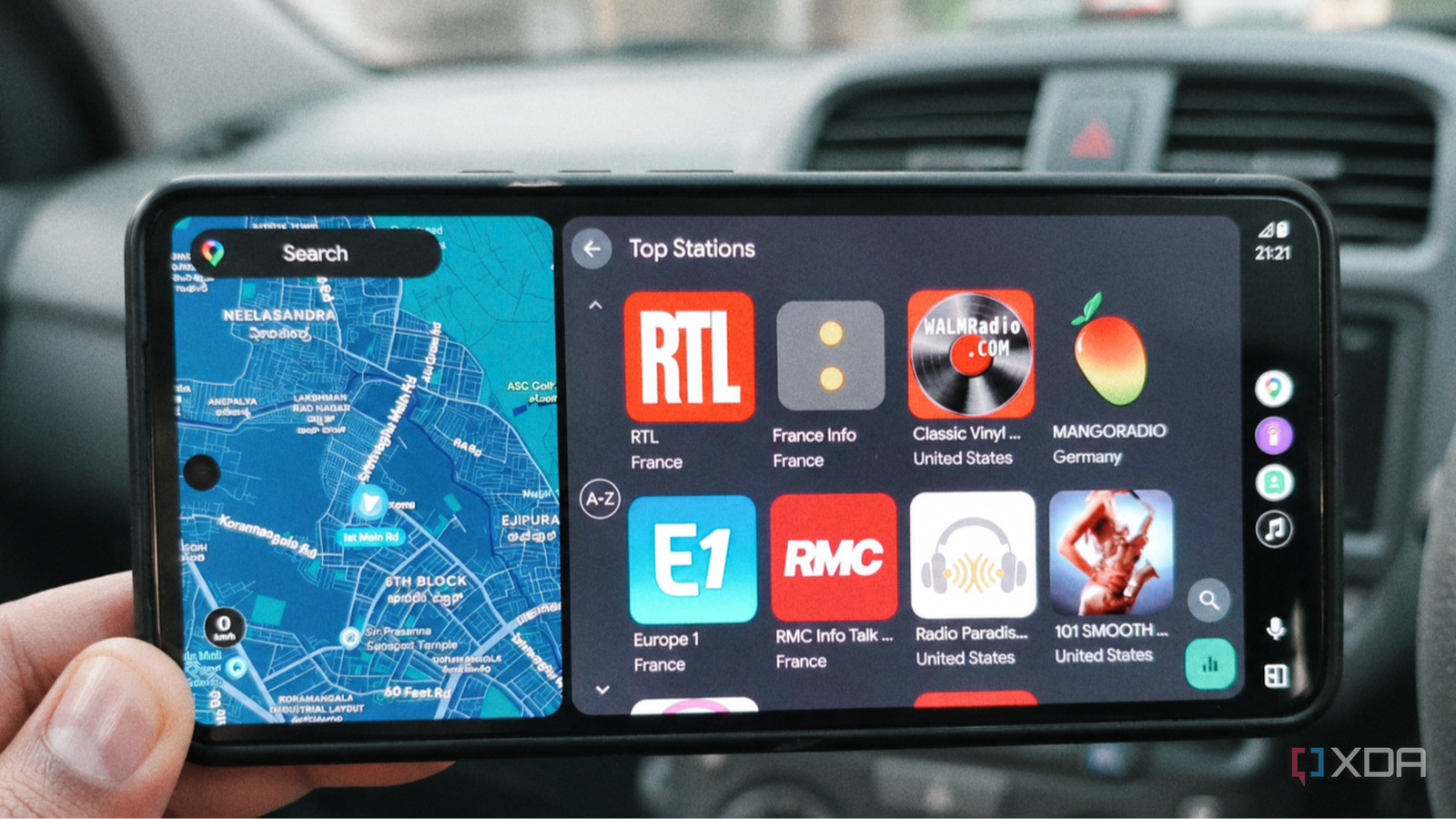
Published Nov 11, 2026, 4:01 PM EST Anurag is an experienced journalist and author who’s been covering tech for the past 5 years, with a focus on Windows, Android, and Apple. He’s written for sites like Android Police, Neowin, Dexerto, and MakeTechEasier. Anurag’s always pumped about tech and loves getting his hands on the latest gadgets. When he's not procrastinating, you’ll probably find him catching the newest movies in theaters or scrolling through Twitter from his bed. I use Android Auto almost every time I get into my car, but most of the time, I'm either listening to music on Spotify or following directions on Google Maps. I rarely bother with the radio anymore, partly because there's only so much you can find on local FM stations. However, I recently came across an app that made me interested in radio again. It brings more than 45,000 internet radio stations from around the world to Android Auto, and you can browse and play them directly from your car's infotainment screen. The best part is that it's completely free, requires no subscription, and works with Android Auto without any complicated setup. RadioShake brings thousands of stations to Android Auto There's a lot more to explore beyond FM The app I'm talking about is RadioShake, a free internet radio player for Android that also works with Android Auto. It uses the open Radio Browser directory, which has more than 45,000 stations from around the world. You can browse stations by country, genre, or popularity, so there's a lot more to explore than what you'd normally find on your car's FM radio. For example, you can tune into a jazz station from Japan, listen to a rock station from the US, or find something broadcasting closer to home. You don't even have to know what you're looking for. You can browse different categories and see what catches your interest. And since these are live radio stations, you never really know what song or program you'll come across next, which is part of what makes radio interesting in the first place. RadioShake also has a few useful features beyond simply playing stations. It can identify songs playing on supported streams and display the artist, track name, and album artwork. You can save stations to your favorites, access your listening history, and even add custom streams if a particular station isn't listed in the directory. It also supports podcasts, including offline downloads, although I'm more interested in the live radio functionality. The important thing to understand is that RadioShake streams stations over the internet rather than picking up FM signals, so you'll need a mobile data connection to listen. The app itself is free, with no ads or subscription fees to worry about. Getting RadioShake running on Android Auto is easy No sideloading or complicated setup required One thing I appreciate about RadioShake is that it supports Android Auto natively, so you don't need to sideload an APK or use any third-party tools to get it working. You can download it directly from the Google Play Store, open it on your phone, and connect to Android Auto as you normally would. The app should appear in your Android Auto app drawer alongside Spotify, YouTube Music, and other supported media players. Once you launch RadioShake on your car's screen, you get a simplified interface designed for Android Auto. Separate sections let you browse stations, access your saved favorites, and listen to podcasts. You can explore stations by genre or country and select one to start streaming. The playback screen displays the station's artwork along with the usual media controls, so you don't have to reach for your phone every time you want to change something. I'd recommend spending a little time exploring stations on your phone and adding the ones you like to your favorites before getting into the car. That way, you have a collection of stations ready to play without having to browse through thousands of options on the dashboard. Another useful feature introduced in version 3.9 is automatic playback. You can enable it in the app's settings so RadioShake resumes your last station whenever the app launches. It's disabled by default, but it's worth enabling if you want the radio to start playing without having to select a station every time you get into your car. RadioShake makes listening to the radio fun again Sometimes it's better to let someone else pick the music One thing I've noticed about music streaming apps is I often end up listening to the same songs and playlists. Apps like Spotify are great when I know exactly what I want to hear, but sometimes I spend more time deciding what to play than actually listening to music. RadioShake offers a nice change from that. There's also something interesting about listening to stations from other countries. You get to discover music that probably wouldn't make it into your usual recommendations, and you can switch between different genres or regions whenever you want. Unlike a playlist, you don't get to skip individual songs, but that's part of the appeal. Of course, there are a few limitations. Since RadioShake relies on internet streams, the experience depends on your mobile data connection. You might run into buffering when driving through areas with poor coverage, and the audio quality also varies depending on the station. Some stations have their own advertisements, even though RadioShake itself doesn't show any. A refreshing change from my usual playlists I don't see RadioShake replacing Spotify or YouTube Music for me, especially when I want to listen to something specific. But it's a refreshing alternative, and having access to so many stations makes it worth keeping on my Android Auto screen.
I turned my car's Android Auto screen into a radio with 45,000 stations, and it didn't cost a dime
Full Article
Original Source
Read the full article at Xda-developers →KhanList aggregates and links to publicly available news content. We do not host full articles from third-party sources. Always verify important information with original sources.