
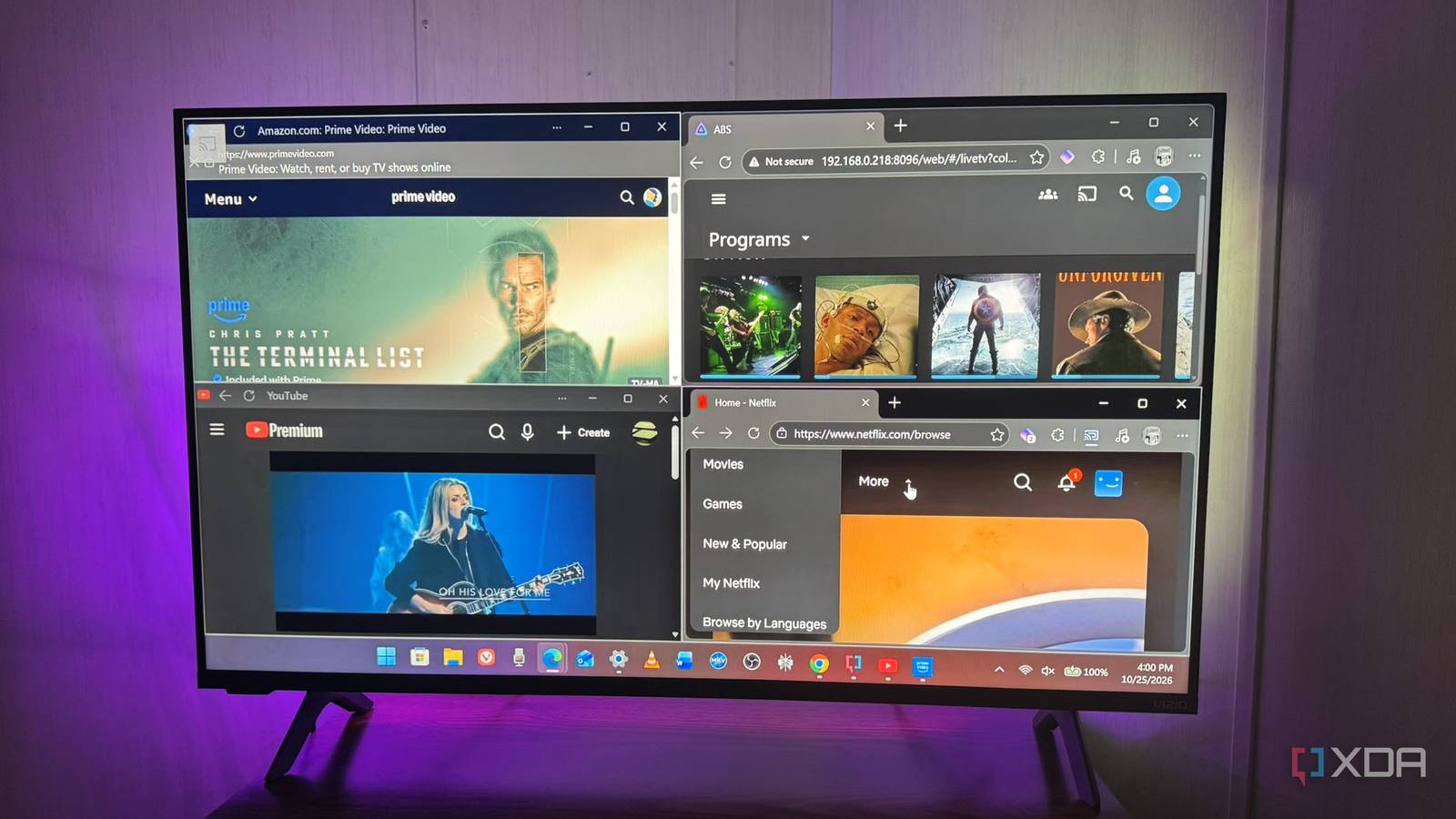
Published Oct 27, 2026, 7:30 AM EDT Based in rural Minnesota, Brian Burgess worked in IT for 10 years before finding his passion for writing about consumer technology. Brian earned his degree in computer and network technology in 2000. He held various IT positions, including help desk support, router installations for IBM, database administration, and other associate network administration roles. He's been a personal technology journalist for 18 years and has written thousands of articles about Microsoft products and services, Android, iOS, streaming, and more. He has written for notable tech sites including XDA, InformationWeek, How-To Geek, Byte, groovyPost, and others. When he is away from the keyboard, you will hear him playing guitar, working outdoors, and watching Star Trek. A Fire TV offers extensive streaming capabilities, with most major platforms available. It also lets me access self-hosted media from Jellyfin or Plex servers and connect to local media drives via the included USB port. But I was tired of underperforming boxes and sticks, which I always connect to a free HDMI port to make a Fire TV set perform better, anyway. So I decided to dial things up to 11 by using a powerhouse device instead. I turned an old laptop into a living room PC. It does everything the Fire TV can and far more. A laptop also has greater processing power and functionality than modern streaming devices, including the Nvidia Shield Pro. Connecting the PC Choose wired or wireless for connectivity to your TV Connecting the laptop wirelessly via technologies like Miracast or Google Cast is ideal if you don't like cables and connectivity is good. But reliability will vary between laptops and TVs. While Moonlight and Sunshine are generally used for gaming, they also offer a wireless way to stream a PC's desktop and other applications. But in the end, I went with a wired connection using a USB-C-to-HDMI cable. It was more reliable and didn't cut out or buffer as the wireless options did. I have a long enough cable that it doesn't get in the way when I connect my laptop to my TV and sit in front of it. The media didn't buffer with the cable. If I want a more straightforward Smart TV or streaming device experience, I can use an IR remote, Bluetooth controllers, or a mobile app for specific services when I don't want to use the laptop to control my experience. Another option is a separate Bluetooth keyboard with an included trackpad, with the laptop PC connected close to the TV. A full web browser Amazon Silk and on-screen keyboards aren't enough I like the ability to browse the web while using my television. Sure, Fire TV has the Silk browser, but it's slow and hard to navigate with a remote. I can use Downloader to check out web pages, and it's useful for sideloading APKs, but nothing beats a computer browser. I can keep multiple tabs open and move between them easily. With a keyboard and trackpad, typing URLs and passwords and clicking buttons and targets is much easier than using a remote. It's also useful to have easy access to my password manager and other browser plugins that help aid my entertainment workflows. It makes signing in to streaming services a cinch. Even though QR codes help, I don't need to dig out my phone or use the remote and an on-screen keyboard. Multitasking I have as many apps open as I need Plenty of streaming and other apps are available on Fire TV, but multitasking is difficult unless I juggle it with my phone. With a living room PC, my big screen becomes my computer, and I can run all the apps I need. Granted, when I am in front of the television, I don't want to do productivity tasks, but I can, and not everything is job-related, so the flexibility is nice. I can do a lot of what I do on my regular computer on my living room laptop, but on a bigger screen. Some modern gaming and other tasks are too demanding for my older laptop, but I can still do far more than I could with my Fire TV and a remote. With Snap layouts or using FancyZones, I can easily resize windows to have multiple things going on. For instance, I can have a browser, Instagram, YouTube, and Plex all open at once and easily move between them. I can watch my library and manage the server Another benefit of a living room PC is that I can view my self-hosted media on my Plex or Jellyfin servers while managing my files at the same time. I connect to either platform through a browser or open a client for the one I want to watch. I can be watching a movie or show while moving files between drives or reclaiming Jellyfin storage. Sometimes, I don't want multitasking or server management to distract me and just want to enjoy the movie. In those cases, I use the Jellyfin Media Player or Plex HTPC apps. They let me connect a remote or gaming controller and get a more traditional streaming-device experience. But the remote or controller you connect varies. I'm fortunate to have a lot of devices, so I have a few remote options. But the mobile app or keyboard is always a good fallback. Content isn't a problem I can stream every major service available on Fire TV With a laptop connected to my TV, I can get every streaming service available on my TV. I can either download the apps for Netflix, Prime Video, Disney+, Hulu, and others, or sign in directly in a web browser and watch that way. Another simple option is to turn the streaming websites into a web app from the browser. That way, I don't waste space downloading a bunch of apps to the PC. Another option I've used is Flex Launcher, a TV-friendly, customizable launcher for streaming apps that makes the laptop work like a streaming device. I can use it with a remote or game controller without needing the keyboard and mouse. Adding services and reordering them is easy: edit the config file and download the right icons. It is a good option when I want a more authentic streaming experience. However, having a keyboard and mouse is still appealing while watching content. A living room PC lets me do far more than a Fire TV (or other streaming device) Instead of worrying about the specs, features, and capabilities of every streaming device on the market, a laptop lets me stream, host my own media, and do so much more. It turns my TV into a super-streamer in the living room, and I can control it with a keyboard and mouse, a remote, or a game controller. It has enough power to run 4K streams and decode tricky files from my Jellyfin and Plex servers. I just wish my old laptop had an internal optical disc drive, so I could watch physical Blu-ray discs. But if you have one, put it to work and have fun with it too.
I turned an old laptop into a living room PC, and it does everything my Fire TV did and more
Full Article
Original Source
Read the full article at Xda-developers →KhanList aggregates and links to publicly available news content. We do not host full articles from third-party sources. Always verify important information with original sources.