
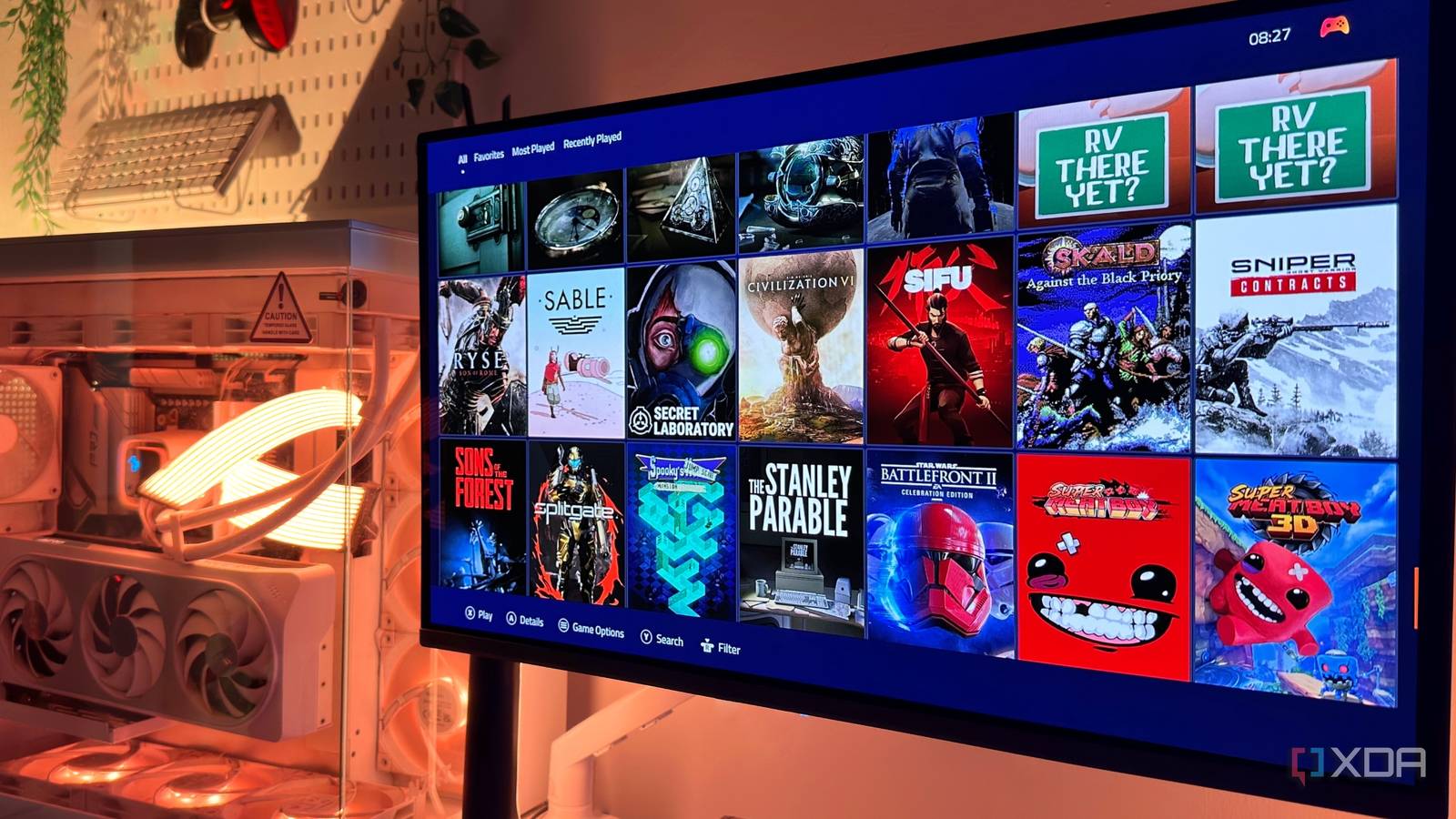
Published Aug 25, 2026, 1:30 PM EDT Gaming has been Samarveer’s greatest passion, and the Literature graduate in him takes immense joy in dissecting games for their themes, messages, and impact. Samarveer holds a deep appreciation of gaming, and considers the platform to be the most immersive and impactful across all media. He can be found engaging with gaming communities online, always ready to debate the finer points of ray tracing or itching to write an 8-page collegiate thesis on any game that impacts him emotionally. Very recently, I began booting my gaming PC straight into the newly-launched (and still rolling out) Xbox Mode, and it felt like the closest Windows could get to being a console. I spent a week without seeing the desktop unless I deliberately went looking for it, and I quickly understood why Microsoft was pushing the idea. It felt cleaner, simpler, and much better suited to the way I actually use my PC when I just want to play something. It did have its problems, and Xbox Mode on Windows 11 clearly has a very long way to go. Regardless, it gave me a taste for something I realized I had wanted all along: a PC that behaved like a console from the moment I switched it on. As such, I decided to push the idea further and see whether Playnite could do what Xbox Mode couldn't quite achieve. Xbox Mode was good enough to make me want more A weekend without the Windows desktop changed what I wanted from my PC Booting straight into Xbox Mode turned out to be a surprisingly convincing experience over a long weekend. I used ViveTool to get Xbox Mode on my PC in the first place, which was the easy part. Booting into Xbox Mode meant my PC could go straight from the power button to a controller-friendly interface without dumping me onto the desktop first. Plus, having the PC connected to a TV meant that the Full Screen Experience eliminated much of the "Windows-ness" standing between me and my games. It wasn't perfect by any stretch of the imagination, though. Xbox Mode gave me immediate controller support and kept Windows out of sight, yes, but it did give me problems with loading games from any launcher that wasn't Game Pass, Steam, or Epic. My secondary monitor was also rendered useless while the Xbox Mode ran. I occasionally added a non‑Steam (GOG) game to Steam, but Xbox Mode failed to import it, forcing me to add it again manually. Overall, the experience felt console-like, but only as long as I stayed within Microsoft's preferred lanes. The good thing about this experience, however, was that these compromises never sent me running back to the desktop. Instead, all they did was the opposite. A week of Xbox Mode had convinced me that I genuinely wanted my gaming PC to behave like a console, albeit with a better interface. Playnite is what I actually wanted It fixed the biggest problems I had with Xbox Mode Getting Playnite ready was pretty simple — I authenticated Steam, Epic, Xbox, and my other launchers, enabled Playnite to start with Windows, and set it to launch directly into Fullscreen mode. I also had to remove Windows Hello, since having Windows stop at a sign-in screen sort of defeats the point of an unattended console-like boot. If Playnite doesn't start automatically for you, adding a shortcut to the shell:startup folder should do the trick. The difference was immediate, with the biggest one being the library itself. Where Xbox Mode felt like it wanted me to choose which ecosystem I belong to, Playnite simply didn't care. It pulled all my games from different launchers, emulators, and even standalone installations, all on my home screen in one interface. Better still, it automatically filled that library with covers and metadata, even for the aforementioned standalone installations. Unlike the Xbox Mode, I was no longer just staring at a blank thumbnail with the text title of a game, because Playnite scraped the thumbnails and cover art for games all by itself. Games from GOG or my emulators no longer looked like second-class citizens next to my Steam collection. It even fixed the multi-monitor problem I had with the Microsoft Full Screen Experience (FSE). Xbox Mode blanked my second monitor (which is particularly silly). Playnite, on the other hand, let me use my second monitor for Discord, WhatsApp, and a browser window at all times. Playnite isn't quite as polished as Xbox Mode, but it does get a lot more done. One wrinkle I had to contend with was controller support. For all its benefits and features, Playnite still expects XInput, while my DualSense controller presents itself through DirectInput. I therefore needed to add DS4Windows running at startup through the Task Scheduler to make Playnite navigable from the couch. Once it all worked, the experience felt remarkably close to a dedicated console. Playnite was essentially sitting above all the launchers, avoiding their wars, and instead turning Windows' messy collection of launchers into something I could actually navigate with a controller. Bear in mind, though — Playnite isn't quite as polished as Xbox Mode, but it does get a lot more done. It did occasionally remind me that I was still running a Windows PC underneath all that fullscreen goodness, but that was a trade-off I was more than happy to make. I wanted the convenience of a console without giving up the flexibility of a PC, and Playnite gave me both. Of course, the "console experience" still has one big catch They're all still using a Windows PC underneath No matter what, I wouldn't credit Xbox Mode with better gaming performance. Microsoft makes a case for a more streamlined gaming environment, but my usual games and settings didn't gain frames when I booted into Xbox Mode. Playnite made no such promise, so seeing my games perform exactly as they did before wasn't particularly surprising. Neither interface actually manages to turn Windows itself into a console operating system. Windows services still run in the background, and I still have to reach for the keyboard and mouse several times. The difference here is that Xbox Mode promises you that you won't have to suffer through these immersion-breaking interruptions, while Playnite never does. Both of them fail to turn Windows 11 into a proper console experience, but they do come close to making it "console-like." Playnite Playnite is a singular game library manager for all your handheld games. It's an alternative to Asus' Armoury Crate software that ships with the ROG Ally by default. I just wanted Windows out of the way After spending two weeks bouncing between the two, I realized I wasn't really looking for an Xbox. I wanted Windows to stop reminding me that it was Windows every time I wanted to play a game. Xbox Mode gave me a taste of that idea. Playnite took it further, without asking me to give up everything that makes a PC worth having.
I tried turning my Windows 11 PC into a console with Xbox Mode, but Playnite did it better
Full Article
Original Source
Read the full article at Xda-developers →KhanList aggregates and links to publicly available news content. We do not host full articles from third-party sources. Always verify important information with original sources.