
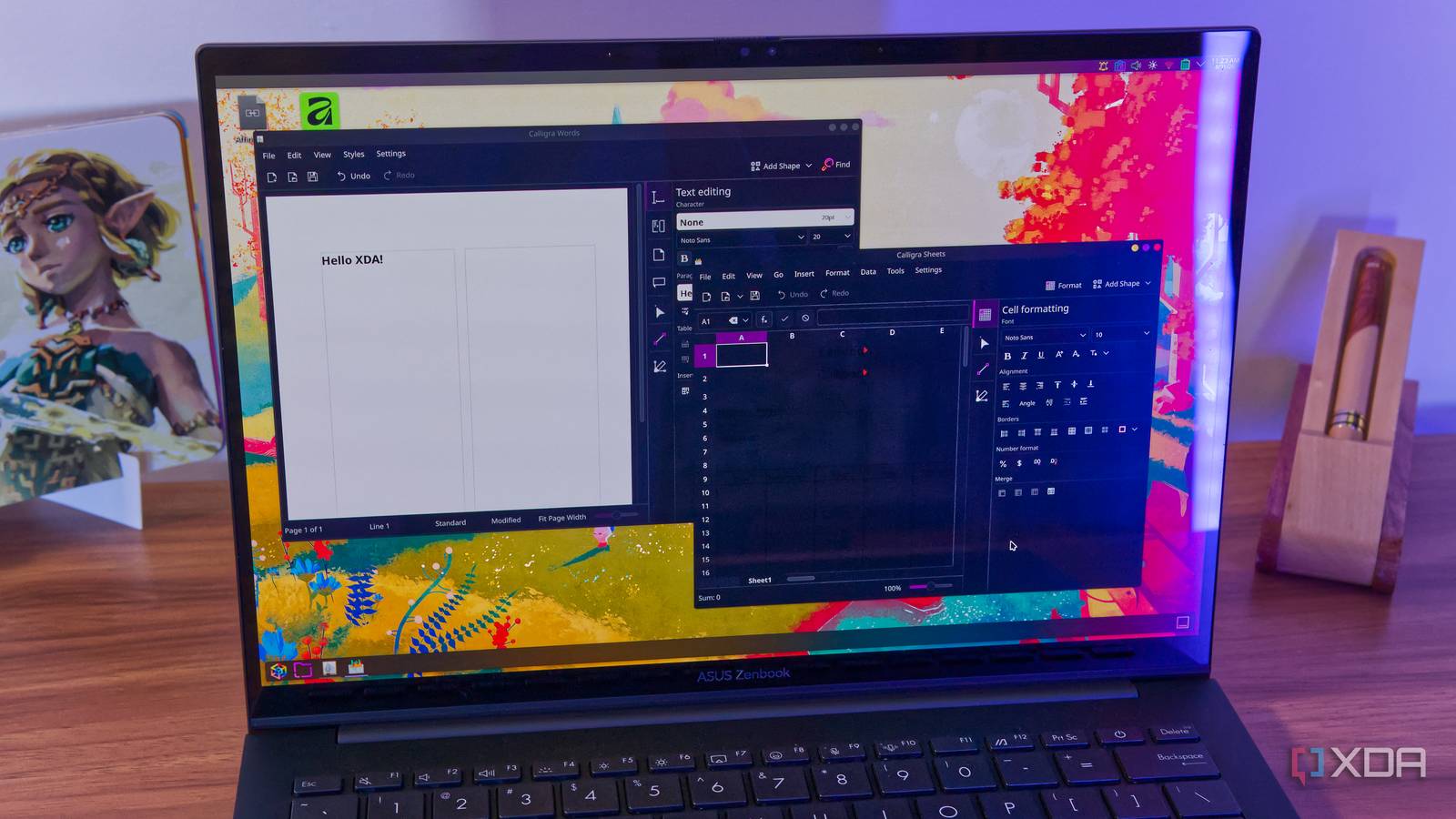
Published Sep 5, 2026, 9:15 AM EDT João has been covering the tech world for over 7 years, with a heavy focus on laptops and the Windows ecosystem. I also love all things tech and videogames, especially Nintendo, which he's always happy to talk about. Prior to joining XDA in 2021, he worked at Neowin: https://www.neowin.net/news/poster/jo%C3%A3o-carrasqueira/ There are a few alternatives to Microsoft's Office suite out there, and a bit of competition among them. The most popular is, of course, LibreOffice, though I tend to prefer the likes of OnlyOffice. But for the Linux users out there, there's an Offise suite that no one really talks about, despite having a pretty big name behind it. It's called Calligra, and it's made by the KDE team, responsible for one of my favorite Linux desktop environments, KDE Plasma. With that kind of pedigree, I was surprised it took me so long to find out it even existed. But after trying to use it, I kind of get it. A native, if convoluted UI It's not the easiest to use One of the things that drew me to Calligra is that it's very clearly made as part of the broader KDE suite of apps, using the Qt6 framework for the UI. I'm not necessarily against custom UIs, but I do like when a platform can standardize, and the Calligra apps fall right in line with other KDE software at first glance, which makes it a perfect fit if you're using KDE Plasma. Office apps are much more convoluted than the usual software KDE makes, though, so there's deifnitely a challenge in bringing these two things together in a way that feels good to use. Instead of the typical top menu bar or ribbon, Calligra puts most of the formatting tools on the right side of the app window, with only a handful of menus along the top. These can be viewing options for Words, formatting tools in Sheets, or even the ability to switch between a slide and its notes in Stage. This can get confusing, especially in Sheets, where a lot of the tools you'd usually find around the same area are now split between the top menu and the one on the right. It also feels like the menu on the right wastes more space on the screen and reduces the work area, but you can resize this sidebar, so it's not a huge deal. It does the basics And not much else Like most Office-style suites, Calligra offers the basic functionality you'd expect. There are four apps included in the main package: Words, Sheets, Stage, and Karbon. The first three are the replacements for the features you'd expect, with Stage being the slideshow presentation maker. Karbon is a graphic design tool, which means it's also the app I need the least of the bunch, as well as the one I have the least experience with. It is nice to see these suites go a bit further than just the basics, though. As far as the basic apps go, things work as you'd expect. Words lets you write up and format documents, though there are no templates I could find, Sheets can in fact create and format spreadsheets, and Stage actually seems like one of the better options, offering the usual array of formatting tools, animations, and even some preset templates that look kind of nice. Sheets can also load up CSV files and format them properly, which is better than I've seen other apps do. I was also able to open files using Microsoft's proprietary formats, and for the basic ones, things looked fine. But while it gets the basics well enough, things get rough for Calligra as you try to explore more of its features. Too much is missing Especially in Sheets As I used Calligra, it didn't take long to realize why this suite doesn't get as much attention as some others. Sheets is easily the biggest offender, because it fails at even one of the most basic aspects: when I load the app, the spreadsheet follows the app's dark theme, except text is still black by default, making the entire thing unreadable. It gets worse as there's also no proper support for inserting or creating tables in a spreadsheet, and while that's not too surprising (OnlyOffice seems to be the only free option that handles this perfectly), this is easily the worst I've seen it be. Even opening an existing document with a table renders it as if there were no sorting options at all. On top of that, Sheets can be quite slow, and it will freeze entirely if you try to format the entire sheet at once. It's basically unusable for the only use case I usually have with spreadsheets. Words offering no options for templates or dedicated formatting also makes it a problem. Even if you just want to make a nice title page, there just aren't any options to make that easier. You'd have to format everything manually. I still want to hope It could be great Like I've mentioned, the KDE team makes one of my favorite desktops for Linux, and its software is generally incredible, with very strong support from the developers. When I discovered Calligra, I hoped it would be treated the same, but it clearly isn't. I wanted to highlight Calligra because I do believe there's potential here. KDE has many fans and many contributors, but even a lot of those people don't know Calligra exists, which is probably why updates are infrequent and tiny. The last major update for the suite seems to have been two years ago, and even the official website has little more to share. I'd love to see the team put more effort into making Calligra a solid competitor to LibreOffice or OnlyOffice. As it stands, not even KDE's own Linux distro comes with Calligra preinstalled, but that could be a big step in making the app more well-known, which in turn could draw attention from developers to make it better. I'm hoping that's what happens, but in the meantime, if you want to check it out yourself, you can download Callighra from Flathub or check your distro's repositories if you're looking for a native package. Calligra
I tried KDE's Office suite and found out why even KDE users skip it
Full Article
Original Source
Read the full article at Xda-developers →KhanList aggregates and links to publicly available news content. We do not host full articles from third-party sources. Always verify important information with original sources.