
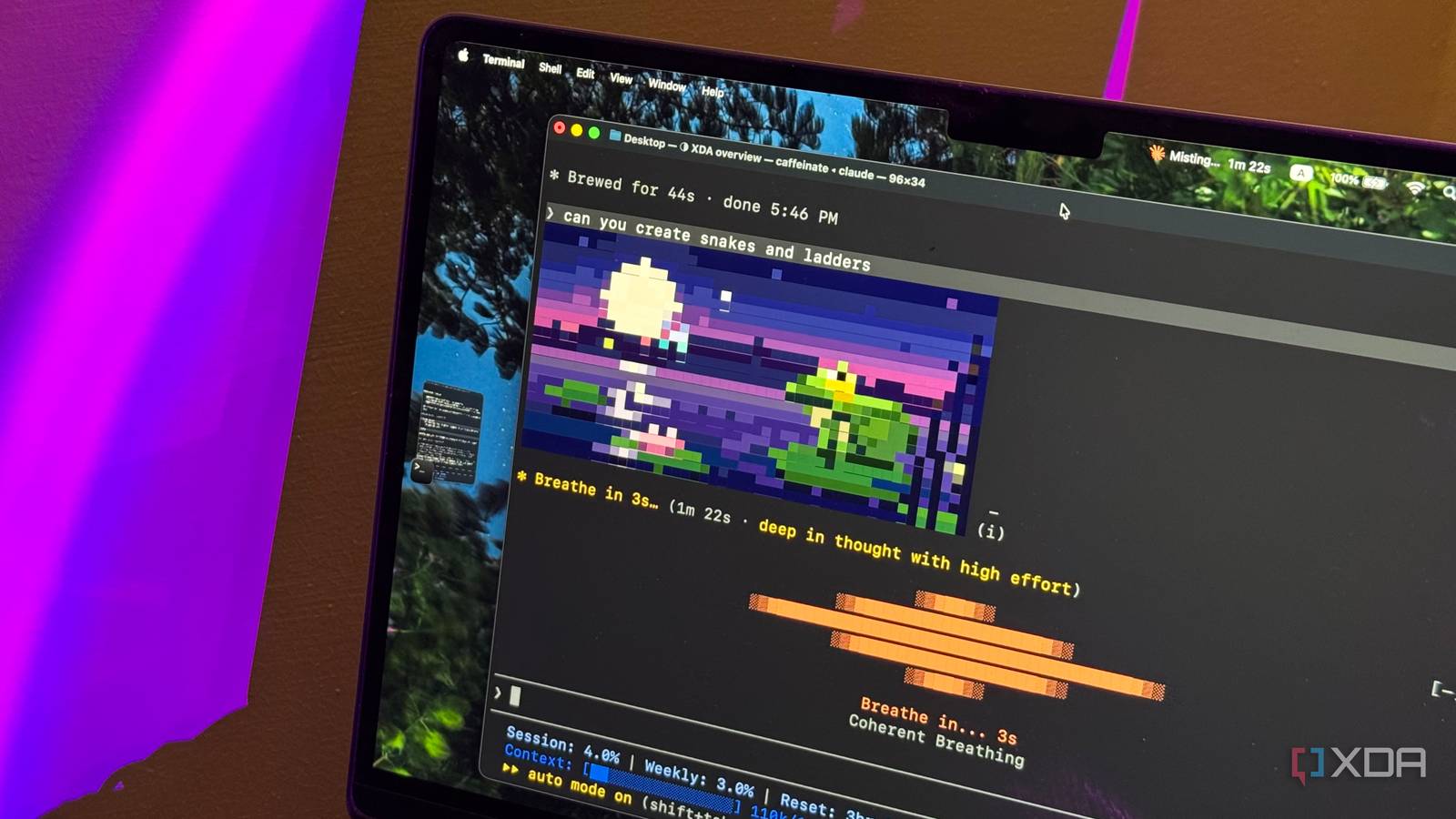
Published Oct 26, 2026, 4:00 PM EDT Mahnoor Faisal is a tech journalist covering AI and productivity tools with bylines at XDA, SlashGear, MakeUseOf, Laptop Mag, and Android Police. She's been writing professionally since she was sixteen, and has since penned hundreds of articles. This includes in-depth coverage of AI tools like NotebookLM to breaking news across the AI space. Her passion for technology started when she received her first iPod Touch (4th generation) on her 8th birthday, and she's been deep in the tech world ever since. Currently pursuing a degree in computer science, Mahnoor brings both a journalist's eye and a technical foundation to her coverage of how AI is reshaping the way we work and learn. I've been using Claude Code since its early days, and if there's one thing I've learned from my experience between now and then, it's that there's almost always a way to make it do more than you initially thought possible. Just when I think I've figured out everything the tool has to offer, Anthropic ends up launching yet another feature that changes the way I use it entirely. Claude Code mods are the latest example of this. While there are already plenty of ways to customize Claude Code to your liking, mods take things a step further by letting you change how the tool itself looks and behaves. Naturally, I had to see just how much of a difference they could make. So, that's exactly what I did a few weeks ago, and it didn't take long for experimenting with different mods to turn into something I couldn't stop doing. That's how I eventually stumbled upon three mods that have made my Claude Code sessions a whole lot more enjoyable. cc-arcade Claude does the work, I get to play It's no fun waiting for Claude Code, or any AI agent for that matter, to complete a task. Sometimes, even the simplest tasks seem to take forever, and there's only so much you can do while waiting for the agent to finish working. As someone who gets distracted easily, I typically end up doing one of two things. I either stare at the terminal window endlessly and wait for the spinner words to stop appearing. Or, what I like to describe as the worst of the two options, is I pick up my phone and go down a doomscrolling rabbit hole. Neither is particularly productive, and the latter usually ends with me spending far more time on my phone than I originally intended. That's where cc-arcade comes in. Instead of staring at the terminal or reaching for my phone, I can play a game right inside Claude Code while it works on my task. All this mod really does is add a collection of mini-games right above the Claude Code prompt, so you can keep yourself entertained while Claude works in the background. There are nine games to choose from, including classics like Snake, Tetris, Minesweeper, 2048, Flapp, Pong, Typing, Invaders, Pet, and even a simplified version of Doom. Once you've installed the mod, all you need to do is type /arcade into Claude Code, and you'll see a list of games to choose from. You can switch between them whenever you like, and the best part is that the game automatically pauses when Claude finishes its task, so you don't have to worry about missing a response. There's also an auto mode that picks a game depending on what Claude is doing. For instance, if Claude has been working on something for over a minute, it'll suggest a longer game like Tetris or Snake. For shorter tasks, it'll pick something quicker, like Flappy or Pong. My favorite little addition, though, is the virtual pet. It actually grows as Claude completes tasks, passes tests, edits files, and makes commits. It's completely unnecessary, of course, but that's precisely what makes it fun. verbs A little more personality never hurt anyone Something I've always appreciated about Claude Code is the little personality Anthropic has given it. It's not something you'd typically expect from a terminal-based coding tool, but between the quirky spinner verbs that appear while it's working and the occasional witty message, Claude Code has always felt a little more playful than your average coding assistant. In fact, I love its spinner verbs so much that I even wrote an entire article about how I added my own to the mix. Words like "Shenaniganing," "Flibbertigibbeting," and "Razzmatazzing" are entertaining enough on their own, but I figured there had to be a way to take things a step further. That's where the verbs mod comes in. It's a mod that turns Claude Code's spinner verbs into little animated pixel-art illustrations that appear right above the loading indicator. There are animations for all 188 spinner verbs, so instead of just watching words like "Swirling," "Frolicking," or "Waddling" flash by, you get a tiny animation to go along with them. It doesn't make Claude Code any faster, improve its responses, or add any particularly useful functionality. It's quite literally just a collection of animations that play while Claude works. But that's precisely what makes it so fun! Unlike some of the more elaborate mods, there's barely anything to configure. Once you've installed it and restarted Claude Code, the animations start appearing automatically. mindful-claude Inhale, exhale, let Claude do its thing The last mod I've added to my Claude Code setup is something my therapist will likely appreciate. I'm terrible at taking breaks, especially when I'm caught up in work, and more often than not, I need an actual reminder to slow down and relax. That's where Mindful Claude comes in. Instead of just watching the usual spinner words appear, you'll see a breathing animation right above the prompt that guides you through when to inhale, hold your breath, and exhale. There are four breathing exercises to choose from, including box breathing, 4-7-8 breathing, coherent breathing, and physiological sighing. You can switch between them using the /breathe command, and even customize the animation's appearance with different styles like waves, ripples, and dots. Of course, needing to remember to start a breathing exercise yourself would sort of defeat the entire purpose of this mod. This is why the animation automatically appears when Claude begins working on a task and disappears as soon as it finishes. You can even set a delay so it only appears when Claude has been working for a certain amount of time. Though a few seconds of guided breathing aren't going to magically eliminate all your stress, I do appreciate the idea of turning those little pockets of waiting time into an opportunity to slow down, rather than immediately looking for something else to occupy my attention. Now, none of these mods make any real difference to Claude Code's actual coding abilities. The code it spits out remains the same, and installing a bunch of mini-games or animated pixel art isn't suddenly going to make it a better coding assistant. However, that's not really the point. If you're someone who spends hours working with Claude Code every day, you'd be surprised how much of a difference these little additions can make. Whether it's playing a quick game of Tetris while Claude work or simply being reminded to take a breather every now and then, they've all made my coding sessions a little more enjoyable.
I tried 3 Claude Code mods, and now waiting for it to finish is actually fun
Full Article
Original Source
Read the full article at Xda-developers →KhanList aggregates and links to publicly available news content. We do not host full articles from third-party sources. Always verify important information with original sources.