
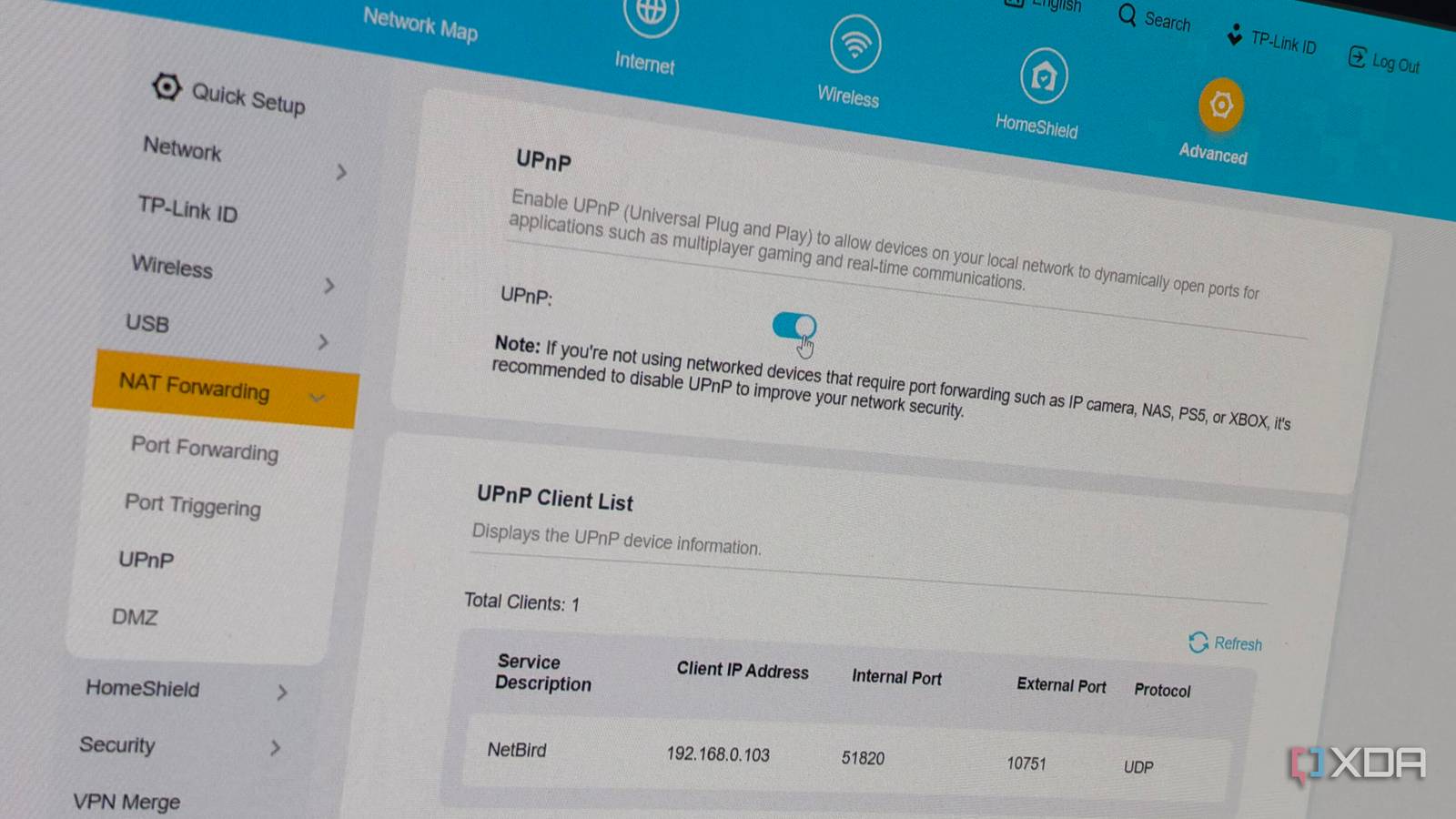
Published Nov 5, 2026, 8:00 AM EST His love of PCs and their components was born out of trying to squeeze every ounce of performance out of the family computer. Tinkering with his own build at age 10 turned into building PCs for friends and family, fostering a passion that would ultimately take shape as a career path. Besides being the first call for tech support for those close to him, Ty is a computer science student, with his focus being cloud computing and networking. He also competed in semi-pro Counter-Strike for 8 years, making him intimately familiar with everything to do with peripherals. Your router's firewall does a pretty decent job at dropping unsolicited inbound traffic, and most people never have to think about it. Even fewer people ever think about UPnP, which is a setting almost every consumer router has that lets any device on the network punch a hole through that protection without telling anyone. My ISP puts me behind carrier-grade NAT, which doesn't allow for the wider internet to reach my IPv4 network directly, but UPnP can still punch holes through IPv6 if it's enabled. My fix was to disable that instead of UPnP, but if you don't have that option, and you don't trust all the devices on your network, disabling UPnP itself is probably the right move. UPnP doesn't ask who's knocking at the door It's a discovery protocol, not a security one UPnP, or Universal Plug and Play, sounds like something you'd want enabled, at least on the surface. It's a family of discovery protocols that lets apps or devices on your network ask the router to forward an external port to it. This isn't a problem on its own, but the router doesn't bother to check whether the request is legitimate before doing so, and that's the problem. There's no password or prompt, and no confirmation sent anywhere. If the request comes from inside of your network, it gets honored. You can see this for yourself if you have a Linux machine and a router where UPnP is enabled: the miniupnpc package includes a tool called upnpc. Running upnpc -l lists every mapping your router currently holds, along with the external address the router reports. Running upnpc -r 8080 TCP as an ordinary user, with no sudo, asks the router to forward port 8080 to your machine. The craziest part is, the firewall never stopped functioning, and as far as it's concerned, everything is peachy. Its default-deny behavior is still there, but UPnP layers exceptions on top of it, so your protection is really only as good as the least-careful app or device on the network. In practice, the apps involved are pretty mundane. It can be something as simple as NetBird, which is the secure-access platform I use for my home lab. It recently added a NAT mapper that looks for UPnP gateways and signals the forwarded port to other peers. Even something like Jellyfin can punch a hole with its UPnP-initiated port forwarding. Every device can use UPnP Even the sketchy ones The only true requirement to use UPnP is having a local IP address, so that means basically any device can use UPnP, including smart TVs and small IoT devices. Again, in a perfect world, this isn't a problem, but it becomes one if any of those devices becomes compromised. If that happens, that device can forward a port to itself or another machine on your network, and now it's open to the internet. This kind of vulnerability has been exploited at scale as well: in 2018, Akamai reported that attackers had compromised 65,000 home routers through UPnP flaws, a campaign it tracked as UPnProxy. A follow-up campaign, which Akamai dubbed EternalSilence, used injected mappings to expose TCP ports 139 and 445 on devices sitting behind the router, the ports Windows file sharing uses. These attacks relied on buggy routers that answered UPnP request from the internet side, which is obviously a huge oversight by the vendor and not the same kind of attack that would happen on a known-good firmware. However, it does show what an unauthenticated port-mapping service is capable of once the wrong party can take advantage of it. There is a case for leaving it on There are scenarios where it makes sense UPnP exists in part because NAT broke peer-to-peer networking. If you turn it off, consoles that rely on P2P for game lobbies will fail, and voice chat can follow suit. Mesh VPNs like Tailscale and NetBird can also be affected if you were to turn it off. In the case of Tailscale, there's a UPnP fallback that makes a direct connection more likely instead of needing to fall back to a DERP relay, which can add latency. There's also a case to be made that UPnP isn't the real threat, because if you already have malicious code running on your network, an open port is the least of your problems. Router vendors will commonly ship their units with UPnP enabled because it lowers stress on customer support. You'd be surprised at how much can break when UPnP gets turned off. Why I'd still turn it off It's a needless risk for most A lot of that assumes that your LAN is entirely made up of totally secure, trustworthy devices, which isn't necessarily true. In reality it’s a mix of devices from vendors with wildly different security track records, and with UPnP on, you're trusting that they've secured their devices properly. If you're behind CGNAT like I am, none of this really applies to you, at least on IPv4. The ports opened by UPnP on my router will sit behind my ISP's NAT and won't be reachable from the open internet, and that's just due to how CGNAT works. But if UPnP is left on and your ISP gives you a public IPv6, it's possible that UPnP can poke holes in the IPv6 firewall, and the same kind of security risk applies to that address space. This is what happened to me—I thought that having UPnP on was only going to affect IPv4 devices, but it opened a bunch of doors for devices on my network that spoke IPv6. Instead of turning off UPnP, though, I just turned off IPv6 at the router level. Go look at your UPnP table If you open your router's admin page and open the UPnP settings, you can take a look and see if anything has punched a hole through your router's firewall. I'd recommend turning it off and trying to live with it for a couple of weeks. If anything breaks, you can forward that port manually and move on.
I thought my router's firewall blocked everything inbound, but UPnP had opened ports I never asked for
Full Article
Original Source
Read the full article at Xda-developers →KhanList aggregates and links to publicly available news content. We do not host full articles from third-party sources. Always verify important information with original sources.