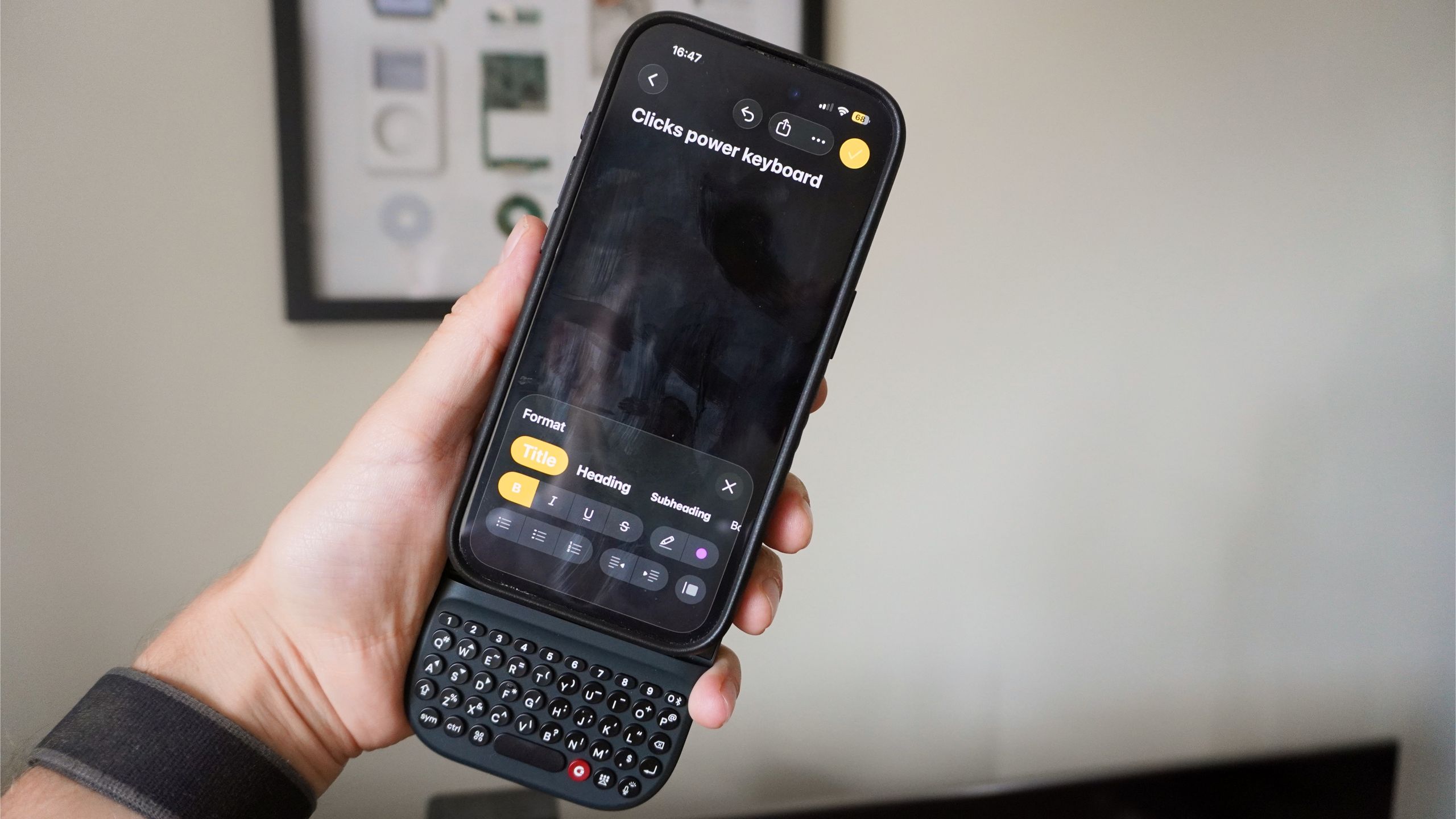
(Image credit: Future) For those of us who came of age firing off emails on a BlackBerry, the tactile click-clack of physical buttons is the holy grail of mobile productivity. So, when Clicks released the Power Keyboard — a MagSafe-compatible slide-out QWERTY keyboard — I was instantly on board.I slapped it onto the back of my phone for a week, ready to watch my words-per-minute (WPM) soar. And then…I actually ran a typing speed test to find out that I am significantly faster on a flat pane of glass than I am on a keyboard.Turns out that strapping a chunky $99 plastic brick to my phone didn’t magically resurrect my 2010 typing skills; it just ruins the modern ergonomics of your phone. But while I do have plenty of problems to talk about on the Power Keyboard, there are some small saving graces here.This accessory is a bit problematic, from its tiny battery for charging your phone to the hinge feeling all kinds of loose. But for the very particular niche I fall into, I couldn’t help but develop a bit of a soft spot for it.The typing test reality check (Image credit: Future)Let me get straight into the typing experience. The keys themselves are objectively well-made, and a good omen for the upcoming Clicks Communicator. They’re ergonomically well shaped with just the right amount of travel and an oh-so satisfying click. Sliding it out to get going took me back to my Palm Pre days!But when I put the Clicks Power Keyboard head-to-head against my on-screen keyboard, the glass screen won effortlessly. Swipe to scroll horizontally Typing method Typing speed (words per minute) Typing accuracy (%) iPhone 15 Pro touchscreen keyboard 53 WPM 81% Clicks Power Keyboard 30 WPM 62% Why? Well probably the most obvious reason here is time invested in these devices. I may have spent years with Blackberrys and my Pre in the past, but the last decade and a half has been nothing but capacitive touchscreens. But it’s more than that.Get instant access to breaking news, the hottest reviews, great deals and helpful tips.Our thumbs have been trained to glide across screens, relying heavily on aggressive autocorrect and predictive text algorithms. Moving back to physical, separated keys requires deliberate, forceful presses. You have to actively hunt for punctuation on that backlit keyboard and travel between letters.It feels more intentional and satisfying for sure, but the raw numbers don’t lie: my thumb-typing muscle memory has moved on.An ergonomic nightmare (Image credit: Future)But trust me when I say you have to suffer for that satisfying feeling. Modern pro smartphones are already pretty chunky, and the Clicks adds another 15.2mm of junk in the trunk.With that bulk comes the weight distribution. Because the keyboard slides down from the bottom, typing makes your phone severely top-heavy. I constantly felt like it was going to somersault backward out of my hands. (Image credit: Future)Combine that awkward balancing act with a cheap-feeling plastic back and a slide-out hinge that feels almost distressingly loose, and the overall build quality doesn’t feel like it hits the mark for an accessory that costs over a hundred bucks.The saving grace (Image credit: Future)There is one superpower that did save it a little for me, and it’s not the power bank element. A 2,300 mAh battery with slow 5W Qi wireless charging is basically life support for a dying phone, not a true battery pack.No, it’s actually the fact that this isn’t just about the phone. With Bluetooth 5.4 and multi-point support for up to nine devices, this became quite the phenomenal universal remote to all my devices. (Image credit: Future)I found myself hot-swapping the bluetooth connection over to my smart TV to bypass the abysmal on-screen keyboard, and then switching over to my PS5 to fire off a quick message in the team chat. It’s real versatility that made this fit real nicely into my multi-device home.Reclaiming my phone screen space is nice, but using this as a tactile hub for your living room is where the real magic happens.Not for everyone (Image credit: Future)So this left me confused. The Clicks Power Keyboard is a fascinating, flawed experiment in nostalgia. It proved to me that while I miss the feeling of physical keys, I certainly don’t miss the speed.If you’re in my niche of wanting a pocketable Bluetooth keyboard to hot-swap between your TV and console, it is undeniably useful. Also, shout-out to using it with Samsung Dex and my Viture Pro 2 glasses. The touchscreen of my Galaxy Z Fold 8 becomes a nice touchpad complemented by the physical keys.But as just a daily driver for your phone, you’ve got to be committed to the throwback feels. You have to be willing to sacrifice your typing speed, your premium aesthetics and your ergonomic comfort. Will you? Follow Tom's Guide on Google News and add us as a preferred source to get our up-to-date news, analysis, and reviews in your feeds. More from Tom's GuideI put Honor's crazy Robot Phone up against the iPhone 17 Pro Max — I'm both impressed and confusedThe tech world hyped up the Galaxy Z Fold 8's 'crease-free' display — here's a reality check after 7 daysI just tried the thinnest phone grip Popsockets has created — and now there's no reason to not get a grip for your phone Jason brings a decade of tech and gaming journalism experience to his role as a Managing Editor of Computing at Tom's Guide. He has previously written for Laptop Mag, Tom's Hardware, Kotaku, Stuff and BBC Science Focus. In his spare time, you'll find Jason looking for good dogs to pet or thinking about eating pizza if he isn't already.
I tested the Clicks Power Keyboard against my touchscreen — the results ruined my BlackBerry nostalgia
Full Article
Original Source
Read the full article at Tomsguide →KhanList aggregates and links to publicly available news content. We do not host full articles from third-party sources. Always verify important information with original sources.